Windows 7 Forums Search
Welcome to Windows 7 Forums. Our forum is dedicated to helping you find solutions with any problems, errors or issues you are experiencing with Windows 7. The Windows 7 forum also covers news and updates and has an extensive Windows 7 tutorial section that covers a wide range of tips and tricks.


Windows 7 - Really need serious help with workgroup please

 
07-26-2010   #1


Windows 7 Ultimate 64-bit


Really need serious help with workgroup please

Hey everybody

AFter installing win 7 x64 ultimate it worked like a beauty for about a week.. i managed to get my workgroup sorted out at home(cos the other 3 pcs are xp) i could share and access other users shared content. Suddenly the other day i start up my pc,theres a lil yellow exclatmation mark in a triangle on the lan/network icon on the bottom right of the screen,mshome shows no internet access,but i can connect to the internet(we have dsl with 3 seperate accounts on dialup) i just can't see my workgroup computers anymore and their shared content.. i did troubleshoot and it did state that i have a dns error of some sort..funny thing is when i connect to the internet the exclamation mark goes away..but i still cant see the workgroup users i think these problems starting occuring after doing a few windows updates maybe. please help.. been trying to figure this out for days.

My System SpecsSystem Spec
07-27-2010   #2


WCP ONLY


Quote   Quote: Originally Posted by Jackdanielz View Post
Hey everybody

AFter installing win 7 x64 ultimate it worked like a beauty for about a week.. i managed to get my workgroup sorted out at home(cos the other 3 pcs are xp) i could share and access other users shared content. Suddenly the other day i start up my pc,theres a lil yellow exclatmation mark in a triangle on the lan/network icon on the bottom right of the screen,mshome shows no internet access,but i can connect to the internet(we have dsl with 3 seperate accounts on dialup) i just can't see my workgroup computers anymore and their shared content.. i did troubleshoot and it did state that i have a dns error of some sort..funny thing is when i connect to the internet the exclamation mark goes away..but i still cant see the workgroup users i think these problems starting occuring after doing a few windows updates maybe. please help.. been trying to figure this out for days.
Hi JD and welcome

first are you running homegroup, or workgroup for networking?

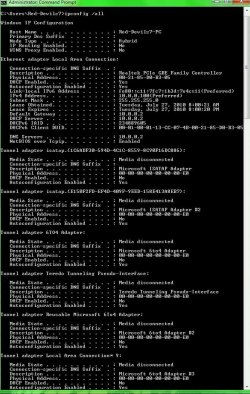
Second can you type cmd in search>then>>ipconfig /all>then make a snapshot of the output and upload it to us?


Thanks

Ken
My System SpecsSystem Spec
07-27-2010   #3


Windows 7 Ultimate 64-bit


Hey ken

Thank you for the reply. Well i am running workgroup as that was the only way i could get my xp computers to work on the workgroup.. another thin i did use /ipconfig /release and then ipconfig /renew and i have all these things that say media disconnected.. heres my ipconfig /all image..

thanks
Attached Thumbnails
Really need serious help with workgroup please-ryvz-ipconfig.jpg  
My System SpecsSystem Spec
.


07-28-2010   #4


Windows 7 Ultimate 64-bit


strange thing.. i switch on the pc today.. and everythings back.. and working.. wtf lol
My System SpecsSystem Spec
07-28-2010   #5


Windows 7 Ultimate 32bit SP1


Sometimes, a reboot is all you need
My System SpecsSystem Spec
07-28-2010   #6


Windows 7 RTM X64


Quote   Quote: Originally Posted by Jackdanielz View Post
Hey ken

Thank you for the reply. Well i am running workgroup as that was the only way i could get my xp computers to work on the workgroup.. another thin i did use /ipconfig /release and then ipconfig /renew and i have all these things that say media disconnected.. heres my ipconfig /all image..

thanks
What you have showing there is just the left over ipv6 entries for each network adaptor, the media disconnected messages are normal and only indicate that ipv6 is not connected to the WAN which is correct.

IPv6 is only used on the LAN for Homegroups, it's use on the WAN is limited to testing only so far.

Also, when ever you change the IP settings you need to reboot your machines in order for those settings to work so it's no wonder that everything worked after you rebooted.
My System SpecsSystem Spec
07-28-2010   #7


Windows 7 Ultimate 64-bit


thnx chev.. over the past 4 days i must've rebooted my pc about 15 times lol.. i never leave my pc on.. always put it off at night .. and in the morning i switch it off before going to work... but we did have a power trip lastnight... and all 5 pcs on the network reset including the router.. maybe that solved it ?
My System SpecsSystem Spec
07-28-2010   #8


Windows 7 RTM X64


Resetting the router alone has fixed more networking problems than everything else combined so there is a good chance that is what fixed the problem. In this case I think the power outage probably did some good.
My System SpecsSystem Spec
Reply

 Really need serious help with workgroup please problems?


Thread Tools


Similar Threads for: Really need serious help with workgroup please
Thread Forum
Can't connect to the Workgroup Network & Sharing
Workgroup vs Homegroup Network & Sharing
Can't see other PCs in Workgroup Network & Sharing
Workgroup problems Network & Sharing
Can't see workgroup can't see me Network & Sharing


All times are GMT -5. The time now is 07:00 PM.


Windows 7 Forums is an independent web site and has not been authorized,
sponsored, or otherwise approved by Microsoft Corporation.
"Windows 7" and related materials are trademarks of Microsoft Corp.
© Designer Media Ltd
  

1 2 3 4 5 6 7 8 9 10 11 12 13 14 15 16 17 18 19 20 21 22 23 24 25 26 27 28 29 30