| Windows 7: Free Word 2010 Ribbon/Fluent UI Guide Available |
28 Jul 2010
|
#1 | | Win 7 Ultimate 64-bit. SP1. |
Free Word 2010 Ribbon/Fluent UI Guide Available Quote:
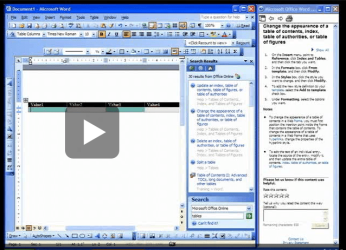
A new resource available for download from Microsoft is designed to let customers upgrading from Office 2003 or earlier to Office 2010, get familiarized with the redesign of the look and feel of the Word components of the product. The Word 2010: Interactive menu to ribbon guide can be grabbed free of charge through the Microsoft Download Center, and as the label implies, users will get a “visual, interactive reference guide to help you find the new location of commands in Word 2010,” according to Microsoft. “Use this interactive tutorial to find the location of commands in Word 2010. The guide is a simulation of the old menu version of Word. Click a command in the guide to learn its new location in Word 2010.”
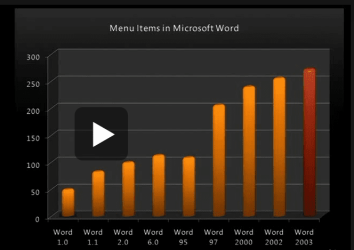
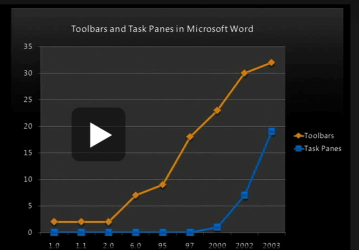
With the advent of Office 2007, Microsoft dramatically overhauled the graphical user interface for its productivity suite. The evolution of the new Ribbon/Fluent GUI continued with Office 2010, which brings to the table a perfected variant of the user interface, widening the gap between the new design and the old File menu that was the default in Office 2003 and earlier.
While Ribbon is immensely superior to the old Office UI, it takes a little time to get accustomed to it. As with everything new there’s a learning curve, but fact is that some users might not get over the initial shock of having to work with a completely overhauled UI. It’s human nature to seek as much comfort as possible, and while the Office 2003 UI might feel extremely comfortable the new users interface of Office 2010 will appear to be strange and extremely different. More - Free Word 2010 Ribbon/Fluent UI Guide Available - For download from Microsoft - Softpedia | My System Specs |
| System Manufacturer/Model Number LAPTOP. HP Pavilion dv7-4010TX . OS Win 7 Ultimate 64-bit. SP1. CPU Intel i7 -720QM.[1.6GHz Turbo Boost 2.8GHz. 6MB Cache.] Memory 8 DDR 3 RAM. 1066MHZ Graphics Card ATI 1024 MB. DDR3. Radeon HD5650 Monitor(s) Displays 17.3" High Definition Brightview LCD. LED Backlit. Screen Resolution 1600 x 900. Mouse Logitech Anywhere mouse. MX. Case Laptop / notebook. Hard Drives 640GB Internet Speed ADSL [ but too slow ] |
28 Jul 2010
|
#2 | | Windows 7 Ultimate x64, Mint 9 In the Crust |
You know, I really don't want to have to read a book to figure out how the UI works....
Unless this has like really cool super-secret tricks in it.
~Lordbob | My System Specs | | System Manufacturer/Model Number Hera OS Windows 7 Ultimate x64, Mint 9 CPU Intel i5-2500k Motherboard ASUS P8P67 Pro Memory 2x 4Gb Corsair VENGEANCE DDR3-1600 Graphics Card NVidia GeForce N260GTX Twin Frozr Sound Card Realtek HD OnBoard Audio Monitor(s) Displays ASUS 24" Monitor Screen Resolution 1920x1080 Keyboard Razer Tarantula Mouse Razer Lachesis PSU Cooler Master Real Power Pro 750W Case Cooler Master Haf 932 Cooling Fans Hard Drives G.SKILL Phoenix Series 60GB SATA II MLC Internal Solid State Drive (SSD)
SAMSUNG Spinpoint F3R 1TB 7200 RPM 32MB Cache SATA II Internet Speed not fast enough |
29 Jul 2010
|
#3 | | Windows 7 Home Premium x64 |
lordbob, I just installed it on a test box I have here at work. It requires Silverlight, it gives you a virtual Word 2003 UI, you can then click on your familiar buttons to find how to perform the same actions in Word 2010.
Too bad there aren't any for other Office apps, if the company wanted to put Silverlight on everyone's PC we could push this as a help for the transition to Office 2010 from 2000.. | My System Specs | | System Manufacturer/Model Number Home built OS Windows 7 Home Premium x64 CPU Phenom II X4 955 BE Motherboard Asus Sabertooth 990FX Memory 8 GB OCZ BE 1667 Graphics Card EVGA GeForce GTX470 SC Monitor(s) Displays BenQ 19" Screen Resolution 1280x1024 Keyboard Logitech Mouse Cyborg R.A.T 7 PSU Thermaltake 850W Case Coolermaster Cosmos 1000 Cooling Air Hard Drives 256 GB OCZ Vertex 3 SSD
2x WD 1 TB
1x WD 2 TB Internet Speed Standard RR |
29 Jul 2010
|
#4 | | Windows 7 Ultimate x64, Mint 9 In the Crust |

Quote: Originally Posted by mlevy lordbob, I just installed it on a test box I have here at work. It requires Silverlight, it gives you a virtual Word 2003 UI, you can then click on your familiar buttons to find how to perform the same actions in Word 2010.
Too bad there aren't any for other Office apps, if the company wanted to put Silverlight on everyone's PC we could push this as a help for the transition to Office 2010 from 2000.. That's not too bad, definitely not what I expected.
~Lordbob | My System Specs | | System Manufacturer/Model Number Hera OS Windows 7 Ultimate x64, Mint 9 CPU Intel i5-2500k Motherboard ASUS P8P67 Pro Memory 2x 4Gb Corsair VENGEANCE DDR3-1600 Graphics Card NVidia GeForce N260GTX Twin Frozr Sound Card Realtek HD OnBoard Audio Monitor(s) Displays ASUS 24" Monitor Screen Resolution 1920x1080 Keyboard Razer Tarantula Mouse Razer Lachesis PSU Cooler Master Real Power Pro 750W Case Cooler Master Haf 932 Cooling Fans Hard Drives G.SKILL Phoenix Series 60GB SATA II MLC Internal Solid State Drive (SSD)
SAMSUNG Spinpoint F3R 1TB 7200 RPM 32MB Cache SATA II Internet Speed not fast enough |
28 Nov 2010
|
#6 | | windows 7 home premium x64 |
Ribbon is possibly the worst ever UI invented by man! I fail to see where it is superior to the classic interface. Computers are supposed to make life easier and if it takes an university diploma just to learn how to use Ribbon then it has failed miserably in user friendliness.
This is what happens when company executives have their way and insist on something to look and function differently for commercial sakes while totally disregarding functionality.
No matter how much they try to convince us that it is the best ui; they seem to forget that they also tried to convince us that Windows ME and Vista were the best too!
Thank god that there are people who take the time to offer us third party software that brings back the excellent and functional classic menu style UI. | My System Specs | | OS windows 7 home premium x64 CPU i7 920 Motherboard asus p6t se Memory 6 gb corsair Graphics Card gtx 260 Hard Drives wd 640gb |
28 Nov 2010
|
#7 | | Windows 7 Ult x64 - SP1/ Windows 8 Pro x64 Wanderer |
Everyone is entitled to their own opinion.
Freedom of choice is one of the things that make this world a great place.
There are other, older versions available if you don't like the newer ones.
I found after a couple of days that I much prefer the new ribbon in Office, works well once you get use to it.
Let's not start on the ME and Vista bashing. Many people, including myself, never had a problem with those OS's. | My System Specs | | Computer type PC/Desktop System Manufacturer/Model Number 76~2.0 OS Windows 7 Ult x64 - SP1/ Windows 8 Pro x64 CPU Intel Core i5-3570K 4.6GHz Motherboard Gigabyte GA-Z77X UD3H, f18 Memory 8GB (2X4GB) DDR3 1600 Corsair Vengeance CL8 1.5v Graphics Card Sapphire HD 7770 Vapor-X OC 1GB DDR5 Sound Card Onboard VIA VT2021 Monitor(s) Displays 22" LCD Dell Screen Resolution 1680x1050 Keyboard Logitech Wave Mouse CM Sentinel PSU Corsair HX650W Case Cooler Master Storm Scout Cooling Corsair H80 2x12cm Noctua NF P12 , 2x14cm case fans Hard Drives Samsung 840Pro 128GB SSD,
Seagate Barracuda 500GB SATA2 7200rpm 32MB cache, Seagate Barracuda 1TB SATA2 7200rpm 32MB cache, Internet Speed Dismal Antivirus Avast Browser Opera Next Other Info eSATA ports,
External eSATA Seagate 500GB SATA2 7200rpm,
External USB WD 500GB |
28 Nov 2010
|
#8 | | Windows 7 64 Bit Home Premium SP1 In The Woods |

Quote: Originally Posted by Dave76 Freedom of choice is one of the things that make this world a great place. There's the rub.
As I understand it, from users complaining to me, there is no option in Office 2010 to turn off the ribbon and show "Classic Menus".
Did I hear that wrong? | My System Specs | | Computer type PC/Desktop System Manufacturer/Model Number Home Built - Jan 2013 OS Windows 7 64 Bit Home Premium SP1 CPU i7-3820 Motherboard Asus P9X79-PRO - Bios 3305 Memory GSkill F3-14900CL9Q - 16GB Graphics Card EVGA GeForce GTX660 - Driver 310.90 Sound Card On board Realtek ALC898 Monitor(s) Displays Acer S271HL Screen Resolution 1920 x 1080 Keyboard MS KC-0405 Mouse Intellimouse 5-button PSU Corsair CMPSU-850TX-V2 - 850 watt (by Seasonic) Case Corsair Obsidian 550D Cooling Standard 3 120mm case fans, Cooler Master Hyper 212 EVO Hard Drives #1- Samsung 840 Pro Series
#2- Western Digital WD1002FAEX Sata3 Black
#3- Western Digital WD1002FAEX Sata3 Black Internet Speed 25Mbits/Sec (on a good day) Antivirus Avast & Malwarebytes Browser Firefox Other Info Asus DVD - DRW-24B1ST 24X |
28 Nov 2010
|
#9 | | Windows 7 Ult x64 - SP1/ Windows 8 Pro x64 Wanderer |
Don't know if there is an option to get classic menus in Office 2010, haven't looked.
It would be impossible to make apps and OSs that suite everyone.
If someone really doesn't like new features on the new editions and can't find anything to change them to an older or specific style they like, then they have to accept/learn the new features or go back to the older versions. Sometimes that is the choice.
No matter what the software companies come up with a large group of users won't like it for some reason.
As users we have to accept changes, they are inevitable, but we don't have to like it.
If we didn't have change in our nature we would still be living in caves, so change is a good thing.
No offense intended to anyone that doesn't like change, it's just going to happen | My System Specs | | Computer type PC/Desktop System Manufacturer/Model Number 76~2.0 OS Windows 7 Ult x64 - SP1/ Windows 8 Pro x64 CPU Intel Core i5-3570K 4.6GHz Motherboard Gigabyte GA-Z77X UD3H, f18 Memory 8GB (2X4GB) DDR3 1600 Corsair Vengeance CL8 1.5v Graphics Card Sapphire HD 7770 Vapor-X OC 1GB DDR5 Sound Card Onboard VIA VT2021 Monitor(s) Displays 22" LCD Dell Screen Resolution 1680x1050 Keyboard Logitech Wave Mouse CM Sentinel PSU Corsair HX650W Case Cooler Master Storm Scout Cooling Corsair H80 2x12cm Noctua NF P12 , 2x14cm case fans Hard Drives Samsung 840Pro 128GB SSD,
Seagate Barracuda 500GB SATA2 7200rpm 32MB cache, Seagate Barracuda 1TB SATA2 7200rpm 32MB cache, Internet Speed Dismal Antivirus Avast Browser Opera Next Other Info eSATA ports,
External eSATA Seagate 500GB SATA2 7200rpm,
External USB WD 500GB |
28 Nov 2010
|
#10 | | Win 7 Ultimate 64-bit. SP1. |

Quote: Originally Posted by Dave76
If someone really doesn't like new features on the new editions and can't find anything to change them to an older or specific style they like, then they have to accept/learn the new features or go back to the older versions. Sometimes that is the choice.
No matter what the software companies come up with a large group of users won't like it for some reason.
As users we have to accept changes, they are inevitable, but we don't have to like it.
If we didn't have change in our nature we would still be living in caves, so change is a good thing.
No offense intended to anyone that doesn't like change, it's just going to happen  Well said Dave.
Change is part of the human condition. It exists!
We all exercise choices. Check it out then decide to use or not use in this case.
Last edited by JMH; 29 Nov 2010 at 03:40 AM..
| My System Specs | | System Manufacturer/Model Number LAPTOP. HP Pavilion dv7-4010TX . OS Win 7 Ultimate 64-bit. SP1. CPU Intel i7 -720QM.[1.6GHz Turbo Boost 2.8GHz. 6MB Cache.] Memory 8 DDR 3 RAM. 1066MHZ Graphics Card ATI 1024 MB. DDR3. Radeon HD5650 Monitor(s) Displays 17.3" High Definition Brightview LCD. LED Backlit. Screen Resolution 1600 x 900. Mouse Logitech Anywhere mouse. MX. Case Laptop / notebook. Hard Drives 640GB Internet Speed ADSL [ but too slow ] Free Word 2010 Ribbon/Fluent UI Guide Available problems? All times are GMT -5. The time now is 09:32 AM. | |