Windows 7 Forums


Windows 7: Adobe previews 64-bit Flash Player 'Square'

15 Sep 2010   #21

Windows 7 Ultimate x64 SP1


Quote   Quote: Originally Posted by Night Hawk View Post
As far as IE 9 beta that will stay on the test drive's copy of 7 not for host drive's OS however since the beta is lacking the main menu bar option and several settings including the option for displaying the Favorites bar which was a bit disappointing but typical for beta releases of anything.
Am I missing something? Night Hawk, here is a shot of IE9 x64 with favorites bar and menu:
Adobe previews 64-bit Flash Player 'Square'-screenshot_8.jpg


There is also a tutorial already put up about how to enable the menus permanently.
Attached Thumbnails
Adobe previews 64-bit Flash Player 'Square'-screenshot_7.jpg  
My System SpecsSystem Spec

15 Sep 2010   #22

Systems 1 and 2: Windows 7 Enterprise x64, Win 8 Developer
University of Kentucky


I was really excited until I read this. "Please uninstall any previous versions of Flash Player before installing this prerelease build." So now I have to install it tomorrow on my virtual pc.
My System SpecsSystem Spec
15 Sep 2010   #23

Windows 7 Ultimate x64 SP1


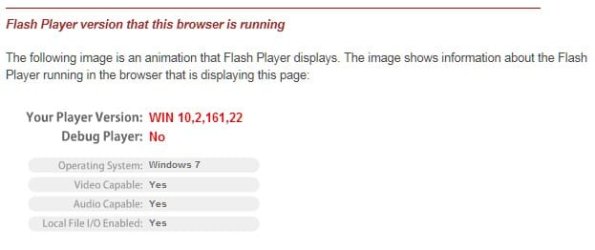
Maybe for the 32 bit version of this "Square Flash" you do, not true with the 64 bit version. Runs along side the other stable 10.1 flash versions.


Adobe previews 64-bit Flash Player 'Square'-capture.jpg
My System SpecsSystem Spec
.


15 Sep 2010   #24

Windows 7 Ultimate x64 SP1


Quote   Quote: Originally Posted by Lemur View Post
I was really excited until I read this. "Please uninstall any previous versions of Flash Player before installing this prerelease build." So now I have to install it tomorrow on my virtual pc.
I didn't uninstall anything. Just added the 64 bit preview version. It is working in IE9x64 and FF 4.07bprex64. 32 bit IE9 and 32 bit FF 4.05b also still work with Flash.

I had hacked the activeX add-on for IE 32 bit and the plug-in for FF 32 bit so Full screen Flash would remain so even upon losing focus with a dual monitor setup. This "feature" remains after the installation of the 64 bit Flash.
My System SpecsSystem Spec
15 Sep 2010   #25

Windows 7 Enterprise x64 SP1, Ubuntu 11.04 x64


64 bit flash working pretty darn good for me in IE 8 64 bit with at least one exception. This speed test site doesn't work: Speakeasy - Speed Test

But this one does work: Speedtest.net - The Global Broadband Speed Test

Everything else I've tried has worked well.
My System SpecsSystem Spec
15 Sep 2010   #26

Windows 7 Ultimate x64, XP Mode, W8 RP VM, Linux Mint Debian 2nd OS HD- 7 Pro x64 second case
New England


Quote   Quote: Originally Posted by mikedl View Post
Quote   Quote: Originally Posted by Night Hawk View Post
As far as IE 9 beta that will stay on the test drive's copy of 7 not for host drive's OS however since the beta is lacking the main menu bar option and several settings including the option for displaying the Favorites bar which was a bit disappointing but typical for beta releases of anything.
Am I missing something? Night Hawk, here is a shot of IE9 x64 with favorites bar and menu:
Attachment 97945

There is also a tutorial already put up about how to enable the menus permanently.
Only posted 4hrs. ago that is. http://www.sevenforums.com/tutorials...ys.html?filter[2]=Networking Internet

You forgot the link for it!
My System SpecsSystem Spec
15 Sep 2010   #27

Windows 7 Ultimate x64 SP1


Quote   Quote: Originally Posted by Night Hawk View Post
Quote   Quote: Originally Posted by mikedl View Post
Quote   Quote: Originally Posted by Night Hawk View Post
As far as IE 9 beta that will stay on the test drive's copy of 7 not for host drive's OS however since the beta is lacking the main menu bar option and several settings including the option for displaying the Favorites bar which was a bit disappointing but typical for beta releases of anything.
Am I missing something? Night Hawk, here is a shot of IE9 x64 with favorites bar and menu:
Attachment 97945

There is also a tutorial already put up about how to enable the menus permanently.
Only posted 4hrs. ago that is. http://www.sevenforums.com/tutorials...ys.html?filter[2]=Networking Internet

You forgot the link for it!
Sorry. I'm new here. I figured you'd be able to find it more quickly than I could re-find it.
My System SpecsSystem Spec
15 Sep 2010   #28

Windows Seven, Ubuntu


It's fast whoohoo.
My System SpecsSystem Spec
15 Sep 2010   #29

Windows 8 X64 M3 8102 / Windows 7 Ultimate X64
Darwin, Australia


IE 9 Epic fail even for a beta 32bit IE9 crashes and reopens ever time you close it and hogs the ram but 64bit works fine!! but still fail when there is no flashplayer!!!
My System SpecsSystem Spec
15 Sep 2010   #30

Windows 7 Ultimate x64 SP1


Quote   Quote: Originally Posted by WiFi Ed View Post
64 bit flash working pretty darn good for me in IE 8 64 bit with at least one exception. This speed test site doesn't work: Speakeasy - Speed Test

But this one does work: Speedtest.net - The Global Broadband Speed Test

Everything else I've tried has worked well.
Ditto on FF 4.07bpre x64 and IE9 x64 beta.
My System SpecsSystem Spec
Reply

 Adobe previews 64-bit Flash Player 'Square' problems?


Thread Tools


Similar help and support threads for: Adobe previews 64-bit Flash Player 'Square'
Thread Forum
Adobe Flash Player Browsers & Mail
IE9 can't install Adobe Flash Square for 64-Bit IE. Can't save or open Browsers & Mail
Firefox 4 64 bit with Adobe Flash Square Browsers & Mail
Adobe Flash Player Software
IE9 & Adobe Flash "Square" only in compatability mode? Browsers & Mail


All times are GMT -5. The time now is 07:47 AM.


Seven Forums Android App Seven Forums IOS App Follow us on Facebook

Windows 7 Forums is an independent web site and has not been authorized,
sponsored, or otherwise approved by Microsoft Corporation.
"Windows 7" and related materials are trademarks of Microsoft Corp.
© Designer Media Ltd
  

1 2 3 4 5 6 7 8 9 10 11 12 13 14 15 16 17 18 19 20 21 22 23 24 25 26 27 28 29 30 31 32