Microsoft Unveils New Look

Gornot you are correct it's not a big deal. Microsoft is trying to make it a big deal for what ever reason.
 

My Computer My Computer

At a glance

Windows 10 Pro. 64/ version 1709 Windows 7 Pr...Intel i7-6800K @ 4.3Corsair Platinum 16 gig @2400EVGA GTX 1070 OC
Computer type
PC/Desktop
Computer Manufacturer/Model Number
Home made Desktop
OS
Windows 10 Pro. 64/ version 1709 Windows 7 Pro/64
CPU
Intel i7-6800K @ 4.3
Motherboard
ASUS X-99 Deluxe II
Memory
Corsair Platinum 16 gig @2400
Graphics Card(s)
EVGA GTX 1070 OC
Monitor(s) Displays
Asus 27" LED LCD/VE278Q
Screen Resolution
1920-1080 or 1280-720 HDMI
Hard Drives
INTEL SSD 730-240 Gb Sata 3.0/
PSU
EVGA Platium 1200W
Case
Phanteks Luxe Tempered Glass 8 fans/ one radiator
Cooling
XSPC/ Water Cooled CPU
Keyboard
Das 4 Professional
Mouse
Logitech M705/MX Anywhere 2-S
Internet Speed
100 mbits
Antivirus
Microsoft Security Essentials/ Malwarebytes Premium 3.0/ SAS
Browser
I.E. 11 default/Firefox/ ISP Time Warner Cable/Spectrum
Other Info
LG BluRay Burner/
Sound system-KLipsch-THX/
Icy Dock ssd Hot Swap bays.
Hi guys (and Gals)

What's WRONG with everybody.

1) Win8 is NOT Win7 so don't expect it to be the same. If it was (were -- English speaker's please ==> what's correct !!) then why create Win8 in the first place.

2) It's a different OS -- so before jumping in and saying you hate it because it doesn't work like Win 7 just take off your horse blinkers and imagine the following scenario.

You don't have a cluttered quick launch toolbar or many desktop icons.

so to start EXCEL in Win 7 -- you go to the start menu ==> choose MS Office -- scroll down the list and hit EXCEL.

(at least 3 mouse actions plus the scrolling -- if you have a lot of entries in the start menu you could scroll a fair bit to get to MS OFFICE for example)..

Now you need to start word as well -- same thing (minimum 3 mouse actions)

now you need notepad for a bit of cut and paste into excel cells so start menu again ==> accessories ==> notepad (3 mouse actions).

Now the Windows 8 method of doing this

You have to have organised your start menu by YOUR most used stuff -- not by application -- I've posted enough of this on the Win 8 Forums

so EXCEL Mouse to start menu, click EXCEL tile 2 clicks (not 3) and to access start screen is far quicker than accessing the classic menu in any case.

Same for Word -- 2 clicks instead of 3.

Same for Notepad -- 2 clicks instead of 3.

So immediately you've reduced your keyboard requirements by 33% without even attempting further optimisation and if you have a LARGE "classic menu" scrolling time will take you far longer than accessing the Windows 8 start screen and clicking on a tile.


Screenshot enc of how I've organised my Win 8 stuff.

The main problems are that it's not an OOBE thing -- takes a bit of work and the metro desktop is about as horrid a design as I've ever seen since some of the stuff I saw many years ago depicting "Soviet art" in a Moscow railway station during the height of the cold war.!!!!

If we could deuglify the start screen I don't think Win 8 would have so many detractors.

Anyway Win 7 guys -- try firing up a Win 8 system as a Virtual Machine and organise the tiles as I have suggested.

I know it goes against your years of experience with previous Windows versions -- but give it a whirl. Forget the ugly tiles and just concentrate of organising your work as how YOU do it rather than hierarchically by application and you might be quite surprised and realize Ms actually has a point.

Here's my start screen -- I've got rid of all the "Pre-selected" metro tiles and replaced the invasive (full screen metro mode) IE with the standard version too.

Apart from the hideous tiles it works quite well -- I'm surprised that I'm actually liking this method of working. As I said forget for the moment the real hideouseness of the start screen and tiles.

If people really don't want it -- then it's fine by me -- but it IS a different way of working so please have a go first before rubbishing it -- and as I said it's not a direct OOBE thing so you will have to do a bit of work "Post install time" unlike W7 which installed and was "ready to run".

Cheers
jimbo
 

Attachments

  • tiles.png
    tiles.png
    87.2 KB · Views: 98

My Computer My Computer

At a glance

Linux CENTOS 7 / various Windows OS'es and se...Intel i7 Intel i58GB, 16GBOn Motherboard
Computer type
PC/Desktop
Computer Manufacturer/Model Number
Custom built, several laptops HP/ASUS
OS
Linux CENTOS 7 / various Windows OS'es and servers
CPU
Intel i7 Intel i5
Memory
8GB, 16GB
Graphics Card(s)
On Motherboard
Sound Card
Realtek HD audio
Monitor(s) Displays
Apple Cinema display, Samsung LCD
Screen Resolution
1920 X 1080
Hard Drives
4 X 1TB SATA
Mouse
Toshiba wireless laser
Internet Speed
> 20MB up
Looks like an orderly desktop. Prob is it's not the desktop. They created another desktop you must go to to choose from buttons.

And you can't push the buttons unless it's a touchscreen. Icons would have done, rather than buttons you can't push on a desktop PC. It's not intuitive.

I'm not against change, usually welcome it. I read every post on the Win7 developers blog even when I didn't understand half of it. Fast Triggers made me giddy. They had gotten the Black Viper. Win7 became the Black Viper.

What's big about the change here is its apparently built on an app infrastructure for tablets. Trying to make that work on desktops is IMO a bridge too far, especially if you're taking away the Start menu.

If it was Vista I might feel differently, but everyone loves Win7 except the haters and they don't love anything. To most it's brand new and now being replaced by buttons on what's functionally a second desktop.
 
Hi guys (and Gals)

What's WRONG with everybody.


If people really don't want it -- then it's fine by me -- but it IS a different way of working so please have a go first before rubbishing it -- and as I said it's not a direct OOBE thing so you will have to do a bit of work "Post install time" unlike W7 which installed and was "ready to run".

Cheers
jimbo

I've run it, played with it and bashed it, but I still hate it, and it looks and feels like 3.1 to me :(

win.jpg


228102d1345841060-microsoft-unveils-new-look-tiles.png


But then again this thread is about the "Microsoft Unveils New Look" and it's not about the functionality of the OS :confused:
 

My Computer My Computer

At a glance

Windows 7 Ultimate 64bitAMD Phenom Quad core 9950 black edition16Gb2x XFX Radeon 5850
Computer type
PC/Desktop
Computer Manufacturer/Model Number
Self Built
OS
Windows 7 Ultimate 64bit
CPU
AMD Phenom Quad core 9950 black edition
Motherboard
Gigabyte
Memory
16Gb
Graphics Card(s)
2x XFX Radeon 5850
Sound Card
PCI Express X-Fi Titanium / Logitech G35
Monitor(s) Displays
2x HP 2410i
Screen Resolution
1920x1080
Hard Drives
2x 500Gb Seagate
1x 300Gb Seagate
1x 1Tb Seagate
2x 1Tb Hitatchi
PSU
Jean Tech Storm 700W
Case
Cooler Master COSMOS S
Cooling
Akasa Evo Blue Pro
Keyboard
Logitech G15
Mouse
Mad Catz M.M.O. 7
Internet Speed
12mb
LOL Jimbo.

You are starting from a strange perspective.

Win8 is NOT Windows 7 so don't expect it to be the same.

I don't think anyone is expecting it to be the same.

you hate it because it doesn't work like Win 7

I don't think anyone is saying that either.

I don't hate it. There are things that could - and in my view should have been done differently - and better. MS had the feedback and went against it. Not surprising it isn't universally liked .

It could have been - and perhaps they will get it next time.

Remember folk saying win7 is what Vista should have been ?

May be they will soon be saying win9 is what win8 should have been.

MS shouldn't be surprised if a lot of people sit this one out. They caused that themselves.

They have announced a fire sale even before it has been released - so they already know.
 

My Computers My Computers

  • At a glance

    7 X64i5 84002x8gb 3200mhz
    Computer type
    PC/Desktop
    OS
    7 X64
    CPU
    i5 8400
    Motherboard
    gigabyte b365m ds3h
    Memory
    2x8gb 3200mhz
    Hard Drives
    various
    PSU
    pure power 11 400w cm
    Case
    Coolermaster
    Cooling
    cryorig m9i
  • At a glance

    7x64g54008gb ddr4 2400
    Computer type
    PC/Desktop
    OS
    7x64
    CPU
    g5400
    Motherboard
    ga b365m ds3h
    Memory
    8gb ddr4 2400
    PSU
    xfx pro 450w
Hi there
I think you've mis-understood what I'm trying to get at here.

If you organise the tiles like I've suggested -- and remember I'm talking about "classic keyboard and mouse" users -- not Touch devices which is another issue entirely -- by clicking the tile you get straight to the application you want to run -- so in fact the entire Desktop is actually now 100% redundant anyway.

If you still think in terms of "The Desktop" I don't think you understood my post in the first place.

If you can access your programs / applications from a particular screen why do you need a "Separate Desktop".

As I keep trying to say "Think Differently".

If you still hate the design --fine by me -- but it's not nearly as bad as the detractors make out.

(Actually Windows 3.1 (or Windows for workgroups 3.11 which was the version I first used) was quite a decent product for its time).

Cheers
jimbo
 

My Computer My Computer

At a glance

Linux CENTOS 7 / various Windows OS'es and se...Intel i7 Intel i58GB, 16GBOn Motherboard
Computer type
PC/Desktop
Computer Manufacturer/Model Number
Custom built, several laptops HP/ASUS
OS
Linux CENTOS 7 / various Windows OS'es and servers
CPU
Intel i7 Intel i5
Memory
8GB, 16GB
Graphics Card(s)
On Motherboard
Sound Card
Realtek HD audio
Monitor(s) Displays
Apple Cinema display, Samsung LCD
Screen Resolution
1920 X 1080
Hard Drives
4 X 1TB SATA
Mouse
Toshiba wireless laser
Internet Speed
> 20MB up
To answer your question, Jimbo: I need a desktop to organize my internet windows beside my open programs - all in one place. I can't do that on the second desktop they created for us to push buttons.

It's personal preference, I realize. I want a small popup to choose from instead of another desktop to trade places, or effectively a wall to come down which interrupts what I'm doing which is jarring.
 
To answer your question, Jimbo: I need a desktop to organize my internet windows beside my open programs - all in one place. I can't do that on the second desktop they created for us to push buttons.

It's personal preference, I realize. I want a small popup to choose from instead of another desktop to trade places, or effectively a wall to come down which interrupts what I'm doing which is jarring.


Hi there
??
not sure I understand this -- after you open IE from your 1st session via the "Tile" you can then via your taskbar open as many Internet explorer sessions as you want (or from within IE explorer itself). Remember I'm saying use STANDARD applications not the Metroized full screen versions" even if you are coming from the W8 start screen tiles.

(My version of IE in its menu has open new tab -- open favourite etc so starting 2nd/ 3rd / 97th session or whatever shouldn't be a problem).

same with EXCEL or any of the other standard applications -- so I'm sticking to my premise that you can do exactly what you do now WITHOUT a desktop. !!

Cheers
jimbo
 

My Computer My Computer

At a glance

Linux CENTOS 7 / various Windows OS'es and se...Intel i7 Intel i58GB, 16GBOn Motherboard
Computer type
PC/Desktop
Computer Manufacturer/Model Number
Custom built, several laptops HP/ASUS
OS
Linux CENTOS 7 / various Windows OS'es and servers
CPU
Intel i7 Intel i5
Memory
8GB, 16GB
Graphics Card(s)
On Motherboard
Sound Card
Realtek HD audio
Monitor(s) Displays
Apple Cinema display, Samsung LCD
Screen Resolution
1920 X 1080
Hard Drives
4 X 1TB SATA
Mouse
Toshiba wireless laser
Internet Speed
> 20MB up
Win8 is NOT Windows 7 so don't expect it to be the same.

I don't expect it to be the same but I expect the new to improve the experience and not degrade it. I also expect to be able to select a close to classic look and feel along with selecting the colors of the various parts of the windows and controls as has been possible since Win3.0. Even if you don't think so, the visual aesthetics and dynamics of a GUI is an important part of the functionality of a GUI. As it is, Windows 8 is only slightly better than a command line OS. Even the primitive GEM GUI that ran on top of DOS had better and more functional aesthetics and dynamics.


it looks and feels like 3.1 to me

It's worse. Less choice over color, flat, no clear delineation between controls. It is even worse than monochrome Open Look or Motif. I have developed quite a lot of software using those GUIs. They were ugly and colorless but functional.


May be they will soon be saying win9 is what win8 should have been.

From the leaked comments on the soon to be win9, it is simply going to be more of the same. Flat, featureless, colorless, and few if any choices over look and feel. The start menu or a fully functional desktop equivalent will continue to be absent. Expect a slightly re-baked Windows 8 with possibly a slightly better touch screen metaphor in place of Metro along with more brainless and featureless Apps. That is unless the current cadre of mangers are replaced with people who really know what they are doing rather than just peeing on all the trees by changing things for the sake of changing them.
 

My Computer My Computer

At a glance

Windows 7 Home Premium 32bit
OS
Windows 7 Home Premium 32bit
But Jimbo the difference is I want to be able to access programs, controls and settings alongside my Firefox windows without having to go to some other wall to do that - and why should I have to when the Start button screen works perfectly?

An app-centric touch screen interface and functionality doesn't translate to a desktop except with extreme modifications. I spent an entire day finding the perfect Win7-style Start Menu and setting it up. You've spent months configuring your second desktop screen.
 
effectively a wall to come down which interrupts what I'm doing which is jarring.
Exactly, that is my experience with trying to do anything with Windows 8 the way it is designed. Install Classic Shell, configure it full Classic, and Windows 8 becomes marginally usable. Its aesthetics and dynamics still suck big time. Then there is that pointless splash screen on boot you must click on to get to the log in screen then the totally unnecessary few second dwell on the Metro screen. That is over the top annoying.

Overall the experience is that no one really thought about how real people who use real computers to do real work must do their work. They simply patched together a set of incomplete components from incompatible environments, cut out features until they met their arbitrary memory budget, and called it a product . It doesn't come close to the polished and completed feel that Windows 7 has.

I was doing touch screen programming in the early 1980's (monochrome) and again worked in the 1990's (sixteen colors). They were using 16 bit OSs under the GUI I had added to them. Even that primitive environment had better aesthetics and dynamics than the Windows 8 GUI. Doing things right is not that much harder than doing them wrong. Working with something not done right is like working in the middle of hell during a hurricane. Not a pleasant experience.
 

My Computer My Computer

At a glance

Windows 7 Home Premium 32bit
OS
Windows 7 Home Premium 32bit
I don't like Classic Shell menu which is a mess, while ViStart is identical to Win7's but isn't customizable to have fold-out menus which I rely upon: Start Menu - Restore in Windows 8

In the comments section of the tutorial SIW2 posted up Start Menu 7 which is not exactly the WIn7 start menu but has its full functionality.
 
I don't like Classic Shell menu which is a mess

That is the point of configurable features. Not everyone likes, needs, wants the same thing. The point of a programmable computer is that it CAN BE PROGRAMMED TO BE CONFIGURED to individual choice. It is likely that nearly everyone will like 80% of a given OS out of the box. If 15% can be configured to the individual likes, the remaining 5% might be annoying but livable depending on which features are unmodifiable.

Allow Metro, Start Button, and windows/controls colors to be configurable, then all is well. All types of users will be happy with it. Lock those things down or out, you get a bimodal population: lovers and haters with both having a lot of energy behind their love or hate. I see this as a mistake unless you are aching for a knockdown drag out fight with both sides digging in for a long and painful battle. Even then, everyone looses more than they win - including Microsoft. It is damn dumb and stupid especially in light of how easily it could have been avoided. However, the path is set with Microsoft being not willing to allow the simple solution. Conflict it is.
 

My Computer My Computer

At a glance

Windows 7 Home Premium 32bit
OS
Windows 7 Home Premium 32bit
I don't hate Microsoft. I love Windows Seven. I also think the touch aspects of Win 8 are good but the desktop changes in Win 8 suck. Explorer looks hideous. The window decoration are very ugly. If they released Win 8 with the Win 7 desktop then I think it would be pretty good. They also should allow the Win 7 start menu as an option. I guess once a few custom visual styles are released it won't be that bad, but the default desktop is hideous. You would think that a company as big as Microsoft could do better. It seems to be a business model to release a half finished OS in between a complete OS so they can keep people buying product over and over.
 

My Computer My Computer

At a glance

Windows Seven, UbuntuIntelIntel
Computer Manufacturer/Model Number
Samsung rv520
OS
Windows Seven, Ubuntu
CPU
Intel
Graphics Card(s)
Intel
jimbo's post about organizing tiles is something that I have attempted as well, but as a person who likes aesthetics as well as functionality, I just cannot use the Start Screen for anything other than the Metro/Modern/WhateverUI apps.

In Windows 7, it's even easier to access applications you would otherwise pile up on the Start Screen: I am, of course, talking about pinning applications to the taskbar. The apps I use occasionally but are still important are pinned to the Start Menu, and since there's not a lot of them that I need but do not want to have on the taskbar, the old Start Menu in 7 is much more useful than the new Start Screen (if we ignore the Store apps):

Untitled.png

So there, no matter which application I need, one click is all it takes for me to launch it. When, from time to time, I need a different kind of utility, I use these that are pinned to the Start Menu; so as far as actually using my hardware (mouse and/or keyboard), Windows 8 is, worst case scenario, the same when it's not worse (like I said, in terms of looks).

I don't think I've EVER needed to actually go through All Programs in the Start Menu and scroll up & down to find an application ever since Windows 7. I just pin it, or keep it in the Start Menu, or don't use a shortcut at all but still have the application for certain file extensions (archives, PDFs etc.)


I guess, what I'm trying to say is, Windows 8's Start Screen isn't supposed to be a replacement for the Start Menu. It is a new environment that features different types of apps, and it's exactly the lack of the old Start Menu that enrages people, myself included. If Microsoft kept it, the Start Screen could've been a colossal success in their campaign to join desktop and tablet PCs, not to mention promote the look and feel of Windows Phone. I understand the concept, and it was a great idea, but it backfired (dare I say completely?) and instead became a colossal mess!
 

My Computer My Computer

At a glance

Windows 7 Home Premium x64Intel Core i5 2500K8GB DDR3nVidia GeForce GTX650 Ti BOOST
Computer type
Laptop
Computer Manufacturer/Model Number
Custom
OS
Windows 7 Home Premium x64
CPU
Intel Core i5 2500K
Motherboard
MSI MS-7750
Memory
8GB DDR3
Graphics Card(s)
nVidia GeForce GTX650 Ti BOOST
Sound Card
Realtek
Monitor(s) Displays
21' Philips
Screen Resolution
Full HD
Hard Drives
1TB
PSU
500W
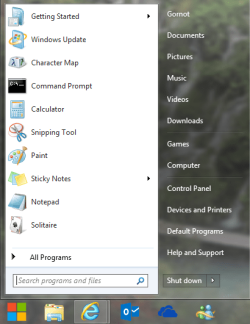
The ViStart Win7 Replica start menu in Gornot's post is the one I like best, if only it had the fold-out Menu's for Computer, Control Panel and User folder. Has anyone a mod to get that?
 
Actually, this IS the Windows 7 Start Menu, I just installed a Windows 8 theme and changed the orb xD

Pretty much the same awesomeness on the desktop here as in Windows 8 xD
 

My Computer My Computer

At a glance

Windows 7 Home Premium x64Intel Core i5 2500K8GB DDR3nVidia GeForce GTX650 Ti BOOST
Computer type
Laptop
Computer Manufacturer/Model Number
Custom
OS
Windows 7 Home Premium x64
CPU
Intel Core i5 2500K
Motherboard
MSI MS-7750
Memory
8GB DDR3
Graphics Card(s)
nVidia GeForce GTX650 Ti BOOST
Sound Card
Realtek
Monitor(s) Displays
21' Philips
Screen Resolution
Full HD
Hard Drives
1TB
PSU
500W
Seriously????? Can you see my surprise they are going back to the graphics of 3.1....is it deja vu or Back to the Future? Wait....there is some dimension in 3.1's logo, forgive me for comparing them. http://www.youtube.com/watch?v=brqlko9pTkk :sarc:
 

My Computer My Computer

At a glance

Windows 7 ultimateIntel Core i5 quad-core20 GBonboard
Computer type
PC/Desktop
Computer Manufacturer/Model Number
Asus p8h77 based home build
OS
Windows 7 ultimate
CPU
Intel Core i5 quad-core
Motherboard
Asus P8H77
Memory
20 GB
Graphics Card(s)
onboard
Sound Card
onboard
Monitor(s) Displays
Planar PL2210MW
Screen Resolution
1680 x 1050
Hard Drives
1 TB internal
1 TB external My Passport
PSU
unsure
Case
Antac 300
Cooling
unsure
Keyboard
Logitech K350
Mouse
Logitech marble mouse (trackball)
Internet Speed
4G wireless usually 15mpbs
Antivirus
Avast with mail shield disabled
Browser
waterfox
Other Info
Attached old wacom iindigo pen and tablet from 2000
I like that new Microsoft logo.
 

My Computer My Computer

At a glance

Windows 7 Home Premium Service Pack 1 32-bit ...AMD C-50 Processor 1.0 Ghz2 GB DDR3 RAM (1.73 usable in System Properties)AMD Radeon HD 6200 series Graphics
Computer Manufacturer/Model Number
Acer Aspire One 722 (AO722)
OS
Windows 7 Home Premium Service Pack 1 32-bit Build 7601
CPU
AMD C-50 Processor 1.0 Ghz
Memory
2 GB DDR3 RAM (1.73 usable in System Properties)
Graphics Card(s)
AMD Radeon HD 6200 series Graphics
Sound Card
High Definition Audio Device
Monitor(s) Displays
Generic PnP Monitor
Screen Resolution
1366 x 768 (recommended)
Hard Drives
320 GB HDD storage
298.09 GB in Disk Management (REAL)
Keyboard
Built-in on my laptop
Mouse
External mouse
Other Info
Installed Windows 7 Service Pack 1 by 9/9/2012
But Jimbo the difference is I want to be able to access programs, controls and settings alongside my Firefox windows without having to go to some other wall to do that - and why should I have to when the Start button screen works perfectly?

An app-centric touch screen interface and functionality doesn't translate to a desktop except with extreme modifications. I spent an entire day finding the perfect Win7-style Start Menu and setting it up. You've spent months configuring your second desktop screen.

Hi there
It's NEW and of course totally unlike Windows 7 so there's always going to be "Learning" environment and I only play with this stuff at odd periods so it's not a full time occupation -- too many EXCELLENT pubs in central Brussels for that. !!!!

I LIKE Windows 7 and will stick with it for the foreseeable future but there's nothing wrong in experimenting with the new OS.

I agree the whole start screen and and metro tile design are positively TERRIBLE in design - someone in Ms's graphics dept needs to get fired pretty smartly - as I'm quite sure there are plenty of 8 year olds in primary schools who could have done a much better job of the design.

But organising work in a new way turned out better than I had expected - again I suppose this is something that people have to work out for themselves.

My first reaction to Win 8 was "WOTIZIT for a POS". I thought I'd play with it for a while.

I'm actually quite sure that if some customisation features are added to Win 8 a lot of arguments will disappear.

I'm not enthoused in any way whatsoever in "Live Full screen" Metro apps -- that's what tablets and smart phones are for but I can see some possibilities in the start screen if used slightly differently.

The real error all along with this is that while Windows 8 brings some values to the table such as Virtual ISO mounting, File update tracking, HUGELY improved security, and generally a snappier all round performace improvement it's still a schizophrenic nightmare of a mix of a Tablet / phone OS or a Desktop OS and IMO fails to deliver properly in BOTH areas.

At install time the prompt should have been

Install device ==>phone/tablet/desktop.

If you install desktop extra choice should be presented ===> install Metro UI interface Y/N.

If N should get standard windows 7 like start up.

(Windows 2012 server gives you a choice of whether you even want a GUI - and you only get the full metro if you choose GUI and then afterwards enable desktop experience). Although why on earth you would want Metro on a SERVER beat me. !!!

Anyway we shall see what transpires with this -- I'm sure there will be a lot of de-installing W8 on new machine as people buy W7 and install that instead like they did with XP when VISTA first appeared.

Cheers
jimbo

 

My Computer My Computer

At a glance

Linux CENTOS 7 / various Windows OS'es and se...Intel i7 Intel i58GB, 16GBOn Motherboard
Computer type
PC/Desktop
Computer Manufacturer/Model Number
Custom built, several laptops HP/ASUS
OS
Linux CENTOS 7 / various Windows OS'es and servers
CPU
Intel i7 Intel i5
Memory
8GB, 16GB
Graphics Card(s)
On Motherboard
Sound Card
Realtek HD audio
Monitor(s) Displays
Apple Cinema display, Samsung LCD
Screen Resolution
1920 X 1080
Hard Drives
4 X 1TB SATA
Mouse
Toshiba wireless laser
Internet Speed
> 20MB up
Back
Top