Windows 7 Forums Search
Welcome to Windows 7 Forums. Our forum is dedicated to helping you find solutions with any problems, errors or issues you are experiencing with Windows 7. The Windows 7 forum also covers news and updates and has an extensive Windows 7 tutorial section that covers a wide range of tips and tricks.


Windows 7 - Windows 7 Resource Monitor


11-01-2008   #1


W 7 64-bit Ultimate


Windows 7 Resource Monitor

Windows 7: Improved Resource Monitor.

One of the coolest new features in Windows Vista is the Performance Monitor. In a similar vein, one of the coolest new features in Windows 7 is the revamped Resource Monitor. Here’s what it looks like:

Note the gray part of the bar. That’s how much RAM you lose by using a 32-bit version of Windows with 4 GB of RAM. Yes, really. (With x64, it’s a tiny sliver.)
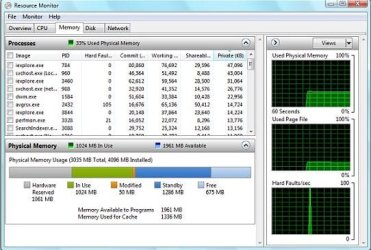
Windows 7 Resource Monitor-windows-7_resource-monitor.jpg

Read more at the source.


Later Ted

My System SpecsSystem Spec
11-02-2008   #2


Vista and now 7 in 32 and 64 bit.


Sorry to throw sour grapes into the system but... I am becoming, almost, an Anti Thurrot guy. I often find my own observations in opposition to his. In the case quoted, I decided to only use the 32 bit "7", as it is in such early rlease. My figures in no way compare to Thurrot's. I actuall cannot see a grey portion on my bar (not even a "sliver")

Last edited by davehc; 11-14-2008 at 12:42 AM..
My System SpecsSystem Spec
11-02-2008   #3


Windows 7 Build 7100


Perhaps it's because you don't have any hardware that reserve's memory. I remember in Vista was the first time they brought the shared memory into performance video cards. So no matter what you did you had some kind of 500MB of memory being used by the video card on top of the 512MB you already had. This would show up in the "Grey" as Hardware Reserved. I think it has something to do with DirectX 10 I am not sure.

As far as it being smaller in 64bit operating systems sounds normal to me since 64bit can process a little faster. So why not use 64bit, because I hate having the program files x86 and the Program Files x64 when can they just make everything compatible.
My System SpecsSystem Spec
.


05-02-2010   #4


Windows 7 Ultimate x32bit


does using 64bit save any ram ?
My System SpecsSystem Spec
05-02-2010   #5


Windows 7 Ultimate x64 SP1 | OSX Lion 10.7 x64


Quote   Quote: Originally Posted by yousaf465 View Post
does using 64bit save any ram ?
Not exactly "save", but allows you to use memory past 3Gb.

(By the way, this is a 2008 thread...)
My System SpecsSystem Spec
05-02-2010   #6


Windows 7 Ultimate x32bit


Yeah I knew that.
My System SpecsSystem Spec
10-22-2010   #7


windows 7 professional 32 bit


Hi,

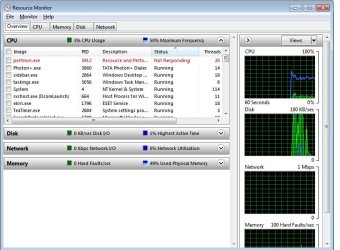
I am having a slight problem with my perfmon.exe which is shown in the Resource monitor.
It is unstable(it switches b/w running and not responding) Windows 7 Resource Monitor-perfmon.jpg

I am not sure if this is the right place to post this. please help.

Regards
&y....
My System SpecsSystem Spec
Reply


Thread Tools


Similar Threads for: Windows 7 Resource Monitor
Thread Forum
Solved Resource Monitor has one of my Hds always at 100% active Performance & Maintenance
Resource Monitor Tutorials
Solved Resource Monitor HDD display Installation & Setup
Odd W7 Resource Monitor behavior Performance & Maintenance
Win 7 Pro 64 - Resource Monitor not working Performance & Maintenance


All times are GMT -5. The time now is 07:22 PM.


Windows 7 Forums is an independent web site and has not been authorized,
sponsored, or otherwise approved by Microsoft Corporation.
"Windows 7" and related materials are trademarks of Microsoft Corp.
© Designer Media Ltd
  

1 2 3 4 5 6 7 8 9 10 11 12 13 14 15 16 17 18 19 20 21 22 23 24 25 26 27 28 29 30