Windows 7 Forums Search
Welcome to Windows 7 Forums. Our forum is dedicated to helping you find solutions with any problems, errors or issues you are experiencing with Windows 7. The Windows 7 forum also covers news and updates and has an extensive Windows 7 tutorial section that covers a wide range of tips and tricks.


Windows 7 - Show Us Your Rig [2]


12-28-2010   #531


Windows 7 Home Premium x64 SP1


Looks like I'll be heading for that... I'll go to the nearest PC shop to check if they can get it... Like I said, it's my lack of self-esteem that prevents me of ordering that and doing it myself. But don't worry, I'll negotiate a price with the shop.

My System SpecsSystem Spec
12-28-2010   #532


7 Ultimate x64


Quote   Quote: Originally Posted by Dave76 View Post
LoL, I'm not worried, just don't want you to damage that nice new rig.

When it gets close to 73°C, maybe 68°C it will start to throttle itself down to keep from damaging the CPU.
In that screenie, those are just the core temps and they actually aren't that bad. Not great, but certainly not dangerous.

If it were the the Tcase (overall CPU) temps - then you'd have to start panicking

(Core temps are always higher than Tcase temps)
My System SpecsSystem Spec
12-28-2010   #533


W7 Professional x64


Cooler master shouldn't disappoint you. I have always recommend replacing the stock coolers with more efficiently designed models, even on most business machines with low demand that I have built, especially with Intel, as I have found them to be completely inefficient.
My System SpecsSystem Spec
.


12-29-2010   #534


Windows 7 pro 64 bit


specs are under my system specs tab

although, i wish i got the i5 3.06 : / but i am still happy with it, im studying to get MCITP server admin, so i am running hyper-v in win srvr 2008, and also i have win 7 pro side by side installation.... im building this again for a friend 2maro cuz he liked mine so much lol


[IMG=http://img442.imageshack.us/img442/5907/62041101500920851904107h.jpg[/IMG]

Last edited by bmcdevitt; 12-30-2010 at 02:59 PM..
My System SpecsSystem Spec
12-30-2010   #535


Windows 7 Ult x64 - SP1/ Windows 8 CP x64


Quote   Quote: Originally Posted by Lebon14 View Post
Guys, question here... I'm using Real Temp frequently to monitor my i7's temperature. Core 1's habitually idling at 40-45ºC, The other 3 cores are at around 38-42ºC. Now, Just for a test, I'll run a convertion of 34 FLAC audio files into MP3s 320kbps CBR at slow high quality using Lame. The encoder is dBPowerAmp v12. This baby is multi-threaded.

So, I start the convert... here is screenshot midway done :

(Deleted)

Notes :
1. HyperThreading is desactivated
2. TurboBoost is also desactivated

Maximum heat, from Core 1 to Core 4, 73ºC 71ºC 70ºC and 69ºC. I believe the threasold for a Core i7 is 73ºC. After that, the CPU diminishes performances to avoid overheat and damage.

What do you think guys... is it OK? I desactivated HyperThreading and TurboBoost because it would nearly reach 90ºC under load. Desactivating TurboBoost didn't do much HyperThreading did help reduce the heat of a good 10ºC under full load.

In fact, that was a report of my PC after almost 2 months being up
Quote   Quote: Originally Posted by smarteyeball View Post
Quote   Quote: Originally Posted by Dave76 View Post
LoL, I'm not worried, just don't want you to damage that nice new rig.

When it gets close to 73°C, maybe 68°C it will start to throttle itself down to keep from damaging the CPU.
In that screenie, those are just the core temps and they actually aren't that bad. Not great, but certainly not dangerous.

If it were the the Tcase (overall CPU) temps - then you'd have to start panicking

(Core temps are always higher than Tcase temps)
Hi Mate,

I was replying to the "Maximum heat, from Core 1 to Core 4, 73ºC 71ºC 70ºC and 69ºC." and "it would nearly reach 90ºC under load"

Seemed to be high, I wouldn't want my system running that hot on a regular basis, or even occasional basis.

Mine runs at 56ºC at 3.84 GHz when maxed out, EIST and Turboboost enabled, and runs at 27ºC at idle.

With an after market cooler he can turn back on the hyperthreading and turboboost, have cool temps and the speed that we crave
And maybe sneak in a wee bit of an OC just to spice it up a little.

Last edited by Dave76; 12-30-2010 at 09:13 AM..
My System SpecsSystem Spec
12-30-2010   #536


I have been watching my heat levels from seeing what you guys are writing made me want to watch it.
From what I have seen you guys say. My is running just fine right. It is all stock. I have never touched it or anything.
Show Us Your Rig [2]-hwmonitor.jpg
My System SpecsSystem Spec
12-31-2010   #537


Windows 7 Ult x64 - SP1/ Windows 8 CP x64


Those temps look good.
My System SpecsSystem Spec
12-31-2010   #538


windows 7 ultimate 64 bit


ugghh...i'm startin to get depressed not havin my rig (on page 34) back to normal after the fire...i'm tryin to rebuild it but i'm only half way done in another case
My System SpecsSystem Spec
12-31-2010   #539


Quote   Quote: Originally Posted by ShArKy View Post
ugghh...i'm startin to get depressed not havin my rig (on page 34) back to normal after the fire...i'm tryin to rebuild it but i'm only half way done in another case
OMG!!! I just went and looked at your RIG. I would be crying if I was you. I feel so bad for you. I am terribly sorry. I would donate money to you. If I had any to. But then again. If I had any extra money. It would probably already be invested in a computer build of my own. I want to build one so bad. But I just do not have the money at all. I barely can pay my internet bill. I really do feel very sorry for you. I hope you get a machine that is at least half the machine that one was. That is probably the most amazing computer I have ever seen. The things I would do for a computer like that. I wish you the best of luck. I hope your new machine comes out twice as good as that one. Look at it this way. Now you have an excuse to buy all those new parts you wanted and to build a completely new machine.
My System SpecsSystem Spec
12-31-2010   #540


Win 7 Home 64 (3 license)


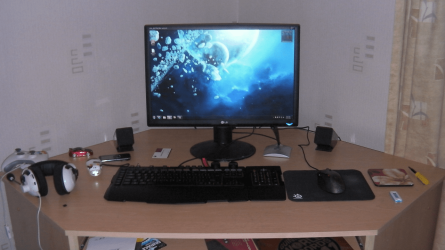
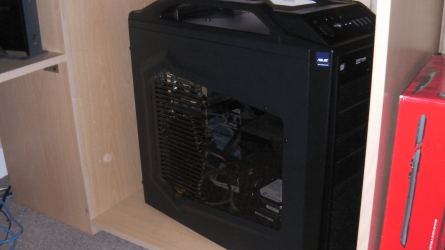
Finally finished (for quite a while anyways)

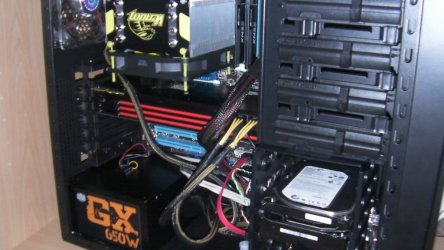
Here's my spagetti monster/love child:


I liked that I used flex tube between the vid cards as it makes it easier to pull a card if needed. Also glad my memory came with a dual fan clip-on as it helps the Northbridge stay cooler. (It was getting kinda hot with no air from a CPU cooler.)

I'd also suggest a fan/radiator for each processor that you have on water. I get by just fine with the 2 radiator/dual fan Swiftech unit, but I do have two upper case fans blowing into the radiator fans. (Thought I was kinda clever by mounting the unit above the case. )

Sys specs are in my sig below and I'm less than 1 month into using Windows 7. I like it!

WEI is 7.6 (in WEI thread) for CPU and SSD. Show Us Your WEI (2)

Note to readers - if you can swing the price of a SSD, get one! You'll love it!

Last edited by Ooomwizard; 12-31-2010 at 03:29 PM.. Reason: proud pappa WEI link :-)
My System SpecsSystem Spec
Closed Thread


Thread Tools


Similar Threads for: Show Us Your Rig [2]
Thread Forum
HDDs Show in BIOS, But Do Not Show in Disk Management Hardware & Devices
Changing when taskbar icons show and don't show. Customization
Show Us Your WEI (2) Performance & Maintenance
show hidden folders show file extensions thru registry General Discussion
DVD Is No Show Hardware & Devices


All times are GMT -5. The time now is 09:10 PM.


Windows 7 Forums is an independent web site and has not been authorized,
sponsored, or otherwise approved by Microsoft Corporation.
"Windows 7" and related materials are trademarks of Microsoft Corp.
© Designer Media Ltd
  

1 2 3 4 5 6 7 8 9 10 11 12 13 14 15 16 17 18 19 20 21 22 23 24 25 26 27 28 29 30