|
Welcome to Windows 7 Forums. Our forum is dedicated to helping you find solutions with any problems, errors or issues you are experiencing with Windows 7. The Windows 7 forum also covers news and updates and has an extensive Windows 7 tutorial section that covers a wide range of tips and tricks.
Windows 7 - Finally worked out good overclock!! |
05-12-2011
|
#1 | | |
Finally worked out good overclock!! I have a ASUS M4N72-E motherboard with a 2.8ghz AMD Athlon II X4 630 64 processor, running windows 7 home premium.
Have read and heard so many things about overclocking AMD's and how much they can tolerate etc,
Not experienced at this to be honest and have had a few unsuccessful play abouts in the bios.
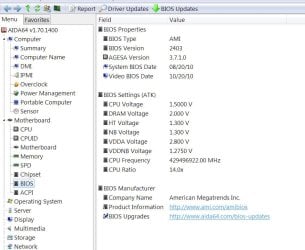
My bios is AMI 2403.
My memory is rated at 800 mhz and the timings were 6-6-18 when installed, I have 3 banks of 2GB installed, should be four but it refuses to accept four!
I wanted to leave as many of the myriad options in my Bios under AI tweaker at auto as possible cause I am a novice to this, but the highest stable setting for my memory clock I could achieve was 206 x 14, any higher and it wouldn't boot.
This is hardly spectacular, turning a 2800mhz into a 2884mhz processor.
But with everything set to auto, that is all I could get.
I then came across a screen in bios saying that my NB clock should be 2000mhz!
This was actually a eureka moment, cause i now realised that alls I had to do were set the DRAM frequency to less than 800mhz to protect them and to get my NB clock to around 2000mhz.
Setting these 2 options to manual did the trick!
DRAM frequency
NB frequency
As well as
CPU Multiplier
FSB clock
Everything else was left on AUTO.
I then started playing around with figures in the FSB in order to achieve the desired less than 800mhz for DRAM and 2000mhz for NB clock.
At the 14x multiplier, the figure that did this best was 228.
I tried several until the figures showing up in DRAM and NB were close to the ideals!!
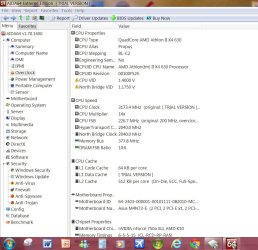
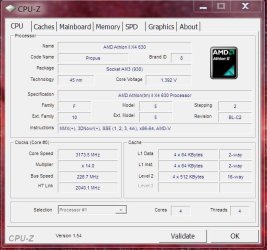
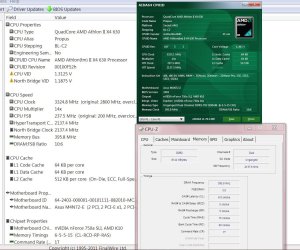
At 228 x 14 i am effective achieving a 3172mhz processor with temperatures of only 51C which has actually decreased and to boot my RAM timings are now 5-5-15 cause i am not pushing the RAM quite so hard at a frequency level.
The DRAM timings were left on AUTO too!
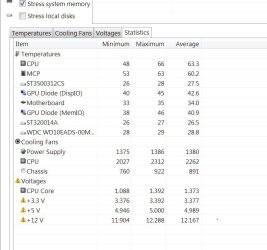
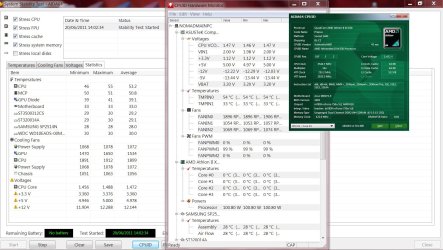
Here should be some results showing this overclock, its the temperature drop that interests me the most! faster but cooler!
Any way very easy way to add at least 10% to your processor, not pushing any further to leave the CPU to have a longer happier life and to aid system stability, I am happy with the increase and there is a noticeable difference when running CPU heavy games like FSX, the frame rates are about 10% higher!
Hope this helps someone!
| My System Specs | | System Manufacturer/Model Number Nomad Creative Solutions (Home build) OS Windows 7 64 bit CPU AMD hexa core AMD Phenom II X6 1090T BE processor Motherboard ASUS m4n72-E with sli NVIDIA 750a chipset Memory 8gb DDR2 Gskill F2-8500CL5D-4GBPK 1000Mhz 4 x 2GB Graphics Card Nvidia GTX 470 1268Mb Sound Card Onboard VIA HD audio 1708S Monitor(s) Displays samsung 40 inch LED monitor Screen Resolution 1920 X 1080 P Keyboard WIRELESS KEYBOARD/TOUCH PAD PSU 1050w psu Case Coolermaster CM690 II Advanced Cooling 1x140mm In, 2x120mm In, 2x140mm Out, 1x120mm Out Hard Drives 1 TB SATA WDC green
500GB SATA Seagate
250 GB IDE Samsung Internet Speed 10.6MBPS Other Info WINDOWS 7 HOME PREMIUM 64 BIT SP1
Tuniq Tower 120 Extreme CPU cooler |
05-12-2011
|
#2 | | |
Congrats!
I would recommend you stress test it with prime 95 or Intel Burn Tool to make sure it is stable.
Cheers | My System Specs | | System Manufacturer/Model Number Home built (GeneO industries)/Model 2 OS Windows 7 64 bit SP1 CPU i5 2500k @ 4.5 GHz, 1.256V 120 GFlop (with AVX) Motherboard ASUS P8Z68-V PRO/GEN3 Memory 16GB (4GBx4) 1600MHz G.skill Ripjaws X 8-8-8-24 Graphics Card Asus Nvidia ENGTS450, 1GB 4030 MHz DDR5 clock, 915 Mhz GPU Sound Card Onboard Realtek HD Monitor(s) Displays NEC Spectraview 2490WUXi-SV Screen Resolution 1920 x 1200 Keyboard HP Wireless Mouse HP wireless PSU Antec TruePower New 650W Case Fractal Design "Define R3" Cooling CM Hyper 212+ push/pull, 5 120mm, 1 140mm case fans Hard Drives Crucial 128GB M4 (system), 2x WD Caviar 1TB Black internal (data), 1x Seagate 750G Barracuda Internal (backups), 1x WD Blue 6Gb/s 320GB Internal, 1x Corsair F40 SSD for cache, 1x 2TB eSata WD20EARS Green, 2x 500GB Seagate external USB, 1x 350GB exte Internet Speed 25.7 Mb/s down, 4.5 Mb/s up Other Info USB 3.0 x4 , SATA III x4, eSATA x3, SATA II x4, USB 2.0 x8. 2 Samsung DVD R/W drives.
WEI: CPU 7.7, Memory 7.9, Graphics 7.4, Disk 7.9 |
05-12-2011
|
#3 | | |
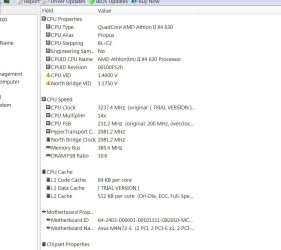
Little bit more..... Have run FSX on it for over an hour which is very CPU critical, i know not an accurate stress test but the system is responding well and has had no ill effects.
Previously when i had left the DRAM and NB frequency alone, the system would not boot, just saying overclocking failed when I got beyond 206 on the FSB.
Have creeped it up a little more but still keeping it under the 800Mhz mark for my RAM.
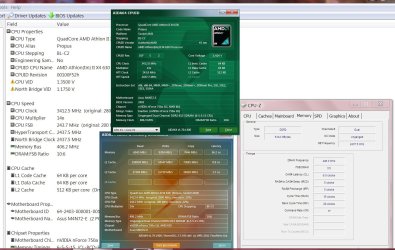
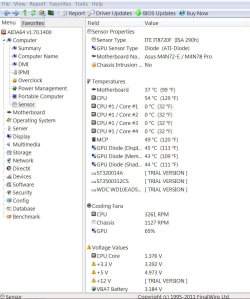
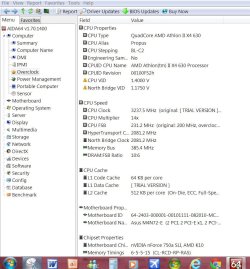
The processor is now at 3237Mhz, CPU temperatures at 52 - 54 C.
Well under the 60C danger zone i have heard about.
FSB-DRam is still 3:5 or 6:10 i have seen also.
couple more aida 64 shots here.....
FSB is set in BIOS to 330 with the 14x mutiplier, actual FSB is running at 331.7 apparently!
Last edited by Nomad8459; 05-12-2011 at 09:58 AM..
Reason: Additions
| My System Specs | | System Manufacturer/Model Number Nomad Creative Solutions (Home build) OS Windows 7 64 bit CPU AMD hexa core AMD Phenom II X6 1090T BE processor Motherboard ASUS m4n72-E with sli NVIDIA 750a chipset Memory 8gb DDR2 Gskill F2-8500CL5D-4GBPK 1000Mhz 4 x 2GB Graphics Card Nvidia GTX 470 1268Mb Sound Card Onboard VIA HD audio 1708S Monitor(s) Displays samsung 40 inch LED monitor Screen Resolution 1920 X 1080 P Keyboard WIRELESS KEYBOARD/TOUCH PAD PSU 1050w psu Case Coolermaster CM690 II Advanced Cooling 1x140mm In, 2x120mm In, 2x140mm Out, 1x120mm Out Hard Drives 1 TB SATA WDC green
500GB SATA Seagate
250 GB IDE Samsung Internet Speed 10.6MBPS Other Info WINDOWS 7 HOME PREMIUM 64 BIT SP1
Tuniq Tower 120 Extreme CPU cooler |
05-12-2011
|
#4 | | |
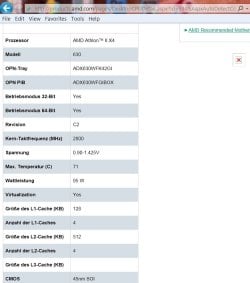
Just came across this piece of tech data from AMD.
Voltage 0.90 - 1.425
Core Temp MAX 71 C, not sure where i had heard 60 C from | My System Specs | | System Manufacturer/Model Number Nomad Creative Solutions (Home build) OS Windows 7 64 bit CPU AMD hexa core AMD Phenom II X6 1090T BE processor Motherboard ASUS m4n72-E with sli NVIDIA 750a chipset Memory 8gb DDR2 Gskill F2-8500CL5D-4GBPK 1000Mhz 4 x 2GB Graphics Card Nvidia GTX 470 1268Mb Sound Card Onboard VIA HD audio 1708S Monitor(s) Displays samsung 40 inch LED monitor Screen Resolution 1920 X 1080 P Keyboard WIRELESS KEYBOARD/TOUCH PAD PSU 1050w psu Case Coolermaster CM690 II Advanced Cooling 1x140mm In, 2x120mm In, 2x140mm Out, 1x120mm Out Hard Drives 1 TB SATA WDC green
500GB SATA Seagate
250 GB IDE Samsung Internet Speed 10.6MBPS Other Info WINDOWS 7 HOME PREMIUM 64 BIT SP1
Tuniq Tower 120 Extreme CPU cooler |
05-16-2011
|
#5 | | |
Decent Overclock 51%........not pushing it too hard. http://s128.photobucket.com/albums/p...-16_213842.png  Hello, I have been using this rig for about 2-2.5 years now, it was easy to setup, basically just bumped the voltage a bit, same with the memory and came up with some pretty good numbers.
I have had the rig up to approximately 4ghz and better but stability was an issue. Better cooling definitely needed
Some stats: X3210 @3.6ghz/AC Freezer Pro
P5K Premium/WiFi/4x1Gb GSkill
ATI Sapphire Vapor-X 4890
2x640Gb WD Black Hdd Raid0/WD 74Gb Raptor
Creative SoundBlaster X-Fi Fatality Extreme Gamer
Lian Li Pc-7B plusII/PC Power and Cooling 850 SSI Turbo
Logitech Z-5500 5.1 speaker system
Samsung SH-223F DVD Burner 2011-05-16_213842.png picture by python134r - Photobucket
Anyway, this machine has been a pleasure to build[X3], sold the others 2 years ago and has always ran well, I have been busy with some builds for customers and I have to say this machine still gives the newer platform rigs a good run for the money, I am thinking of adding an SSD as the OS drive, Keep the WD X2 640's Black Hdd for data and still use this for a while longer........ | My System Specs | | OS win 7 Pro 64 bit CPU X3210 @3.6gb Motherboard Asus P5K Premium/WiFi Memory 4 X 1gb Gskill DDR2 Graphics Card Sapphire 4890 Vapor X 1GB Sound Card Creative XFi Extreme Gamer Fatality Pro Monitor(s) Displays 2 X Dell 1908FP Screen Resolution 1280 x 1024 Keyboard Saitek Gamers KYB Mouse MX-510 PSU Pc Power and Cooling 850 SSI Turbo Case Lian Li Pc7b-modded Cooling Arctic Cooling Freezer 7 pro rev 2 Hard Drives Kingston SSDNow V 64GB
2 X WD640gb Black Raid 0
1 X WD 80 GB Sata Internet Speed 20 Mg D/L 5 Mg upload Other Info Logitech 5500 Speakers 5.1 |
05-16-2011
|
#6 | | |
 Hello, I have been using this rig for about 2-2.5 years now, it was easy to setup, basically just bumped the voltage a bit, same with the memory and came up with some pretty good numbers.
I have had the rig up to approximately 4ghz and better but stability was an issue. Better cooling definitely needed
Some stats: X3210 @3.6ghz/AC Freezer Pro
P5K Premium/WiFi/4x1Gb GSkill
ATI Sapphire Vapor-X 4890
2x640Gb WD Black Hdd Raid0/WD 74Gb Raptor
Creative SoundBlaster X-Fi Fatality Extreme Gamer
Lian Li Pc-7B plusII/PC Power and Cooling 850 SSI Turbo
Logitech Z-5500 5.1 speaker system
Samsung SH-223F DVD Burner 2011-05-16_213842.png picture by python134r - Photobucket
Anyway, this machine has been a pleasure to build[X3], sold the others 2 years ago and has always ran well, I have been busy with some builds for customers and I have to say this machine still gives the newer platform rigs a good run for the money, I am thinking of adding an SSD as the OS drive, Keep the WD X2 640's Black Hdd for data and still use this for a while longer........ | My System Specs | | OS win 7 Pro 64 bit CPU X3210 @3.6gb Motherboard Asus P5K Premium/WiFi Memory 4 X 1gb Gskill DDR2 Graphics Card Sapphire 4890 Vapor X 1GB Sound Card Creative XFi Extreme Gamer Fatality Pro Monitor(s) Displays 2 X Dell 1908FP Screen Resolution 1280 x 1024 Keyboard Saitek Gamers KYB Mouse MX-510 PSU Pc Power and Cooling 850 SSI Turbo Case Lian Li Pc7b-modded Cooling Arctic Cooling Freezer 7 pro rev 2 Hard Drives Kingston SSDNow V 64GB
2 X WD640gb Black Raid 0
1 X WD 80 GB Sata Internet Speed 20 Mg D/L 5 Mg upload Other Info Logitech 5500 Speakers 5.1 |
05-18-2011
|
#7 | | |
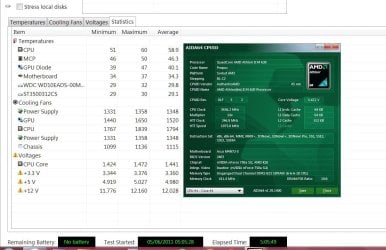
Found some great software called AIDA 64, only free for 30 days tho!
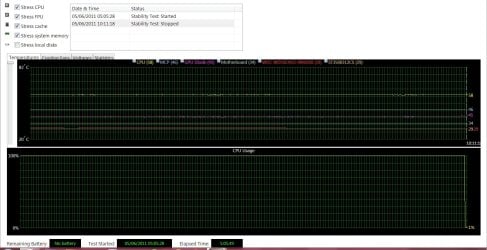
Really helps with monitoring the overclock and has a stress test that runs at 100%cpu! constantly!!!
These are the stats after about 30 mins of this full assault on the CPU and Memory.
As you can see the CPU is running at 3237 mhz
Last edited by Nomad8459; 05-18-2011 at 05:09 PM..
Reason: additions
| My System Specs | | System Manufacturer/Model Number Nomad Creative Solutions (Home build) OS Windows 7 64 bit CPU AMD hexa core AMD Phenom II X6 1090T BE processor Motherboard ASUS m4n72-E with sli NVIDIA 750a chipset Memory 8gb DDR2 Gskill F2-8500CL5D-4GBPK 1000Mhz 4 x 2GB Graphics Card Nvidia GTX 470 1268Mb Sound Card Onboard VIA HD audio 1708S Monitor(s) Displays samsung 40 inch LED monitor Screen Resolution 1920 X 1080 P Keyboard WIRELESS KEYBOARD/TOUCH PAD PSU 1050w psu Case Coolermaster CM690 II Advanced Cooling 1x140mm In, 2x120mm In, 2x140mm Out, 1x120mm Out Hard Drives 1 TB SATA WDC green
500GB SATA Seagate
250 GB IDE Samsung Internet Speed 10.6MBPS Other Info WINDOWS 7 HOME PREMIUM 64 BIT SP1
Tuniq Tower 120 Extreme CPU cooler |
05-18-2011
|
#8 | | Windows 7 Ultimate x64, Mint 9 |
Prime95 runs the CPU at 100% and does variable tests to check for stability, and it is always free.
You can also use CPUz (also free) to monitor hardware, and Realtemp (still free) to monitor temperatures. All are good programs, and I recommend Prime95 over whatever that program you found was.
~Lordbob | My System Specs | | System Manufacturer/Model Number Hera OS Windows 7 Ultimate x64, Mint 9 CPU Intel i5-2500k Motherboard ASUS P8P67 Pro Memory 2x 4Gb Corsair VENGEANCE DDR3-1600 Graphics Card NVidia GeForce N260GTX Twin Frozr Sound Card Realtek HD OnBoard Audio Monitor(s) Displays ASUS 24" Monitor Screen Resolution 1920x1080 Keyboard Razer Tarantula Mouse Razer Lachesis PSU Cooler Master Real Power Pro 750W Case Cooler Master Haf 932 Cooling Fans Hard Drives G.SKILL Phoenix Series 60GB SATA II MLC Internal Solid State Drive (SSD)
SAMSUNG Spinpoint F3R 1TB 7200 RPM 32MB Cache SATA II Internet Speed not fast enough |
05-19-2011
|
#9 | | |

Quote: Originally Posted by Lordbob75 Prime95 runs the CPU at 100% and does variable tests to check for stability, and it is always free.
You can also use CPUz (also free) to monitor hardware, and Realtemp (still free) to monitor temperatures. All are good programs, and I recommend Prime95 over whatever that program you found was.
~Lordbob +1
Great programs. | My System Specs | | System Manufacturer/Model Number Paulpicks Special Edition OS windows 7 64 bit CPU i7 2600k @4.6ghz Motherboard Asus P8P67 EVO Memory 8gb G.skill Ripjaws X DDR3 2133Mhz 10-11-10-28 Graphics Card 2x KFA2 GTX 560ti Anarchy Edition in Sli Sound Card Xear 3d C Media PCI Monitor(s) Displays 27" Hanns-G HL272 Screen Resolution 1920x1080 Keyboard Logitech Mouse Coolermaster Storm Inferno PSU Antec Truepower New 750 Case Antec 1100 Cooling Thermaltake Frio. Case fans - 1x200mm, 5x120mm Hard Drives Crucial M4 64gb, 320 gb Seagate HDD. Internet Speed 76 meg down, 16 meg up Other Info My constant upgrades get me into a lot of trouble with her indoors, its a battle but the build must go on! |
05-19-2011
|
#10 | | |

Quote: Originally Posted by paulpicks21 
Quote: Originally Posted by Lordbob75 Prime95 runs the CPU at 100% and does variable tests to check for stability, and it is always free.
You can also use CPUz (also free) to monitor hardware, and Realtemp (still free) to monitor temperatures. All are good programs, and I recommend Prime95 over whatever that program you found was.
~Lordbob +1
Great programs.
And Intel Burn Test (IBT) puts an even greater load on the cores so can spot a bad CPU overclock much quicker, though Prime95 is better all-round for catching memory and memory controller problems in addition to CPU. | My System Specs | | System Manufacturer/Model Number Home built (GeneO industries)/Model 2 OS Windows 7 64 bit SP1 CPU i5 2500k @ 4.5 GHz, 1.256V 120 GFlop (with AVX) Motherboard ASUS P8Z68-V PRO/GEN3 Memory 16GB (4GBx4) 1600MHz G.skill Ripjaws X 8-8-8-24 Graphics Card Asus Nvidia ENGTS450, 1GB 4030 MHz DDR5 clock, 915 Mhz GPU Sound Card Onboard Realtek HD Monitor(s) Displays NEC Spectraview 2490WUXi-SV Screen Resolution 1920 x 1200 Keyboard HP Wireless Mouse HP wireless PSU Antec TruePower New 650W Case Fractal Design "Define R3" Cooling CM Hyper 212+ push/pull, 5 120mm, 1 140mm case fans Hard Drives Crucial 128GB M4 (system), 2x WD Caviar 1TB Black internal (data), 1x Seagate 750G Barracuda Internal (backups), 1x WD Blue 6Gb/s 320GB Internal, 1x Corsair F40 SSD for cache, 1x 2TB eSata WD20EARS Green, 2x 500GB Seagate external USB, 1x 350GB exte Internet Speed 25.7 Mb/s down, 4.5 Mb/s up Other Info USB 3.0 x4 , SATA III x4, eSATA x3, SATA II x4, USB 2.0 x8. 2 Samsung DVD R/W drives.
WEI: CPU 7.7, Memory 7.9, Graphics 7.4, Disk 7.9 All times are GMT -5. The time now is 09:13 PM. |  |