Solved Some questions about OC and selecting right case and fans

Trinty

New member
Power User
Local time
9:58 PM
Messages
144
Hello, SF members.

Some members already know me, I asked a several questions about OC and my computer.
Thanks again to James7679 who helped me a lot with this.


I want to continue this theard : http://www.sevenforums.com/overclocking-case-mods/220725-beginner-how-overclock-your-computer.html . I asked new, because that is old and sloved.

OK, I'm going on questions.

1.
In Europe will be summer for 1-2 months. In my country today was 28-30°C, for 1 month can be 40°C. Last summer I had problem with overheating.
I can play NFS:Carbon for only 30min , and after I can't use my computer. My case is very hot and whole computer.
Now, I want to upgrade my computer with new case and cooling.

1a. Can anyone recommend to me cheaper and expensive version of case good for OC and other ?
1b. Can anyone recommend to me good cooling and fans ? Is Water Cooling good and Is there any good ?
1c. Do I need new PSU for more fans and better cooling ?

I did one small Prime95 test, so you can see my temp. and other informations.

2.
I know all problems in my build. My CPU don't have good potential for Overclocking, but I will back on this. I think, I will upgrade my computer soon and I want to improve my overclocking skills.

2a. Can BIOS version or any software affect my overclock ? For better OC, do I need to update BIOS ?
2b. I want to continue that question from other theard. Can someone analzye my statistic about computer ? I will attach pictures with Prime95 test and other. Today, I loaded optimized settings and run tests again (like James7679 said in last theard).
For people who will analzye my computer.
2b.a. ? Is my currently build good (don't include CPU, I know it's bad :( )
2.b.b. ? What can I upgrade too ?

That is all for now.
Please answer soon and thanks in advance.
Trinty :) .

Edit : I forgot my attachment. Sorry for this.
 

Attachments

  • Prime95a.png
    Prime95a.png
    83.9 KB · Views: 17
  • Prime95b.png
    Prime95b.png
    85.4 KB · Views: 9
Last edited:

My Computer My Computer

At a glance

Windows 7 Ultimate x64 - Service Pack 1Intel(R) Pentium(R) CPU G620 @ 2.60GHzTranscend Informations - 2*2048GB DDR3 @ 1066MHzATI Radeon HD 5670 - 1024MB DDR5 - Driver : 1...
Computer Manufacturer/Model Number
Trinty Self Build 2011
OS
Windows 7 Ultimate x64 - Service Pack 1
CPU
Intel(R) Pentium(R) CPU G620 @ 2.60GHz
Motherboard
ASUSTeK Computer INC. P8H61-M LX2
Memory
Transcend Informations - 2*2048GB DDR3 @ 1066MHz
Graphics Card(s)
ATI Radeon HD 5670 - 1024MB DDR5 - Driver : 19.04.2011
Sound Card
AMD High Definition Audio Device
Monitor(s) Displays
SAMSUNG SyncMaster 2220LM 22"
Screen Resolution
1680x1050
Hard Drives
SAMSUNG HD503HI ATA Device - 500GB
PSU
Don't know for now !
Case
Case MSI
Cooling
Stock
Keyboard
MS Industrial 2.4GHz Wirelees Keyboard
Mouse
MS Industrial 2.4GHz Wirelees Optical Mouse
Internet Speed
Download speed : 6,5Mbps / Upload speed : 1Mpbs
Other Info
BIOS version : BIOS Date: 02/05/10 19:13:52 Ver: 08.00.10
Prime95 (4h) : max. 65°C
DirectX 11 version.
Logitech G13 Advanced Gaming Keyboard.
Just looking at your CPU temperatures, they look fine!

Can you install HWMonitor or other temperature monitoring software, and record your temperatures while playing for 10 min of NFS? I'm thinking it's not the CPU that is having trouble, and it would help to see all the system temperatures.

The next thing I would check is the PSU - you absolutely need a good quality PSU. I would recommend Antec, Seasonic or Corsair.
 

My Computer My Computer

At a glance

Windows 7 Ultimate x64 SP1Intel Core i7-3960X16 GB GSkill DDR3-2133 CL9EVGA SC GTX 680
Computer Manufacturer/Model Number
Custom
OS
Windows 7 Ultimate x64 SP1
CPU
Intel Core i7-3960X
Motherboard
Intel DX79SI
Memory
16 GB GSkill DDR3-2133 CL9
Graphics Card(s)
EVGA SC GTX 680
Sound Card
Onboard Realtek
Monitor(s) Displays
Dell 2005FPW
Screen Resolution
1680x1050
Hard Drives
Intel 520 SSD 240 GB,
2x Seagate 7200.12 1 TB
PSU
Corsair 850W HX
Case
Corsair 500R
Cooling
Corsair H100
Keyboard
Microsoft Natural 4000
Have you already tried O.C? I see your vcore is at 1.14 is that not a bit to much for a dual core at 2.6Ghz? I haven't used a lot of different CPU's but my brothers i7 860 is running at stock and I have manually put 1.03, or does that cpu require more vcore?

And as long as gaming goes I would check your graphic card and see how hot it is running when your gaming

And do you only have 1 fan in your whole case on the cpu or the rest connected straight away to your PSU & your +12V is at 6.55v is not something wrong with that?
 

My Computer My Computer

At a glance

Windows 7 Home Premium x64Intel Core i7 860 (Lynnfield)Corsair Vengeance 9,9,9,24 1600Mhz 1.50v 2x4GAsus nVidia 560 GTX
Computer type
PC/Desktop
OS
Windows 7 Home Premium x64
CPU
Intel Core i7 860 (Lynnfield)
Motherboard
Asus P7P55D (LGA1156)
Memory
Corsair Vengeance 9,9,9,24 1600Mhz 1.50v 2x4G
Graphics Card(s)
Asus nVidia 560 GTX
Sound Card
Asus Xonar DG
Monitor(s) Displays
Acer P235H & NEC E201W
Screen Resolution
1920x1080 & 900x1600
Hard Drives
2
PSU
Corsair 650 Modular
Case
Corsair 800D
Cooling
Corsair H80 with Noctua fans
Keyboard
Ducky Shine
Mouse
tT Theron
Internet Speed
100/100
Browser
IE10
Hello, Seeliewight and Andreas W.

First, thanks for answering on my question.

My current temperatures is good for now. But, I want to be prepared for summer as I said. Currently , there is spring, and temepratures is not higher then 30°C, but can be higher for less then one month.

I will play NFS for 10-20 minutes, and will attach pictures with temeratures.

For my PSU, I only don't know for this. I think that is 400-500W one classic (not Corsair or other high quality).

I never tried to OC for NOW. I will try for maybe some days. I didn't changed anything in BIOS or used any program for this. I only loaded defaults in BIOS and that is all. For that VCORE , I for sure didn't changed anything. Maybe when I bought my computer. Is there any problem with this ?

For Fans. I have two, I think. One on CPU , and other the is near PSU on last side of my computer. That is all !

Questions :
1. What do you think about my computer ? Is it good for one small OC (I know for CPU, I hate this ! :mad:) ?
2. What do I need to upgrade for now (after CPU) ?

Thanks in advance, and please answer soon.
Trinty :)
 

My Computer My Computer

At a glance

Windows 7 Ultimate x64 - Service Pack 1Intel(R) Pentium(R) CPU G620 @ 2.60GHzTranscend Informations - 2*2048GB DDR3 @ 1066MHzATI Radeon HD 5670 - 1024MB DDR5 - Driver : 1...
Computer Manufacturer/Model Number
Trinty Self Build 2011
OS
Windows 7 Ultimate x64 - Service Pack 1
CPU
Intel(R) Pentium(R) CPU G620 @ 2.60GHz
Motherboard
ASUSTeK Computer INC. P8H61-M LX2
Memory
Transcend Informations - 2*2048GB DDR3 @ 1066MHz
Graphics Card(s)
ATI Radeon HD 5670 - 1024MB DDR5 - Driver : 19.04.2011
Sound Card
AMD High Definition Audio Device
Monitor(s) Displays
SAMSUNG SyncMaster 2220LM 22"
Screen Resolution
1680x1050
Hard Drives
SAMSUNG HD503HI ATA Device - 500GB
PSU
Don't know for now !
Case
Case MSI
Cooling
Stock
Keyboard
MS Industrial 2.4GHz Wirelees Keyboard
Mouse
MS Industrial 2.4GHz Wirelees Optical Mouse
Internet Speed
Download speed : 6,5Mbps / Upload speed : 1Mpbs
Other Info
BIOS version : BIOS Date: 02/05/10 19:13:52 Ver: 08.00.10
Prime95 (4h) : max. 65°C
DirectX 11 version.
Logitech G13 Advanced Gaming Keyboard.
Personally I would get rid of core temp and speedfan and use HWmonitor instead, and I do think your vcore is a tad high but I would guess it runs in auto right now since you haven't touched bios settings. You're CPU temps are good so you got room for some O.C.

This is how I would do it, put all settings in your bios to manual set all you're voltages to standard & minimum & last I would reduce the vcore quite a bit, try putting it down to 1.04. Then do Prime95 and after your computer is stable at default/minimum settings you can start O.C & if your computer is not stable at 1.04 just increase it with 1 incline at the time

If your RAM require 1.65 dram volt your IMC/VTT needs to be 1.15 but if your dram volt is 1.50 you can leave it at 1.10

And if you havent google around so you can get good explanations on what the different volts do, and you can google your CPU & or motherboard and see what overs have gotten for results in O.C
 

My Computer My Computer

At a glance

Windows 7 Home Premium x64Intel Core i7 860 (Lynnfield)Corsair Vengeance 9,9,9,24 1600Mhz 1.50v 2x4GAsus nVidia 560 GTX
Computer type
PC/Desktop
OS
Windows 7 Home Premium x64
CPU
Intel Core i7 860 (Lynnfield)
Motherboard
Asus P7P55D (LGA1156)
Memory
Corsair Vengeance 9,9,9,24 1600Mhz 1.50v 2x4G
Graphics Card(s)
Asus nVidia 560 GTX
Sound Card
Asus Xonar DG
Monitor(s) Displays
Acer P235H & NEC E201W
Screen Resolution
1920x1080 & 900x1600
Hard Drives
2
PSU
Corsair 650 Modular
Case
Corsair 800D
Cooling
Corsair H80 with Noctua fans
Keyboard
Ducky Shine
Mouse
tT Theron
Internet Speed
100/100
Browser
IE10
Regarding a good case for cooling and that of course includes sealed water systems.
For a open air gamer look with every conceivable option look no further than:
Newegg.com - Antec Lanboy air Blue Black / Blue ATX Mid Tower Computer Modular Case
Then for a upgraded classic look this is hard to beat:
Corsair CC-9011013-WW Carbide Series 500R Mid Tower Gaming Case - ATX, mATX, 4x Ext 5.25 Bays, 6x Int 3.5 Bays, 1x 200mm and 2x 120mm White LED Fans, 1x 120mm Fan, 2x USB 3.0 and 1x FireWire Ports at TigerDirect
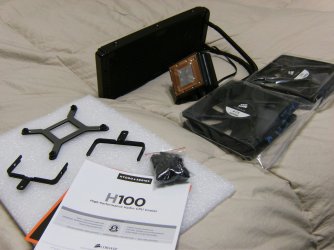
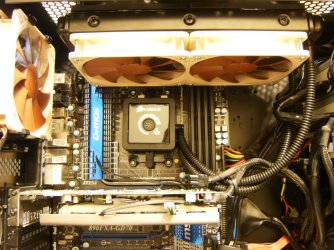
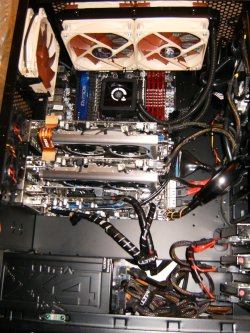
Cooling Corsair push/pull H80 or spend the extra for premium quiet fans like I did on the H100:
HPIM1447.JPG

HPIM1453.JPG

HPIM2116.jpg
 

My Computer My Computer

At a glance

Windows 7 Ultimate 64i7 3770k OC'd 4.6 @ 1.17v, also FX 8120 & i5 ...32 gb G.Skill Sniper DDR3 10-12-12-31 @ 2133XFX Radeon 7870 2GB DDR5
Computer type
PC/Desktop
Computer Manufacturer/Model Number
A blend of brains, brawn and dumb luck.
OS
Windows 7 Ultimate 64
CPU
i7 3770k OC'd 4.6 @ 1.17v, also FX 8120 & i5 miniITX
Motherboard
MSI P67A-GD80 b3
Memory
32 gb G.Skill Sniper DDR3 10-12-12-31 @ 2133
Graphics Card(s)
XFX Radeon 7870 2GB DDR5
Sound Card
Sound Blaster Z Series Card
Monitor(s) Displays
(2) LG LED 23" 1920 x 1080 2ms Monitors via mini d-port
Screen Resolution
1680 X 1050 p
Hard Drives
Samsung 256 gb 830 SSD sata III
(1) 1 tb WD Black
(2) 1 tb Hitachi deskmates/sata II
(2) 1 tb WD green/sata II
(2) 3 tb Seagate Barracuda
(1) 120 gb OCZ Vertex SS
(1) Drobo 5N w/5 Seagate 3tb
PSU
EVGA modular 1000G2 80% gold rating & APC 1200 RS
Case
CoolerMaster Storm Styker
Cooling
7 case fans 140mm & 120mm, NZXT Kraken X60
Keyboard
(2) Logitech Illuminated Keyboards (1) usb (1) wireless
Mouse
Logitech G700 & T-BC21 - nano nx for the laptop
Internet Speed
Basic 120mbps down
Antivirus
Trend Micro Titanium Max Security & Malwarebytes Premium
Browser
Chrome and IE 10
Other Info
5 Noctua case fans + 3 Noctua in p/p on NZXT cooler
Integrated hot swap drive bays for 2.5" Drives
(2) Lite-on dvd/cd/Blu Ray optical 22X
Integrated fan controller and led on/off
HP Officejet Pro 8630 all-n-one
Hot-swappable 3.5" hard drive bay
Netgear Nighthawk router
Asus USB 3 & sata 6 PCIe card
Vantec IDE to sata adptr./Ultra sata adptr
Lenovo L420 i5 lappy with m sata
Drobo 5N advanced NAS
You aren't likely to need a new PSU just because you add fans. Fans use very, very little power.

Find out what diameter fans you need and then look for good brands like Noctua, Scythe, or Nexus.
 

My Computer My Computer

At a glance

Windows 7 Home Premium SP1, 64-bitIntel Skylake i5-6600K, not overclocked8 GB HyperX DDR4-2666 (2 x 4 GB)none; graphics are integrated on CPU
Computer type
PC/Desktop
Computer Manufacturer/Model Number
Ignatz Special; 4 speed manual gearbox; factory air conditioning; one of one
OS
Windows 7 Home Premium SP1, 64-bit
CPU
Intel Skylake i5-6600K, not overclocked
Motherboard
AsRock Z170M Extreme 4, micro ATX
Memory
8 GB HyperX DDR4-2666 (2 x 4 GB)
Graphics Card(s)
none; graphics are integrated on CPU
Sound Card
onboard: Realtek ALC1150; external: USB Behringer UF0-202
Monitor(s) Displays
Dell S2340M 23 inch IPS
Screen Resolution
1600 x 900
Hard Drives
System: Crucial MX100 series SSD, 128 GB;
Data: Samsung Spinpoint 103SJ, 1 TB;
Backup: WD Caviar Green WD30EZRX-00D8PB0, 3 TB
PSU
Rosewill SilentNight 500 watt fanless, semi-modular
Case
Antec Solo II
Cooling
Noctua NH-U12S; Noctua F12 intake, Noctua S12A exhaust
Keyboard
Microsoft 200 6JH-00001 USB
Mouse
Dell or Microsoft optical wired; USB
Antivirus
Microsoft Security Essentials and Malwarebytes Premium
Browser
Pale Moon
Other Info
All fans PWM; speeds at idle: CPU circa 500 rpm; intake circa 600 rpm; exhaust circa 600 rpm; CPU temps 27 idle and 47 C load in a warm room (27 C/81 F) when running Intel Extreme Tuning Utility stress test.
Hello, people.

Sorry for my small lateing and thanks for fast and good answers.

Today, I went outside for 3-4h. When I backed, I opened BIOS for only 5-10minutes to make some small images and after this (I will attach picture), temerature of my CPU was 45°C. I think that is high for 5 minute work in BIOS. I don't know.

And, I did a NFS:Carbon test, too. I will attach picture and you will see details.


After all this....
I tried to find voltage settings, but I have one problem. My BIOS is not one classic. It is ASUS EFI BIOS Tool. I can say , that I hate it ! People said Advanced mode is like old one BIOS, but for me : THAT NEVER CAN BE GOOD BIOS !

I will attach pictures with voltages so you can read it.

For Case... I like that Corsair CC-9011013-WW. That is very good.Antec is ugly for me , I dont like it.

Tommorow , I will ask new questions. For Today, you can read my pictures and said something what you think about my computer.

Please answer soon and thanks in advance.
Trinty :)
 

Attachments

  • Untitled.png
    Untitled.png
    54.1 KB · Views: 4
  • IMG_000027.jpg
    IMG_000027.jpg
    314.3 KB · Views: 3
  • IMG_000018.jpg
    IMG_000018.jpg
    366.4 KB · Views: 5
  • IMG_000020.jpg
    IMG_000020.jpg
    343.3 KB · Views: 3

My Computer My Computer

At a glance

Windows 7 Ultimate x64 - Service Pack 1Intel(R) Pentium(R) CPU G620 @ 2.60GHzTranscend Informations - 2*2048GB DDR3 @ 1066MHzATI Radeon HD 5670 - 1024MB DDR5 - Driver : 1...
Computer Manufacturer/Model Number
Trinty Self Build 2011
OS
Windows 7 Ultimate x64 - Service Pack 1
CPU
Intel(R) Pentium(R) CPU G620 @ 2.60GHz
Motherboard
ASUSTeK Computer INC. P8H61-M LX2
Memory
Transcend Informations - 2*2048GB DDR3 @ 1066MHz
Graphics Card(s)
ATI Radeon HD 5670 - 1024MB DDR5 - Driver : 19.04.2011
Sound Card
AMD High Definition Audio Device
Monitor(s) Displays
SAMSUNG SyncMaster 2220LM 22"
Screen Resolution
1680x1050
Hard Drives
SAMSUNG HD503HI ATA Device - 500GB
PSU
Don't know for now !
Case
Case MSI
Cooling
Stock
Keyboard
MS Industrial 2.4GHz Wirelees Keyboard
Mouse
MS Industrial 2.4GHz Wirelees Optical Mouse
Internet Speed
Download speed : 6,5Mbps / Upload speed : 1Mpbs
Other Info
BIOS version : BIOS Date: 02/05/10 19:13:52 Ver: 08.00.10
Prime95 (4h) : max. 65°C
DirectX 11 version.
Logitech G13 Advanced Gaming Keyboard.
A CPU temp of 45 at idle, with an ambient temp of 30, is not bad. Not excellent, but tolerable, particularly since you don't appear to have an exhaust fan.

Is it true that you have no exhaust fan? I see none in HWInfo.

If you have only a CPU fan and the power supply fan, you can't expect the best temperatures.

If you do have an exhaust fan, it doesn't seem to be listed in your monitoring app.
 

My Computer My Computer

At a glance

Windows 7 Home Premium SP1, 64-bitIntel Skylake i5-6600K, not overclocked8 GB HyperX DDR4-2666 (2 x 4 GB)none; graphics are integrated on CPU
Computer type
PC/Desktop
Computer Manufacturer/Model Number
Ignatz Special; 4 speed manual gearbox; factory air conditioning; one of one
OS
Windows 7 Home Premium SP1, 64-bit
CPU
Intel Skylake i5-6600K, not overclocked
Motherboard
AsRock Z170M Extreme 4, micro ATX
Memory
8 GB HyperX DDR4-2666 (2 x 4 GB)
Graphics Card(s)
none; graphics are integrated on CPU
Sound Card
onboard: Realtek ALC1150; external: USB Behringer UF0-202
Monitor(s) Displays
Dell S2340M 23 inch IPS
Screen Resolution
1600 x 900
Hard Drives
System: Crucial MX100 series SSD, 128 GB;
Data: Samsung Spinpoint 103SJ, 1 TB;
Backup: WD Caviar Green WD30EZRX-00D8PB0, 3 TB
PSU
Rosewill SilentNight 500 watt fanless, semi-modular
Case
Antec Solo II
Cooling
Noctua NH-U12S; Noctua F12 intake, Noctua S12A exhaust
Keyboard
Microsoft 200 6JH-00001 USB
Mouse
Dell or Microsoft optical wired; USB
Antivirus
Microsoft Security Essentials and Malwarebytes Premium
Browser
Pale Moon
Other Info
All fans PWM; speeds at idle: CPU circa 500 rpm; intake circa 600 rpm; exhaust circa 600 rpm; CPU temps 27 idle and 47 C load in a warm room (27 C/81 F) when running Intel Extreme Tuning Utility stress test.
Thank you for fast answer.

Today, I have a lot of free time. I will try Prime95 test for much more if I can.
After this, I will upload new pictures and you will see, again my results.

For fans. I said , I have only CPU and Power Supply fan. That is all and that is my problem. In summer, when my room is too hot , I have problem with overheating.

That is not good for my computer and myself.
I want to be prepared for this. I want to start with new case and new fans.
Problem is, I can't find in my country Corsair cases and good fans. I will try to find it but it is not easy :cry:

I don't have for now 2000$ and more for best computer. I will do what I said. Start with good case and fans, after motherboard and Intel i7 with K.....

Thanks to all for help.
I'm going to create another theard with another questions.

Theard is sloved (for now :p)
++ Rep to all (if I can)

Trinty :)
 

My Computer My Computer

At a glance

Windows 7 Ultimate x64 - Service Pack 1Intel(R) Pentium(R) CPU G620 @ 2.60GHzTranscend Informations - 2*2048GB DDR3 @ 1066MHzATI Radeon HD 5670 - 1024MB DDR5 - Driver : 1...
Computer Manufacturer/Model Number
Trinty Self Build 2011
OS
Windows 7 Ultimate x64 - Service Pack 1
CPU
Intel(R) Pentium(R) CPU G620 @ 2.60GHz
Motherboard
ASUSTeK Computer INC. P8H61-M LX2
Memory
Transcend Informations - 2*2048GB DDR3 @ 1066MHz
Graphics Card(s)
ATI Radeon HD 5670 - 1024MB DDR5 - Driver : 19.04.2011
Sound Card
AMD High Definition Audio Device
Monitor(s) Displays
SAMSUNG SyncMaster 2220LM 22"
Screen Resolution
1680x1050
Hard Drives
SAMSUNG HD503HI ATA Device - 500GB
PSU
Don't know for now !
Case
Case MSI
Cooling
Stock
Keyboard
MS Industrial 2.4GHz Wirelees Keyboard
Mouse
MS Industrial 2.4GHz Wirelees Optical Mouse
Internet Speed
Download speed : 6,5Mbps / Upload speed : 1Mpbs
Other Info
BIOS version : BIOS Date: 02/05/10 19:13:52 Ver: 08.00.10
Prime95 (4h) : max. 65°C
DirectX 11 version.
Logitech G13 Advanced Gaming Keyboard.
You wont be needing an i7 if your not going to do media works like video editing, the HT that comes with i7 don't really give any performance boost in games, but an i7 cost more then an i5
 

My Computer My Computer

At a glance

Windows 7 Home Premium x64Intel Core i7 860 (Lynnfield)Corsair Vengeance 9,9,9,24 1600Mhz 1.50v 2x4GAsus nVidia 560 GTX
Computer type
PC/Desktop
OS
Windows 7 Home Premium x64
CPU
Intel Core i7 860 (Lynnfield)
Motherboard
Asus P7P55D (LGA1156)
Memory
Corsair Vengeance 9,9,9,24 1600Mhz 1.50v 2x4G
Graphics Card(s)
Asus nVidia 560 GTX
Sound Card
Asus Xonar DG
Monitor(s) Displays
Acer P235H & NEC E201W
Screen Resolution
1920x1080 & 900x1600
Hard Drives
2
PSU
Corsair 650 Modular
Case
Corsair 800D
Cooling
Corsair H80 with Noctua fans
Keyboard
Ducky Shine
Mouse
tT Theron
Internet Speed
100/100
Browser
IE10
Back
Top