Cooler Master’s HAF X

Yeah the top is filtered, but the rear isn't, nor should it be.

The top shouldn't need a filter if the fans are configured as exhaust either really.

I ended up getting some DEMCi Flex filters for my 932 (1 front 120mm which still lets dust in due to the 200mm fan and case design :sarc: , side panel, PSU and top.

These filters are as restrictive as hell on the airflow ( :rolleyes: ) and I found that all that the top filter did was make the ambient temps even hotter.
 

My Computer

Computer type
PC/Desktop
Computer Manufacturer/Model Number
Systems by SmartEyeball
OS
8 Pro x64
CPU
i7 3770K 4.6GHz
Motherboard
ASUS P8Z77 WS
Memory
16GB G.Skill Trident X 2666mhz
Graphics Card(s)
x2 EVGA 780 Ti Superclocked SLI
Sound Card
SB X-FI Surround 5.1 PRO USB / ATH-AD900 Headphones
Monitor(s) Displays
x3 Dell U2410 / 58" Samsung
Screen Resolution
5760*1200/ 1920*1200
Hard Drives
2x Intel 520 240GB (RAID 0) * 2x WD Caviar Blacks 2TB (RAID 0) * 2TB WD Caviar Black * Sony Optirac DVD
PSU
Silverstone Strider Evolution 1200W
Case
Thermaltake Level 10 GT Snow Edition
Cooling
Noctua NH-D14
Keyboard
Topre Realforce // Ducky Shine MX Black // Filco Ninja TKL
Mouse
Thermaltake Theron (Highly Recommended) + Razer Imperator
Antivirus
MSE
Browser
IE, FF, WaterFox
Other Info
GT Extreme V2 Sim Racing Cockpit + 40" LCD and K/B Mouse stand ▼
Fanatec CSR Elite Wheel + Clubsport V1 Pedals + CSR shifter/7G-H ▼Saitek X52 Pro ▼ TrackIR 5 Pro
Buttkicker v2 Seat Rumbler with Dedicated 5.1 and Sub Woofer attached to frame ▼
=
Bloody Big Grin

My Computer

Computer type
PC/Desktop
Computer Manufacturer/Model Number
Custom built by me.
OS
Windows 10 Pro
CPU
Intel Core i7-4770K (3.5Ghz)
Motherboard
Gigabyte G1 Sniper 5 (F10 Bios)
Memory
32 gig Corsair Dominator Platinum (4x8Gig)
Graphics Card(s)
Sapphire Tri-X R9 Fury
Sound Card
Soundblaster ZXR
Monitor(s) Displays
NEC PA242W 24" LCD Monitor
Screen Resolution
1920 x 1200
Hard Drives
Primary - Samsung 850 Pro (512gig), Samsung 840 Pro (256gig), 2TB WD Caviar Black.
PSU
EVGA Supernova 1000 G2
Case
Cooler Master HAF X
Cooling
Corsair H100i with Corsair Air Series SP120 Quiet Fans
Keyboard
Logitech Wireless Wave
Mouse
Logitech Performance MX
Internet Speed
High Speed Cable
Antivirus
Norton Security
Browser
IE11
Other Info
Memory Timings - 1866MHz @ 9-9-9-27-1T @ 1.5 volts
I have seen that rear fan accumulates dust over the period of time. Is there any way to prevent this?
 

My Computer

Computer Manufacturer/Model Number
Dell Inspiron 15
OS
Windows 7 Ultimate x64
@ anandtvm:
In our dusty Trivandrum climate, periodic maintenance.

You could also try replacing or augmenting the built-in mesh filters (front, sides, bottom) with a layer of thin sponge, although that will drastically cut airflow.

By the way, how are you doing with your case and build?

Been a while since I heard from you over at Digit.

I myself just did a cleanup yesterday when I upgraded to a GTX470, and I got a lot of dust in front and at the side (intakes), but hardly any at the exhaust filters. Removing and lightly vacuuming the intake area filters should take care of the dust accumulation. You could also try brushing them down with a stiff brush.
 

My Computers

System One System Two

  • Computer type
    Laptop
    Computer Manufacturer/Model Number
    Custom
    OS
    Windows 10 Professional 64-Bit
    CPU
    Intel Core i7 8700K
    Motherboard
    Asus Maximus X Code
    Memory
    G.Skill TridentZ RGB DDR4 4000 F4-4000C18D-16GTZR
    Graphics Card(s)
    Zotac GeForce GTX-1660 Ti AMP 6GB
    Sound Card
    ROG SupremeFX S1220 (Onboard)
    Monitor(s) Displays
    Dell UP2716D
    Screen Resolution
    2560x1440
    Hard Drives
    Samsung 980 Pro PCIe NVMe 500GB
    Samsung 970 Evo PCIe NVMe 250GB
    Samsung 860 Evo SATA III 2TB
    WD Black WD2003FZEX 2TB x 3
    ODD - GH24NSC0
    PSU
    Coolermaster V1000
    Case
    Corsair Obsidian 450D
    Cooling
    Corsair H115i - Corsair SP140 Red x 2
    Keyboard
    Logitech G213
    Mouse
    Logitech G102
    Internet Speed
    100 Mbps (Supposedly) - Asianet India FTTH
    Antivirus
    Avast Free!
    Browser
    Maxthon Cloud Browser 5.xx
    Other Info
    Asus FX-553VD (960 Evo, 860 Evo, 16GB)
    Samsung Galaxy C9 Pro
    Canon EOS 70D
  • Computer type
    Laptop
    System Manufacturer/Model Number
    Asus FX503VD
    OS
    Windows 10 Pro x64
    CPU
    Intel Core i7 7700HQ
    Memory
    2 x 8GB Samsung DDR4 2400
    Graphics Card(s)
    GTX 1050
    Screen Resolution
    1920 x 1080
    Hard Drives
    Samsung 960 Evo PCIe NVMe 250GB Boot
    Samsung 840 Pro Series 256 GB SSD (MZ-7PD256BW);
Sir -

I was supposed to buy the system this month but I had to clean my room as it got lot of dust.

I will buy new system with HAF X soon from Logtech. I will sometimes wait for new sandybridge CPU. I hope I will get new core i7 2600K from logtech by next month. If not I will buy corei7 950.

I had enquired with several small vendors and all of them have core i5 only. They say there is no market for corei7 cpu. That's why I have opted for logtech as they get new stuff.

I will update you as and when I buy a new system.
 

My Computer

Computer Manufacturer/Model Number
Dell Inspiron 15
OS
Windows 7 Ultimate x64
You can try DemciFlex filters for HAF X.

@ anandtvm:
In our dusty Trivandrum climate, periodic maintenance.

You could also try replacing or augmenting the built-in mesh filters (front, sides, bottom) with a layer of thin sponge, although that will drastically cut airflow.

By the way, how are you doing with your case and build?

Been a while since I heard from you over at Digit.

I myself just did a cleanup yesterday when I upgraded to a GTX470, and I got a lot of dust in front and at the side (intakes), but hardly any at the exhaust filters. Removing and lightly vacuuming the intake area filters should take care of the dust accumulation. You could also try brushing them down with a stiff brush.
 

My Computer

Computer Manufacturer/Model Number
Dell Inspiron 15
OS
Windows 7 Ultimate x64
Love my Half X


Here are some Pics

4d7390a1.jpg


1f4634ad.jpg


c85f22f5.jpg


d74bea46.jpg


09cc1934.jpg


046a8ff4.jpg


4a2c7672.jpg


8eb35a05.jpg


429a8f95.jpg


86a5be30.jpg


ccdbd475.jpg


b1f8c285.jpg


38db4314.jpg


9c96f058.jpg


8954df7a.jpg


7acb3c72.jpg


54cd31da.jpg


3a0e4b78.jpg


26612693.jpg


732c0068.jpg
 

My Computer

Computer Manufacturer/Model Number
Asus
OS
Windows 7 x64 Ultimate SP1
CPU
I5 875K Unlocked
Motherboard
P7P55D-E-PRO
Memory
Kingston HyperX Genesis DDR3-1600MHz 9-9-9-27 @ 1.65V XMP
Graphics Card(s)
EVGA GeForce GTX 570 HD 732 MHz GPU 1280 MB, 152 GB Mem
Sound Card
Onboard Via 1828S
Monitor(s) Displays
Samsung T240 HD
Screen Resolution
Dual 1920X1200 1027X768
Hard Drives
OCZ Vertex II Extended Sandforce SSD 60 Gig 2X WD Black Caviar 1 terabyte 6GBS Transer Sata 3 Marvell Chip
PSU
Corsair Gold fully Modular 80 Plus 850
Case
Coolermaster Half X Full Tower
Cooling
Noctua NH-U12P
Keyboard
MS
Mouse
MS
Internet Speed
Fast enough
Other Info
My fridge has a water tap
Zardoc are you actually using your USB 3.0 front ports? If not you know you can remove those blue cables and turn those front ports into 2.0 ports. That what I did.
 

My Computer

Computer type
PC/Desktop
Computer Manufacturer/Model Number
Custom built by me.
OS
Windows 10 Pro
CPU
Intel Core i7-4770K (3.5Ghz)
Motherboard
Gigabyte G1 Sniper 5 (F10 Bios)
Memory
32 gig Corsair Dominator Platinum (4x8Gig)
Graphics Card(s)
Sapphire Tri-X R9 Fury
Sound Card
Soundblaster ZXR
Monitor(s) Displays
NEC PA242W 24" LCD Monitor
Screen Resolution
1920 x 1200
Hard Drives
Primary - Samsung 850 Pro (512gig), Samsung 840 Pro (256gig), 2TB WD Caviar Black.
PSU
EVGA Supernova 1000 G2
Case
Cooler Master HAF X
Cooling
Corsair H100i with Corsair Air Series SP120 Quiet Fans
Keyboard
Logitech Wireless Wave
Mouse
Logitech Performance MX
Internet Speed
High Speed Cable
Antivirus
Norton Security
Browser
IE11
Other Info
Memory Timings - 1866MHz @ 9-9-9-27-1T @ 1.5 volts
What is the exact size for the screws for optional 200 mm fan? One of my relative is coming from US and he can get the screws for me.
 

My Computer

Computer Manufacturer/Model Number
Dell Inspiron 15
OS
Windows 7 Ultimate x64
Cooler Master's "replacement" Cable...

So I built myself a new system...

- http://www.sevenforums.com/pc-custo...7-motherboard-suggestions-10.html#post2609458
- http://www.sevenforums.com/pc-custo...6779-show-us-your-rig-6-a-67.html#post2611417

Anyway Cooler Master stated they would give us, free of charge, a new cable to connect to the motherboard's USB 3.0 header when they become available.

Question - How do I use the SuperSpeed USB 3.0 ports?

Answer - HAF X is the first available full tower chassis with USB 3.0 support. Currently the NEC controllers on USB 3.0 motherboards do not support a standardized header. To use the USB 3.0 ports, route the extension cables from the I/O behind the motherboard and through the rear hole in the motherboard tray. You can then use one of the three rubber water cooling ports on the rear of the chassis to meet the USB 3.0 port on the motherboard. As soon as a better solution is released with a standard USB 3.0 motherboard header on chip, Cooler Master will provide the internal header USB 3.0 cables as a free part exchange.
How do I use the SuperSpeed USB 3.0 ports? - Cooler Master

For those that don't remember the original setup when the case was releases was to have the cables run from the front panel to the USB connectors or the back of the motherboard as MB's back then didn't have USB 3.0 headers. See here: http://www.sevenforums.com/pc-custom-builds-overclocking/96257-cooler-master-s-haf-x.html

Anyway contacting Cooler Master to take them up for their offer, this is what I got in today...

7 Inch USB 3.0 Header Cable.jpg

A blue 7 inch (end to end) short cable :confused:

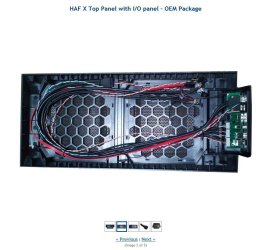
I don't want to look a gift horse in the mouth, but c'mon Cooler Master, really??? And why can't we get the USB 3.0 Header cable like the one you show on your new HAF X front panel; which is considerably longer, and black? :confused:

HAF X Top Panel with IO Panel.JPG

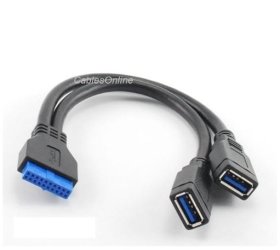
Anyway I'd ordered and received this cable from Amazon a little over a week ago. It's probably about 8-9 inches and is used to bridge the USB blues cables to the front header of the case to the USB headers on the MB...

USB 3 MB Cable.JPG

So now I guess I'll just have to be stuck with the original blue cables and the adapter from Amazon for now...

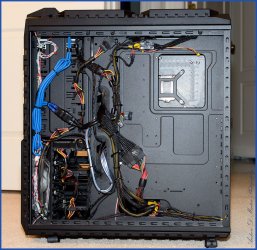
HAF-X-Wire-Management.jpg

Just would have been nice if Cooler Master gave us the actual cable they're using now instead of making us use miles of cable :(
 

My Computer

Computer type
PC/Desktop
Computer Manufacturer/Model Number
Custom built by me.
OS
Windows 10 Pro
CPU
Intel Core i7-4770K (3.5Ghz)
Motherboard
Gigabyte G1 Sniper 5 (F10 Bios)
Memory
32 gig Corsair Dominator Platinum (4x8Gig)
Graphics Card(s)
Sapphire Tri-X R9 Fury
Sound Card
Soundblaster ZXR
Monitor(s) Displays
NEC PA242W 24" LCD Monitor
Screen Resolution
1920 x 1200
Hard Drives
Primary - Samsung 850 Pro (512gig), Samsung 840 Pro (256gig), 2TB WD Caviar Black.
PSU
EVGA Supernova 1000 G2
Case
Cooler Master HAF X
Cooling
Corsair H100i with Corsair Air Series SP120 Quiet Fans
Keyboard
Logitech Wireless Wave
Mouse
Logitech Performance MX
Internet Speed
High Speed Cable
Antivirus
Norton Security
Browser
IE11
Other Info
Memory Timings - 1866MHz @ 9-9-9-27-1T @ 1.5 volts
Back
Top