|
Welcome to Windows 7 Forums. Our forum is dedicated to helping you find solutions with any problems, errors or issues you are experiencing with Windows 7. The Windows 7 forum also covers news and updates and has an extensive Windows 7 tutorial section that covers a wide range of tips and tricks.
Windows 7 - Changing the number of processors on an Intel i3 |
07-31-2010
|
#1 | | Win 7 Home Premium 64bit Ver 6.1.7600 Build 7601 - SP1 |
Changing the number of processors on an Intel i3 Hi! Everyone,
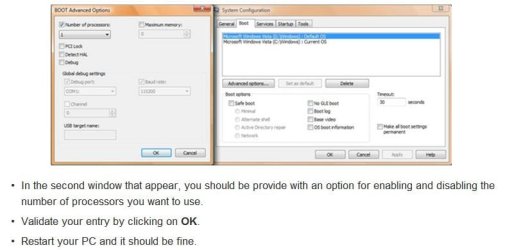
I just finished reading a post on processors, and it showed me how to check to see how many processors I have running... - Start> run> msconfig> Boot tab> Advance options>.
In the upper left corner it shows I have one (1) selected.
I can click on the Number of processors box, open the drop down menu, and select up to four (4).
My processor stats: - 2.93 gigahertz Intel Core i3 530 DX4831
- 32 kilobyte primary memory cache
- 64-bit ready
- Multi-core (2 total)
- Hyper-threaded (4 total)
- Other stats are listed in my System Specs
Some benchmarks I can share are: - Cold start to desktop ready: 1minute 20.82secs
- Warm restart to desktop ready: 1minute 11.74secs
- Shutdown 19.42secs
- American Megatrends Bios 11-17-2009
- CPU temp 32°C - 90° F
- System temp 45°C – 113° F
- CPU fan speed 1056rpm
- No system fan
- Smart fan enabled
CPU Voltages: - CPU Core 1.136V
- +1.1V – 1.088V
- +3.30 – 3.360V
- +5.00 – 5.026V
- +12.0 – Fluctuates from 11.968 to 12.032V
- 5 VSB – 5.026V
- VBAT – 3.248V
- Not absolutely sure, but I think the + values are the settings, and the figure to the right is the reading.
This is our first multi-core processor, and being new at this I would rather ask questions first....My DW always asks me if I have read the instructions first!
For now I am not looking to Overclock ( though, that may come later), but I paid for multi-core, and I would like to use it.
My questions are.... - What is the best way to experiment with this setting, go up one at a time, and observe the reaction?
- Watch the temps, right?
- Since I only have two am I committed to setting the advance tab number to two or will the hyper-threading allow four?
- Can my experimenting cause any damage?
- The most obvious tip-off that something is wrong would be that the machine won't boot, can you foresee any others?
- If that would happen, how would I get the machine to boot?
- Can you suggest any in-depth links on processors, and how they operate?
- Can you think of anything I may have overlooked?
Until I return I will be doing a google search on the title of my post....Among other things.
Thank You for reading, and any help you may have to offer.
Anak | My System Specs | | System Manufacturer/Model Number Gateway DX4831e OS Win 7 Home Premium 64bit Ver 6.1.7600 Build 7601 - SP1 CPU Intel i3 530 2.93GHz, 2933MHz 2 Cores 4 Logical Processors Motherboard Gateway H57M01 133 megahertz Memory 6GB of 1,333MHz DDR3 SDRAM Graphics Card 32MB Intel Graphics Media Accelerator HD IGChip Sound Card Realtek High Definition Audio Monitor(s) Displays Gateway HX2000 20inch TFT active matrix TN Screen Resolution 1600 x 900 x 59 hertz Keyboard MS 'Natural' Standard PS/2 Enhanced 101-102 Key Mouse Gateway USB wired optical PSU Knowing Gateway it is probably just a 300watter. Case Mid-Tower Desktop Hard Drives WDC WD10EADS-00M2B0 [HDD] (1000.20 GB) -- drive 0,
HL-DT-ST DVDRAM GH41N [CD-ROM dr]
HP Photosmart Plus B210a e_series AIO Printer
Four card readers, and Four USB 2.0 Internet Speed Verizon FIOS 24.57Mbps Down - 5.68Mbps up Other Info BIOS: American Megatrends Inc. P01-A0 11/17/2009
Browsers: IE8.0.7601.17514, FireFox 11.0, System Specs by Belarc.
Join Date March 27th 2010 at 10:44:15 AM. |
07-31-2010
|
#2 | | Windows 7 Professional x64 |
That is the setting for the number of processors used during boot, as in when you see the fancy windows animation. Once the computer is up and running you have four (technically two with hyper threading) running. Usually only one is used during boot-up. Only difference you'd see is a faster boot time. | My System Specs | | System Manufacturer/Model Number Dell Vostro 1700 OS Windows 7 Professional x64 CPU Core 2 Duo 2.00GHz T7250 Memory 4GB DDR2 667 Graphics Card Intel GM965 Sound Card SigmaTel HD Audio Monitor(s) Displays Built-in 17.2" and Insignia 22" Screen Resolution 1440x900 and 1360x768 Hard Drives 160GB Western Digital Scorpio Blue
1TB Seagate FreeAgent External Other Info Current warranty does not expire until 4/14/2012 |
07-31-2010
|
#3 | | |
The setting does nothing but disable processors (or cores). It is for testing and debugging. You should leave the checkbox unchecked. Let me say this one more time. This setting has NEVER increased performance of anything in any version of Windows, period. | My System Specs | | System Manufacturer/Model Number Dell Inspiron e1705 OS Windows 7 (7600) x86 CPU Intel Core 2 Duo T7200 (2 GHz) Motherboard Unknown Dell MB Memory 2 GB Graphics Card ATI Mobility Radeon x1400 (128 MB Dedicated) Sound Card SigmaTel HD Audio; Turtle Beach Audio Advantage SRM Monitor(s) Displays Laptop 17" Screen Resolution 1920x1200 Other Info Dell Inspiron Mini 10v (Intel Atom N270 1.6 GHz; 1GB; Windows 7 Ultimate) |
07-31-2010
|
#4 | | Windows 7 Professional x64 |

Quote: Originally Posted by logicearth The setting does nothing but disable processors (or cores). It is for testing and debugging. You should leave the checkbox unchecked. Let me say this one more time. This setting has NEVER increased performance of anything in any version of Windows, period. When 7 RC first came out everything I read said exactly what I posted earlier. When changing the setting on my computer the boot-up definitely was a bit faster. Many people report the same thing. I suppose the placebo effect could play a role in it, but everything I've seen on any other site suggest otherwise. | My System Specs | | System Manufacturer/Model Number Dell Vostro 1700 OS Windows 7 Professional x64 CPU Core 2 Duo 2.00GHz T7250 Memory 4GB DDR2 667 Graphics Card Intel GM965 Sound Card SigmaTel HD Audio Monitor(s) Displays Built-in 17.2" and Insignia 22" Screen Resolution 1440x900 and 1360x768 Hard Drives 160GB Western Digital Scorpio Blue
1TB Seagate FreeAgent External Other Info Current warranty does not expire until 4/14/2012 |
07-31-2010
|
#5 | | |

Quote: Originally Posted by Petey7 When 7 RC first came out everything I read said exactly what I posted earlier. When changing the setting on my computer the boot-up definitely was a bit faster. Many people report the same thing. I suppose the placebo effect could play a role in it, but everything I've seen on any other site suggest otherwise. This setting is not the cause. Windows 7 caches the previous boot up. Every time you boot it it gets a little faster. This setting has nothing to do with it. No matter what setting you pick, Windows must get the processor information and must count how many processors there are. Then it proceeds to validate and check the value and turns off processors. The whole setting is nothing but a myth and has been for several years. | My System Specs | | System Manufacturer/Model Number Dell Inspiron e1705 OS Windows 7 (7600) x86 CPU Intel Core 2 Duo T7200 (2 GHz) Motherboard Unknown Dell MB Memory 2 GB Graphics Card ATI Mobility Radeon x1400 (128 MB Dedicated) Sound Card SigmaTel HD Audio; Turtle Beach Audio Advantage SRM Monitor(s) Displays Laptop 17" Screen Resolution 1920x1200 Other Info Dell Inspiron Mini 10v (Intel Atom N270 1.6 GHz; 1GB; Windows 7 Ultimate) |
07-31-2010
|
#6 | | Windows 7 Professional x64 |
Took me a while but I found the original article I read: 10 Simple Ways To Speedup Windows 7 | Connected Internet Quote: Windows 7 only uses one core to boot out of the box. By increasing the number of cores used you can decrease the boot time:
Click on Start and then ‘Run’
Search for Run and type ‘msconfig’
Click on the tab ‘Boot’ and click on ‘Advanced options…’
Check ‘Number of processors’ and enter how many your PC has (usually 2,4 or 8)
Click ‘OK’ and ‘Apply’
Reboot | My System Specs | | System Manufacturer/Model Number Dell Vostro 1700 OS Windows 7 Professional x64 CPU Core 2 Duo 2.00GHz T7250 Memory 4GB DDR2 667 Graphics Card Intel GM965 Sound Card SigmaTel HD Audio Monitor(s) Displays Built-in 17.2" and Insignia 22" Screen Resolution 1440x900 and 1360x768 Hard Drives 160GB Western Digital Scorpio Blue
1TB Seagate FreeAgent External Other Info Current warranty does not expire until 4/14/2012 |
07-31-2010
|
#7 | | |

Quote: Originally Posted by Petey7 Took me a while but I found the original article I read: 10 Simple Ways To Speedup Windows 7 | Connected Internet Quote: Windows 7 only uses one core to boot out of the box. By increasing the number of cores used you can decrease the boot time:
Click on Start and then ‘Run’
Search for Run and type ‘msconfig’
Click on the tab ‘Boot’ and click on ‘Advanced options…’
Check ‘Number of processors’ and enter how many your PC has (usually 2,4 or 8)
Click ‘OK’ and ‘Apply’
Reboot And that is the myth. It doesn't do any such thing. The only thing it is ever used for is disabling processors. If you pick the same amount of processors that you have, it does nothing. | My System Specs | | System Manufacturer/Model Number Dell Inspiron e1705 OS Windows 7 (7600) x86 CPU Intel Core 2 Duo T7200 (2 GHz) Motherboard Unknown Dell MB Memory 2 GB Graphics Card ATI Mobility Radeon x1400 (128 MB Dedicated) Sound Card SigmaTel HD Audio; Turtle Beach Audio Advantage SRM Monitor(s) Displays Laptop 17" Screen Resolution 1920x1200 Other Info Dell Inspiron Mini 10v (Intel Atom N270 1.6 GHz; 1GB; Windows 7 Ultimate) |
07-31-2010
|
#8 | | Windows 7 Professional x64 |
Okay. To be honest, since I've seen it in multiple locations, but only heard anything to the contrary here, I'm going to remain undecided on it. I'm not saying your wrong or anything, just that when you have a thousand people telling onething, and one person telling you different, who would you believe? | My System Specs | | System Manufacturer/Model Number Dell Vostro 1700 OS Windows 7 Professional x64 CPU Core 2 Duo 2.00GHz T7250 Memory 4GB DDR2 667 Graphics Card Intel GM965 Sound Card SigmaTel HD Audio Monitor(s) Displays Built-in 17.2" and Insignia 22" Screen Resolution 1440x900 and 1360x768 Hard Drives 160GB Western Digital Scorpio Blue
1TB Seagate FreeAgent External Other Info Current warranty does not expire until 4/14/2012 |
07-31-2010
|
#9 | | Win 7 Home Premium 64bit Ver 6.1.7600 Build 7601 - SP1 |
This is where I saw the information: Multicore CPU: how to disable a core
The page title should say it all. “How to disable a core”, but when I saw 1 in my settings I jumped to the conclusion that It should have been at least 2, maybe 4.
I'm happy with the way things are, and if all changing the setting does is a minute difference in performance then I shall leave it where it is.
Though, I wonder if there is information available to make a definitive answer.
If I find anything I'll post back here.
My desire to change processors comes from the first sentence under the images.
I underlined enabling and disabling for emphasis. Quote: •In the second window that appear, you should be provide with an option for enabling and disabling the number of processors you want to use. | My System Specs | | System Manufacturer/Model Number Gateway DX4831e OS Win 7 Home Premium 64bit Ver 6.1.7600 Build 7601 - SP1 CPU Intel i3 530 2.93GHz, 2933MHz 2 Cores 4 Logical Processors Motherboard Gateway H57M01 133 megahertz Memory 6GB of 1,333MHz DDR3 SDRAM Graphics Card 32MB Intel Graphics Media Accelerator HD IGChip Sound Card Realtek High Definition Audio Monitor(s) Displays Gateway HX2000 20inch TFT active matrix TN Screen Resolution 1600 x 900 x 59 hertz Keyboard MS 'Natural' Standard PS/2 Enhanced 101-102 Key Mouse Gateway USB wired optical PSU Knowing Gateway it is probably just a 300watter. Case Mid-Tower Desktop Hard Drives WDC WD10EADS-00M2B0 [HDD] (1000.20 GB) -- drive 0,
HL-DT-ST DVDRAM GH41N [CD-ROM dr]
HP Photosmart Plus B210a e_series AIO Printer
Four card readers, and Four USB 2.0 Internet Speed Verizon FIOS 24.57Mbps Down - 5.68Mbps up Other Info BIOS: American Megatrends Inc. P01-A0 11/17/2009
Browsers: IE8.0.7601.17514, FireFox 11.0, System Specs by Belarc.
Join Date March 27th 2010 at 10:44:15 AM. |
07-31-2010
|
#10 | | Windows 7 Professional x64 |
even if what I read is true, and what logicearth (who I respect enough to begin doubting everything I have read) says is wrong, you'd only notice about a 5-10 second decrease in start time at the most. | My System Specs | | System Manufacturer/Model Number Dell Vostro 1700 OS Windows 7 Professional x64 CPU Core 2 Duo 2.00GHz T7250 Memory 4GB DDR2 667 Graphics Card Intel GM965 Sound Card SigmaTel HD Audio Monitor(s) Displays Built-in 17.2" and Insignia 22" Screen Resolution 1440x900 and 1360x768 Hard Drives 160GB Western Digital Scorpio Blue
1TB Seagate FreeAgent External Other Info Current warranty does not expire until 4/14/2012 Changing the number of processors on an Intel i3 problems? All times are GMT -5. The time now is 07:39 PM. |  |