|
Welcome to Windows 7 Forums. Our forum is dedicated to helping you find solutions with any problems, errors or issues you are experiencing with Windows 7. The Windows 7 forum also covers news and updates and has an extensive Windows 7 tutorial section that covers a wide range of tips and tricks.
Windows 7 - circle spinning drives me nuts |
08-16-2010
|
#1 | | |
circle spinning drives me nuts Hi there!
I'm new to the forums; i just got Windows 7 this weekend and so far I totaly love it
I have changed the cursors both busy and waiting to other cursors that dont use that crazy green circle.
but..
when windows is on the log in screen it plays the circle as well as on the log off screen when installing updates.
How can I change or remove the green spinning circle icons from these places?
p.s.
I remember from back in the day that Internet Explorer would let you change it's icons to a custom icon like aol or compuserve ( wow the memories ); how can we change the spinning circle icon in the IE 8 tabs to something else? ( like the ie6 windows waving flag maybe? )
Many Thanks in advance! | My System Specs | | System Manufacturer/Model Number Acer || Meeeee OS XP Pro SP3 || Windows 7 CPU Pentium-D || intel Core i5 3.2GHz ( 2 cores w/HT == 4 cpus ) Motherboard Acer || ASUS Memory 4GB DDR2-800MHz || 4GB DDR3-1600 Graphics Card onboard nVidia Geforce something or other Sound Card onboard Monitor(s) Displays 1 21" crt Screen Resolution 1152 x 864 Keyboard Acer || Microsoft <-- I LOVE this KB ^^ Mouse Acer || Microsoft <-- I LOVE this mouse ^^ PSU dont know || Ultra Case Acer || My old one Cooling fans || nicer fans Hard Drives 500GB sata2 Seagate 7200.12 || 1TB sata2 Seagate 7200.12 Internet Speed Comcast || Comcast Other Info Companion PC || Main PC
I use these computers primarily for video game development; when I get my first release ready I'll let you know :-)
O/S Exp:
DOS, Windows 3.11 for workgroups, 95OSR2, 98SE (fav), XP Pro SP3 (fav), Windows 7 Home Premium (fav, ohh wow!!)
I have a copy of vista that came with my Acer but felt more comfortable with XP so I rebuilt it with XP Pro SP3
I don't know p |
08-16-2010
|
#2 | | MS Windows 7 Ultimate SP1 64-bit |
ucm,
Welcome to SevenForums.
That spinning dodaddy simply indicates that Win 7 is busy.
I really like the "spinner" and always wait for same to disappear before continuing. | My System Specs | | System Manufacturer/Model Number Toshiba Satellite L305D laptop OS MS Windows 7 Ultimate SP1 64-bit CPU AMD Athlon X2 Dual-Core QL-64, 2100 Mhz, 2 Cores Motherboard TOSHIBA Portable PC (Socket M2/S1G1) Memory 4.0GB (2x2GB) DDR2 @ 333MHz 5-5-5-15 Graphics Card ATI Radeon 3100 Graphics (Toshiba) Sound Card Realtek High Definition Audio Monitor(s) Displays Generic PnP Monitor @ 1280x800 Screen Resolution 1280 x 800 Keyboard standard PS/2 Keyboard Mouse HP Wireless Optical Mobile Mouse Model FHA-3410 Hard Drives 125.03GB Corsair CSSD-V128GB2 ATA Device (IDE)
Depending upon testing, organized as 1,2, or 3 partitions with/without a 100mb system partition at the front. Internet Speed What the local pub, local coffee shop offers. Other Info Optical Drives HL-DT-ST DVDRAM GSA-T50N ATA Device
Synaptics PS/2 Port TouchPad
Speakers (Realtek High Definition Audio)
Atheros AR5007EG Wireless Network Adapter
Also have an Asus ha1002xp netbook with Win 7 Ultimate installed. |
08-16-2010
|
#3 | | MS Windows 7 Ultimate SP1 64-bit |
UCM,
When you get a couple of spare minutes, you can help us better answer you questions by filling out your system specs.
________________________________________
HOW TO FILL OUT YOUR SYSTEM SPECS
In the line at the top of www.SevenForums.com you will see UserCP.
That is an abbreviation for User Control Panel.
Click on UserCP.
In the left-hand column, under Your Profile you will see Edit System Spec.
Click on Edit System Spec
You can copy and paste from the output of Speccy, Speccy - System Information - Free Download to fill out much of the info. Be sure to use the Other Info section of your System Specs for such info as your optical drive, your wireless adapter, your speakers, etc.
________________________________________ | My System Specs | | System Manufacturer/Model Number Toshiba Satellite L305D laptop OS MS Windows 7 Ultimate SP1 64-bit CPU AMD Athlon X2 Dual-Core QL-64, 2100 Mhz, 2 Cores Motherboard TOSHIBA Portable PC (Socket M2/S1G1) Memory 4.0GB (2x2GB) DDR2 @ 333MHz 5-5-5-15 Graphics Card ATI Radeon 3100 Graphics (Toshiba) Sound Card Realtek High Definition Audio Monitor(s) Displays Generic PnP Monitor @ 1280x800 Screen Resolution 1280 x 800 Keyboard standard PS/2 Keyboard Mouse HP Wireless Optical Mobile Mouse Model FHA-3410 Hard Drives 125.03GB Corsair CSSD-V128GB2 ATA Device (IDE)
Depending upon testing, organized as 1,2, or 3 partitions with/without a 100mb system partition at the front. Internet Speed What the local pub, local coffee shop offers. Other Info Optical Drives HL-DT-ST DVDRAM GSA-T50N ATA Device
Synaptics PS/2 Port TouchPad
Speakers (Realtek High Definition Audio)
Atheros AR5007EG Wireless Network Adapter
Also have an Asus ha1002xp netbook with Win 7 Ultimate installed. |
08-16-2010
|
#4 | | |
It does look rather nice and pretty but ( please don't think bad of me ) when it spins it gives me a headache
I have no idea why I get a headache but it quickly turns into a migrane. That's the reason why I couldn't use Vista...
I have no idea why i get the headaches from it spinning but if i could even just have it not spin then that would also work too.
Oh sorry about the specs; i'll go update that now | My System Specs | | System Manufacturer/Model Number Acer || Meeeee OS XP Pro SP3 || Windows 7 CPU Pentium-D || intel Core i5 3.2GHz ( 2 cores w/HT == 4 cpus ) Motherboard Acer || ASUS Memory 4GB DDR2-800MHz || 4GB DDR3-1600 Graphics Card onboard nVidia Geforce something or other Sound Card onboard Monitor(s) Displays 1 21" crt Screen Resolution 1152 x 864 Keyboard Acer || Microsoft <-- I LOVE this KB ^^ Mouse Acer || Microsoft <-- I LOVE this mouse ^^ PSU dont know || Ultra Case Acer || My old one Cooling fans || nicer fans Hard Drives 500GB sata2 Seagate 7200.12 || 1TB sata2 Seagate 7200.12 Internet Speed Comcast || Comcast Other Info Companion PC || Main PC
I use these computers primarily for video game development; when I get my first release ready I'll let you know :-)
O/S Exp:
DOS, Windows 3.11 for workgroups, 95OSR2, 98SE (fav), XP Pro SP3 (fav), Windows 7 Home Premium (fav, ohh wow!!)
I have a copy of vista that came with my Acer but felt more comfortable with XP so I rebuilt it with XP Pro SP3
I don't know p |
08-16-2010
|
#5 | | MS Windows 7 Ultimate SP1 64-bit |
Thanks for spec update. Excellent.
Presently, the only solution I know is to look away when the spinner starts. Wish i had another solution. Let's hope that someone else knows how to replace the spinner, although I'm not optimistic. | My System Specs | | System Manufacturer/Model Number Toshiba Satellite L305D laptop OS MS Windows 7 Ultimate SP1 64-bit CPU AMD Athlon X2 Dual-Core QL-64, 2100 Mhz, 2 Cores Motherboard TOSHIBA Portable PC (Socket M2/S1G1) Memory 4.0GB (2x2GB) DDR2 @ 333MHz 5-5-5-15 Graphics Card ATI Radeon 3100 Graphics (Toshiba) Sound Card Realtek High Definition Audio Monitor(s) Displays Generic PnP Monitor @ 1280x800 Screen Resolution 1280 x 800 Keyboard standard PS/2 Keyboard Mouse HP Wireless Optical Mobile Mouse Model FHA-3410 Hard Drives 125.03GB Corsair CSSD-V128GB2 ATA Device (IDE)
Depending upon testing, organized as 1,2, or 3 partitions with/without a 100mb system partition at the front. Internet Speed What the local pub, local coffee shop offers. Other Info Optical Drives HL-DT-ST DVDRAM GSA-T50N ATA Device
Synaptics PS/2 Port TouchPad
Speakers (Realtek High Definition Audio)
Atheros AR5007EG Wireless Network Adapter
Also have an Asus ha1002xp netbook with Win 7 Ultimate installed. |
08-16-2010
|
#6 | | |
you can adjust your system for best performance and this will get rid of the spinning-circle...however it won't for IE...
start > control panel > all control panel items > performance information and tools > advanced tools > adjust the appearance and performance of windows > select 'Adjust for best performance' | My System Specs | | System Manufacturer/Model Number Mac Mini OS MAC OS X v10.4.10 CPU 2.4 Ghz Motherboard Intel Mini ITX iG45 Memory 2GB Graphics Card NVIDIA GeForce 320M 256MB of DDR3 SD Hard Drives 320GB |
08-16-2010
|
#7 | | MS Windows 7 Ultimate SP1 64-bit |
UCM,
I don't know about your experience with the draconian action of selecting "best performance", but I still have the spinning circle. | My System Specs | | System Manufacturer/Model Number Toshiba Satellite L305D laptop OS MS Windows 7 Ultimate SP1 64-bit CPU AMD Athlon X2 Dual-Core QL-64, 2100 Mhz, 2 Cores Motherboard TOSHIBA Portable PC (Socket M2/S1G1) Memory 4.0GB (2x2GB) DDR2 @ 333MHz 5-5-5-15 Graphics Card ATI Radeon 3100 Graphics (Toshiba) Sound Card Realtek High Definition Audio Monitor(s) Displays Generic PnP Monitor @ 1280x800 Screen Resolution 1280 x 800 Keyboard standard PS/2 Keyboard Mouse HP Wireless Optical Mobile Mouse Model FHA-3410 Hard Drives 125.03GB Corsair CSSD-V128GB2 ATA Device (IDE)
Depending upon testing, organized as 1,2, or 3 partitions with/without a 100mb system partition at the front. Internet Speed What the local pub, local coffee shop offers. Other Info Optical Drives HL-DT-ST DVDRAM GSA-T50N ATA Device
Synaptics PS/2 Port TouchPad
Speakers (Realtek High Definition Audio)
Atheros AR5007EG Wireless Network Adapter
Also have an Asus ha1002xp netbook with Win 7 Ultimate installed. |
08-16-2010
|
#8 | | |

Quote: Originally Posted by ucm Hi there!
I'm new to the forums; i just got Windows 7 this weekend and so far I totaly love it
I have changed the cursors both busy and waiting to other cursors that dont use that crazy green circle.
but..
when windows is on the log in screen it plays the circle as well as on the log off screen when installing updates.
How can I change or remove the green spinning circle icons from these places?
p.s.
I remember from back in the day that Internet Explorer would let you change it's icons to a custom icon like aol or compuserve ( wow the memories ); how can we change the spinning circle icon in the IE 8 tabs to something else? ( like the ie6 windows waving flag maybe? )
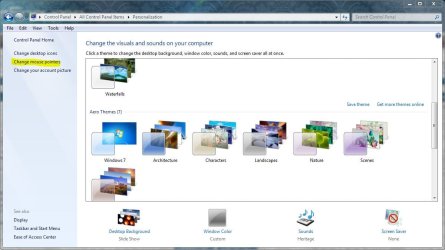
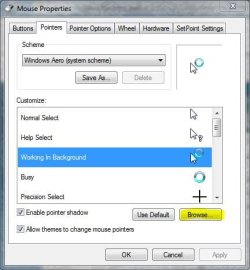
Many Thanks in advance! In the personalize window select change mouse pointers,
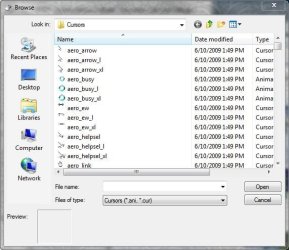
In the next window choose browse,
Change to something else, | My System Specs | | System Manufacturer/Model Number compaq sr5410f case OS Windows 7 Pro 64 SP1 CPU AMD X2 4450E @ 2.3 ghz Motherboard Biostar MCP6P M2+ Memory 4.0 g Graphics Card Nvidia GeForce 9600 GT , 512mb Sound Card onboard Monitor(s) Displays auria eq2367 Screen Resolution 1920 x 1080 Keyboard logitech wave cordless Mouse logitech LX8 cordless laser mouse PSU 250 watts Case compaq Cooling couple fans Hard Drives 1 tb Hitachi HDT721010SLA scsi, 500 gb external Internet Speed comcast hi speed 19 dn 8 up Other Info Laptop specs: HP g7-1365dx /
CPU: AMD A6-3420M APU with Radeon(tm) HD Graphics /
RAM: Crucial 8Gb (2x4Gb) /
SSD: Crucial M4-CT128M4SSD2 ATA Device/ FW 000F /
GFX: AMD Radeon HD 6520G /
OS: Microsoft Windows 7 Professional 64-bit 7601 Multiprocessor Free Service Pack 1 |
08-16-2010
|
#9 | | MS Windows 7 Ultimate SP1 64-bit |
I thought she was talking about the other times you see the spinner rather than the ones you can control from there.
Could be that this is what she was looking for.
I don't use the standard scheme anyway so for the normal busy I don't have the spinner.
Thanks for pointing out the obvious. As stated, this could be precisely what she means. | My System Specs | | System Manufacturer/Model Number Toshiba Satellite L305D laptop OS MS Windows 7 Ultimate SP1 64-bit CPU AMD Athlon X2 Dual-Core QL-64, 2100 Mhz, 2 Cores Motherboard TOSHIBA Portable PC (Socket M2/S1G1) Memory 4.0GB (2x2GB) DDR2 @ 333MHz 5-5-5-15 Graphics Card ATI Radeon 3100 Graphics (Toshiba) Sound Card Realtek High Definition Audio Monitor(s) Displays Generic PnP Monitor @ 1280x800 Screen Resolution 1280 x 800 Keyboard standard PS/2 Keyboard Mouse HP Wireless Optical Mobile Mouse Model FHA-3410 Hard Drives 125.03GB Corsair CSSD-V128GB2 ATA Device (IDE)
Depending upon testing, organized as 1,2, or 3 partitions with/without a 100mb system partition at the front. Internet Speed What the local pub, local coffee shop offers. Other Info Optical Drives HL-DT-ST DVDRAM GSA-T50N ATA Device
Synaptics PS/2 Port TouchPad
Speakers (Realtek High Definition Audio)
Atheros AR5007EG Wireless Network Adapter
Also have an Asus ha1002xp netbook with Win 7 Ultimate installed. |
08-16-2010
|
#10 | | |

Quote: Originally Posted by karlsnooks I thought she was talking about the other times you see the spinner rather than the ones you can control from there.
Could be that this is what she was looking for.
I don't use the standard scheme anyway so for the normal busy I don't have the spinner.
Thanks for pointing out the obvious. As stated, this could be precisely what she means. Actually after re-reading the post I'm not sure either, I guess we'll see. | My System Specs | | System Manufacturer/Model Number compaq sr5410f case OS Windows 7 Pro 64 SP1 CPU AMD X2 4450E @ 2.3 ghz Motherboard Biostar MCP6P M2+ Memory 4.0 g Graphics Card Nvidia GeForce 9600 GT , 512mb Sound Card onboard Monitor(s) Displays auria eq2367 Screen Resolution 1920 x 1080 Keyboard logitech wave cordless Mouse logitech LX8 cordless laser mouse PSU 250 watts Case compaq Cooling couple fans Hard Drives 1 tb Hitachi HDT721010SLA scsi, 500 gb external Internet Speed comcast hi speed 19 dn 8 up Other Info Laptop specs: HP g7-1365dx /
CPU: AMD A6-3420M APU with Radeon(tm) HD Graphics /
RAM: Crucial 8Gb (2x4Gb) /
SSD: Crucial M4-CT128M4SSD2 ATA Device/ FW 000F /
GFX: AMD Radeon HD 6520G /
OS: Microsoft Windows 7 Professional 64-bit 7601 Multiprocessor Free Service Pack 1 circle spinning drives me nuts problems? All times are GMT -5. The time now is 07:40 PM. |  |