|
Welcome to Windows 7 Forums. Our forum is dedicated to helping you find solutions with any problems, errors or issues you are experiencing with Windows 7. The Windows 7 forum also covers news and updates and has an extensive Windows 7 tutorial section that covers a wide range of tips and tricks.
Windows 7 - Why i cant extend C partition?? |
08-22-2010
|
#1 | | windows 7 ultimate 64 bits |
Why i cant extend C partition?? First, i have read other threads but i think my problem is diferent, or perhaps my english is very awfull (its possible).
I have win 7 , ultimate, 64 bits
Im trying to do with paragon partition manager, from program and from cd boot maked from this program.
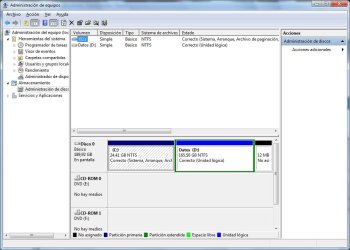
This is my start configuration: (see attached file)
I obviusly want to extend C partition, shrinking D partition. I dont want to format or to backup all D partition.
Fist attemp:
I shrink d: partition, getting enough free gigabytes to right of d: partition. But when i try to expand c partition, program doenst "see" free space. Well, i think that to extend c:, free space must be just right to c: not right to d: partition; but imnot sure of this.
Second attemp:
I make a new partition from d: (i get d and e)
I make a partition backup from d into the new partition e
I erase d:.. in this moment i have a lot of gigabytes free just to the "right" of C:
But again when i try to extend c: program doesnt see free space
What im making wrong?  ..
thxs | My System Specs | | OS windows 7 ultimate 64 bits |
08-22-2010
|
#2 | | MS Windows 7 Ultimate SP1 64-bit |
Ogro,
Your attachment is very very difficult for me to read on my laptop.
Try using the Snipping Tool in Win 7.
Also maximize the Disk Management display before "snipping".
Please fill out your system specs.
for the snipping tool, WIN | type Snipping Tool | ENTER
WIN is the key with the wavy flag on it.
________________________________________
HOW TO FILL OUT YOUR SYSTEM SPECS
In the line at the top of www.SevenForums.com you will see UserCP.
That is an abbreviation for User Control Panel.
Click on UserCP.
In the left-hand column, under Your Profile you will see Edit System Spec.
Click on Edit System Spec
You can copy and paste from the output of Speccy, Speccy - System Information - Free Download to fill out much of the info. Be sure to use the Other Info section of your System Specs for such info as your optical drive, your wireless adapter, your speakers, etc. | My System Specs | | System Manufacturer/Model Number Toshiba Satellite L305D laptop OS MS Windows 7 Ultimate SP1 64-bit CPU AMD Athlon X2 Dual-Core QL-64, 2100 Mhz, 2 Cores Motherboard TOSHIBA Portable PC (Socket M2/S1G1) Memory 4.0GB (2x2GB) DDR2 @ 333MHz 5-5-5-15 Graphics Card ATI Radeon 3100 Graphics (Toshiba) Sound Card Realtek High Definition Audio Monitor(s) Displays Generic PnP Monitor @ 1280x800 Screen Resolution 1280 x 800 Keyboard standard PS/2 Keyboard Mouse HP Wireless Optical Mobile Mouse Model FHA-3410 Hard Drives 125.03GB Corsair CSSD-V128GB2 ATA Device (IDE)
Depending upon testing, organized as 1,2, or 3 partitions with/without a 100mb system partition at the front. Internet Speed What the local pub, local coffee shop offers. Other Info Optical Drives HL-DT-ST DVDRAM GSA-T50N ATA Device
Synaptics PS/2 Port TouchPad
Speakers (Realtek High Definition Audio)
Atheros AR5007EG Wireless Network Adapter
Also have an Asus ha1002xp netbook with Win 7 Ultimate installed. |
08-22-2010
|
#3 | | Windows 7 x64 pro/ Windows 7 x86 Pro/ XP SP3 x86 |
Ogro,
You need to have unallocated space immediately to the right of C: partition, only then will you be able to extend C:. From the snip you have posted, there is no such unallocated space.
I dont know much about paragon, but does it let you pull a slider so that you can create unallocated space at the beginning of D:? | My System Specs | | System Manufacturer/Model Number Too many to describe... OS Windows 7 x64 pro/ Windows 7 x86 Pro/ XP SP3 x86 |
08-22-2010
|
#4 | | Windows 7 Home Premium 64bit |
The free space must be Unallocated, and it must be directly beside the C partition. this is why you can not expand it with unsallocated space at the end of the drive.
I do not know much about paragon, but ... it can be accomplished using Win 7s Disk Manager.
This will require a few steps, and moving things around however.
If using Win7s built in tool, you will need to Shrink partition D.
next, Create a New partiton and move all DATA from D to it. this partition should be to the right of partition D.
You Should have at this point C -- D -- (New Partition with DATA)
next, Delete partition D.
It should show in the Disk manager as C -- unallocated -- new partition
You can then expand C | My System Specs | | System Manufacturer/Model Number Custom (Self Build) OS Windows 7 Home Premium 64bit CPU Intel Core i7 2700k (4.5Ghz) Motherboard eVGA P67 SLI Memory 2x4GB Mushkin Redline Ridgebacks (@1866) Graphics Card EVGA GTX570 SuperClocked (1280MB) Sound Card XiFi Titanium HD Monitor(s) Displays LG W2453V Screen Resolution 1920x1080 Keyboard Saitek Cyborg PSU Seasonic x750 Case Corsair 600T (SE White) Cooling eVGA Superclocked CPU Cooler Hard Drives [OS SSD]Intel 320 (80GB) -- Intel X25-V (40GB) --WD Black (1TB)x2 -- WD Blue (640GB) Other Info LG BD/DVD |
08-22-2010
|
#5 | | MS Windows 7 Ultimate SP1 64-bit |
Orgo,
Without a readable disk managment display I'm reluctant to jump to recommendations.
If you would like to charge ahead then 100% to recommend is to make a system image backup of your computer, selecting all drives you need/use. | My System Specs | | System Manufacturer/Model Number Toshiba Satellite L305D laptop OS MS Windows 7 Ultimate SP1 64-bit CPU AMD Athlon X2 Dual-Core QL-64, 2100 Mhz, 2 Cores Motherboard TOSHIBA Portable PC (Socket M2/S1G1) Memory 4.0GB (2x2GB) DDR2 @ 333MHz 5-5-5-15 Graphics Card ATI Radeon 3100 Graphics (Toshiba) Sound Card Realtek High Definition Audio Monitor(s) Displays Generic PnP Monitor @ 1280x800 Screen Resolution 1280 x 800 Keyboard standard PS/2 Keyboard Mouse HP Wireless Optical Mobile Mouse Model FHA-3410 Hard Drives 125.03GB Corsair CSSD-V128GB2 ATA Device (IDE)
Depending upon testing, organized as 1,2, or 3 partitions with/without a 100mb system partition at the front. Internet Speed What the local pub, local coffee shop offers. Other Info Optical Drives HL-DT-ST DVDRAM GSA-T50N ATA Device
Synaptics PS/2 Port TouchPad
Speakers (Realtek High Definition Audio)
Atheros AR5007EG Wireless Network Adapter
Also have an Asus ha1002xp netbook with Win 7 Ultimate installed. |
08-22-2010
|
#6 | | windows 7 ultimate 64 bits |
Bill2
The capture i put its the start position. With paragon i get free space (making some operation to backup information) just right of the C: partition (not right to the d: partition). But when i tried to extend C: its like it wasnt free space
karlsnooks
If you click in my capture image you will see bigger. Anyway i have one HD with two partitions; both NTFS. With paragon soft that its my start position:
The snipping tool, i dont know how its names in spanish.
thxs! | My System Specs | | OS windows 7 ultimate 64 bits |
08-22-2010
|
#7 | | MS Windows 7 Ultimate SP1 64-bit |
| My System Specs | | System Manufacturer/Model Number Toshiba Satellite L305D laptop OS MS Windows 7 Ultimate SP1 64-bit CPU AMD Athlon X2 Dual-Core QL-64, 2100 Mhz, 2 Cores Motherboard TOSHIBA Portable PC (Socket M2/S1G1) Memory 4.0GB (2x2GB) DDR2 @ 333MHz 5-5-5-15 Graphics Card ATI Radeon 3100 Graphics (Toshiba) Sound Card Realtek High Definition Audio Monitor(s) Displays Generic PnP Monitor @ 1280x800 Screen Resolution 1280 x 800 Keyboard standard PS/2 Keyboard Mouse HP Wireless Optical Mobile Mouse Model FHA-3410 Hard Drives 125.03GB Corsair CSSD-V128GB2 ATA Device (IDE)
Depending upon testing, organized as 1,2, or 3 partitions with/without a 100mb system partition at the front. Internet Speed What the local pub, local coffee shop offers. Other Info Optical Drives HL-DT-ST DVDRAM GSA-T50N ATA Device
Synaptics PS/2 Port TouchPad
Speakers (Realtek High Definition Audio)
Atheros AR5007EG Wireless Network Adapter
Also have an Asus ha1002xp netbook with Win 7 Ultimate installed. |
08-22-2010
|
#8 | | Windows 7 x64 pro/ Windows 7 x86 Pro/ XP SP3 x86 |
Check in the disk management snip you attached in your first post. There is NO unallocated space to the right of and contiguous with C:. | My System Specs | | System Manufacturer/Model Number Too many to describe... OS Windows 7 x64 pro/ Windows 7 x86 Pro/ XP SP3 x86 |
08-22-2010
|
#9 | | |
In order to accomplish what you want, use free Partition Wizard bootable CD. back up your files as any resizing done by 3rd party apps can sometimes fail.
Boot PW CD, select 1 for Screen Res, rightclick on D to Modify>Convert to Primary, OK.
Next rightlick D to Resize, grab the left grey border and drag to the right to make as much space as you want to extend your C partition into, OK.
Now rightclick C>Resize and drag the right grey border to the right to include the space from D which you made, OK, Apply all steps.
Resizing in rare cases can cause Windows 7 to not boot, in which case you will need your DVD Repair console or Windows 7 Repair CD to boot into Recovery Tools list to run Startup Repair up to 3 separate times to repair the MBR. This is highly unlikely though since the files being moved here are not near the boot sector.
Last edited by gregrocker; 08-23-2010 at 10:07 PM..
| My System Specs | | |
08-23-2010
|
#10 | | windows 7 ultimate 64 bits |
Wishmaster
That you said is what i did, but system doesnt see free space when i tried to expand C I finally do it  . The problem was that my free space was inside the extended partition. Then, when i tried to expand C: partition, system didnt saw free space
Solution, resize extended partition (not only logical partition). Doing this free space get out of extended partition, so, when i expand C partition, then system at last saw free space.
Thxs for helping 
pd: im sorry for my english | My System Specs | | OS windows 7 ultimate 64 bits Why i cant extend C partition?? problems? All times are GMT -5. The time now is 07:40 PM. |  |