Windows 7 Forums Search
Welcome to Windows 7 Forums. Our forum is dedicated to helping you find solutions with any problems, errors or issues you are experiencing with Windows 7. The Windows 7 forum also covers news and updates and has an extensive Windows 7 tutorial section that covers a wide range of tips and tricks.


Windows 7 - sata ide or ahci

 
08-22-2010   #1


Win7 Home Premium x64 SP1/Windows 8 Consumer Preview x64


sata ide or ahci

Hi guys
I was told by a friend that changing the sata settings in the bios from ide to ahci can help improve performance so i did.Windows loaded installed the drivers and asked for a reboot which i did all fine. Stupidly it was only then that i decided to look into it and apparently your suppose to change the reg key HKLM/system/currentcontrolset/services/Msahci value to 0 before you enable it in the bios otherwise its BSOD time. Well my laptop loaded the drivers and boots up fine however the value in that reg key is 3 not 0.
Question is should i change it as your suppose to or leave it alone
Thankyou

My System SpecsSystem Spec
08-22-2010   #2


Windows 7 Ultimate x64 SP1


Hello Danny,

Yeah, I would go ahead and change it to 0 and restart the computer to help make sure that it's using AHCI.

AHCI : Enable in Windows 7 / Vista

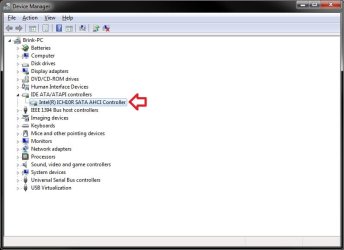
Also look in your Device Manager to make sure that it's show as a AHCI controller like below.

sata ide or ahci-ahci.jpg

Hope this helps,
Shawn
My System SpecsSystem Spec
08-22-2010   #3


Win7 Home Premium x64 SP1/Windows 8 Consumer Preview x64


Hi Brink
Ok changed value to 0 rebooted and checked device manager all seem well.Guess i was just lucky jumping in like that ive read some real horror stories from people not changing reg key first.
Thankyou for clarification
My System SpecsSystem Spec
.


08-22-2010   #4


Windows 7 Ultimate x64 SP1


You're welcome.

Yeah, usually if it didn't work without changing the key first you would just have to reboot and change the BIOS settings back to SATA IDE to be able to change the REG setting.
My System SpecsSystem Spec
08-22-2010   #5


Win7 Home Premium x64 SP1/Windows 8 Consumer Preview x64


One other thing are changes to the bios included in system images or are they exempt and keep the settings they currently have.
great help brink thankyou
My System SpecsSystem Spec
08-22-2010   #6


Windows 7 Ultimate x64 SP1


Since BIOS settings are kept on a memory chip on the motherboard, it will not be included in a system image. A system image only includes the selected hard drives.

However, you will usually have an option in BIOS to save the settings as a file on your hard drive that you could load from BIOS to use to restore the BIOS settings with.
My System SpecsSystem Spec
08-22-2010   #7


Win7 Home Premium x64 SP1/Windows 8 Consumer Preview x64


Thanks brink will do that i think
My System SpecsSystem Spec
08-22-2010   #8


Windows 7 Ultimate x64 SP1


You're welcome.
My System SpecsSystem Spec
08-22-2010   #9


Windows 7 Home Premium


Quote   Quote: Originally Posted by Brink View Post
You're welcome.

Yeah, usually if it didn't work without changing the key first you would just have to reboot and change the BIOS settings back to SATA IDE to be able to change the REG setting.

I can certainly verify this!

Ap
My System SpecsSystem Spec
Reply

 sata ide or ahci problems?


Thread Tools


Similar Threads for: sata ide or ahci
Thread Forum
Sata Mode AHCI / IDE Hardware & Devices
Configure Sata as IDe or AHCI? Hardware & Devices
IDE ot AHCI for SATA drives (SSD and regular) Installation & Setup
Intel Sata controler ICH10R AHCI + Jmicron AHCI error Drivers
W7 on laptop - Configure SATA as IDE or AHCI General Discussion


All times are GMT -5. The time now is 07:40 PM.


Windows 7 Forums is an independent web site and has not been authorized,
sponsored, or otherwise approved by Microsoft Corporation.
"Windows 7" and related materials are trademarks of Microsoft Corp.
© Designer Media Ltd
  

1 2 3 4 5 6 7 8 9 10 11 12 13 14 15 16 17 18 19 20 21 22 23 24 25 26 27 28 29 30