| Windows 7: Intermittent lag whilst watching / playing flash |
03 Sep 2010
|
#1 | | |
Intermittent lag whilst watching / playing flash Hi guys, I have an Acer Aspire 5536 notebook which I bought last year in September. Ever since I've had a problem when playing flash games or watching YouYube videos.
The lag occurs every 40-60 seconds, the audio will continue uninterrupted where as the video will become extremely choppy for 5-10 seconds and then it will return to it's normal state, now this doesn't just apply to flash apps, this also happens when I play Trackmania Nations or any other game.
On another note, my laptop gets extremely hot, I've been using HWmonitor to check the temperatures and my CPU has hit a max of 96 celcius. Currently I'm running Google chrome with 1 tab open and I have Windows Live Messenger running too and both cores of the CPU are reading at 70 celcius. I've read up about this and once it reaches a certain temperature the CPU throttles it's self to prevent further damage, although I'm thankful this happens, it renders my laptop practically unusable.
Has anyone else experienced any of this before and is there anything I can do about it?
Thanks in advance!
Acer Aspire 5536g
AMD Turion RM-74 2.2 Ghz x2
500GB HDD
4GB RAM
ATI Mobility HD3200 | My System Specs |
| System Manufacturer/Model Number Acer Aspire 5536 Notebook OS Windows 7 Ultimate x64 CPU AMD Turion x2 Memory 4GB Graphics Card ATI Radeon Monility HD3200 Hard Drives 500GB |
03 Sep 2010
|
#2 | | Win7 Ultimate SP1 x64 / Windows 8 Pro / Android Mauritius |
Update flash player and your graphics drivers
Flash: http://www.adobe.com/products/flashplayer/
Display driver: ATI Catalystâ„¢ Mobility Display Driver
There may be some dust blocking the laptop vents causing overheating | My System Specs | | System Manufacturer/Model Number Custom Build OS Win7 Ultimate SP1 x64 / Windows 8 Pro / Android CPU Intel Core 2 Quad Q8200 OC'd 3.08GHz Motherboard Asus Rampage formula LGA775 Memory 8GB DDR2 900Mhz Graphics Card Zotac GTX 460OC 2GB GDDR5/Asus EN9600GT 1GB DDR3 PhyX Sound Card Supreme FX2 Monitor(s) Displays AOC 22' Screen Resolution 1680x1050 Keyboard Prolink keyboard Mouse Prolink optical mouse PSU Cooler Master GX 650W Cooling Cooler Master V6 + 3X fans Hard Drives 3X500GB hitachi, 2TB internal, 500GB Seagate FreeAgent, 640GB Samsung Internet Speed 1MiB/s Other Info 5.1 System + 2.1 System |
03 Sep 2010
|
#3 | | Win 7 Ultimate 64-bit. SP1. |

Quote: Originally Posted by Josh1821 Hi guys, I have an Acer Aspire 5536 notebook which I bought last year in September. Ever since I've had a problem when playing flash games or watching YouYube videos.
The lag occurs every 40-60 seconds, the audio will continue uninterrupted where as the video will become extremely choppy for 5-10 seconds and then it will return to it's normal state, now this doesn't just apply to flash apps, this also happens when I play Trackmania Nations or any other game.
On another note, my laptop gets extremely hot, I've been using HWmonitor to check the temperatures and my CPU has hit a max of 96 celcius. Currently I'm running Google chrome with 1 tab open and I have Windows Live Messenger running too and both cores of the CPU are reading at 70 celcius. I've read up about this and once it reaches a certain temperature the CPU throttles it's self to prevent further damage, although I'm thankful this happens, it renders my laptop practically unusable.
Has anyone else experienced any of this before and is there anything I can do about it?
Thanks in advance!
Acer Aspire 5536g
AMD Turion RM-74 2.2 Ghz x2
500GB HDD
4GB RAM
ATI Mobility HD3200 Hi Josh & welcome
Some 'housework ' questions for you first.
*Have you examined Task Manager - Processes to see what is running?
*Do you defrag - run check disc - disk clean up - on a regular basis?
*Have you checked in Device Manager to see the state of your drivers? * Is your Flash Player the current version? etc. | My System Specs | | System Manufacturer/Model Number LAPTOP. HP Pavilion dv7-4010TX . OS Win 7 Ultimate 64-bit. SP1. CPU Intel i7 -720QM.[1.6GHz Turbo Boost 2.8GHz. 6MB Cache.] Memory 8 DDR 3 RAM. 1066MHZ Graphics Card ATI 1024 MB. DDR3. Radeon HD5650 Monitor(s) Displays 17.3" High Definition Brightview LCD. LED Backlit. Screen Resolution 1600 x 900. Mouse Logitech Anywhere mouse. MX. Case Laptop / notebook. Hard Drives 640GB Internet Speed ADSL [ but too slow ] |
03 Sep 2010
|
#4 | | |
Hey, thanks for the warm welcome and replies! I'm just updating my drivers now. I run defrag and disk cleanup every few weeks, I work as a graphic designer so my laptop tends to get cluttered! Also there seems to be nothing suspicious running in the process list too, I'm going to do a disk clean up now and run CCleaner and hopefully that should help, if not I think I'm going to chuck XP on it. | My System Specs | | System Manufacturer/Model Number Acer Aspire 5536 Notebook OS Windows 7 Ultimate x64 CPU AMD Turion x2 Memory 4GB Graphics Card ATI Radeon Monility HD3200 Hard Drives 500GB |
03 Sep 2010
|
#5 | | Win 7 Ultimate 64-bit. SP1. |

Quote: Originally Posted by Josh1821 Hey, thanks for the warm welcome and replies! I'm just updating my drivers now. I run defrag and disk cleanup every few weeks, I work as a graphic designer so my laptop tends to get cluttered! Also there seems to be nothing suspicious running in the process list too, I'm going to do a disk clean up now and run CCleaner and hopefully that should help, if not I think I'm going to chuck XP on it. Let us know how you go Josh.
I would suggest that you rethink the backward step of possibly returning to XP.
Vista [in spite of what you may have heard or read] & Win 7 are far better OS's.
You will get plenty of help here [ if you so desire] as you adjust to this new program.
Good luck. | My System Specs | | System Manufacturer/Model Number LAPTOP. HP Pavilion dv7-4010TX . OS Win 7 Ultimate 64-bit. SP1. CPU Intel i7 -720QM.[1.6GHz Turbo Boost 2.8GHz. 6MB Cache.] Memory 8 DDR 3 RAM. 1066MHZ Graphics Card ATI 1024 MB. DDR3. Radeon HD5650 Monitor(s) Displays 17.3" High Definition Brightview LCD. LED Backlit. Screen Resolution 1600 x 900. Mouse Logitech Anywhere mouse. MX. Case Laptop / notebook. Hard Drives 640GB Internet Speed ADSL [ but too slow ] |
05 Sep 2010
|
#6 | | |
Hey again, I've installed the catalyst control centre for my graphics card and i've gone through my installed programs and took off any I don't need, I also did a de-frag on all my partitions and I'm afraid the problem is still here :S. I think the heat at which my laptop reaches is causing the problems, which is throttling my CPU.
I'm going to clean out the air vent with some compressed air (yes theres only one) and see if it helps. | My System Specs | | System Manufacturer/Model Number Acer Aspire 5536 Notebook OS Windows 7 Ultimate x64 CPU AMD Turion x2 Memory 4GB Graphics Card ATI Radeon Monility HD3200 Hard Drives 500GB |
05 Sep 2010
|
#7 | | Win 7 Ultimate 64-bit. SP1. |
Keep us posted here with the results....
Good luck Josh. | My System Specs | | System Manufacturer/Model Number LAPTOP. HP Pavilion dv7-4010TX . OS Win 7 Ultimate 64-bit. SP1. CPU Intel i7 -720QM.[1.6GHz Turbo Boost 2.8GHz. 6MB Cache.] Memory 8 DDR 3 RAM. 1066MHZ Graphics Card ATI 1024 MB. DDR3. Radeon HD5650 Monitor(s) Displays 17.3" High Definition Brightview LCD. LED Backlit. Screen Resolution 1600 x 900. Mouse Logitech Anywhere mouse. MX. Case Laptop / notebook. Hard Drives 640GB Internet Speed ADSL [ but too slow ] |
06 Sep 2010
|
#8 | | |
A little update: I cleaned out the vent and there wasn't an improvement so I actually took my laptop apart and took a look inside, there was a minor build up of dust but nothing spectacular. I've just noticed something on the underside of my laptop though, there are grooves in the area where the fan is which looks like another air vent, but it hasn't been cut out when it's been manufactured. I'm guessing this is why it gets so hot, so tomorrow I'm going to cut the hole out and put some steel mesh there to provide better airflow, I really hope this works! | My System Specs | | System Manufacturer/Model Number Acer Aspire 5536 Notebook OS Windows 7 Ultimate x64 CPU AMD Turion x2 Memory 4GB Graphics Card ATI Radeon Monility HD3200 Hard Drives 500GB |
06 Sep 2010
|
#9 | | Win 7 Ultimate 64-bit. SP1. |
Hum.............. interesting.
Will be interested to hear the results re your theory. | My System Specs | | System Manufacturer/Model Number LAPTOP. HP Pavilion dv7-4010TX . OS Win 7 Ultimate 64-bit. SP1. CPU Intel i7 -720QM.[1.6GHz Turbo Boost 2.8GHz. 6MB Cache.] Memory 8 DDR 3 RAM. 1066MHZ Graphics Card ATI 1024 MB. DDR3. Radeon HD5650 Monitor(s) Displays 17.3" High Definition Brightview LCD. LED Backlit. Screen Resolution 1600 x 900. Mouse Logitech Anywhere mouse. MX. Case Laptop / notebook. Hard Drives 640GB Internet Speed ADSL [ but too slow ] |
07 Sep 2010
|
#10 | | |
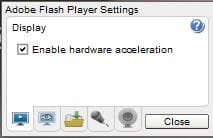
To remove the video lag from my videos I right clicked on the video playing such as youtube and choose Settings. Then untick the enable hardware acceleration box. Thats it! | My System Specs | | System Manufacturer/Model Number Fujitsu Siemens OS Windows 7 Professional Memory 2gb Graphics Card 1gb Sound Card 265 Monitor(s) Displays 1080p Cooling fan Hard Drives 1 external 1tb Intermittent lag whilst watching / playing flash problems? All times are GMT -5. The time now is 12:48 PM. | |