| Windows 7: How many processes should ideally be running? |
07 Sep 2010
|
#1 | | Windows Home Premium 64bit |
How many processes should ideally be running? Hi, right now on my system I have these things running
Google Chrome
3 PDFs in Adobe Reader
Call of Duty 4
Digsby
Free Download Manager
Steam
As of now, I have 120 processes running. Is this normal for Windows 7 or in order to get ideal performance, there should be less running?
I use this computer for editing and would like to know how much more performance I can get out of it that might be held back by the unnecessary processes.
Thanks. | My System Specs |
| System Manufacturer/Model Number Asus N61JQ-A1 OS Windows Home Premium 64bit CPU Core i7 720 Motherboard Asus Memory Black Diamond Graphics Card Ati Radeon 5730 Sound Card Realtek |
08 Sep 2010
|
#2 | | Windows 7 x64 Ultimate San Diego |
Well that depends on how much memory and CPU you have... The i77 20 is ok, and memory will be fine till you run out. The computer will be fast fast fast right till then then be horribly slow  THEN you know you better shut dome programs down...
I only have 75 processes running with Normal windows, MSE, WHS connector, IE, a game open and WMP12 running. Looks like you may have a larger than normal number of things running. But just check your CPU usage and your emmory usage in the task manager, if your not close to maxing them out then your ok. | My System Specs | | System Manufacturer/Model Number Scratch built OS Windows 7 x64 Ultimate CPU i7 960 Motherboard Asus P6X58D Memory 12 Gig Corsair Dominator Graphics Card Nvidia 480 Sound Card Maudio Delta 44 + breakout box Monitor(s) Displays Dell UltraSharp U2410 24in and Samsung 21 dual monitors Screen Resolution 1920x1200 and 1280x1024 Keyboard Logitech G15 + N52 game pad Mouse Logitech MX518 PSU Corasair TX850 Case Cooler Master HAF Cooling Corsair H50 Hard Drives Primary: Intel X-25M G2 160G SSD
Secondary: Segate baracuda 1.0 TB
HDs in AHCI mode. Internet Speed 15kbs down 4.5kbps up Other Info WEI 7.6
CPU & RAM 7.6
Graphics 7.9
Hard disk 7.7 |
08 Sep 2010
|
#3 | | |

Quote: Originally Posted by deathwinger Hi, right now on my system I have these things running
Google Chrome
3 PDFs in Adobe Reader
Call of Duty 4
Digsby
Free Download Manager
Steam
As of now, I have 120 processes running. Is this normal for Windows 7 or in order to get ideal performance, there should be less running?
I use this computer for editing and would like to know how much more performance I can get out of it that might be held back by the unnecessary processes.
Thanks. Seems a little high TBH.
I usually disable unnecessary services every time I do a fresh install of any Windows version ( Black Viper's Web Site has one of the better guides for this on his site, so check him out).
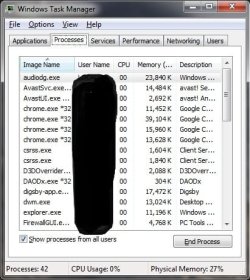
Here's my Task Manager with Steam, ~3 tabs of Google Chrome, Digsby, avast! Free Antivirus, PC Tools Firewall Plus, D3D Overrider & Team Speak 3 all running. | My System Specs | | System Manufacturer/Model Number Self Built OS Windows 7 Pro x64 SP1 CPU Intel Core i5-2500K Motherboard ASUS P8P67 Memory 8GB Corsair XMS3 DDR3 Graphics Card EVGA GeForce GTX 670 FTW Sound Card ASUS Xonar DS Monitor(s) Displays SAMSUNG P2070 Screen Resolution 1600 x 900 @ 60Hz Keyboard Logitech K300 Black Mouse Genius on Steelseries 4HD Gaming pad PSU Corsair TX950W Case Corsair Obsidian 650D Cooling Thermaltake Frío Hard Drives WD Caviar Blue Other Info Headphones: Sennheiser HD-515 |
08 Sep 2010
|
#4 | | Win 7 Pro 64-bit South Central Texas |
I concur with SlackerITGuy. The number of processes on any given machine really depends on what programs are installed and what is configured to run at start up. While task manager gives a basic overview of the processes that are running, a free utility called Process Explorer from Microsoft will give a lot more info. You can either install it on your machine or run it in your browser (right column, "Run Process Explorer now". Process Explorer | My System Specs | | Computer type Laptop System Manufacturer/Model Number Sony Vaio VPCEB47GM Laptop OS Win 7 Pro 64-bit CPU Intel i5 2.4 Ghz Memory 8GB DDR3 Graphics Card Intel HD 3000 Sound Card IDT High Definition Monitor(s) Displays 15.6 WGXA Anti-Glare LED Screen Resolution 1280x800 Hard Drives 640Gb 7200rpm Antivirus MSE Browser Opera (primary) with IE9 backup |
08 Sep 2010
|
#5 | | Windows 7 Ultimate 64bit Norfolk, VA |
I've got 128 processes running. | My System Specs | | System Manufacturer/Model Number HAL-9000 OS Windows 7 Ultimate 64bit CPU Intel i7 3770K Motherboard Asus Sabertooth Z77 Memory 16GB DDR3 1333 Corsair XMS3 Graphics Card XFX HD6950 2GB EyeFinity Sound Card Logitech G35 & Sennheiser PC135 & VIA HD Monitor(s) Displays 23" HP 2310e, 23" Samsung B2230, 21.5" Viewsonic Screen Resolution 5760x1080 Keyboard Logitech G15 and G13 Mouse Logitech G700 Gaming Mouse PSU Antec True Power New 650watt Case Cooler Master HAF-932 Cooling Corsair H60 Hydro Cooler, 3x 230mm Fans, 2x120mm Fan Hard Drives 16TB of Storage
128GB & 256GB Crucial M4 SSD's, 2X 1TB WD Black, 3x 2TB WD, 3x 2TB Samsung F4, 1.5TB Seagate, WD 500GB, Internet Speed 50/10 Mbit Other Info Speakers : Alesis M1 Active Mk2 Studio Monitors , APC RS 1200 UPS, HP 4500DN Color Laser, HP P1006 mono Laser, Kodak 8500 Dye-Sub, Epson 1280 inkjet, Epson Worforce 610 MFC |
08 Sep 2010
|
#6 | | Windows Home Premium 64bit |
Lol I just looked at my processes and I now have 128 running.
The cpu usage hovers around 3-5% and the memory usage is 35%.
However, after rendering a huge file in Premiere Pro/Media Encoder, I feel like the computer takes quite a while to 'recover', in terms of the memory is at 90% used up to ten minutes after the render is complete.
I was wondering if the processes amount would have had anything to do with that. | My System Specs | | System Manufacturer/Model Number Asus N61JQ-A1 OS Windows Home Premium 64bit CPU Core i7 720 Motherboard Asus Memory Black Diamond Graphics Card Ati Radeon 5730 Sound Card Realtek |
08 Sep 2010
|
#7 | | |
With regards to the number of processes running...while some people prefer to shut off what they deem "unnecessary" services...what may not be realized is that 1 or 2 running processes could improve performance. For example, I have an SSD drive for my OS and people always say "disable superfetch, it isn't needed". Well, my computer is simply faster with superfetch enabled.
On my work computer, with a few of my daily apps open, I'm sitting at 65 processes. So, a reasonably light load. That's running Trend AV, outlook, an instant messenger, our checkpoint security suite, some remote desktop connections, etc. | My System Specs | | System Manufacturer/Model Number Self-Built in July 2009 OS Windows 7 Ultimate x64 CPU Intel Q9550 2.83Ghz OC'd to 3.40Ghz Motherboard Gigabyte GA-EP45-UD3R rev. 1.1, F12 BIOS Memory 8GB G.Skill PI DDR2-800, 4-4-4-12 timings Graphics Card EVGA 1280MB Nvidia GeForce GTX570 Sound Card Realtek ALC899A 8 channel onboard audio Monitor(s) Displays 23" Acer x233H Screen Resolution 1920x1080 Keyboard ABS M1 Mechanical Mouse Logitech G9 Laser Mouse PSU Corsair 620HX modular Case Antec P182 Cooling stock Hard Drives Intel X25-M 80GB Gen 2 SSD
Western Digital 1TB Caviar Black, 32MB cache. WD1001FALS Internet Speed 15/2 cable modem Other Info Windows and Linux enthusiast. Logitech G35 Headset. |
08 Sep 2010
|
#8 | | Windows Home Premium 64bit |

Quote: Originally Posted by Zepher I've got 128 processes running. Hey, I'd like to get a Hi rez shot of your workspace there. I'd like to see your workflow with three screens.
What graphics card you got there powering all that and what are the connections? | My System Specs | | System Manufacturer/Model Number Asus N61JQ-A1 OS Windows Home Premium 64bit CPU Core i7 720 Motherboard Asus Memory Black Diamond Graphics Card Ati Radeon 5730 Sound Card Realtek |
11 Sep 2010
|
#9 | | Windows 7 Ultimate 64bit Norfolk, VA |

Quote: Originally Posted by deathwinger 
Quote: Originally Posted by Zepher I've got 128 processes running. Hey, I'd like to get a Hi rez shot of your workspace there. I'd like to see your workflow with three screens.
What graphics card you got there powering all that and what are the connections? In the pic below I was running a GTX285 and a 9600GT, all DVI. I don't do too much editing on this machine so I sold the 285 to a friend who is shooting a documentary using a Canon 7D, and the 285 helps out a lot with his workflow using the Mercury Playback Engine.
I went with an HD5850 so I could do Eyefinty and use 1 card for the 3 screens. 2 DVI and 1 Display Port to VGA adapter. | My System Specs | | System Manufacturer/Model Number HAL-9000 OS Windows 7 Ultimate 64bit CPU Intel i7 3770K Motherboard Asus Sabertooth Z77 Memory 16GB DDR3 1333 Corsair XMS3 Graphics Card XFX HD6950 2GB EyeFinity Sound Card Logitech G35 & Sennheiser PC135 & VIA HD Monitor(s) Displays 23" HP 2310e, 23" Samsung B2230, 21.5" Viewsonic Screen Resolution 5760x1080 Keyboard Logitech G15 and G13 Mouse Logitech G700 Gaming Mouse PSU Antec True Power New 650watt Case Cooler Master HAF-932 Cooling Corsair H60 Hydro Cooler, 3x 230mm Fans, 2x120mm Fan Hard Drives 16TB of Storage
128GB & 256GB Crucial M4 SSD's, 2X 1TB WD Black, 3x 2TB WD, 3x 2TB Samsung F4, 1.5TB Seagate, WD 500GB, Internet Speed 50/10 Mbit Other Info Speakers : Alesis M1 Active Mk2 Studio Monitors , APC RS 1200 UPS, HP 4500DN Color Laser, HP P1006 mono Laser, Kodak 8500 Dye-Sub, Epson 1280 inkjet, Epson Worforce 610 MFC |
11 Sep 2010
|
#10 | | Windows 7 x64 Home Premium |
Years ago when I was trying to tame Vista's 137 services I discovered some excellent step by step advise on how to safely do so at the BlackViper website. Originally my Win 7 x64 computer was running about 56 services some of which were for printers, fax machines, wireless internet access and other services which I have no use for so I disabled them knowing that if I should need any of them in the future I can always start them again with the click of a mouse. Since thinning out about 20 unneeded services in Win 7 it now has between 35 and 38 services running after its 21 second boot to the desktop according to the Windows uptime clock.
~Maxx~
.
Last edited by Maxxwire; 11 Sep 2010 at 11:12 PM..
| My System Specs | | System Manufacturer/Model Number HP HPE 270f OS Windows 7 x64 Home Premium CPU Intel Core i7 930 @ 2.8 Ghz Socket 1366 LGA Motherboard Pegatron Truckee v1.04E41 Memory 8 GB 1366 Mhz DDR3 (PC3-10700) RAM Graphics Card ATI Radeon 5770 1 GB DDR5 RAM Sound Card Realtech High Definition Monitor(s) Displays 32" Sony Bravia Screen Resolution 1366 X 768 Keyboard Logitech Illuminated Mouse Logitech MX Revolution Hard Drives Intel 25nm 120 GB Series 320 SSD HD Tune- 265 MBps Read/ 130 MBps Write
LaCie 1TB + 1TB RAID 0 eSATA Drive HD Tune- 160 MBps Read/ 90 MBps Write Internet Speed 36.4 Mbps Maximum on a 37 Mbps Motorola SB501 Modem How many processes should ideally be running? problems? All times are GMT -5. The time now is 02:52 PM. | |