| Windows 7: win 7 backing up xp drive? |
12 Sep 2010
|
#1 | | windows 7 ultimate 32 bit |
win 7 backing up xp drive? Hi--I am not a computer newbie, but I am new to win 7. I searched the forums and tutorials first, I may have missed a simple answer to this question, and if you have answered this before please just point me to the answer.
I have xp installed on my C drive, and recently installed win 7 ultimate 32 bit on a clean F drive. Both systems work flawlessly.
I use a 1 tb (drive letter H) drive for my backups.
Today I tried the win 7 backup utility, selected H as my backup location, with disk image etc included. Backup ran for about 10-15 minutes and, being curious, I clicked on the "view details" (i think that is what it is called) and saw that the backup was backing up my C drive. I stopped the backup, and deleted the files win 7 had created on my H drive.
I just assumed that win 7 would backup itself, and that that is why there is no "source" choice option, only a "destination" option. Of course, if win 7 is ACTUALLY backing up itself from the F drive, but defaults to calling itself C, then that would still work. Don't know.
Thinking about letting the backup complete and then going into it on H to see what is there, xp from C or win 7 from F, but hope to hear from someone who already has the answer.
So glad I found this forum, I am sure to learn a lot here. Thanks in advance. | My System Specs |
| System Manufacturer/Model Number dell xps gen 3 OS windows 7 ultimate 32 bit CPU 3.4ghs pent 4 ht Memory 4 gb Graphics Card ati radeon 4830 Sound Card sb audigy Monitor(s) Displays lg 23" flatron Screen Resolution 1034 x 768 Hard Drives c=250 gb seagate with xp
f=250 gb seagate with win 7 ultimate 32 bit
h=1 tb seagate for storage |
12 Sep 2010
|
#2 | | Win 7 Home X86 on 2 machines X64 on 3 machines WHS V1 on 1 machine Hot Springs Village, AR |
If you boot from Win 7, that drive becomes "C" for that boot cycle. | My System Specs | | System Manufacturer/Model Number Dell XPS 7100 OS Win 7 Home X86 on 2 machines X64 on 3 machines WHS V1 on 1 machine CPU AMD Motherboard Dell Memory 6GB Monitor(s) Displays 2 1=DVI 1=VGA Hard Drives 320 GB for system. 1 TB drive for data. Internet Speed Cable 8Gb Other Info 4 laptops of different flavors
1 Desktop with Windows Home Server. 3 500 GB drives on the server.
4 pre orders of Home Prem. |
12 Sep 2010
|
#3 | | Win7 Enterprise, Win7 x86 (Ult 7600), Win7 x64 Ult 7600, TechNet RTM on AMD x64 (2.8Ghz) SomeWhere in the HOT Arizona Desert ! |
I did an image backup of an 80gb laptop drive with 2 partitions (xp &7). It make one image that had both  I had named each partition "xp_25gb" & "Win7_45gb" . I saw it use both names while doing the image to the 1tb ext HD. I then restored it to a new 250gb HD in the laptop. It restored both the XP & Windows 7 partitions. So the laptop can still dual boot on the new HD | My System Specs | | Computer type PC/Desktop System Manufacturer/Model Number Built them myself, Science Experiments ! OS Win7 Enterprise, Win7 x86 (Ult 7600), Win7 x64 Ult 7600, TechNet RTM on AMD x64 (2.8Ghz) CPU AMD fx8350 4ghz, AMD-32 2400mhz, AMD-64 3200mhz, AMDx64 2.8G Motherboard SIS 755, ECS-K8M890M-M (Ult 7600), GigaByte & others Memory 2gb, 4gb on the Ult 7600, 4gb on Technet RTM, 32gb on FX8350 Graphics Card Draw my own Graphics, several nVidia cards Sound Card on motherboard Monitor(s) Displays 19" flat scr, 28" I-Inc widescr,22" Emprex Widescr, 23" Acer Screen Resolution 1280 x 1024, 1440 x 900, 1920 x 1080 Keyboard Compaq & Dell recycled from GoodWill Mouse Made in China Optical Wired Mouse PSU 430w, 550w, 600w, 700, 800, etc Case All Generic Full Towers Cooling Open Air & a few fans, some w/ colored LEDs Hard Drives 6 pata Ide HD's & 2 Sata HD's
added 80gb external on Ult 7600 computer,
numerous extra 1tb, 2TB, 3Tb SATA HD's
A collection of ext HD Docks w/ HDs Internet Speed Fast Cable InterNet Antivirus AVG Free on 24 different Desktops, NO Problems! Browser IE 8 is preferred, but use FireFox sometimes Other Info Linksys Routers, switches, & Hubs
Too Many USB Flash Drives to count, Biggest is 64GB !
Eight computers in my home network.
Sixteen computers at my business network.
Linked via TeamViewer !
Lots of old used spare computer parts everywhere! |
12 Sep 2010
|
#4 | | windows 7 ultimate 32 bit |
ahhh---so it is backing up win 7 on H. thanks so much for the astonishingly quick reply. | My System Specs | | System Manufacturer/Model Number dell xps gen 3 OS windows 7 ultimate 32 bit CPU 3.4ghs pent 4 ht Memory 4 gb Graphics Card ati radeon 4830 Sound Card sb audigy Monitor(s) Displays lg 23" flatron Screen Resolution 1034 x 768 Hard Drives c=250 gb seagate with xp
f=250 gb seagate with win 7 ultimate 32 bit
h=1 tb seagate for storage |
12 Sep 2010
|
#5 | | W 7 64-bit Ultimate The Lowcountry |
Hello valc, welcome to Seven forums!
It is probably because the XP install it "System, Active", where the boot files are stored for both XP and Windows 7 and they both have to be backed-up for that reason.
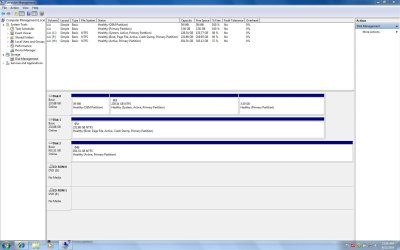
Will you please post a snip/screen-shot of the entire disk management drive map so we can see what you have going on.
In the Windows start menu right click computer and click manage, in the left pane of the "Computer Management" window that opens click disk management and post a snip of that. How to Post a Screenshot in Seven Forums | My System Specs | | System Manufacturer/Model Number * BFK Customs * OS W 7 64-bit Ultimate CPU Intel Q9550 Yorkfield Motherboard ASUS P5Q Pro Memory 8GB Dominator 8500C5D Graphics Card ATI : XFX 5870 Sound Card Realtek HD Audio 7-1 Monitor(s) Displays 1x 47" LCD HDMI & 3x 26" LCD HDMI Screen Resolution 1920x1080P & 1920x1200 Keyboard Microsoft 500 Mouse Razer Diamondback 3G PSU Corsair 620HX Case Cooler Master RC-690 Cooling Tuniq Tower 120, 2x 140mm and 3x 120mm case fans Hard Drives 1x 80GB Intel X25-M G2 SSD : 1x 500GB & 1x 640GB WD Caviar Black(s) Internet Speed 14 Mb/s Other Info 1x Koutech 3Gb/s SATA HDD Hot Swap Rack |
12 Sep 2010
|
#6 | | windows 7 ultimate 32 bit |
ok here is a snip taken from the win 7 drive. | My System Specs | | System Manufacturer/Model Number dell xps gen 3 OS windows 7 ultimate 32 bit CPU 3.4ghs pent 4 ht Memory 4 gb Graphics Card ati radeon 4830 Sound Card sb audigy Monitor(s) Displays lg 23" flatron Screen Resolution 1034 x 768 Hard Drives c=250 gb seagate with xp
f=250 gb seagate with win 7 ultimate 32 bit
h=1 tb seagate for storage |
12 Sep 2010
|
#7 | | W 7 64-bit Ultimate The Lowcountry |
OK
Disk 0 is C: ... XP
Disk 1 F: is ... W_7
You can see the "System, Active" partition, that's where the boot files for the dual boot are stored, I can see you are in Windows 7 (the "Boot" designation), how did it get labeled as F:? | My System Specs | | System Manufacturer/Model Number * BFK Customs * OS W 7 64-bit Ultimate CPU Intel Q9550 Yorkfield Motherboard ASUS P5Q Pro Memory 8GB Dominator 8500C5D Graphics Card ATI : XFX 5870 Sound Card Realtek HD Audio 7-1 Monitor(s) Displays 1x 47" LCD HDMI & 3x 26" LCD HDMI Screen Resolution 1920x1080P & 1920x1200 Keyboard Microsoft 500 Mouse Razer Diamondback 3G PSU Corsair 620HX Case Cooler Master RC-690 Cooling Tuniq Tower 120, 2x 140mm and 3x 120mm case fans Hard Drives 1x 80GB Intel X25-M G2 SSD : 1x 500GB & 1x 640GB WD Caviar Black(s) Internet Speed 14 Mb/s Other Info 1x Koutech 3Gb/s SATA HDD Hot Swap Rack |
12 Sep 2010
|
#8 | | windows 7 ultimate 32 bit |
I had this drive in before I installed win 7 on it as a backup drive for the C=xp drive. Then added the H drive and moved everything from F to H. Then installed win 7 on H. | My System Specs | | System Manufacturer/Model Number dell xps gen 3 OS windows 7 ultimate 32 bit CPU 3.4ghs pent 4 ht Memory 4 gb Graphics Card ati radeon 4830 Sound Card sb audigy Monitor(s) Displays lg 23" flatron Screen Resolution 1034 x 768 Hard Drives c=250 gb seagate with xp
f=250 gb seagate with win 7 ultimate 32 bit
h=1 tb seagate for storage |
12 Sep 2010
|
#9 | | windows 7 ultimate 32 bit |
oops--i meant to say installed win 7 on F. sorry | My System Specs | | System Manufacturer/Model Number dell xps gen 3 OS windows 7 ultimate 32 bit CPU 3.4ghs pent 4 ht Memory 4 gb Graphics Card ati radeon 4830 Sound Card sb audigy Monitor(s) Displays lg 23" flatron Screen Resolution 1034 x 768 Hard Drives c=250 gb seagate with xp
f=250 gb seagate with win 7 ultimate 32 bit
h=1 tb seagate for storage |
12 Sep 2010
|
#10 | | W 7 64-bit Ultimate The Lowcountry |
If you choose, the best way to solve the issue is to do-away the Windows managed dual boot and use the BIOS to choose which OS you want to boot when the PC is first started.
It's fairly simple process, first, disconnect the Hard Disk Drive (HDD) that has Windows XP installed to it and leave only the Windows 7 HDD connected, then you mark the Windows 7 partition as "Active" then do 3 separate startup repairs with a system restart between each repair to create a set of boot files just for Windows 7 so that it will be able to boot independently of XP.
When finished and Windows 7 is booting on its own then reconnect the XP HDD and that's it, they will now boot independently of each other using the BIOS boot menu.
It's not as big a deal as it sounds, have a look at the tutorial at the link below for all the details. Startup Repair - Run 3 Separate Times | My System Specs | | System Manufacturer/Model Number * BFK Customs * OS W 7 64-bit Ultimate CPU Intel Q9550 Yorkfield Motherboard ASUS P5Q Pro Memory 8GB Dominator 8500C5D Graphics Card ATI : XFX 5870 Sound Card Realtek HD Audio 7-1 Monitor(s) Displays 1x 47" LCD HDMI & 3x 26" LCD HDMI Screen Resolution 1920x1080P & 1920x1200 Keyboard Microsoft 500 Mouse Razer Diamondback 3G PSU Corsair 620HX Case Cooler Master RC-690 Cooling Tuniq Tower 120, 2x 140mm and 3x 120mm case fans Hard Drives 1x 80GB Intel X25-M G2 SSD : 1x 500GB & 1x 640GB WD Caviar Black(s) Internet Speed 14 Mb/s Other Info 1x Koutech 3Gb/s SATA HDD Hot Swap Rack win 7 backing up xp drive? problems? All times are GMT -5. The time now is 04:41 PM. | |