Windows 7 Forums


Windows 7: Hang Dog Win 7

25 May 2009  
Tram 1

Win7
87 posts
 
 
Hang Dog Win 7

Hi,

Doggies do seem to be my thing at the moment.

Is there a tutorial here on Seven forums that shows/informs how to speed up Win 7 boot up times?

Mine is a new build PC but it still takes about 90 seconds from boot up to desk top.

I know about tweaks in msconfig and services but there has to be something else to speed up these boot times.

At start up my OS seems to hang at " Starting Windows ".

My System SpecsSystem Spec

25 May 2009  
Uber Philf

W7 RTM Ultimate x64
2,905 posts
South Coast NSW


Not sure, i dont have a password, so that decreases boot time massively :P
Enzo.
My System SpecsSystem Spec
25 May 2009  
ronalde

Windows 7 RC Ultimate Build 7100 X64
26 posts
Leeuwarden, Netherlands


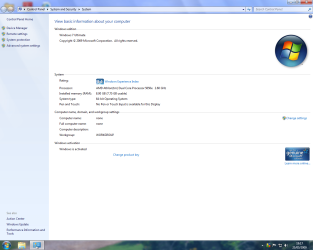
Tram 1, could you post your system specs?

Greetz Ronald E
My System SpecsSystem Spec
.


25 May 2009  
Tram 1

Win7
87 posts


Quote   Quote: Originally Posted by ronalde View Post
Tram 1, could you post your system specs?

Greetz Ronald E
Hi ronalde and will do,........'.er... how do I do that?
My System SpecsSystem Spec
25 May 2009  
Uber Philf

W7 RTM Ultimate x64
2,905 posts
South Coast NSW


Heres how:

right click the "my computer" icon.

Select properties.

Take a screenshot*

Attach to your post using the attach button above the message box (AKA the paperclip)


* To Take a screenshot, find the "prt sc" button usually in the top row second group from the right.

Open paint, located in accessories, which is in the all programs section.

PRESS CTRL + V, in paint of course..

Save to desktop, or where ever.

Done!


Enzo.
My System SpecsSystem Spec
25 May 2009  
ronalde

Windows 7 RC Ultimate Build 7100 X64
26 posts
Leeuwarden, Netherlands


Thanks, Enzo, for explaining it allready!

Or you could use SIW: SIW | Download
and get your info from there.

This is a tool for System Information.
Under Hardware - System Summary you can find lots of info.

<use the standalone-version... Then you don't have to install, just run.>

Greetz Ronald E
My System SpecsSystem Spec
25 May 2009  
Tram 1

Win7
87 posts


Quote   Quote: Originally Posted by ENZO View Post
Heres how:

right click the "my computer" icon.

Select properties.

Take a screenshot*

Attach to your post using the attach button above the message box (AKA the paperclip)


* To Take a screenshot, find the "prt sc" button usually in the top row second group from the right.

Open paint, located in accessories, which is in the all programs section.

PRESS CTRL + V, in paint of course..

Save to desktop, or where ever.

Done!

Enzo.
Thanks Enzo.
My System SpecsSystem Spec
25 May 2009  
Tram 1

Win7
87 posts


Quote   Quote: Originally Posted by Tram 1 View Post
Hi ronalde and will do,........'.er... how do I do that?
Hello ronalde,

I went a little further and I need some help.

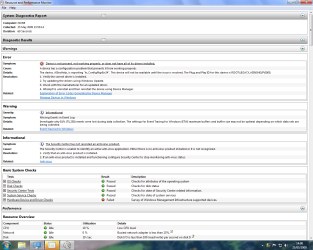
In screen shot 1 the first three entries, I don't know how to resolve these.

I don't know how to find the troublesome device, I only have 6 devices fitted to the PC, 1x internal HD, 2 x optical drives, 1x floppy, 1 x front multi hub and 1x external usb back up HD, all appears to be working, I checked in device manger, I saw no problems.

Anti virus, I have freebie AVG installed, it appears to work OK, I've already done a system scan with it with nothing found.

But system is saying no anti virus installed.

Event logger, Yesterday I had to do a restore after the PC would not respond properly after a Windows update.

There was 1 urgent update and three recommended, I blithely installed all 4 updates, hence the problem.

I don't think it was the urgent update that caused the problem,....but I don't know, I did reinstall it and no problem.

Microsoft in their wisdom,....or maybe not.....have made windows update automatic, you have no control, this is bound to cause problems in the future,.....this newbie thinks.

I digress, I don't know how to resolve this issue,.....if I need to.

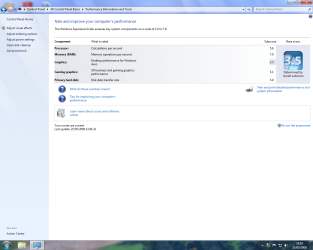
Lastly is the performance screen, I can't get this above 3.5 no matter what I do, as this is a new build, I'm a little disapointed,....or should I be?

Advice on any of the screen shots would be appreciated as would advise on speeding up boot times.
Attached Thumbnails
Hang Dog Win 7-screen-shot-1.png   Hang Dog Win 7-screen-shot-2.png   Hang Dog Win 7-screen-shot-3.png  
My System SpecsSystem Spec
25 May 2009  
ronalde

Windows 7 RC Ultimate Build 7100 X64
26 posts
Leeuwarden, Netherlands


Hey, Tram1.

Have you got a AMD Cool & Quiet-app installed?
Or something else from AMD or Asus?

The error your performance-log gives, is a little bug in either one of these programs. Nothing to worry about, but you could solve it by reinstalling these apps.

Like in Vista & XP, Windows isn't always able to find and check the antivirus-program. You can indicate that you don't want Windows to check your antivirus. I'm using Eset Smart Security Business x64 and Windows detects it perfectly. Maybe something for you?
It uses a lot less resources than AVG. Especially the freebie.

About Windows Update, I have configured my settings that it will automatically download updates but I decide when it installs them.
Especially when there goes something wrong, I can simply rule out if it's an update or not. Just system-restore, and everythings works fine.
(Only had to do this one time, fortunatly.)

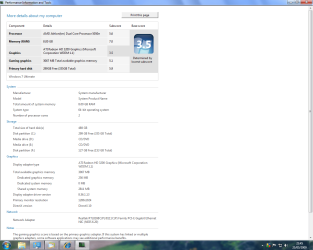
In the Performance-index screen, could you click "View and print detailed performance and system information". Could place a screenshot?
I'm guessing you don't have a very strong graphicscard, do you?
It determines your score by your lowest score and your desktop-performance stands at 3.5.

Greetz Ronald E
My System SpecsSystem Spec
25 May 2009  
Uber Philf

W7 RTM Ultimate x64
2,905 posts
South Coast NSW


No problem :P

And for the popup thats nagging you about no antivirus, the solution i used was to disable popups about the antivirus ( Open action center, Security, Antivirus, and Turn off messages about Virus Protection. )

Easy as piehh :P

Enzo.
My System SpecsSystem Spec
Reply

 Hang Dog Win 7 problems?


Thread Tools


Similar help and support threads for: Hang Dog Win 7
Thread Forum
Solved Welcome screen hang, log on hang, black screen crash, and more! BSOD Help and Support
OMG, I have new hang! BSOD Help and Support
nic hang up Network & Sharing
Hang Installation & Setup
Cold Boot Hang 7 hang up Performance & Maintenance


All times are GMT -5. The time now is 10:05 PM.


Windows 7 Forums is an independent web site and has not been authorized,
sponsored, or otherwise approved by Microsoft Corporation.
"Windows 7" and related materials are trademarks of Microsoft Corp.
© Designer Media Ltd