| Windows 7: No Hang Dog this, it's somin' else. |
28 May 2009
|
#1 | | |
No Hang Dog this, it's somin' else. My new mobo is an ASUS M3A78-EM and I rely on the on board graphics, the installed HD is a Seagate Barracuda Sata 2 affair
The problems lay with starting up or a reboot.
I've been reading all the advise and following tutorials and so on, some fun, interesting and successful, some tedious but nothing ventured...... in an attempt to try and resolve boot hangs and delays. On boot up or restart, I get the boot log sequence, this takes about 15 seconds, from there it goes to Starting Windows and logo, it hangs there for 35 seconds, then the screen goes black for 20 seconds, then it reverts back to a "starting Windows" and logo screen for about 20 seconds, then goes to the welcome screen and desk top.
I don't understand the reason why the 1st or 2nd "starting windows" screens.
A few days ago, briefly I had 2 internal HDs fitted, both with WIN 7 installed, one HD has now been removed completely but I'm wondering if this might be a reason for the 2 start windows, if there is any remnants left from the removed HD? if that makes sense.
I’ve checked the BIOS and boot sequence, all appears in order anything, else I should check?
If one of the "starting windows" could be eliminated, that would speed things up.
I’ll try and explain a little further, upon start or reboot, when the first "starting windows screen" appears the HD remains silent, there is no sound of a spin, for 35 seconds it’s silent, ( I think ), when the 2nd "windows starting" screen appears, then I hear the HD click and whirl, could any of this be connected?
During this 2nd "starting windows" the screen flickers for about 15 seconds and then settles, I am wondering also what might be the cause of this.
Lastly, the HD, in Win 7, I have not enabled XP mode in any shape or form, I’m doing without it so that can’t be a cause and no issues with the PC shutting down, ( didn’t know if that info’ was relevant/ important or not). | My System Specs |
| |
28 May 2009
|
#2 | | W7 RTM Ultimate x64 South Coast NSW |
I dont know, but maybe a format to the new 7127, or the coming ( i think) 7137, might help?
Enzo. | My System Specs | | System Manufacturer/Model Number Custom Build OS W7 RTM Ultimate x64 CPU Intel Q8400 @ 2.66GHZ Motherboard Gigabyte GA-EG45M-UD2H Memory 4GB DDR2-800 Graphics Card Gainward GTS 450 GLH 1GB Edition Sound Card Integrated 8 Channel Monitor(s) Displays AOC 23.6 Inch Widescreen LCD Screen Resolution 1920x1080 Keyboard HP SK-2960 Multimedia Keyboard Mouse Logitech M350 Wireless Gaming Mouse PSU Apevia Java Power 500W Case Cooler Master HAF 922 Black Cooling Stock Intel CPU Fan Hard Drives Seagate 500GB Internal
Western Digital 1TB Internal
Hitachi 1TB External Internet Speed 1.5MB |
28 May 2009
|
#3 | | |

Quote: Originally Posted by Tram 1 My new mobo is an ASUS M3A78-EM and I rely on the on board graphics, the installed HD is a Seagate Barracuda Sata 2 affair
The problems lay with starting up or a reboot.
I've been reading all the advise and following tutorials and so on, some fun, interesting and successful, some tedious but nothing ventured...... in an attempt to try and resolve boot hangs and delays. On boot up or restart, I get the boot log sequence, this takes about 15 seconds, from there it goes to Starting Windows and logo, it hangs there for 35 seconds, then the screen goes black for 20 seconds, then it reverts back to a "starting Windows" and logo screen for about 20 seconds, then goes to the welcome screen and desk top.
I don't understand the reason why the 1st or 2nd "starting windows" screens.
A few days ago, briefly I had 2 internal HDs fitted, both with WIN 7 installed, one HD has now been removed completely but I'm wondering if this might be a reason for the 2 start windows, if there is any remnants left from the removed HD? if that makes sense.
I’ve checked the BIOS and boot sequence, all appears in order anything, else I should check?
If one of the "starting windows" could be eliminated, that would speed things up.
I’ll try and explain a little further, upon start or reboot, when the first "starting windows screen" appears the HD remains silent, there is no sound of a spin, for 35 seconds it’s silent, ( I think ), when the 2nd "windows starting" screen appears, then I hear the HD click and whirl, could any of this be connected?
During this 2nd "starting windows" the screen flickers for about 15 seconds and then settles, I am wondering also what might be the cause of this.
Lastly, the HD, in Win 7, I have not enabled XP mode in any shape or form, I’m doing without it so that can’t be a cause and no issues with the PC shutting down, ( didn’t know if that info’ was relevant/ important or not). do you have a floppy drive..??, if not make sure this is also disabled or it will sit there trying to detect it.....  SK | My System Specs | | System Manufacturer/Model Number myself OS SEVEN x64 CPU Q9450 @ 3.6GHZ 1.34v Motherboard ASUS P5K PREMIUM P35 Memory 8GB 1066 buffalo firestix @ 1152mhz CL5 Graphics Card Sapphire HD 5970 + GTX260 (physX) Sound Card Creative X-FI Xtreme Gamer Monitor(s) Displays SAMSUNG 20'' & SAMSUNG 23'' (dual screens) Screen Resolution 2048x1152 & 1680x1050 Keyboard LOGITECH E110 Mouse logitech NX5 PSU XCILIO 850w (78A) Case CM590 1x 120x38mm & 2x92x38mm / 4x 120x25mm Cooling AC7 PRO @ 92x38mm blower, Lamptron military bus bay controll Hard Drives 1x seagate 160gb IDE & 1x seagate 160gb SATA Internet Speed 2MB Other Info its a continual ''work in progress''.... |
28 May 2009
|
#4 | | Windows 7 Ultimate x64 Service Pack 1 Doncaster, UK |
Hi Tram 1,
It sounds as though you might have 2 versions of the OS still listed on the boot screen, and it is trying to load the missing one by default, failing and then defaulting to the alternative which still exists. You should be able to get rid of this entry by following the instructions here BCDEDIT - How to Use
For example, here is my boot configuration: Code: Microsoft Windows [Version 6.1.7100]
Copyright (c) 2009 Microsoft Corporation. All rights reserved.
C:\Windows\system32>bcdedit
Windows Boot Manager
--------------------
identifier {bootmgr}
device partition=D:
description Windows Boot Manager
locale en-US
inherit {globalsettings}
default {current}
resumeobject {dfa4d7f0-ee22-11dd-9151-80c0e23d2d5c}
displayorder {current}
{dfa4d7ed-ee22-11dd-9151-80c0e23d2d5c}
{10b463b1-edca-11dd-b04d-b24914808d20}
{3fe3de61-ed67-11dd-ade0-981e9c5a65a3}
toolsdisplayorder {memdiag}
timeout 10
Windows Boot Loader
-------------------
identifier {current}
device partition=C:
path \Windows\system32\winload.exe
description Windows 7 RC 7100 64-bit
locale en-US
inherit {bootloadersettings}
recoverysequence {dfa4d7f2-ee22-11dd-9151-80c0e23d2d5c}
recoveryenabled Yes
osdevice partition=C:
systemroot \Windows
resumeobject {dfa4d7f0-ee22-11dd-9151-80c0e23d2d5c}
nx OptIn
Windows Boot Loader
-------------------
identifier {dfa4d7ed-ee22-11dd-9151-80c0e23d2d5c}
device partition=F:
path \Windows\system32\winload.exe
description Windows 7 RC 7100 32-bit
locale en-US
inherit {bootloadersettings}
recoverysequence {dfa4d7ee-ee22-11dd-9151-80c0e23d2d5c}
recoveryenabled Yes
osdevice partition=F:
systemroot \Windows
resumeobject {dfa4d7ec-ee22-11dd-9151-80c0e23d2d5c}
nx OptIn
Windows Boot Loader
-------------------
identifier {10b463b1-edca-11dd-b04d-b24914808d20}
device partition=E:
path \Windows\system32\winload.exe
description Windows Vista Ultimate 64-bit SP1
locale en-US
inherit {bootloadersettings}
osdevice partition=E:
systemroot \Windows
resumeobject {10b463b2-edca-11dd-b04d-b24914808d20}
nx OptIn
Windows Boot Loader
-------------------
identifier {3fe3de61-ed67-11dd-ade0-981e9c5a65a3}
device partition=D:
path \Windows\system32\winload.exe
description Windows Vista Home Premium 32-bit SP1
locale en-US
inherit {bootloadersettings}
osdevice partition=D:
systemroot \Windows
resumeobject {3fe3de62-ed67-11dd-ade0-981e9c5a65a3}
nx OptIn
C:\Windows\system32> If I wanted to remove my Windows 7 RC 7100 32-bit from the menu, I would type the following: Code: bcdedit /delete {dfa4d7ed-ee22-11dd-9151-80c0e23d2d5c} Note that you will need to substitute the correct identifier string from YOUR system. | My System Specs | | Computer type PC/Desktop System Manufacturer/Model Number Dwarf Dwf/11/2012 OS Windows 7 Ultimate x64 Service Pack 1 CPU Intel Core-i5-3570K 4-core @ 3.4GHz (Ivy Bridge) (OC 4.2GHz) Motherboard ASRock Z77 Extreme4-M Memory 4 x 4GB DDR3-1600 Corsair Vengeance CMZ8GX3M2A1600C9B (16GB) Graphics Card 2 x AMD Radeon HD7770 1GB CrossFired (OC 1100MHz/1250MHz) Sound Card Realtek High Definition on board solution (ALC 898) Monitor(s) Displays ViewSonic VA1912w Widescreen (VGA) Screen Resolution 1440x900 Keyboard Microsoft Comfort Curve Keyboard 3000 (USB) Mouse Microsoft Comfort Mouse 3000 for Business (USB) PSU XFX Pro Series 850W Semi-Modular Case Gigabyte IF233 Cooling 1 x 120mm Front Inlet 1 x 120mm Rear Exhaust Hard Drives OCZ Agility 3 SSD 120GB SATA III x2 (RAID 0)
Samsung HD501LJ 500GB SATA II x2
Hitachi HDS721010CLA332 1TB SATA II
Iomega 1.5TB Ext USB 2.0
WD 2.0TB Ext USB 3.0 Internet Speed NetGear DG834Gv3 ADSL Modem/Router (Ethernet) ~4.0 Mb/s (O2) Antivirus Avast! 8.0.1483 Browser IE 9 Other Info Optical Drive: HL-DT-ST BD-RE BH10LS30 SATA Bluray
Lexmark S305 Printer/Scanner/Copier (USB)
CTF-430 Tablet & Pen
WEI Score: 7.7/7.9/7.4/7.4/7.9
Asus Eee PC 1011PX Netbook (Windows 7 x86 Starter) |
28 May 2009
|
#6 | | |
Hi Dwarf,
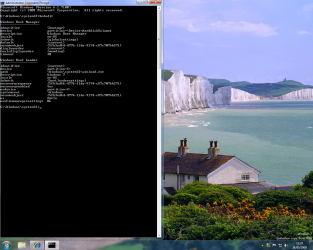
Here is a screen shot of my boot configuration, are you able to tell if I have an issue with my boot loadings from the attached.
I suspect it is the 1st boot loader entry I need to alter or delete, do I need to delete the whole entry or just a line in it.
You wrote "Note that you will need to substitute the correct identifier string from YOUR system."
I'm a little confused by this, if I delete the whole or a single line of the 1st entry do, I need to substitute with anything?
Before taking screen shot, I disconnected my external HD, I guess this was ok to do. | My System Specs | | |
28 May 2009
|
#7 | | Windows 7 Ultimate x64 Service Pack 1 Doncaster, UK |
Hi Tram 1,
Having viewed your image, and compared it to the relevant part of mine, I think that I can see where the trouble is. I've highlighted it in the image below. 
This would seem to indicate that the boot manager was in fact installed on the HDD that you removed from your system. To correct this, type the following: Code: bcdedit /set {bootmgr} device partition=C: | My System Specs | | Computer type PC/Desktop System Manufacturer/Model Number Dwarf Dwf/11/2012 OS Windows 7 Ultimate x64 Service Pack 1 CPU Intel Core-i5-3570K 4-core @ 3.4GHz (Ivy Bridge) (OC 4.2GHz) Motherboard ASRock Z77 Extreme4-M Memory 4 x 4GB DDR3-1600 Corsair Vengeance CMZ8GX3M2A1600C9B (16GB) Graphics Card 2 x AMD Radeon HD7770 1GB CrossFired (OC 1100MHz/1250MHz) Sound Card Realtek High Definition on board solution (ALC 898) Monitor(s) Displays ViewSonic VA1912w Widescreen (VGA) Screen Resolution 1440x900 Keyboard Microsoft Comfort Curve Keyboard 3000 (USB) Mouse Microsoft Comfort Mouse 3000 for Business (USB) PSU XFX Pro Series 850W Semi-Modular Case Gigabyte IF233 Cooling 1 x 120mm Front Inlet 1 x 120mm Rear Exhaust Hard Drives OCZ Agility 3 SSD 120GB SATA III x2 (RAID 0)
Samsung HD501LJ 500GB SATA II x2
Hitachi HDS721010CLA332 1TB SATA II
Iomega 1.5TB Ext USB 2.0
WD 2.0TB Ext USB 3.0 Internet Speed NetGear DG834Gv3 ADSL Modem/Router (Ethernet) ~4.0 Mb/s (O2) Antivirus Avast! 8.0.1483 Browser IE 9 Other Info Optical Drive: HL-DT-ST BD-RE BH10LS30 SATA Bluray
Lexmark S305 Printer/Scanner/Copier (USB)
CTF-430 Tablet & Pen
WEI Score: 7.7/7.9/7.4/7.4/7.9
Asus Eee PC 1011PX Netbook (Windows 7 x86 Starter) |
28 May 2009
|
#8 | | |

Quote: Originally Posted by Dwarf Hi Tram 1,
Having viewed your image, and compared it to the relevant part of mine, I think that I can see where the trouble is. I've highlighted it in the image below. Attachment 12358
This would seem to indicate that the boot manager was in fact installed on the HDD that you removed from your system. To correct this, type the following: Code: bcdedit /set {bootmgr} device partition=C: Hi Dwarf,
Are you saying open command prompt delete the high lighted entry/line and type/replace it with bcdedit /set {bootmgr} device partition=C:
OR
are you saying open command prompt and at the curser type, bcdedit /set {bootmgr} device partition=C: | My System Specs | | |
28 May 2009
|
#9 | | Windows 7 Ultimate x64 Service Pack 1 Doncaster, UK |
Hi Tram 1,
The latter option, 
Quote: Originally Posted by Tram 1 open command prompt and at the curser type, bcdedit /set {bootmgr} device partition=C: | My System Specs | | Computer type PC/Desktop System Manufacturer/Model Number Dwarf Dwf/11/2012 OS Windows 7 Ultimate x64 Service Pack 1 CPU Intel Core-i5-3570K 4-core @ 3.4GHz (Ivy Bridge) (OC 4.2GHz) Motherboard ASRock Z77 Extreme4-M Memory 4 x 4GB DDR3-1600 Corsair Vengeance CMZ8GX3M2A1600C9B (16GB) Graphics Card 2 x AMD Radeon HD7770 1GB CrossFired (OC 1100MHz/1250MHz) Sound Card Realtek High Definition on board solution (ALC 898) Monitor(s) Displays ViewSonic VA1912w Widescreen (VGA) Screen Resolution 1440x900 Keyboard Microsoft Comfort Curve Keyboard 3000 (USB) Mouse Microsoft Comfort Mouse 3000 for Business (USB) PSU XFX Pro Series 850W Semi-Modular Case Gigabyte IF233 Cooling 1 x 120mm Front Inlet 1 x 120mm Rear Exhaust Hard Drives OCZ Agility 3 SSD 120GB SATA III x2 (RAID 0)
Samsung HD501LJ 500GB SATA II x2
Hitachi HDS721010CLA332 1TB SATA II
Iomega 1.5TB Ext USB 2.0
WD 2.0TB Ext USB 3.0 Internet Speed NetGear DG834Gv3 ADSL Modem/Router (Ethernet) ~4.0 Mb/s (O2) Antivirus Avast! 8.0.1483 Browser IE 9 Other Info Optical Drive: HL-DT-ST BD-RE BH10LS30 SATA Bluray
Lexmark S305 Printer/Scanner/Copier (USB)
CTF-430 Tablet & Pen
WEI Score: 7.7/7.9/7.4/7.4/7.9
Asus Eee PC 1011PX Netbook (Windows 7 x86 Starter) |
28 May 2009
|
#10 | | |

Quote: Originally Posted by Dwarf Hi Tram 1,
The latter option, Thanks Dwarf,
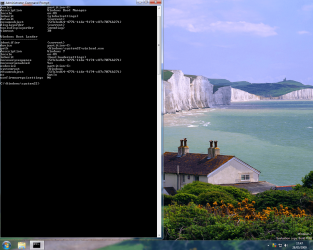
Would you check the attatched.
Questions, why does it still show 2 boot loaders, can I despense/delete top one all together, is this advisable and how do I do this?
At the bottom of the 2nd boot loader, last line, it says "system 32, I thought Windows 7 was a 64 bit system, I'm curious as to why it shows 32? | My System Specs | | No Hang Dog this, it's somin' else. problems? All times are GMT -5. The time now is 09:05 AM. | |