
Windows 7 Forums


Windows 7: Accurate CPU temps

04 Oct 2010   #1

Windows 7 Ultimate
 
 
Accurate CPU temps

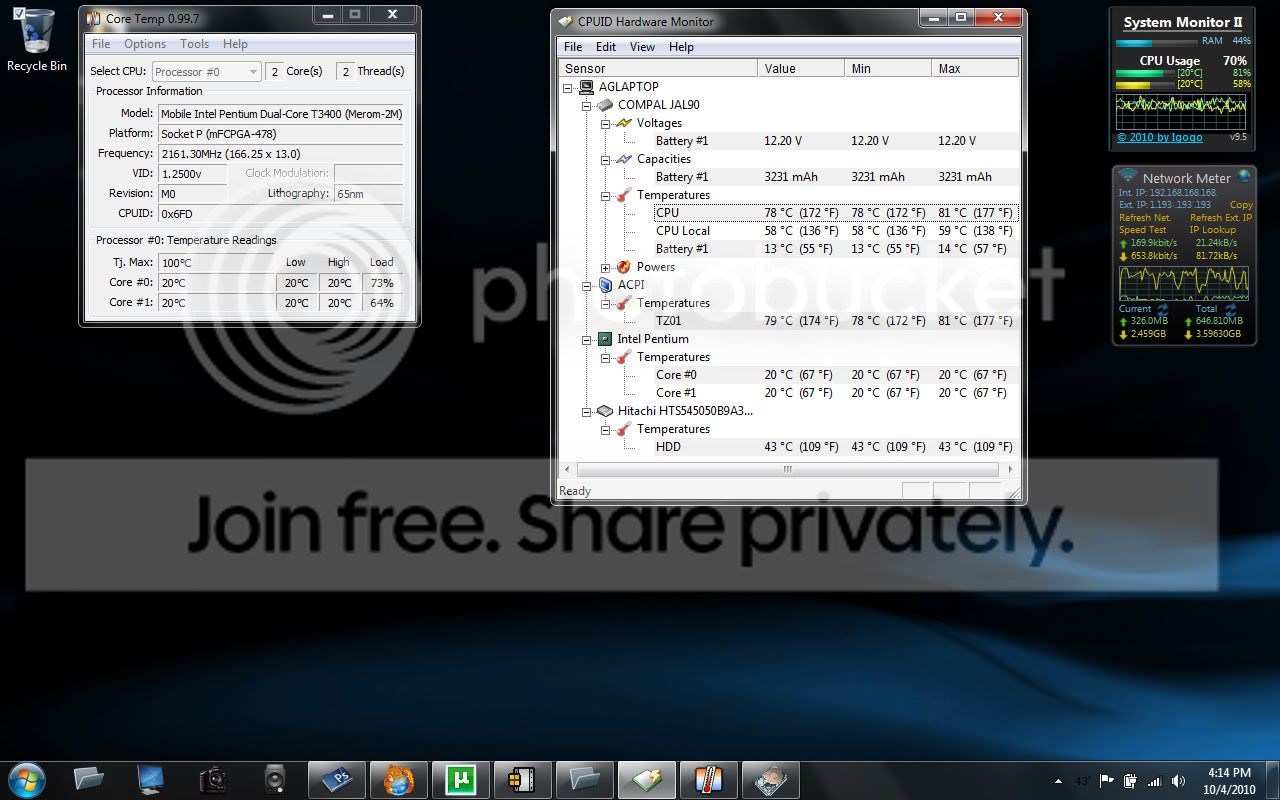
With different software, it seems that there sometimes is a difference in reported temps. I normally have Core Temp set to run as soon as I start up, but I noticed that today while running task had the cpu at around 60-75% for hours, the cpu temp reported in Core Temp hasn't changed at all. So I ran CPUID hardware monitor and noticed two locations for CPU temps, one matching the 20deg reading as in Core Temp and readings of 81deg C and 59 deg C under the motherboard section for CPU temps. Screen shot attached. What do you guys use for accurate readings and is what is shown here something to be concerned about for high temps? Thanks.


My System SpecsSystem Spec

04 Oct 2010   #2
MK2


Hi,

According to the specs of your processor: Intel® Pentium® Processor T3400 (1M Cache, 2.16 GHz, 667 MHz FSB) Socket P with SPEC Code(s) SLB3P it can handle those temps, but if correct they are on the high side.
Processors on laptops usually get hotter though.

About the 20c reading, you could check the bios and see what it reads, it could be that the temperature sensors on the CPU are stuck but i'm not sure.

I always use Realtemp to monitor my CPU: Real Temp - CPU temperature monitoring you could give it a try and see what it reads.

If you want to try to lower the temps you could clean the airduct with some compressed air and you could raise the back of the laptop with some raisers to ensure enough air flow.

MK2
My System SpecsSystem Spec
04 Oct 2010   #3

Windows 7 Ultimate


Thanks MK2,

I just got Real Temp and it is giving the same 20deg C reading, although I have around 8 programs fully taxing the cpu to 100% right now including PS, DPP, and DxO raw processing. I gues I was concerned about two different readings for CPU - under the intel CPU listing and on the motherboard. I have started regularly hitting the heat sink/fan assembly with compressed air which has managed to keep thing from getting to 100deg C and shutting off.
My System SpecsSystem Spec
.


04 Oct 2010   #4
MK2


Did you check the bios?
It still looks like the core temperature sensors of the CPU are stuck and you only get a reading of the overall CPU temerature from the motherboard.
My System SpecsSystem Spec
04 Oct 2010   #5

Windows 7 32 bit
Burntwood, Staffordshire, ENGLAND


My System SpecsSystem Spec
13 Oct 2010   #6

Windows 7 Ultimate


Quote   Quote: Originally Posted by MK2 View Post
Did you check the bios?
It still looks like the core temperature sensors of the CPU are stuck and you only get a reading of the overall CPU temerature from the motherboard.
Just booted into BIOS but didn't see anything there related to the temps - the bios (Inside BIOS) has very limited configuration on this laptop.
My System SpecsSystem Spec
16 Oct 2010   #7

Windows 7 Pro, Vista Business, Vista Ultimate, Windows XP
Tucson, AZ


Just out of curiosity - Have you tried SpeedFan?

Sure helps my workstations out, but come to think of it I haven't tried it on my HP Laptop...

Think i will try my own advice now and see what happens!

UPDATE:
Okay, I had no fans, or temp sensors show up, so it's non-functional for me. You may wish to give it a shot - you can vary fan utilization based on temperature. But only if the sensors that run the fans show up...

Hope it helps you, but on my HP Elitebook 8530p it's a no go.
My System SpecsSystem Spec
Reply

 Accurate CPU temps problems?


Thread Tools


Similar help and support threads for: Accurate CPU temps
Thread Forum
Keyboard not accurate General Discussion
How accurate is driver max? Drivers
Disk Activity is NOT accurate in Resource Monitor....not even close! Performance & Maintenance
MPG files don't show accurate time [and resolution] Music, Pictures & Video
Question about accurate speed testing and Choke points Network & Sharing


All times are GMT -5. The time now is 09:38 PM.


Seven Forums Android App Seven Forums IOS App Follow us on Facebook

Windows 7 Forums is an independent web site and has not been authorized,
sponsored, or otherwise approved by Microsoft Corporation.
"Windows 7" and related materials are trademarks of Microsoft Corp.
© Designer Media Ltd
  

1 2 3 4 5 6 7 8 9 10 11 12 13 14 15 16 17 18 19 20 21 22 23 24 25 26 27 28 29 30 31 32