Windows 7 Forums


Windows 7: Need to turn on System Protection

12 Oct 2010   #1

Windows 7 Starter 32 bit
 
 
Need to turn on System Protection

I am trying to do a system restore. When I get to the screen titled 'confirm disks to restore' it says 'you must enable System Protection on this drive'. I am unable to enable System Protection thru normal means because the tab isn't showing up. I searched the forum and found an answer in the following thread that I thought would help:

Can't access System Protection options

There's probably a value in the registry called "DisableConfig" or "DisableSR" at HKEY_LOCAL_MACHINE\Software\Policies\Microsoft\Windows NT\SystemRestore. Open regedit, browse to that key, and if either value exists, delete and reboot the PC. You should get your System Restore tab back after doing this.
Last edited by cluberti; 08-27-2010 at 05:55 AM.. Reason: Seems there's a second value - updating thread

Unfortunately, I have HKEY_LOCAL_MACHINE\Software\Policies\Microsoft\Windows NT\

but no SystemRestore after that.

Can anyone help me????

My System SpecsSystem Spec

12 Oct 2010   #2

Windows 7 Ultimate x64
Milton Keynes, United Kingdom


Hi garzon6, welcome to the forums

It sounds like 'Systems Restore' has been disabled. To enable it just follow the steps below...

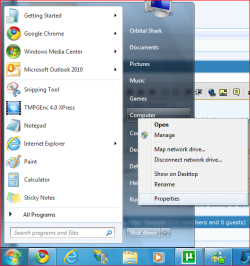
1 Click Start and right-click 'Computer' & select 'Properties'

Need to turn on System Protection-1-start-computer.png

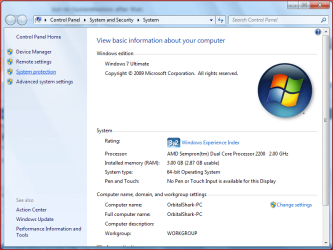
2 Select 'System Protection'

Need to turn on System Protection-2-system-protection.png

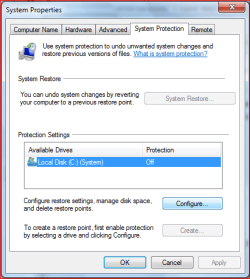
3 Click 'Configure'

Need to turn on System Protection-3-configure.png

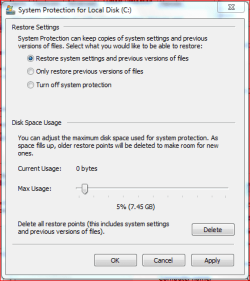
4 Select the first option in the list then click 'Apply' then 'Ok'

Need to turn on System Protection-4-make-changes.png

Hope this helps

Quote:
I am unable to enable System Protection thru normal means because the tab isn't showing up
Can you show a snip regarding the lack of options above too?

OS
My System SpecsSystem Spec
12 Oct 2010   #3

MS Windows 7 Ultimate SP1 64-bit
Austin, Texas


Garzon,
Welcome to SevenForums.

The procedure you received from Orbital Shark should solve your problem If not, then please read, please read the following tutorial and follow the procedure there.
System File Checker - SFC /SCANNOW Command
My System SpecsSystem Spec
.


12 Oct 2010   #4

Windows 7 Starter 32 bit


I can't show any images because I am on another computer. The computer that has the problem displays a blue screen and shuts down almost immediately each time I turn it on. The couple times it didn't shut down in safe mode, I tried the procedure you have laid out above, but I don't even have a tab that says System Protection. The thread I reference above was started by someone who also did not have that tab and the advice given worked...I just seem to be missing that last file. This is a mess!
My System SpecsSystem Spec
12 Oct 2010   #5

Windows 7 Ultimate x64
Milton Keynes, United Kingdom


Have you tried the above link from karlsnooks in safe mode?
My System SpecsSystem Spec
12 Oct 2010   #6

Windows 7 Starter 32 bit


The sfc /scannow command was also mentioned in the above referenced thread. I did it and received the same result...'There is a system repair pending which requires reboot to complete. Restart Windows and run sfc again.'
My System SpecsSystem Spec
12 Oct 2010   #7

Windows 7 Ultimate x64
Milton Keynes, United Kingdom


If, when you boot up, you press F8 and select 'Repair Computer' you can select 'Advanced repair options' that should allow you to select system restore from there.
My System SpecsSystem Spec
12 Oct 2010   #8

Windows 7 Starter 32 bit


That is how I got to system restore and where it says I need to enable System Protection. I'm sorry to be such a pain.
My System SpecsSystem Spec
12 Oct 2010   #9

MS Windows 7 Ultimate SP1 64-bit
Austin, Texas


My System SpecsSystem Spec
12 Oct 2010   #10

Windows 7 Starter 32 bit


Thanks, tried the start up repair...says no problems found.
My System SpecsSystem Spec
Reply

 Need to turn on System Protection problems?


Thread Tools


Similar help and support threads for: Need to turn on System Protection
Thread Forum
System Protection - Turn On or Off Tutorials
Can I turn on system protection thru cmd? Windows is frozen. General Discussion
could i turn system protection on or off from command line? Backup and Restore
System Protection will not turn on General Discussion
How to Turn Off System Protection by registry (regedit) Performance & Maintenance


All times are GMT -5. The time now is 03:01 AM.


Windows 7 Forums is an independent web site and has not been authorized,
sponsored, or otherwise approved by Microsoft Corporation.
"Windows 7" and related materials are trademarks of Microsoft Corp.
© Designer Media Ltd