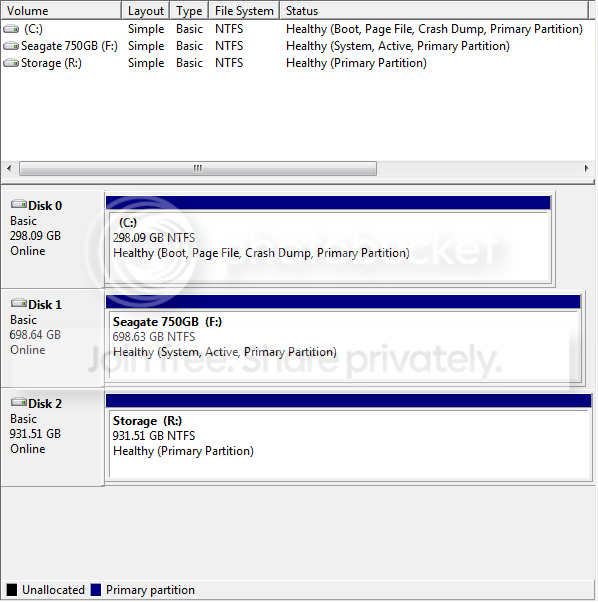
Hello,
I know this might be a very silly question, but I am trying to format one of my storage drives, and it seems like Windows does not want me to.
I have always only used it to store data, so why is Windows 7 telling me it is a system partition? Did Windows put data on the drive and start using it without even asking me?
At first I tried just unplugging the drive, but then Windows would not boot, so clearly it needs it for some reason.
I'm really confused as to why Windows needs this storage drive so badly. Could anyone help me figure this out? I would really appreciate it! Thanks~
I know this might be a very silly question, but I am trying to format one of my storage drives, and it seems like Windows does not want me to.
I have always only used it to store data, so why is Windows 7 telling me it is a system partition? Did Windows put data on the drive and start using it without even asking me?
At first I tried just unplugging the drive, but then Windows would not boot, so clearly it needs it for some reason.
I'm really confused as to why Windows needs this storage drive so badly. Could anyone help me figure this out? I would really appreciate it! Thanks~
My Computer
At a glance
Windows 7 Ultimate 64bit
- OS
- Windows 7 Ultimate 64bit