Windows 7 Forums Search
Welcome to Windows 7 Forums. Our forum is dedicated to helping you find solutions with any problems, errors or issues you are experiencing with Windows 7. The Windows 7 forum also covers news and updates and has an extensive Windows 7 tutorial section that covers a wide range of tips and tricks.


Windows 7 - Monitor ICC Profile (color management)


06-03-2009   #1


Windows Seven RC1


Monitor ICC Profile (color management)

Hi all

I have a problem with color management :

I'm an amateur photographer, I have made an ICC color profile for my screen under windows xp (using a friend's probe and software) the profile works perfectly under xp

I have loaded it under seven following all the steps found here

Color management settings: frequently asked questions - Windows Vista Help

at the "How do I change the default color settings for a specific device for all users on the computer?" section

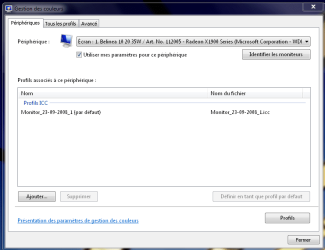
The monitor is properly installed, the profile is set as default for my monitor, but I can see no change in color rendering... as if the icc profile is not active

Any pointers ?

Thanks

Attached Thumbnails
Monitor ICC Profile (color management)-capture1.png  
My System SpecsSystem Spec
06-03-2009   #2


Windows 7 Ultimate x64 SP1


Hello Aturion, and welcome to Seven Forums,

This may be what you are looking for:

Display Color Calibration

Hope this helps,
Shawn
My System SpecsSystem Spec
06-04-2009   #3


Windows Seven RC1


Thank you Brink

I'll try that if I don't find a way to use my icc profile

The icc profile was made using an eye one display 2 probe and it's supposed to be way more precise than a manual calibration, colors are really accurate on my win Xp boot using this profile

I have to say that on my xp boot there is a little software that reminds windows to use the profile every boot, but as I don't have the probe anymore I can't reinstall it, theoretically the profile file is sufficient to make the monitor works correctly, as long as windows accepts to use it...

Thank you anyway
My System SpecsSystem Spec
.


06-04-2009   #4


Windows7


I don't believe profiles and their degree of complexity are entirely standardized, and you may well have a profile that requires loading from the software rather than the system.

I'd see if you can find the loading software you were using before. You should be able to install it and associate the profile without the hardware.

Given the way monitors can drift over time, you might also want to look into getting your own device like the Spyder2Express by ColorVision which remains fairly affordable, especially if you do photography stuff on a semi-regular basis. It might not quite be up to the same caliber as the super-duper pro models, but it works perfectly fine under most scenarios, and is certainly better than forcing an outdated profile, too.
My System SpecsSystem Spec
06-04-2009   #5


Windows Seven RC1


Thanks poin2, smart advices.

You're right, probes are not so expensive, I'll buy myself one, however lcd screens does not drift much, crt does.

I thought icc profiles were standardized enough to be directly used by the system, but I may be wrong, color management is very complex indeed.

Last edited by Aturion; 06-04-2009 at 04:30 AM.. Reason: typo
My System SpecsSystem Spec
06-05-2009   #6


windows 7 HP 64bit


Ive got my display calibrated with a Spyder2 and while it works fine i find that i still have to use the spyder software to load it on start up because the Windows 7 CM applet doesn't always load it.
It works fine with Windows 7 but for some reason windows doesn't always load it.

PITA.
My System SpecsSystem Spec
01-08-2010   #7


I realize that this thread is very old, but I thought maybe I'd try it anyway, as I am lost (again):

I am having the same problem as Aturion. I am also an amateur photographer and use the iOne Display 2 to calibrate my monitor. I have used it with XP for many years, with excellent results. Whenever I start up with XP, I can see the exact moment in time when the .icc profile is loaded and applied.

After conducting the calibration within windows 7, the .icc is applied. There is even a setting in the calibration software that allows me to turn the .icc profile on and off, so that I can visualize the difference. But when I start-up Windows 7, the .icc is not applied.

I have gone into the advanced settings and designated the .icc file as the default, but it seems as if it is never applied. And yes, I do have the 'use my settings for this device' box checked.

I also do not have the Adobe gamma correction program in my startup, so this cannot be the issue.

If anyone has any suggestions, please let me know!
My System SpecsSystem Spec
08-13-2010   #8


win7 prof.


rename icc profiles?

I have a slightly different question:
Does anyone know if I can rename the icc profiles under Windows 7?
I didn't find out how so far...

thx
My System SpecsSystem Spec
Reply

Monitor ICC Profile (color management) problems?


Thread Tools


Similar Threads for: Monitor ICC Profile (color management)
Thread Forum
color management? General Discussion
More than one Color Management/Clear Type Profile (work vs home) Customization
color management in IE9 Browsers & Mail
Dual profile management Customization
Color management General Discussion


All times are GMT -5. The time now is 09:47 AM.


Windows 7 Forums is an independent web site and has not been authorized,
sponsored, or otherwise approved by Microsoft Corporation.
"Windows 7" and related materials are trademarks of Microsoft Corp.
© Designer Media Ltd
  

1 2 3 4 5 6 7 8 9 10 11 12 13 14 15 16 17 18 19 20 21 22 23 24 25 26 27 28 29 30