Windows 7 Forums Search
Welcome to Windows 7 Forums. Our forum is dedicated to helping you find solutions with any problems, errors or issues you are experiencing with Windows 7. The Windows 7 forum also covers news and updates and has an extensive Windows 7 tutorial section that covers a wide range of tips and tricks.


Windows 7 - Win7 Memory hog pagefile and hiberfil?

 
10-30-2010   #1


windows 7 Ultimate 32bit & 64bit


Win7 Memory hog pagefile and hiberfil?

Hey guys i just recently installed windows 7 bootcamp on my new macbook pro, the hard drive isnt bit (100gb) so i notice right away when a nice chunk of my memory is gone, 4gb to pagefile.sys and 3gb to hiberfil.sys, do i need them can i delete it?

thanks.

My System SpecsSystem Spec
10-30-2010   #2


WCP ONLY


Quote   Quote: Originally Posted by hastyle View Post
Hey guys i just recently installed windows 7 bootcamp on my new macbook pro, the hard drive isnt bit (100gb) so i notice right away when a nice chunk of my memory is gone, 4gb to pagefile.sys and 3gb to hiberfil.sys, do i need them can i delete it?

thanks.
Cant delete either hyberfil.sys is used to sleep and resume, page file is used when demand exceeds the avail memory.


You can minimize both if really needed.

Ken
My System SpecsSystem Spec
10-30-2010   #3
Nid


Windows 7 Pro 64bit


I'll have to disagree with Ken on deleting hiberfil.sys. You can if you don't want your computer to hibernate. Sleep is suspends to RAM not HDD.

To safely delete hiberfil.sys go to Start menu, type “cmd” open up command prompt and the type powercfg.exe -h off.

Just make sure you are an Administrator.

For pagefile I would leave it alone since you only have 2GB of RAM.
My System SpecsSystem Spec
.


11-01-2010   #4


windows 7 Ultimate 32bit & 64bit


tried deleting it wont allow me to, say i dont have permission but my account is an admin acc. I have 4gb of ram, what does pagefile do?

thanks.


Quote   Quote: Originally Posted by Nid View Post
I'll have to disagree with Ken on deleting hiberfil.sys. You can if you don't want your computer to hibernate. Sleep is suspends to RAM not HDD.

To safely delete hiberfil.sys go to Start menu, type “cmd” open up command prompt and the type powercfg.exe -h off.

Just make sure you are an Administrator.

For pagefile I would leave it alone since you only have 2GB of RAM.
My System SpecsSystem Spec
11-01-2010   #5


Windows 7 x64 pro/ Windows 7 x86 Pro/ XP SP3 x86


Quote   Quote: Originally Posted by hastyle View Post
tried deleting it wont allow me to, say i dont have permission but my account is an admin acc. I have 4gb of ram, what does pagefile do?

thanks.


Quote   Quote: Originally Posted by Nid View Post
I'll have to disagree with Ken on deleting hiberfil.sys. You can if you don't want your computer to hibernate. Sleep is suspends to RAM not HDD.

To safely delete hiberfil.sys go to Start menu, type “cmd” open up command prompt and the type powercfg.exe -h off.

Just make sure you are an Administrator.

For pagefile I would leave it alone since you only have 2GB of RAM.
Run cmd as admin, then run the powercfg command.

Elevated Command Prompt

Hibernate - Enable or Disable

Pagefile is a part of the hard disk that supplements RAM, when required.
My System SpecsSystem Spec
11-01-2010   #6


MS Windows 7 Ultimate SP1 64-bit


Use Bill2's post to turn hibernate off.
On you next reboot, the hibernate file will be gone.

I do not use hibernate. I do not use sleep. My shutdowns and startups are quick.

Leave the Pagefile size alone. Microsoft finally got pagefile managment down to a fine science and they size and allocation are that which is deemed best for your system.

Back in the XP days, MS wasn't too intelligent regarding size of the pagefile but don't listen to any of these supposed experts who will advise you everything from zero to half of your drive.
My System SpecsSystem Spec
11-01-2010   #7


MS Windows 7 Ultimate SP1 64-bit


hastyle,

Just a comment on your 100 GB. For the majority of people, but not all, that is plenty.

My workhorse computer is my Toshiba laptop.

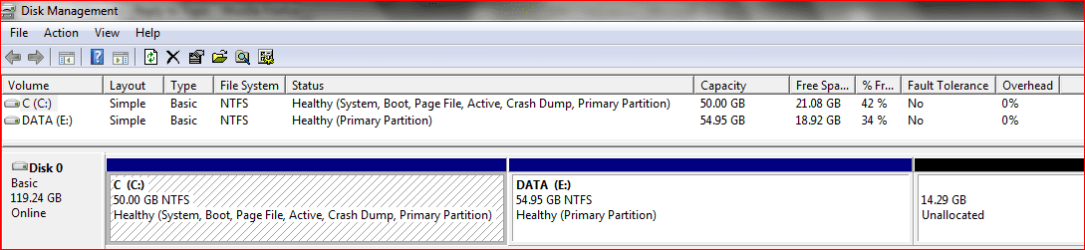
I'm including a map of the SSD (solid state drive) in the laptop
Win7 Memory hog pagefile and hiberfil?-mytoshibalaptopdiskpartitions.png
My System SpecsSystem Spec
11-01-2010   #8


MS Windows 7 Ultimate SP1 64-bit


Hastyle,

I would also like to mention the most popular program for cleaning up junk.

This program is the number one program in this category and by an unbelievable margin. This program is probably used by all of us here.
CCleaner
My System SpecsSystem Spec
11-01-2010   #9


windows 7 Ultimate 32bit & 64bit


i do a lot of 3d design and video editing, so i need everything.

Got it removed, thank you guys.


Quote   Quote: Originally Posted by karlsnooks View Post
hastyle,

Just a comment on your 100 GB. For the majority of people, but not all, that is plenty.

My workhorse computer is my Toshiba laptop.

I'm including a map of the SSD (solid state drive) in the laptop
Attachment 109872
My System SpecsSystem Spec
11-01-2010   #10


MS Windows 7 Ultimate SP1 64-bit


Glad that we could be of assistance and enjoy your Win 7.
My System SpecsSystem Spec
Reply

 Win7 Memory hog pagefile and hiberfil? problems?


Thread Tools


Similar Threads for: Win7 Memory hog pagefile and hiberfil?
Thread Forum
Solved Unmoveable System Files other than pagefile and hiberfil? General Discussion
Solved PageFile.sys & Hiberfil.sys - Delete Safe? Performance & Maintenance
How can I securely delete pagefile.sys and hiberfil.sys? General Discussion
I set maximum memory to 2 with no pagefile Performance & Maintenance
pagefile.sys & hiberfil.sys General Discussion


All times are GMT -5. The time now is 07:44 PM.


Windows 7 Forums is an independent web site and has not been authorized,
sponsored, or otherwise approved by Microsoft Corporation.
"Windows 7" and related materials are trademarks of Microsoft Corp.
© Designer Media Ltd
  

1 2 3 4 5 6 7 8 9 10 11 12 13 14 15 16 17 18 19 20 21 22 23 24 25 26 27 28 29 30