Computer Idling at 55% Ram Usage

Singley

New member
All,

My computer currently runs above 50% ram usage at all times, even when I have nothing but a browser open. I have noticed it is starting to react more sluggishly, and when I play any sort of game it is much more laggy and slow then it used to be. I was hoping someone on the forums would have some insight to why this is happening.

I have searched old topics about this, and haven't been able to figure it out on my system. I haven't recently installed anything big or a new anti virus or anything, so I don't know what the cause is. A screen shot is attached with my open processes running.

I have 4 GB of ram on my machine, and am running Windows 7 Home Premium 64 bit.

Any advice is greatly appreciated, and if I left off any pertinent information please let me know.

Thank you in advance.
 

Attachments

  • Capture.JPG
    Capture.JPG
    120 KB · Views: 81

My Computer

OS
Windows 7 Home Premium 64 bit
Memory
4 GB
How many Chrome tabs did you have open when you did the screen shot?
It shows 7 Chrome tabs open.
Total of roughly 160,000k.
1.6MB out of your 4MB.

Mike
 

My Computer

Computer Manufacturer/Model Number
Hopalong/ Godzilla
OS
Windows7 Pro 64bit SP-1; Windows XP Pro 32bit
CPU
Intel Core i7-870 Lynnfield 2.93GHz LGA 1156 95W Quad-Core
Motherboard
ASUS P7P55D-E PRO
Memory
8GB@1400MHz Crucial Ballistix DDR3-1600 4x2GB
Graphics Card(s)
ASUS ENGTX460 DirectCU/2DI/1GD5 1GB 256-bit GDDR5
Sound Card
VIA Onboard
Monitor(s) Displays
Asus VS248H-P 24"; Samsung SyncMaster 941BW 19"ws
Screen Resolution
1920x1080; 1440x900
Hard Drives
Samsung 830 120GB SSD
Intel 320 120GB SSD
Western Digital Caviar Black WD7501AALS 750GB 7200 RPM SATA 3.0Gb/s
Western Digital Caviar Black WD6401AALS 640GB 7200 RPM SATA 3.0Gb/s
PSU
COOLER MASTER Silent Pro RS850-AMBAJ3-US 850W Modular
Case
COOLER MASTER HAF 932 RC-932-KKN5-GP Black
Cooling
Scythe "Mugen-2 Rev.B" (2 ScytheKaze-Jyuni PWM fans)
Keyboard
Logitech K-320
Mouse
Kensington
Antivirus
Avast Inernet Suite
Browser
IE 9 ; Chrome
I closed all instances of Chrome and took another screen shot. The only program I had open at the time was my snipping program to grab the screen shot. I'm still at 58%.
 

Attachments

  • Capture.JPG
    Capture.JPG
    103.2 KB · Views: 59

My Computer

OS
Windows 7 Home Premium 64 bit
Memory
4 GB
dwm.exe is the Windows Aero desktop stuff. Mine is only using 18,K.

Click start and type in resource monitor in the search bar. Open that then click on the memory tab at top.
It gives a more detailed listing.
Post a Snip and I'll try to find some more help while your doing that.

I posted for some help. Don't know exactly when but hopefully soon.
 

My Computer

Computer Manufacturer/Model Number
Hopalong/ Godzilla
OS
Windows7 Pro 64bit SP-1; Windows XP Pro 32bit
CPU
Intel Core i7-870 Lynnfield 2.93GHz LGA 1156 95W Quad-Core
Motherboard
ASUS P7P55D-E PRO
Memory
8GB@1400MHz Crucial Ballistix DDR3-1600 4x2GB
Graphics Card(s)
ASUS ENGTX460 DirectCU/2DI/1GD5 1GB 256-bit GDDR5
Sound Card
VIA Onboard
Monitor(s) Displays
Asus VS248H-P 24"; Samsung SyncMaster 941BW 19"ws
Screen Resolution
1920x1080; 1440x900
Hard Drives
Samsung 830 120GB SSD
Intel 320 120GB SSD
Western Digital Caviar Black WD7501AALS 750GB 7200 RPM SATA 3.0Gb/s
Western Digital Caviar Black WD6401AALS 640GB 7200 RPM SATA 3.0Gb/s
PSU
COOLER MASTER Silent Pro RS850-AMBAJ3-US 850W Modular
Case
COOLER MASTER HAF 932 RC-932-KKN5-GP Black
Cooling
Scythe "Mugen-2 Rev.B" (2 ScytheKaze-Jyuni PWM fans)
Keyboard
Logitech K-320
Mouse
Kensington
Antivirus
Avast Inernet Suite
Browser
IE 9 ; Chrome
I appreciate you helping me with this. The screen shot is below. There are multiple tabs of Chrome open again, so that will show up again.
 

Attachments

  • Capture.JPG
    Capture.JPG
    142.8 KB · Views: 82

My Computer

OS
Windows 7 Home Premium 64 bit
Memory
4 GB
Well java is eating most of it.

I didn't install java. I don't need or use it.

I'm not sure how to calm the java down.:confused:
 

My Computer

Computer Manufacturer/Model Number
Hopalong/ Godzilla
OS
Windows7 Pro 64bit SP-1; Windows XP Pro 32bit
CPU
Intel Core i7-870 Lynnfield 2.93GHz LGA 1156 95W Quad-Core
Motherboard
ASUS P7P55D-E PRO
Memory
8GB@1400MHz Crucial Ballistix DDR3-1600 4x2GB
Graphics Card(s)
ASUS ENGTX460 DirectCU/2DI/1GD5 1GB 256-bit GDDR5
Sound Card
VIA Onboard
Monitor(s) Displays
Asus VS248H-P 24"; Samsung SyncMaster 941BW 19"ws
Screen Resolution
1920x1080; 1440x900
Hard Drives
Samsung 830 120GB SSD
Intel 320 120GB SSD
Western Digital Caviar Black WD7501AALS 750GB 7200 RPM SATA 3.0Gb/s
Western Digital Caviar Black WD6401AALS 640GB 7200 RPM SATA 3.0Gb/s
PSU
COOLER MASTER Silent Pro RS850-AMBAJ3-US 850W Modular
Case
COOLER MASTER HAF 932 RC-932-KKN5-GP Black
Cooling
Scythe "Mugen-2 Rev.B" (2 ScytheKaze-Jyuni PWM fans)
Keyboard
Logitech K-320
Mouse
Kensington
Antivirus
Avast Inernet Suite
Browser
IE 9 ; Chrome
you have 143 running processes!!! that is far FAR too many its no wonder your using too much ram thats why explorer and dwm are also utilising too much ram even your cpu is "idling" at 25% you need to do some serious optimisation on that rig

put a check in the box "show processes from all users" then post up the same screenie of task manager

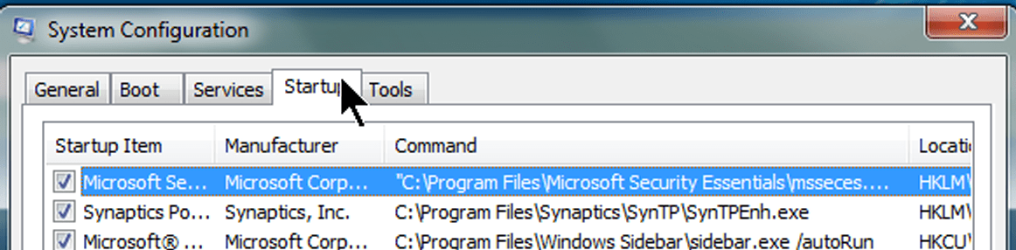
also click start/all programs/accesories/run

in the resultin window type msconfig and hit return post up a screenshot of the startup tab
 

My Computer

Computer type
PC/Desktop
Computer Manufacturer/Model Number
Custom
OS
Win 10 Home Premium 64 Bit
CPU
I7 5930K @ 4.5
Motherboard
Asus X99 s
Memory
16GB Kingston Hyper X Fury DDR4
Graphics Card(s)
EVGA 980ti SC + ACX 2.0
Sound Card
Onboard
Monitor(s) Displays
ROG Swift PG278Q
Screen Resolution
2560x1440
Hard Drives
Kingston Hyper X 250gb SSD
Samsung 2TB mechanical
PSU
Corsair RM 850
Case
NZXT H440 Red
Cooling
Corsair H100i GTX
Keyboard
Razer Reclusa
Mouse
Logitech G5 Gamer
Internet Speed
34mb
Antivirus
Eset Smart Security
Browser
Firefox
What does that process do? I don't know what it is either... Obviously if you don't have it installed it isn't vital?
 

My Computer

OS
Windows 7 Home Premium 64 bit
Memory
4 GB
Archie

There shouldn't be two java.exe running either should there? Seems odd anyway.
 

My Computer

Computer Manufacturer/Model Number
Hopalong/ Godzilla
OS
Windows7 Pro 64bit SP-1; Windows XP Pro 32bit
CPU
Intel Core i7-870 Lynnfield 2.93GHz LGA 1156 95W Quad-Core
Motherboard
ASUS P7P55D-E PRO
Memory
8GB@1400MHz Crucial Ballistix DDR3-1600 4x2GB
Graphics Card(s)
ASUS ENGTX460 DirectCU/2DI/1GD5 1GB 256-bit GDDR5
Sound Card
VIA Onboard
Monitor(s) Displays
Asus VS248H-P 24"; Samsung SyncMaster 941BW 19"ws
Screen Resolution
1920x1080; 1440x900
Hard Drives
Samsung 830 120GB SSD
Intel 320 120GB SSD
Western Digital Caviar Black WD7501AALS 750GB 7200 RPM SATA 3.0Gb/s
Western Digital Caviar Black WD6401AALS 640GB 7200 RPM SATA 3.0Gb/s
PSU
COOLER MASTER Silent Pro RS850-AMBAJ3-US 850W Modular
Case
COOLER MASTER HAF 932 RC-932-KKN5-GP Black
Cooling
Scythe "Mugen-2 Rev.B" (2 ScytheKaze-Jyuni PWM fans)
Keyboard
Logitech K-320
Mouse
Kensington
Antivirus
Avast Inernet Suite
Browser
IE 9 ; Chrome
Here is the screenshot, sorted with the heavy ones at the top obviously.

How many processes should be run? Or how do I identify which ones I should get rid of?
 

Attachments

  • Capture.JPG
    Capture.JPG
    124.5 KB · Views: 72

My Computer

OS
Windows 7 Home Premium 64 bit
Memory
4 GB
Archie

I haven't a clue what to keep or disable. If you can help go ahead.

Mike
 

My Computer

Computer Manufacturer/Model Number
Hopalong/ Godzilla
OS
Windows7 Pro 64bit SP-1; Windows XP Pro 32bit
CPU
Intel Core i7-870 Lynnfield 2.93GHz LGA 1156 95W Quad-Core
Motherboard
ASUS P7P55D-E PRO
Memory
8GB@1400MHz Crucial Ballistix DDR3-1600 4x2GB
Graphics Card(s)
ASUS ENGTX460 DirectCU/2DI/1GD5 1GB 256-bit GDDR5
Sound Card
VIA Onboard
Monitor(s) Displays
Asus VS248H-P 24"; Samsung SyncMaster 941BW 19"ws
Screen Resolution
1920x1080; 1440x900
Hard Drives
Samsung 830 120GB SSD
Intel 320 120GB SSD
Western Digital Caviar Black WD7501AALS 750GB 7200 RPM SATA 3.0Gb/s
Western Digital Caviar Black WD6401AALS 640GB 7200 RPM SATA 3.0Gb/s
PSU
COOLER MASTER Silent Pro RS850-AMBAJ3-US 850W Modular
Case
COOLER MASTER HAF 932 RC-932-KKN5-GP Black
Cooling
Scythe "Mugen-2 Rev.B" (2 ScytheKaze-Jyuni PWM fans)
Keyboard
Logitech K-320
Mouse
Kensington
Antivirus
Avast Inernet Suite
Browser
IE 9 ; Chrome
Archie

There shouldn't be two java.exe running either should there? Seems odd anyway.

i dont know tbh mate its maybe a chrome thing , i dont use it myself
 

My Computer

Computer type
PC/Desktop
Computer Manufacturer/Model Number
Custom
OS
Win 10 Home Premium 64 Bit
CPU
I7 5930K @ 4.5
Motherboard
Asus X99 s
Memory
16GB Kingston Hyper X Fury DDR4
Graphics Card(s)
EVGA 980ti SC + ACX 2.0
Sound Card
Onboard
Monitor(s) Displays
ROG Swift PG278Q
Screen Resolution
2560x1440
Hard Drives
Kingston Hyper X 250gb SSD
Samsung 2TB mechanical
PSU
Corsair RM 850
Case
NZXT H440 Red
Cooling
Corsair H100i GTX
Keyboard
Razer Reclusa
Mouse
Logitech G5 Gamer
Internet Speed
34mb
Antivirus
Eset Smart Security
Browser
Firefox
Start up screen shot is attached.

Do you know how to stop processes from starting by themselves? Obviously the 143 is an issue.
 

Attachments

  • Capture.JPG
    Capture.JPG
    80.1 KB · Views: 29

My Computer

OS
Windows 7 Home Premium 64 bit
Memory
4 GB
I posted to see if Stormy13 is busy. Maybe he might know where to start at least.

Singley

Nothing broke just too many applications running. I have 72 running you have 140 something.

Some of them can be uninstalled or disabled. The right ones. None of the Windows.

I think we need a Pro. We have some so we wait to get one here.
 

My Computer

Computer Manufacturer/Model Number
Hopalong/ Godzilla
OS
Windows7 Pro 64bit SP-1; Windows XP Pro 32bit
CPU
Intel Core i7-870 Lynnfield 2.93GHz LGA 1156 95W Quad-Core
Motherboard
ASUS P7P55D-E PRO
Memory
8GB@1400MHz Crucial Ballistix DDR3-1600 4x2GB
Graphics Card(s)
ASUS ENGTX460 DirectCU/2DI/1GD5 1GB 256-bit GDDR5
Sound Card
VIA Onboard
Monitor(s) Displays
Asus VS248H-P 24"; Samsung SyncMaster 941BW 19"ws
Screen Resolution
1920x1080; 1440x900
Hard Drives
Samsung 830 120GB SSD
Intel 320 120GB SSD
Western Digital Caviar Black WD7501AALS 750GB 7200 RPM SATA 3.0Gb/s
Western Digital Caviar Black WD6401AALS 640GB 7200 RPM SATA 3.0Gb/s
PSU
COOLER MASTER Silent Pro RS850-AMBAJ3-US 850W Modular
Case
COOLER MASTER HAF 932 RC-932-KKN5-GP Black
Cooling
Scythe "Mugen-2 Rev.B" (2 ScytheKaze-Jyuni PWM fans)
Keyboard
Logitech K-320
Mouse
Kensington
Antivirus
Avast Inernet Suite
Browser
IE 9 ; Chrome
ok in msconfig (i linked to it earlier it contains a list of all programs that start with windows) you want to be looking in the startup tab now everything in there can be safely disabled (without affecting your windows install) but some things you may want too keep for example your anti virus maybe there you dont want to disable that from starting when you boot , but you will most likely find many other things in there you can do without (in your case about 100 things ;) my running processes currently at 41 for example)

Now most of the time its easy to spot what each entry does for example Logitech setpoint would be your mouse/keyboard drivers something you could disable unless of course you have programmable keys on your mouse you use everyday , disabling that would most likely render them useless (im trying to give you some idea of what startup programs are and what they do so you can decide what you do and dont need)

any entries you cant figure out just google and all will be revealed :)

to disable any entry its as simple as removing the check from the box and clicking apply and rebooting

now for the next bit...........there is another tab "services" look under services BUT the first thing you MUST do is put a check in the box at the bottom that says "hide all microsoft services" this will hide all the services you really dont want to be messing with ;)

you will find many more startup items there too that can be disabled once again lookout for antivirus/firwall services , you are best leaving them alone

so to summerise , the startup tab you can disable anything and everything you like , but the services tab be sure to check the box first then again disable anything you like :)

then in future when you install a program just have a wee look in the startup folder make sure it hasnt put a startup process in there you dont need/want , if you can get into doing this on a regular basis you wont get into this mess again ;)

anymore help just shout

oh and a wee linky http://netsquirrel.com/msconfig/msconfig_win7.html

oh and as for the chrome processes , that browser starts a new process for every tab you open if you have three tabs open in chrome you will have three chrome processes running its normal , they do it so if one tab crashes it can be shut down without affecting the whole browser , something internet explorer does but IE does it better ;)
 

My Computer

Computer type
PC/Desktop
Computer Manufacturer/Model Number
Custom
OS
Win 10 Home Premium 64 Bit
CPU
I7 5930K @ 4.5
Motherboard
Asus X99 s
Memory
16GB Kingston Hyper X Fury DDR4
Graphics Card(s)
EVGA 980ti SC + ACX 2.0
Sound Card
Onboard
Monitor(s) Displays
ROG Swift PG278Q
Screen Resolution
2560x1440
Hard Drives
Kingston Hyper X 250gb SSD
Samsung 2TB mechanical
PSU
Corsair RM 850
Case
NZXT H440 Red
Cooling
Corsair H100i GTX
Keyboard
Razer Reclusa
Mouse
Logitech G5 Gamer
Internet Speed
34mb
Antivirus
Eset Smart Security
Browser
Firefox
you want to be aiming for something like this .............. ;)
 

Attachments

  • services.jpg
    services.jpg
    469.5 KB · Views: 69

My Computer

Computer type
PC/Desktop
Computer Manufacturer/Model Number
Custom
OS
Win 10 Home Premium 64 Bit
CPU
I7 5930K @ 4.5
Motherboard
Asus X99 s
Memory
16GB Kingston Hyper X Fury DDR4
Graphics Card(s)
EVGA 980ti SC + ACX 2.0
Sound Card
Onboard
Monitor(s) Displays
ROG Swift PG278Q
Screen Resolution
2560x1440
Hard Drives
Kingston Hyper X 250gb SSD
Samsung 2TB mechanical
PSU
Corsair RM 850
Case
NZXT H440 Red
Cooling
Corsair H100i GTX
Keyboard
Razer Reclusa
Mouse
Logitech G5 Gamer
Internet Speed
34mb
Antivirus
Eset Smart Security
Browser
Firefox
Start up screen shot is attached.

Do you know how to stop processes from starting by themselves? Obviously the 143 is an issue.

Uncheck EVERYTHING that is NOT:
Microsoft,
Dell,
Synaptics,
Intel.

Don't worry. You won't be disabling those other things but will stop them from running until needed.

I'm including a snaphot of mine:
startupprograms.png
 

My Computer

Computer Manufacturer/Model Number
Toshiba Satellite S875D-S7239 laptop
OS
MS Windows 7 Ultimate SP1 64-bit
CPU
AMD A10-4600M
Motherboard
AMD Pumori (Socket FT1)
Memory
6.00 GB Dual-Channel DDR3 @ 798MHz (11-11-12-28)
Graphics Card(s)
AMD Radeon HD 7660G
Sound Card
High Definition Audio Device
Monitor(s) Displays
Generic PnP Monitor (1600x900@60Hz)
Screen Resolution
1600x900@60Hz
Hard Drives
SSD 119GB Corsair CSSD-V128GB2 ATA Device
Keyboard
Standard PS/2 Keyboard
Mouse
HP Wireless Optical Mobile Mouse Model FHA-3410
Internet Speed
What the local pub, local coffee shop offers.
Other Info
Optical Drive:MATSHITA BD-CMB UJ160B ATA Device


Also have an Asus ha1002xp netbook with Win 7 Ultimate installed.
This a work computer? Reason for asking is there is a truckload of processes running that when looking them up all point to software from here,

SAP - SAP BusinessObjects: Business Intelligence Software and Enterprise Performance Solutions

and from a quick look around there I don''t see much of anything that is needed for a stand alone computer. Then there is this one as well,

Sensible Vision

which from the looks of it is similar to the first.

Looking at a couple of the other processes running this one, sfctlcom.exe lead me to here,

Computer running at 99% due to SFCTLCOM.EXE - Trend Community

which looks to be a problem with TrendMicro's AV suite.

If this is a work computer, and from looking at a lot of what is running I would say it is, then you would be better off talking to the IT people than having us telling you what to try and get rid of. This is one of those things where we don't want to inadvertently have you shut something down that shouldn't be.
 

My Computer

Computer type
PC/Desktop
Computer Manufacturer/Model Number
Me
OS
Win 7 Ultimate x64
CPU
FX-8350 @ 4.6 GHz so far
Motherboard
Asus M5A97 EVO
Memory
ADATA XPG V1 Series Black 8GB DDR3 1600
Graphics Card(s)
Sapphire R9 270x Dual-X
Sound Card
Xonar DGX w/ Corsair Vengence 1300
Monitor(s) Displays
Acer S232HL Abid
Screen Resolution
1920x1080
Hard Drives
120 GB OCZ Vertex 3
500 GB Seagate 7200.12
PSU
Antec Earthwatts 650W Green
Case
Antec Three Hundred
Cooling
Cooler Master 212 EVO
Keyboard
Logitech G510
Mouse
Logitech G500s
Internet Speed
35000/3000
I can not recommend strong enough following:
Download Microsoft Security Essentials,
Using Control Panel |Programs and Features | right-click on TrendMicro and choose Uninstall

Now install Microsoft Security Essentials-the best, the least obtrusive, no interference with any Microsoft software, that includes Win 7.

Remove any firewall program you have and use Windows Firewall.

MSE - Microsoft Security Essentials

Also go to Control Panel | Programs and Features | rt-click on any and all Java entries and choose uninstall.

If you have some program that just can't live without Java, you will be prompted to install Java. At that time you can install Java.
 

My Computer

Computer Manufacturer/Model Number
Toshiba Satellite S875D-S7239 laptop
OS
MS Windows 7 Ultimate SP1 64-bit
CPU
AMD A10-4600M
Motherboard
AMD Pumori (Socket FT1)
Memory
6.00 GB Dual-Channel DDR3 @ 798MHz (11-11-12-28)
Graphics Card(s)
AMD Radeon HD 7660G
Sound Card
High Definition Audio Device
Monitor(s) Displays
Generic PnP Monitor (1600x900@60Hz)
Screen Resolution
1600x900@60Hz
Hard Drives
SSD 119GB Corsair CSSD-V128GB2 ATA Device
Keyboard
Standard PS/2 Keyboard
Mouse
HP Wireless Optical Mobile Mouse Model FHA-3410
Internet Speed
What the local pub, local coffee shop offers.
Other Info
Optical Drive:MATSHITA BD-CMB UJ160B ATA Device


Also have an Asus ha1002xp netbook with Win 7 Ultimate installed.
This is a personal computer that I use for work, so I won't be screwing a work computer up at all, thank you for your concern though.

I'll be going through all the responses given here and doing the things mentioned.

All of your replies are greatly appreciated. If no progress is made by tomorrow I will come back.

Thanks guys!

(rep given)
 

My Computer

OS
Windows 7 Home Premium 64 bit
Memory
4 GB
Back
Top