
I find that I am experiencing lagginess on my laptop, relatively old: C2D T9300, 4GB DDR2, 1280MB GeForce 8600MGT
Is high memory faults the cause?
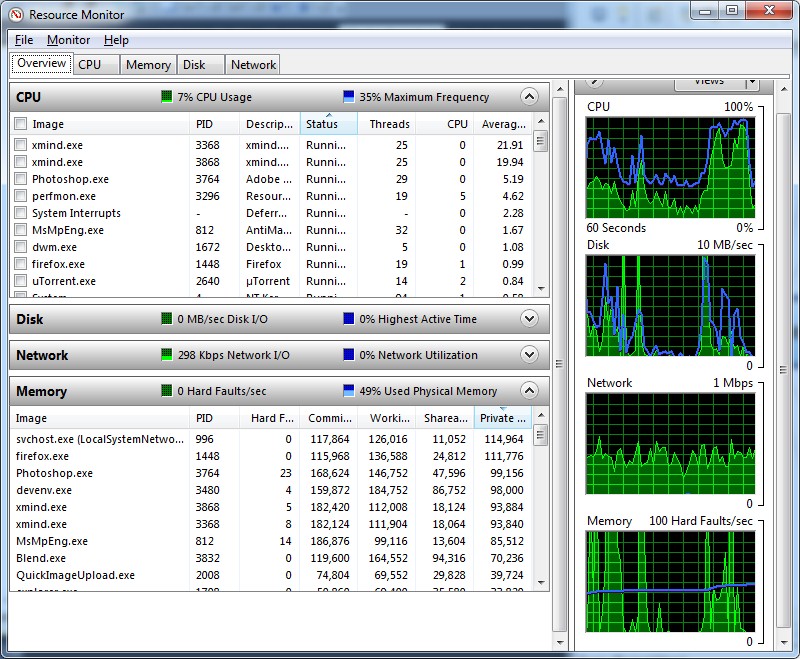
Sometimes, the faults are "maxed" out near 100/sec throughout that chart. What are memory faults?
Is high memory faults the cause?
Sometimes, the faults are "maxed" out near 100/sec throughout that chart. What are memory faults?
My Computer
At a glance
Windows 7 x64 UltimateIntel Core2Duo T9300 2.5GHz4GB DDR2NVIDIA 1280MB GeForce 8600MGT TurboCache
- Computer Manufacturer/Model Number
- Acer Aspire 5920G
- OS
- Windows 7 x64 Ultimate
- CPU
- Intel Core2Duo T9300 2.5GHz
- Memory
- 4GB DDR2
- Graphics Card(s)
- NVIDIA 1280MB GeForce 8600MGT TurboCache
- Monitor(s) Displays
- 15.4" WXGA Acer CrystalBrite LCD
- Hard Drives
- 320GB


