how to repair windows explorer?

WimYogya

New member
Member
VIP
Local time
11:57 AM
Messages
104
Is there a way to repair Windows Explorer in case of malfunctioning?

This is my problem: from time to time, unexpectedly, Windows Explorer behaves in strange ways. The most common errors I came across so far: 1. certain keys don't work anymore - such as in THIS moment the ( which i could only copy/paste here - 2. sometimes many keys don't work anymore and instead an error sound is heard - 3. the right mouse click does not pop up the context menu - or it is just visible for 0,0001 second in a flash.
There is a workaround to solve error 3: start a new instance of windows explorer and use the right mouse. if it works it will also work in the original window.
After a computer restart problems 1 & 2 are gone as well, till all of a sudden they come up again. No idea why...

This is my situation: after a long series of computer repairs I am finally able to install all my applications again. I am somewhere in the middle. At a certain point the above mentioned explorer errors started - no clue what triggered the trouble. System restore does not help: I can only go 2 days back (why not many days more?) and that does not solve the trouble.
Of course I could start from scratch again - very annoying - and re-install Windows7 completely.
Some individual applications have an 'application repair' option - usually found in the control panel > uninstall section. Does Windows7 have this option too? Or is there another way to repair or reset the windows explorer? Or just re-install the isolated windows explorer? Or check/repair the registry related to windows explorer?
Thanks!
 

My Computer My Computer

At a glance

windows 7Genuine Intel u23004Gb?
Computer Manufacturer/Model Number
AcerAspire 1410 Netbook with external CD/DVD-RW
OS
windows 7
CPU
Genuine Intel u2300
Motherboard
?
Memory
4Gb
Graphics Card(s)
?
Sound Card
?
Monitor(s) Displays
?
Hard Drives
Hitachi HTS
various WD external hard drives
PSU
?
Case
?
Cooling
?

My Computer My Computer

At a glance

Windows 10, Home Clean InstallIntel Core2 processsor Q8200(2.33Ghz 1333FSB)...6 gbATI Radeon 256MB HD3650
Computer type
PC/Desktop
Computer Manufacturer/Model Number
Dell XPS 420
OS
Windows 10, Home Clean Install
CPU
Intel Core2 processsor Q8200(2.33Ghz 1333FSB) Quad Core Tech
Motherboard
Dell
Memory
6 gb
Graphics Card(s)
ATI Radeon 256MB HD3650
Sound Card
Intergrated 7.1 Channel Audio
Monitor(s) Displays
Dell SP2009W 20"
Hard Drives
640 GB Serial ATA Hard drive
Cooling
Fan
Keyboard
Dell USB Keyboard
Mouse
Dell Premium Optical USB
Internet Speed
DSL 2.85
Is this a factory install, clean install or an in-place Upgrade?

Often times an Upgrade will carry over corruption from the previous OS and needs to have the HD wiped of any infected or corrupt code to clean reinstall. http://www.sevenforums.com/installation-setup/125874-re-install-windows-7-a.html#post1086729

A factory install can be corrupted from the start due to large amount of bloatware and useless factory utilities. Win7 has superior versions of almost all unneeded factory utilities. This is why many tech enthusiasts find a clean-copy installer of their version to reinstall with Product Key on COA sticker.

If you want to continue troubleshooting and SFC linked above doesn't find corrupt system files, you can try a http://www.sevenforums.com/tutorials/3413-repair-install.html?ltr=R.

Study also the Event Viewer>Custom view>Admin to google repeat errors to resolution. Check also the Performance log on Advanced Tool pages accessed by clicking WEI score link at Computer>Properties. Look for cued issues at top of Tools page, Generate A System Health Report.

Type "problems" in start seach box to see if any problem solutions have been sent to reported or unreported problems.
 
@richc46:
malwarebytes and sfc didnt find any problems - as far as i could see...
in sfc there was a flashy unreadable message when 100% had been scanned, then the box closed - no problems or advices were displayed.

@gregrocker:
its a clean installation after my acer laptop had been repaired 3x...
i will have to study more the other solutions u recommended. i am afraid all these instructions are faaaaaaaaaar beyond my computer knowledge.

especially this is abacaabra for me, no clue at all: "Study also the Event Viewer>Custom view>Admin to google repeat errors to resolution. Check also the Performance log on Advanced Tool pages accessed by clicking WEI score link at Computer>Properties. Look for cued issues at top of Tools page, Generate A System Health Report. "

does anyone of you (or others) recognize the specific errors i mentioned + the new one: after restarting computer the normal dropdown menus (file, edit etc) cannot really be displayed: they flash and disappear, unless I run a fresh explorer.exe. anyone familiar with this behaviour? any cause? any solution? thanks
 

My Computer My Computer

At a glance

windows 7Genuine Intel u23004Gb?
Computer Manufacturer/Model Number
AcerAspire 1410 Netbook with external CD/DVD-RW
OS
windows 7
CPU
Genuine Intel u2300
Motherboard
?
Memory
4Gb
Graphics Card(s)
?
Sound Card
?
Monitor(s) Displays
?
Hard Drives
Hitachi HTS
various WD external hard drives
PSU
?
Case
?
Cooling
?
Rich and I posted links that give you step by step instructions for running System File Checker and Repair Install.

Type Event Viewer in Start Search box to access it. Go Start>rightclick Computer>Properties>click WEI score link to get to Advanced Tools page for Performance log and to Generate a System Health Reprot.

Report back the results of the steps given if you are interested in troubleshooting your computer and not just complaining about how hard it is without asking specific questions about the steps.

Did you clean reinstall yourself, or did Dell reinstall the factory installation for you? A reinstall using Factory Recovery is not a clean reinstall as it replaces all of the factory bloatware which easily corrupts and hinders instantaneous performance by Win7.
 
Correct me if i am wrong but do you have only keyboard and mouse related errors? Have you tried using an external mouse E.g.?
 

My Computer My Computer

At a glance

Windows 7 x64 pro/ Windows 7 x86 Pro/ XP SP3 x86
Computer Manufacturer/Model Number
Too many to describe...
OS
Windows 7 x64 pro/ Windows 7 x86 Pro/ XP SP3 x86
@gregrocker, richc46
had no internet connection (indonesia!) for a few days. experimented a bit in the meantime, think i solved my own problem.
the trouble was caused by nero multimedia suite 10. at least: after uninstalling those nero applications that i didnt really need, the problems were over - so far at least.
so at this moment no need to search through event view etc.
and greg, please do understand that simple computer users, non-experts like me, are sometimes overwhelmed by the dozens of new terms included in the help suggestions offered by friendly and fabulous people in this forum. sometimes i don't understand the instructions or cannot find the locations etc. please understand.
thanks for your help - if necessary i checkout more and get back to you.

@bill2
mouse was not the problem, same things happened with mousepad & shortcuts. thanks
 

My Computer My Computer

At a glance

windows 7Genuine Intel u23004Gb?
Computer Manufacturer/Model Number
AcerAspire 1410 Netbook with external CD/DVD-RW
OS
windows 7
CPU
Genuine Intel u2300
Motherboard
?
Memory
4Gb
Graphics Card(s)
?
Sound Card
?
Monitor(s) Displays
?
Hard Drives
Hitachi HTS
various WD external hard drives
PSU
?
Case
?
Cooling
?
Hi,

You seem to have solved the problem, for the time being anyway, but I find myself wondering whether you possible have USB device problems.

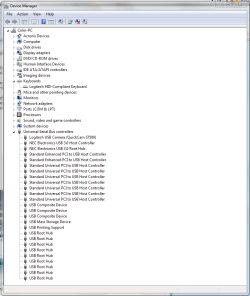
Can you open your Device Manager, and just check to see that you don't have any yellow exclamation symbols next to your keyboard and USB devices, as shown in the image below? If you don't, then this isn't a problem.

Regards,
Golden
 

Attachments

  • Capture.PNG
    Capture.PNG
    28.4 KB · Views: 308

My Computer My Computer

At a glance

Windows 10 Pro x64 ; Xubuntu x64Intel i7 860 @ 2.80 GHz O/C'ed to 4.0GHz16GB Corsair Vengance DDR3 @ 661 MHz Dual Cha...EVGA NVidia GTX 560 1024MB
Computer type
PC/Desktop
Computer Manufacturer/Model Number
Golden Mk. I.4
OS
Windows 10 Pro x64 ; Xubuntu x64
CPU
Intel i7 860 @ 2.80 GHz O/C'ed to 4.0GHz
Motherboard
Gigabyte P55A-UD3R Rev.1. Award BIOS F13
Memory
16GB Corsair Vengance DDR3 @ 661 MHz Dual Channel (9-9-9-24)
Graphics Card(s)
EVGA NVidia GTX 560 1024MB
Sound Card
Realtek Integrated
Monitor(s) Displays
Dual Samsung SyncMaster 2494HS
Screen Resolution
1920*1080 and 1920*1080
Hard Drives
1*Samsung 840 EVO 120GB SSD;
1*OCZ Vertex 2 60GB SSD;
2*Samsung F3 SpinPoint 1TB in RAID0;
1*Samsung F1 SpinPoint 1TB;
2*Western Digital 1TB External USB 3.0
1*Western Digital 500GB External USB 3.0
1*Seagate 500GB External USB 2.0
PSU
Thermaltake ToughPower QFan 750W
Case
Thermaltake Element S VK60001W2Z
Cooling
Corsair H60 Water Cooling, 2*230mm and 2*80mm case fans
Keyboard
Logitech G110
Mouse
Logitech MX518
Back
Top