Just to make sure... this is a question regarding SATA 2.0 mechanical HDD Transfer rates. My intention is to build a list or database of actual, real world, transfer rates for mechanical SATA drives. No need to post your SSD transfer rates here.
What should a user expect transfer-wise when performing a local internal disc to disc copy on a large file, or say like when performing a backup via image?
Theoretically SATA 2.0 is good to 3Gbps... but we know that doesn't happen!
What differences should you see with different levels of disc cache?
What actual transfer rates do you get with SATA 2.0???
What are you doing or using while testing?
Please post your SATA 2.0 transfer rates, or comments on them.. here!
Also, please post whether you are running your SATA drives in IDE or AHCI mode?
Last edited:
My Computer
At a glance
Windows 7 Ultimate 64 bit Steve Ballmer Signa...Intel Core 2 Quad - Q9550 - 2.83GHz stock - O...4GB DDR2 800MHz (PC6400) OCZ ReaperNvidia GE Force 8800 GTS
Computer Manufacturer/Model Number
Homebrew PC - "Alpha_Dawg"
OS
Windows 7 Ultimate 64 bit Steve Ballmer Signature Edition
1*Samsung 840 EVO 120GB SSD;
1*OCZ Vertex 2 60GB SSD;
2*Samsung F3 SpinPoint 1TB in RAID0;
1*Samsung F1 SpinPoint 1TB;
2*Western Digital 1TB External USB 3.0
1*Western Digital 500GB External USB 3.0
1*Seagate 500GB External USB 2.0
PSU
Thermaltake ToughPower QFan 750W
Case
Thermaltake Element S VK60001W2Z
Cooling
Corsair H60 Water Cooling, 2*230mm and 2*80mm case fans
Some HD Tach HdTach
Measures read speed and burst rate.
I get drastically different results using each one. These tools just simulate and measure access times mostly I believe, they are not real world speed if you use other techniques like below...
Some apps will show you an average when finished as does Macrium Reflect backup imaging app.
I was running utorrent, a-squared anti malaware, outpost firewall suite, hide my ass vpn, ccenhancer, and the usual system programs that run in the background...
EDIT: And by the way I had to use compatibility mode to use this particular program with Windows 7 X64..500gb Seagate Barracuda 7500 rpm 16mb cache....
Seagate 750GB Vertical storage and an older 160GB Seagate drive benched with HDTune.
There are settings for various KB block sizes within this utility that change the results dramatically.
I have HDTune currently set to 64KB:
Attachments
HDTune_Benchmark_ST3750528AS.png
15.4 KB
· Views: 195
HDTune_Benchmark_ST3160813AS.png
14.7 KB
· Views: 136
Last edited:
My Computer
At a glance
Windows 7 Home Premium x64AMD Phenom II X6 1600T16GB PC3-10700 (1342MHz)ATI Radeon 5770 HD (x2) CrossFire
Isn't it best to test various drives with a common file size? For example, a smaller files will transfer faster because it makes better use of the burst rate, whereas a larger file depends largerly on the sustained rate?
I remember actually writing a DOS batch file at work that used FSUTIL and a TIMETHIS command to build and test transfer rates for different files sizes across 4x15,000rpm SAS drives in a RAID0 array. I got some phenomenal speed from that BTW. Perhaps I'll bring that in and share it here?
My Computer
At a glance
Windows 10 Pro x64 ; Xubuntu x64Intel i7 860 @ 2.80 GHz O/C'ed to 4.0GHz16GB Corsair Vengance DDR3 @ 661 MHz Dual Cha...EVGA NVidia GTX 560 1024MB
1*Samsung 840 EVO 120GB SSD;
1*OCZ Vertex 2 60GB SSD;
2*Samsung F3 SpinPoint 1TB in RAID0;
1*Samsung F1 SpinPoint 1TB;
2*Western Digital 1TB External USB 3.0
1*Western Digital 500GB External USB 3.0
1*Seagate 500GB External USB 2.0
PSU
Thermaltake ToughPower QFan 750W
Case
Thermaltake Element S VK60001W2Z
Cooling
Corsair H60 Water Cooling, 2*230mm and 2*80mm case fans
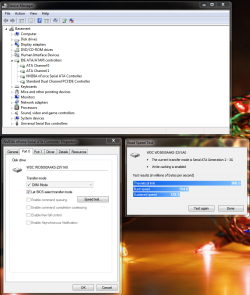
For a quick and simple test (if you have a Nvidia chip set) you can go to device manager. Right click on your Serial ATA Controller and go to properties. Then select a port. Once there, there should be a "Speed test" button. AHCI mode I believe
Last edited:
My Computer
At a glance
Windows 10 Education 64 bitAMD Phenom II X4 980 Black Edition Deneb 3.7GHz8GB 4GBx2 Kingston PC10600 DDR3 1333 MemoryZotac NVIDIA Geforce GT640 2 Gig DDR3 PCIe
Computer type
PC/Desktop
Computer Manufacturer/Model Number
Home Built
OS
Windows 10 Education 64 bit
CPU
AMD Phenom II X4 980 Black Edition Deneb 3.7GHz
Motherboard
Asus M4N68T-M V2 µATX Motherboard
Memory
8GB 4GBx2 Kingston PC10600 DDR3 1333 Memory
Graphics Card(s)
Zotac NVIDIA Geforce GT640 2 Gig DDR3 PCIe
Sound Card
VIA VT1708s High Definition Audio 8-channel Onboard
I'll have to check my daughters netbook and see if it has it. It's the only other windows 7 PC in the house. I just assumed it was a feature of windows 7.
My Computer
At a glance
Windows 10 Education 64 bitAMD Phenom II X4 980 Black Edition Deneb 3.7GHz8GB 4GBx2 Kingston PC10600 DDR3 1333 MemoryZotac NVIDIA Geforce GT640 2 Gig DDR3 PCIe
Computer type
PC/Desktop
Computer Manufacturer/Model Number
Home Built
OS
Windows 10 Education 64 bit
CPU
AMD Phenom II X4 980 Black Edition Deneb 3.7GHz
Motherboard
Asus M4N68T-M V2 µATX Motherboard
Memory
8GB 4GBx2 Kingston PC10600 DDR3 1333 Memory
Graphics Card(s)
Zotac NVIDIA Geforce GT640 2 Gig DDR3 PCIe
Sound Card
VIA VT1708s High Definition Audio 8-channel Onboard
My daughters netbook doesn't have it. Hers has an Intel chip set so I would say that it is an Nforce specific option. Your netbook drive is likely a 5400 RPM drive and that will hurt performance compared to a 7200 RPM drive.
My Computer
At a glance
Windows 10 Education 64 bitAMD Phenom II X4 980 Black Edition Deneb 3.7GHz8GB 4GBx2 Kingston PC10600 DDR3 1333 MemoryZotac NVIDIA Geforce GT640 2 Gig DDR3 PCIe
Computer type
PC/Desktop
Computer Manufacturer/Model Number
Home Built
OS
Windows 10 Education 64 bit
CPU
AMD Phenom II X4 980 Black Edition Deneb 3.7GHz
Motherboard
Asus M4N68T-M V2 µATX Motherboard
Memory
8GB 4GBx2 Kingston PC10600 DDR3 1333 Memory
Graphics Card(s)
Zotac NVIDIA Geforce GT640 2 Gig DDR3 PCIe
Sound Card
VIA VT1708s High Definition Audio 8-channel Onboard
yeah, i suppose i'll get round to upgrading it someday...it's about 5th on the list atm.
my main desktop 'needs' an ssd and a new gfx card, and the second monitor goes all green from time to time, then the netbook could do with 2 more gigs of ram before a hdd/ssd...
it never stops does it? (which is good if you can afford it!)
For a quick and simple test you can go to device manager. Right click on your Serial ATA Controller and go to properties. Then select a port. Once there, there should be a "Speed test" button. View attachment 118142