| Windows 7: Why can't I change my power options? |
26 Nov 2010
|
#1 | | Windows 7 Home Premium 64bit |
Why can't I change my power options? Hello,
I am the administrator on my computer, yet I can't access the main customization options, such as power options, user accounts, system, personalization, or performance information. I've tried disconnecting from any internet since it may be a system administrator's settings from the network that might have been the problem, but I still couldn't. I just want to have access to the things that I SHOULD have access to. I am the only one with an account on this computer.
As a side note: This computer came loaded with Vista and just recently I loaded Windows 7 onto it. I was the administrator on Vista, but I don't know if something got messed up in the process of switching to Windows 7? Maybe?
Help anyone? | My System Specs |
| System Manufacturer/Model Number Gateway OS Windows 7 Home Premium 64bit Memory 4GB Graphics Card NVIDIA GeForce 9800M GTS |
26 Nov 2010
|
#2 | | Win7 Enterprise, Win7 x86 (Ult 7600), Win7 x64 Ult 7600, TechNet RTM on AMD x64 (2.8Ghz) SomeWhere in the HOT Arizona Desert ! |
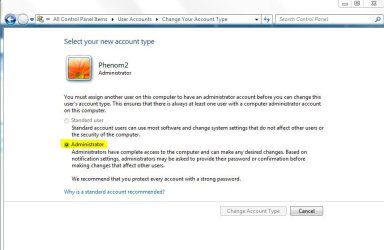
Does your Admin User Acct look like this?
There is also a hidden Admin acct in Safe Mode. | My System Specs | | Computer type PC/Desktop System Manufacturer/Model Number Built them myself, Science Experiments ! OS Win7 Enterprise, Win7 x86 (Ult 7600), Win7 x64 Ult 7600, TechNet RTM on AMD x64 (2.8Ghz) CPU AMD fx8350 4ghz, AMD-32 2400mhz, AMD-64 3200mhz, AMDx64 2.8G Motherboard SIS 755, ECS-K8M890M-M (Ult 7600), GigaByte & others Memory 2gb, 4gb on the Ult 7600, 4gb on Technet RTM, 32gb on FX8350 Graphics Card Draw my own Graphics, several nVidia cards Sound Card on motherboard Monitor(s) Displays 19" flat scr, 28" I-Inc widescr,22" Emprex Widescr, 23" Acer Screen Resolution 1280 x 1024, 1440 x 900, 1920 x 1080 Keyboard Compaq & Dell recycled from GoodWill Mouse Made in China Optical Wired Mouse PSU 430w, 550w, 600w, 700, 800, etc Case All Generic Full Towers Cooling Open Air & a few fans, some w/ colored LEDs Hard Drives 6 pata Ide HD's & 2 Sata HD's
added 80gb external on Ult 7600 computer,
numerous extra 1tb, 2TB, 3Tb SATA HD's
A collection of ext HD Docks w/ HDs Internet Speed Fast Cable InterNet Antivirus AVG Free on 24 different Desktops, NO Problems! Browser IE 8 is preferred, but use FireFox sometimes Other Info Linksys Routers, switches, & Hubs
Too Many USB Flash Drives to count, Biggest is 64GB !
Eight computers in my home network.
Sixteen computers at my business network.
Linked via TeamViewer !
Lots of old used spare computer parts everywhere! |
26 Nov 2010
|
#3 | | Windows 7 Home Premium 64bit |
Following the sequence in the bar from your screenshot, I can't access "user accounts" to check. I'd assume I'm actually not administrator, for some reason, anymore since I can't access the things that define how the accounts are run. I'll try safe mode and see what I can do there.
But, I can't answer your question since I can't access that area. It just gives me very quiet "boop" sound when I click those areas. I can barely hear it even with the volume at 100%. | My System Specs | | System Manufacturer/Model Number Gateway OS Windows 7 Home Premium 64bit Memory 4GB Graphics Card NVIDIA GeForce 9800M GTS Why can't I change my power options? problems? All times are GMT -5. The time now is 02:17 AM. | |