| Windows 7: Windows 7 keeps losing my RAM |
16 Dec 2010
|
#1 | | Windows XP to Windows 7 Colorado |
Windows 7 keeps losing my RAM I've read a few of the posts here and can't seem to find one that directly relates to my problem. I'm running Windows7 64, 16 G of OCZ Triple Channel DDR3 and NVidia Quadro FX 4800. Sometimes I have 8 G of RAM, sometimes I have 4 G of RAM. VERY RARELY does all 16 G show up. I think maybe 3 times since I built this beast. It's messing with my work. Can anyone PLEASE tell me once and for all, what can I do to make this go away and have all 16 G of RAM I paid dearly for??
Windows7 64
16 G OCZ Triple Channel DDR3
ASUS Rampage III
NVidia Quadro FX 4800
Thanks for any help.
Laura | My System Specs |
| System Manufacturer/Model Number Home Built-Frankenstein OS Windows XP to Windows 7 CPU Intel Core 2 Quad 2.83 Motherboard P5Q ASUS Memory 4x2 OCZ Platinum Graphics Card Nvidia GForce 8500 GT Sound Card Internal Realtek Monitor(s) Displays Dell Keyboard MS Ergo Mouse WACOM-3 Tablets-Intuos 4, Graphire 4, Graphire 3 to surf Hard Drives 3 Maxtor 500G
1 HD Caviar Green WD7500AADS
1 Seagate 500 G
1 Seagate TB Internet Speed Whatever Comcast High Speed is doing at the moment |
16 Dec 2010
|
#2 | | Windows 7 x64 Ultimate San Diego |
Does the ram /always/ show up as 16 gig in your bios?
Also 16 gig and "triple channel" don't really sound right togeather. (Or did you mean 18gig of triple channel?) If 16, gig probably should be dual channel, though that I believe is a function entirely of the MB itself, except that dual/triple channel ram is generaly sold in matched modules packs in sets of 2 or 3 and are best installed in those groupings.
Are you sure the ram you got was vetted by ASUS? (ASUS lists compatible modules in their manuals).
Edit, also are your computer specs up to date? Still using the core 2 quad? | My System Specs | | System Manufacturer/Model Number Scratch built OS Windows 7 x64 Ultimate CPU i7 960 Motherboard Asus P6X58D Memory 12 Gig Corsair Dominator Graphics Card Nvidia 480 Sound Card Maudio Delta 44 + breakout box Monitor(s) Displays Dell UltraSharp U2410 24in and Samsung 21 dual monitors Screen Resolution 1920x1200 and 1280x1024 Keyboard Logitech G15 + N52 game pad Mouse Logitech MX518 PSU Corasair TX850 Case Cooler Master HAF Cooling Corsair H50 Hard Drives Primary: Intel X-25M G2 160G SSD
Secondary: Segate baracuda 1.0 TB
HDs in AHCI mode. Internet Speed 15kbs down 4.5kbps up Other Info WEI 7.6
CPU & RAM 7.6
Graphics 7.9
Hard disk 7.7 |
16 Dec 2010
|
#3 | | Windows 7 Professional (x64/SP1) / XP Pro 4th planet from the sun |
Hi,
You have not told us what windows version your running. Here are the limits for the windows versions.
' - Windows 7 Starter: 8GB
- Windows 7 Home Basic: 8GB
- Windows 7 Home Premium: 16GB
- Windows 7 Professional: 192GB
- Windows 7 Enterprise: 192GB
- Windows 7 Ultimate: 192GB'
| My System Specs | | Computer type PC/Desktop System Manufacturer/Model Number GIGABYTE Rig (Custom) OS Windows 7 Professional (x64/SP1) / XP Pro CPU Intel i5-3570k 3.40 GHz @ 4.5 GHz Motherboard GIGABYTE Z77X-D3H Memory 8GB (2133MHz) DDR3 cl9 Graphics Card Asus GTX560 Ti (Nvidia) + Palit GTS 450 (Nvidia) Sound Card Audigy Sound blaster SE Monitor(s) Displays (1920x1080) HP, (1440x900) Acer, (1280x800) Compaq Keyboard Steelseries 6Gv2 Mouse Logitech M505 / IBM Thinkpad Travel Mouse PSU Antec 620w High Current Gamer Case Coolmaster HAF 922 Cooling CPU - Antec KÜHLER H₂O 920 Hard Drives Sandisk Extreme (120GB, SSD) Samsung HD103SJ (1TB, 7200RPM, 32MB)
Western Digital WD740GD (74.3GB, 10'000RPM, 16MB) (4 other drives) Internet Speed 4 - 6mb/s Antivirus ESET NOD32 / Comodo Firwewall Browser Chrome/Waterfox Other Info ThinkPad T42p |
16 Dec 2010
|
#4 | | Operating System : Windows 7 Home Premium Edition 6.01.7600 SP1 (x64) MILTON KEYNES |
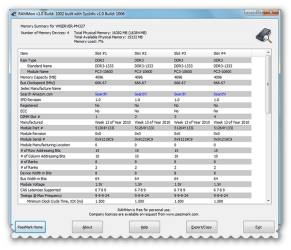
hi there i check my ram in resmon and check with rammon by passmark> link here PassMark RAMMon - Identify RAM type, speed & memory timings ( be sure to use the right version for 32/64 Bit)
RAMMon is an easy to use Windows based application that allows users to quickly retrieve the Serial Presence Detect (SPD) data from their RAM modules. It will allow users to identify a multitude of attributes, of which, includes the manufacturer, the clockspeed and other data of their DDR2, DDR3, XMP and EPP memory devices and even some older memory types. It uses SysInfo DLL SDK to gather the SPD attributes from RAM devices. This information provides a snapshot of the available data for each RAM module installed on the system. | My System Specs | | System Manufacturer/Model Number packard bell IXTREME M5722 OS Operating System : Windows 7 Home Premium Edition 6.01.7600 SP1 (x64) CPU Processor : Intel Core 2 Quad Q8300 @ 2500 MHz Motherboard Mainboard : Packard Bell (Acer EG43M ) Memory Physical Memory :8GB Corsair4x 2GB 800MHz C5 DDR2 Graphics Card Video Card : XFX 6700 AMD Monitor(s) Displays Maestro 234DL - BenQ V2220 - BenQ VW2420H Screen Resolution Current Display :1920x1080p pixels at 60 Hz in HD LED Keyboard Gigabyte Aivia K8100 Mouse TRUST-Wireless Laser Mouse - Carbon edition MI-7770C PSU XFX ProSeries 550W PSU Case PACKARD BELL IXTREME Cooling System Blower Current: 150mA Air Flow16CFM ;Akasa 90mm rear Hard Drives Hard Disks : WDC (1000 GB)
Drive C: (Hard Disk) : 428 GB available on 491 GB
Drive D: (Hard Disk) : 426 GB available on 492 GB
SAMSUNG spinpoint HD103SJ 1000.2 GB
(X 2) KINGSTON SSD NOW V 30GB Internet Speed TP-LINK > TL-WN951N / AV500 Gigabit Powerline Adapters Other Info EXTRA COOLING>(FAN CONTROLLER) PC Bay Cooler 3 x 40mm fans; Akasa AK-HD-BL Blue hard drive cooler 2 x 40 mm fan 4500 rpm 29.7 dBA
Bios> American Megatrends Inc.
Version : P01-A1
Date : 08/31/2009 |
16 Dec 2010
|
#5 | | Operating System : Windows 7 Home Premium Edition 6.01.7600 SP1 (x64) MILTON KEYNES |
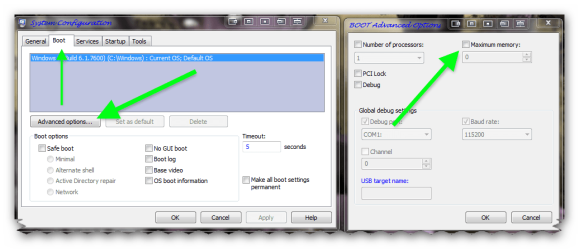
also check that windows has allocated all the ram - type msconfig in windows start menu search box
- click on result in left result pane
- in the window that pops up click boot
- click advanced options
- next check the MAXIMUM MEMORY box is UN-TICKED in box that pops up
- click ok
- click ok again
- reboot if required
| My System Specs | | System Manufacturer/Model Number packard bell IXTREME M5722 OS Operating System : Windows 7 Home Premium Edition 6.01.7600 SP1 (x64) CPU Processor : Intel Core 2 Quad Q8300 @ 2500 MHz Motherboard Mainboard : Packard Bell (Acer EG43M ) Memory Physical Memory :8GB Corsair4x 2GB 800MHz C5 DDR2 Graphics Card Video Card : XFX 6700 AMD Monitor(s) Displays Maestro 234DL - BenQ V2220 - BenQ VW2420H Screen Resolution Current Display :1920x1080p pixels at 60 Hz in HD LED Keyboard Gigabyte Aivia K8100 Mouse TRUST-Wireless Laser Mouse - Carbon edition MI-7770C PSU XFX ProSeries 550W PSU Case PACKARD BELL IXTREME Cooling System Blower Current: 150mA Air Flow16CFM ;Akasa 90mm rear Hard Drives Hard Disks : WDC (1000 GB)
Drive C: (Hard Disk) : 428 GB available on 491 GB
Drive D: (Hard Disk) : 426 GB available on 492 GB
SAMSUNG spinpoint HD103SJ 1000.2 GB
(X 2) KINGSTON SSD NOW V 30GB Internet Speed TP-LINK > TL-WN951N / AV500 Gigabit Powerline Adapters Other Info EXTRA COOLING>(FAN CONTROLLER) PC Bay Cooler 3 x 40mm fans; Akasa AK-HD-BL Blue hard drive cooler 2 x 40 mm fan 4500 rpm 29.7 dBA
Bios> American Megatrends Inc.
Version : P01-A1
Date : 08/31/2009 |
17 Dec 2010
|
#6 | | Windows XP to Windows 7 Colorado |
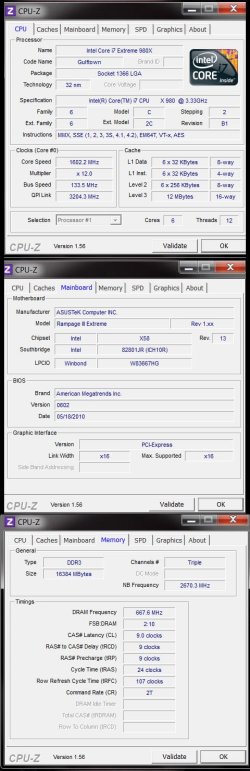
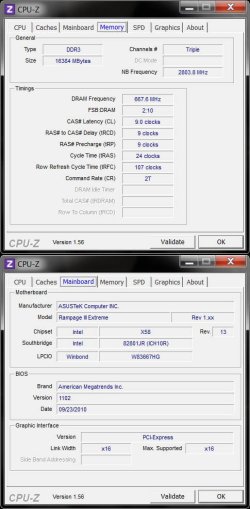
OK---here's the specs right off CPU-Z
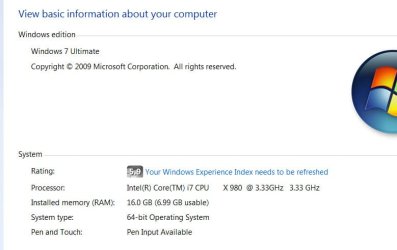
I am running Windows 7 64 bit Ultimate. Intel iCore7 Extreme 980X
I will try that. It's driving me crazy. Thank you Brianzion!!!
Yes, my RAM is compatible with the motherboard. | My System Specs | | System Manufacturer/Model Number Home Built-Frankenstein OS Windows XP to Windows 7 CPU Intel Core 2 Quad 2.83 Motherboard P5Q ASUS Memory 4x2 OCZ Platinum Graphics Card Nvidia GForce 8500 GT Sound Card Internal Realtek Monitor(s) Displays Dell Keyboard MS Ergo Mouse WACOM-3 Tablets-Intuos 4, Graphire 4, Graphire 3 to surf Hard Drives 3 Maxtor 500G
1 HD Caviar Green WD7500AADS
1 Seagate 500 G
1 Seagate TB Internet Speed Whatever Comcast High Speed is doing at the moment |
17 Dec 2010
|
#7 | | Windows XP to Windows 7 Colorado |
It would appear that I'm losing my C Drive. Right after I last posted, it started clicking and being difficult. I'll post if I have more trouble after getting this ironed out. Thanks to all that offered help and suggestions!  Now to go rescue my Drive 0. It's actually two terabytes. Thankfully most of the stuff is backed up, but I need to rescue the stuff that isn't. | My System Specs | | System Manufacturer/Model Number Home Built-Frankenstein OS Windows XP to Windows 7 CPU Intel Core 2 Quad 2.83 Motherboard P5Q ASUS Memory 4x2 OCZ Platinum Graphics Card Nvidia GForce 8500 GT Sound Card Internal Realtek Monitor(s) Displays Dell Keyboard MS Ergo Mouse WACOM-3 Tablets-Intuos 4, Graphire 4, Graphire 3 to surf Hard Drives 3 Maxtor 500G
1 HD Caviar Green WD7500AADS
1 Seagate 500 G
1 Seagate TB Internet Speed Whatever Comcast High Speed is doing at the moment |
20 Dec 2010
|
#8 | | Windows XP to Windows 7 Colorado |
OK, that wasn't the problem. That box wasn't checked.
My CDrive didn't die, and until it does something that Seagate recognizes as a problem, they won't give me a new one.
So, moving on.
The reason the RAM is the way it is with 16 G is because it's two matched sets of 4G sticks---they came in pairs, I bought two pair.
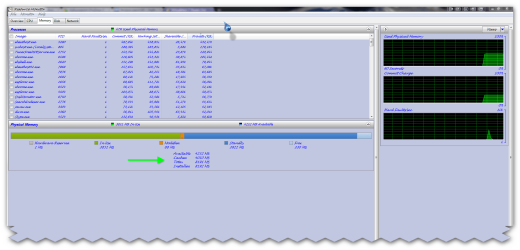
Now, it's showing that I have 16G installed, but it says I only have 6.9 G usable? What's all that about??
This RAM issue is driving me crazy.
Any help?
Thanks!
Laura | My System Specs | | System Manufacturer/Model Number Home Built-Frankenstein OS Windows XP to Windows 7 CPU Intel Core 2 Quad 2.83 Motherboard P5Q ASUS Memory 4x2 OCZ Platinum Graphics Card Nvidia GForce 8500 GT Sound Card Internal Realtek Monitor(s) Displays Dell Keyboard MS Ergo Mouse WACOM-3 Tablets-Intuos 4, Graphire 4, Graphire 3 to surf Hard Drives 3 Maxtor 500G
1 HD Caviar Green WD7500AADS
1 Seagate 500 G
1 Seagate TB Internet Speed Whatever Comcast High Speed is doing at the moment |
20 Dec 2010
|
#9 | | Windows 7 x64 Ultimate San Diego |
Well, the first thing is that you have a tripple channel motherboard and processor. The sticks should go in in sets of 3. As I said before some motherboards will take them in pairs but I don't know how well that functions in reality.
Try sticking in just three of the 4 gig sticks in "Bank 0" (closely check your manual for exactly where to put in three sticks, could be slot 1, 3 and 5 for example in a 6 slot motherboard) and see if you get a consistant and solid 12 gig of ram showing up. | My System Specs | | System Manufacturer/Model Number Scratch built OS Windows 7 x64 Ultimate CPU i7 960 Motherboard Asus P6X58D Memory 12 Gig Corsair Dominator Graphics Card Nvidia 480 Sound Card Maudio Delta 44 + breakout box Monitor(s) Displays Dell UltraSharp U2410 24in and Samsung 21 dual monitors Screen Resolution 1920x1200 and 1280x1024 Keyboard Logitech G15 + N52 game pad Mouse Logitech MX518 PSU Corasair TX850 Case Cooler Master HAF Cooling Corsair H50 Hard Drives Primary: Intel X-25M G2 160G SSD
Secondary: Segate baracuda 1.0 TB
HDs in AHCI mode. Internet Speed 15kbs down 4.5kbps up Other Info WEI 7.6
CPU & RAM 7.6
Graphics 7.9
Hard disk 7.7 |
20 Dec 2010
|
#10 | | Windows 7 Ultimate x64 Ontario, Canada |
i've seen this happen due to BIOS issues.
do you have the latest version? | My System Specs | | OS Windows 7 Ultimate x64 CPU Core i7 960 Motherboard ASUS P6TD Deluxe Memory Corsair XMS3 DDR3-1600 - 12 GB Graphics Card eVGA GTX 275 1792 MB Sound Card Onboard HD etc Monitor(s) Displays Dell SP2208WFP Keyboard MS Natural (you know, like the ones you find in nature...) Mouse MS Intellimouse Explorer PSU BFG EX-1200 Case CoolerMaster HAF 922 Cooling Thermalright Ultra 120 Extreme with Noctua NH-12 Fan Hard Drives Western Digital Caviar Black 1 TB x 2 (RAID-1) Windows 7 keeps losing my RAM problems? All times are GMT -5. The time now is 08:07 AM. | |