

- Local time
- 8:30 AM
- Messages
- 176
Been running W7U about a year now,, it performs well,, I like to tweak things and i have my system running quite well i think but it still seems to just lack that wow factor. I dont have my system overclocked nor do i have my Geforce overclocked but i know iwth my set up i could probably easily gain some performance but would i see a noticable difference?
I have read the how to overclock tutorials and i guess i have to admit im lazy i wanna just make some small adjustments in the bios to get me up a few more Mhz's so as not to create to much more heat and or instability issues. so my questions are:
#1 am i better off over clocking the processor? Ram? Or my graphics? or should i do a little bump to all 3?
#2 What tweaks have worked the best for you? where you actually noticed a performance gain during normal everyday use?
Mind you i'm not a gamer,,, i mainly surf, email, chat, webcam and do some graphics and website work.
Heres my main system specs
I have read the how to overclock tutorials and i guess i have to admit im lazy i wanna just make some small adjustments in the bios to get me up a few more Mhz's so as not to create to much more heat and or instability issues. so my questions are:
#1 am i better off over clocking the processor? Ram? Or my graphics? or should i do a little bump to all 3?
#2 What tweaks have worked the best for you? where you actually noticed a performance gain during normal everyday use?
Mind you i'm not a gamer,,, i mainly surf, email, chat, webcam and do some graphics and website work.
Heres my main system specs
Attachments

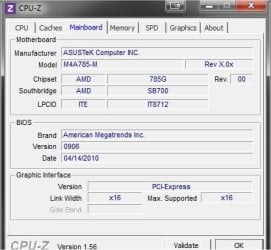
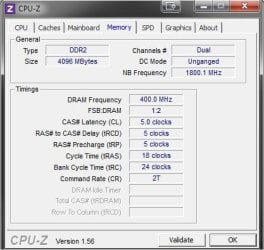
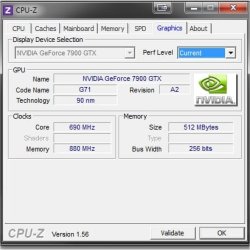
My Computer
At a glance
Win 7 64 UltimateAMD 8350 Bulldozer 4ghz6gbATI Radeon HD 5770 X 2
- Computer type
- PC/Desktop
- Computer Manufacturer/Model Number
- JRockZ
- OS
- Win 7 64 Ultimate
- CPU
- AMD 8350 Bulldozer 4ghz
- Motherboard
- Asus M5a97 R2
- Memory
- 6gb
- Graphics Card(s)
- ATI Radeon HD 5770 X 2
- Sound Card
- Board
- Monitor(s) Displays
- Dual Gateway 19" and 32" TV 3 displays at once :D
- Screen Resolution
- 1440X900
- Hard Drives
- OCZ Agility SSD Patriot Blaze 120
- PSU
- 750 Watt Thermaltake Tough Power
- Case
- Diablotek EVO Mid Tower Case CPA-6170 - 8X 120mm case fans
- Cooling
- Corsair Liquid Cooled
- Antivirus
- NAV
- Browser
- Always IE


