| Windows 7: Registry cleaners |
06 Feb 2011
|
#1 | | |
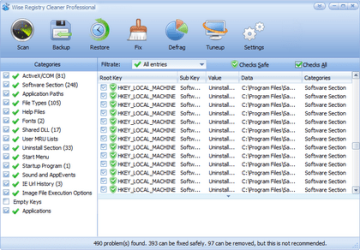
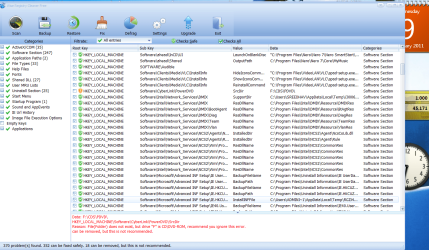
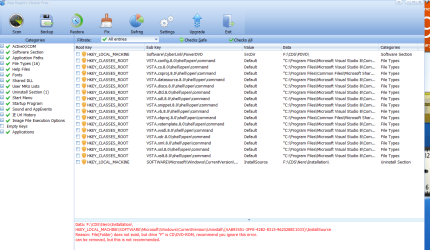
Registry cleaners Ok so I'm still learning Windows 7. anyways, back with vista there was a program called wise registry cleaner 4, and what i liked about this prog was the fact that in its description of each registry entry it showed the location of the entry, as in e:\whatever\whatever as in the location that is labeled data in the image below. I found entries in the registry that were attached to my external hard drive that i want to delete, however i cannot remember where they were. i wanted to clean up the registry and cannot find a registry cleaner or viewer that will show me entries by their location. i hope someone here can help me find something that will work.
thanx in advance. | My System Specs |
| |
06 Feb 2011
|
#2 | | Windows 7 Home Premium SP1, clean install, upgrade disc CT |
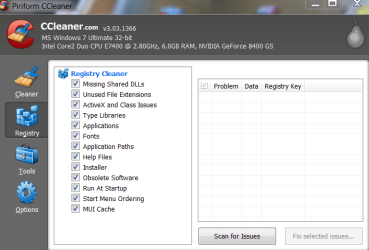
This may not be what you want to hear, but its true. For both Vista and Windows Seven you should not use registry cleaners; they can cause more harm than good. In fact, they are not even needed. The one exception is ccleaner. It may not meet the requirements that you described, but it is a very benign cleaner, that should not cause problems. It is also used to clean up temp files and other crap that can and should be removed. | My System Specs | | System Manufacturer/Model Number Dell XPS 420 OS Windows 7 Home Premium SP1, clean install, upgrade disc CPU Intel Core2 processsor Q8200(2.33Ghz 1333FSB) Quad Core Tech Motherboard Dell Memory 6 gb Graphics Card ATI Radeon 256MB HD3650 Sound Card Intergrated 7.1 Channel Audio Monitor(s) Displays Dell SP2009W 20" Keyboard Dell USB Keyboard Mouse Dell Premium Optical USB Cooling Fan Hard Drives 640 GB Serial ATA Hard drive Internet Speed DSL 2.85 |
06 Feb 2011
|
#3 | | Vista, Windows7, Mint Mate, Zorin, Windows 8 Florida in winter, Black Forest/Germany |
If you want to post a different problem every day on this forum, use any cleaner you like. But if you want to keep your system running, throw all cleaners in the bin. | My System Specs | | System Manufacturer/Model Number HP, Dell, Gateway, Toshiba - 4 laptops and 2 desktops OS Vista, Windows7, Mint Mate, Zorin, Windows 8 CPU from 1.6GHz Duo to i7 Monitor(s) Displays 2x HP w2207 Keyboard with trackball - no mices Mouse Trackball mice Hard Drives 5x HDD, 7x SSD, 12x Externals Internet Speed DSL 6000 |
06 Feb 2011
|
#4 | | MS Windows 7 Home Premium 64-bit SP1 Seasonal Bird |
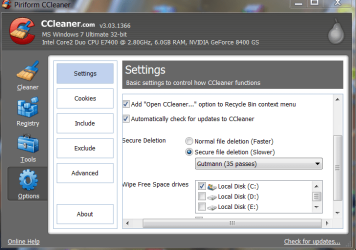
Dear gsx1000r02, Warm welcome to the forum! Please resist the tiniest temptation to even touch the registry(with even the longest barge pole), because you are sure to remove a critical key another day if not today! This is sure to lead to a BSOD and a system crash! Do you take regular backups of your drives? Even in Ccleaner, i am happy just to cleanup temp.files, but using the Gutmann 35 pass method. As you know"if it ain't broke, leave it as it is"! They are not Registry cleaners but registry killers! regards, Sreedhav | My System Specs | | System Manufacturer/Model Number Sony Vaio C series VPCCB35FN laptop OS MS Windows 7 Home Premium 64-bit SP1 CPU IntelCore i5@2.40GHz; Sandy Bridge 32nm Tech. Motherboard Sony Vaio Version:C609NJYJ Memory 4096Mb RAM; Single ChannelDDR3@665MHz; DRAM Freq:662MHz Graphics Card AMD Radeon HD 6630M; GPU:Whistler;BIOS Core&mem Clock:123.36 Sound Card REALTEK High Definition Audio Device; INTEL Display Card Monitor(s) Displays Generic PnP Intel HD;Resolution:1920*1040 Pixels; BPP:32bits Screen Resolution Current Resolution:1920*1080 Pixels; Monitor Frequency:60Hz Keyboard Logitech Bluetooth+ Generic Integrated K-B Mouse Logitech Bluetooth Cooling Lateral Exhaust with a Cooling Pad Placed Beneath. Hard Drives Internal HD:TOSHIBA MK5061GSY; Real Size:488 GB;NTFS; 3 Partitions; SATA; HEADS:16
External HDD: WD Elements 1023 PORTABLE; Estimated Size: 1TB; NTFS; 3 Partitions Internet Speed 2MBPS Other Info 1)Trend Micro Titanium Maximum Security Suite Version:3
2)SAS-PRO
3)MBAM--PRO
4)WATERFOX+IE9 +WOT+LINKEXTEND+ DRWEBCUREIT LINK CHECKER
5)SPYWAREBLASTER
6) WINPATROL PLUS
7) SANDBOXIE and
8) A BIT OF COMMON SENSE. |
07 Feb 2011
|
#5 | | Windows 7 Home Premium SP1, clean install, upgrade disc CT |
Easier just to use System Restore | My System Specs | | System Manufacturer/Model Number Dell XPS 420 OS Windows 7 Home Premium SP1, clean install, upgrade disc CPU Intel Core2 processsor Q8200(2.33Ghz 1333FSB) Quad Core Tech Motherboard Dell Memory 6 gb Graphics Card ATI Radeon 256MB HD3650 Sound Card Intergrated 7.1 Channel Audio Monitor(s) Displays Dell SP2009W 20" Keyboard Dell USB Keyboard Mouse Dell Premium Optical USB Cooling Fan Hard Drives 640 GB Serial ATA Hard drive Internet Speed DSL 2.85 |
07 Feb 2011
|
#6 | | |
To answer the OP's question - doesn't wise run on 7 ? - I think it does.
If you know what you are doing - you should be able to identify the entries with that. http://www.wisecleaner.com/wiseregistrycleanerfree.html | My System Specs | | OS Vista x64 / 7 X64 CPU E8400 Motherboard ASRock 1333 GLAN R2.0 Memory 2x1 gb 800mhz Graphics Card 9500gt 1gb Case Coolermaster Cooling Winpower 500w Hard Drives Maxtor 160gb-2mb cache |
07 Feb 2011
|
#7 | | Vista, Windows7, Mint Mate, Zorin, Windows 8 Florida in winter, Black Forest/Germany |
Quote: If you know what you are doing This is the key - - if you know what you are doing, you can do a lot of things. But when it comes to the registry, I think most "average" users have no clue. | My System Specs | | System Manufacturer/Model Number HP, Dell, Gateway, Toshiba - 4 laptops and 2 desktops OS Vista, Windows7, Mint Mate, Zorin, Windows 8 CPU from 1.6GHz Duo to i7 Monitor(s) Displays 2x HP w2207 Keyboard with trackball - no mices Mouse Trackball mice Hard Drives 5x HDD, 7x SSD, 12x Externals Internet Speed DSL 6000 |
07 Feb 2011
|
#8 | | Windows 7 Ultimate SP1 (64-bit) Valencia, VE. |
Yup, i agree with whs here... registry cleaners are not for the average "click next, next, next, finish" type of users, they require a certain amount of knowledge and common sense (backing up registry before making any changes)
So i'd stay away from registry cleaners if i don't know what i'm doing | My System Specs | | System Manufacturer/Model Number Built by Myself OS Windows 7 Ultimate SP1 (64-bit) CPU Intel Core i5-2310 @ 2.90GHz Motherboard MSI PH67A-C43 (B3) Memory Kingston KVR 16GB (4 x 4GB) DDR3 @ 1333MHz Graphics Card PNY XLR8 GTX 560 Ti 1GB GDDR5 Sound Card Realtek HD Audio (ALC 892) Monitor(s) Displays LG W2353V-PF Screen Resolution 1920 x 1080 (HDMI) Keyboard Logitech MK320 Wireless Keyboard Mouse Logitech MK320 Wireless Mouse PSU Thermaltake Toughpower XT 575w Modular 80 PLUS Bronze Case Cooler Master CM Storm Enforcer Cooling Thermaltake Frío, CM MegaFlow 200mm (2), CM 120mm (1) Hard Drives Samsung HD502HJ (500GB), ExcelStor J8080S (80GB) Internet Speed dl: 1024kbps, ul: 512kbps |
07 Feb 2011
|
#9 | | Win 7 Ultimate 64-bit. SP1. |

Quote: Originally Posted by gsx1000r02 i wanted to clean up the registry and cannot find a registry cleaner or viewer that will show me entries by their location. i hope someone here can help me find something that will work.
thanx in advance. You would be well advised to NOT use a registry cleaner.
*Modifying registry keys incorrectly can cause Windows instability, or make Windows unbootable.
*No registry cleaner is completely safe and the potential is ever present to cause more problems than they claim to fix.
THEREFORE
*If you do not have knowledge of the registry, then you would probably be better off leaving it alone, and definitely not placing blind trust in a program to do the job for you.
Should you go ahead & use a registry cleaner make sure you have
1.a current System Restore point created.
2.a recent Back up - preferably to an external HD. | My System Specs | | System Manufacturer/Model Number LAPTOP. HP Pavilion dv7-4010TX . OS Win 7 Ultimate 64-bit. SP1. CPU Intel i7 -720QM.[1.6GHz Turbo Boost 2.8GHz. 6MB Cache.] Memory 8 DDR 3 RAM. 1066MHZ Graphics Card ATI 1024 MB. DDR3. Radeon HD5650 Monitor(s) Displays 17.3" High Definition Brightview LCD. LED Backlit. Screen Resolution 1600 x 900. Mouse Logitech Anywhere mouse. MX. Case Laptop / notebook. Hard Drives 640GB Internet Speed ADSL [ but too slow ] |
07 Feb 2011
|
#10 | | Win7 x 6 PC's California, Florida, Boston |
Have installed CCleaner on hundreds of installs representing thousands of uses without a single issue. It's Disk and Registry cleaner are safe as they don't touch files which are still in use.
Unfortunately the Registry Cleaner sales scams with no genius behind them have tarred the whole lot. But CCleaner remains perhaps the most respected single app in the tech world. | My System Specs | | Registry cleaners problems? All times are GMT -5. The time now is 03:13 PM. | |