Hi there,
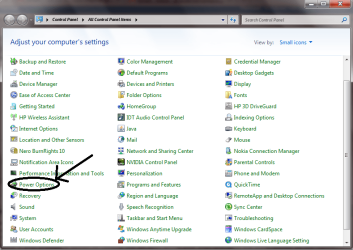
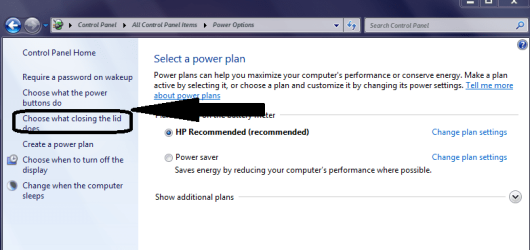
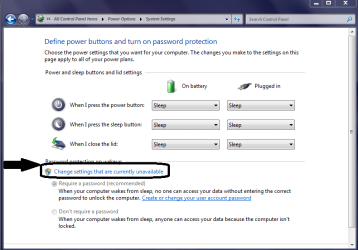
hope we're doing well today. I've had a problem lately with my Windows 7 HP Mini that has never happened up until now. For some reason when I close the lid of my netbook and reopen it, it does not ask for a password. I went to the "Change what closing the lid does" option and it says "Sleep" for closing the lid for both charging and battery state. And it also says on the bottom of the screen to ask for a password when Windows wakes. But when I close and open, it doesn't. It just goes back as if I set it to do nothing. I hear the computer sleep when I close the lid. But when opened, no password is being asked for. I set it to do nothing when the lid is closed before, but I set it back later on to sleep. I tried rebooting the netbook, but no luck was found. Is there a fix for this? Thanks for the help.
hope we're doing well today. I've had a problem lately with my Windows 7 HP Mini that has never happened up until now. For some reason when I close the lid of my netbook and reopen it, it does not ask for a password. I went to the "Change what closing the lid does" option and it says "Sleep" for closing the lid for both charging and battery state. And it also says on the bottom of the screen to ask for a password when Windows wakes. But when I close and open, it doesn't. It just goes back as if I set it to do nothing. I hear the computer sleep when I close the lid. But when opened, no password is being asked for. I set it to do nothing when the lid is closed before, but I set it back later on to sleep. I tried rebooting the netbook, but no luck was found. Is there a fix for this? Thanks for the help.
My Computer
At a glance
Windows 7 Home Premium 64 BitHP Pavilion DV7 Notebook PC8GB RAMAMD Radeon Graphics
- Computer Manufacturer/Model Number
- HP
- OS
- Windows 7 Home Premium 64 Bit
- CPU
- HP Pavilion DV7 Notebook PC
- Memory
- 8GB RAM
- Graphics Card(s)
- AMD Radeon Graphics
- Hard Drives
- 1TB Hard Drive