Having a weird issue with my Win 7 Pro 64bit system. About 3 days ago the system starts up normally and at first everything is normal. But after a few minutes use the PC begins to lag way behind the cursor actions. I can click on a tab/icon/etc and nothing happens...multiple clicks don't seam to matter...the system just "freezes" until what ever it is releases it. Then a few moments later the same issue repeats?
I have task manager obviously but also have Process Explorer... current version for 64 bits.
However...I don't know what to look for or if these apps can help me isolate what is causing these slowdowns ?
I suspect my AV software (Bitdefender Internet Security 2011) but my system has been running fine and disabling the AV part doesn't seem to make any difference ?
Anyone have an idea on what's causing this ands where to start to try and correct this ?
Thanks...TRinAZ
My Computer
At a glance
Windows 7 Pro 64bit SP1AMD FX-6100 Six-Core Processor2ea Corsair-1333MHz-PC3-10666-240-pin-CMX4GX3...NVIDIA GeForce GT 630 - 1023MB (EVGA)
Run an online scan to help rule out malware. First disable Bitdefender so as to not interfere with the online scan.
ESET Online Scanner
Note: You can use either Internet Explorer or Mozilla FireFox for this scan. You will however need to disable your current installed Anti-Virus, how to do so can be read here.
Vista/Windows 7 users: You will need to to right-click on the either the IE or FF icon in the Start Menu or Quick Launch Bar on the Taskbar and select Run as Administrator from the context menu.
Note: If using Mozilla Firefox you will need to download esetsmartinstaller_enu.exe when prompted then double click on it to install. All of the below instructions are compatible with either Internet Explorer or Mozilla FireFox.
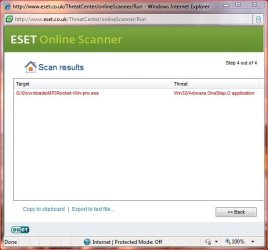
You can manually delete that file: Start ===> Computer
Double click to open the G: drive
Double click Downloads to open the folder
Scroll down to the file (in red below)
G:\Downloads\MP3Rocket-Win-pro.exe
Right click on MP3Rocket-Win-pro.exe and select delete
===================
Please go to the Security Center and confirm that you have only one firewall enabled.
===================
Since you know that this started 3 or 4 days ago, I think you should try System Restore. Just select Restore Point with an earlier date.