Windows 7 Forums


Windows 7: Huge pagefile.sys file

07 Jul 2009   #1

Win 7 Ultimate
 
 
Huge pagefile.sys file

Hello everyone. I have a doubt in an odd situation.


I divided my Hard Disc onto three partitions. One of them I haven't used yet, so, hipotetically (I guess), it should be blank (with no files), right?

Well, I've just noticed that this "empty" partition has 5GB occupied already.

When I unchecked "Hide protected operating system files" feature, I found out this pagefile.sys file which has about 5.12GB.

What's that file for? Can I just get rid of it or, at least, reduce its size?


Thanks.
My System SpecsSystem Spec

07 Jul 2009   #2

Vista
België


I have that same file on my main HDD :-)

But since it is that big... I don't think we should delete it :-p
My System SpecsSystem Spec
07 Jul 2009   #3

Windows 7 Build 7264 X64


That 5 gb file is the virtuam memory....if you have more than 3 or 4 gb of ram it is ok to disable virtual memory. To to that: right click on "my computher" then click prop. Go to "Advanced System Settings", go to "Advanced" tab and click "Settings" under Performance, then go to advanced tab and click "Change" hit "No paging file" and then hit "Set".

Warning: After doing this some games or appz won't work anymore, extremely rarely but it might just happen. Fuel doesn't work without a pagefile.
My System SpecsSystem Spec
.


07 Jul 2009   #4

Vista
België


Aright Thanks for the information Tzeapa,
But i'll leave it there, I have space enough...

Although I have 8GB of ram... I play Fuel (atm) so i'll leave it on ^^
My System SpecsSystem Spec
07 Jul 2009   #5

Windows 7 Professional 64-bit


My System SpecsSystem Spec
07 Jul 2009   #6

Win 7 Ultimate


I would never guess that it's the virtual memory file.

If I remember correctly, Windows XP wouldn't display the paging file occuping my partition - it would just show a lower data capacity to the same. That's probably why I found it odd.

Anyhow, thanks for the replies.
My System SpecsSystem Spec
07 Jul 2009   #7

Server 2008 R2 SP1, Win7 x64 Pro SP1


Quote   Quote: Originally Posted by AdeonC View Post
I would never guess that it's the virtual memory file.

If I remember correctly, Windows XP wouldn't display the paging file occuping my partition - it would just show a lower data capacity to the same. That's probably why I found it odd.

Anyhow, thanks for the replies.
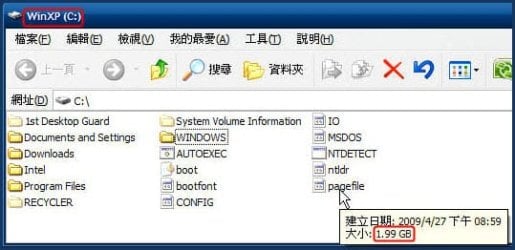
The pagefile exists in the partition of the Windows XP:

Huge pagefile.sys file-snap1.jpg
My System SpecsSystem Spec
07 Jul 2009   #8
Lee

Win 7 Pro x64, VM Win XP, Win7 Pro Sandbox, Kubuntu 11
Fruitland, Idaho


What is happening is Win 7 is using the drive with the greater amount of free space for virtual memory. Before you go turning off this feature completely it would be a good idea to test out what would happen if you do; may be all you need to do is to down size it from what it is set at first (example: if at 5.2 mbs then try 1.2 mbs (these are only examples, and nothing more)). I am running 16 Gbit of DDR2 6400, and really don't pay attention to the Virtual Drive settings It is not going to increase you performance all that much.
My System SpecsSystem Spec
07 Jul 2009   #9

Windows 7 Home Premium x64 7600 [MSDN]
Los Angeles


For the love of...

Just disable the thing, entirely. Sheesh, it's a throw-back to the stoneage.
My System SpecsSystem Spec
07 Jul 2009   #10

Windows 7 Build 7264 X64


Actually virtual memory is slowing down the computer because the os instead of using RAM uses pagefile.sys wich is located on HDD. Disabling it will give your computer a boost of performance...

Virtual Memory is for computers with small amounts of ram !

And I can't understand why games like Fuel won't start with no virtual memory
My System SpecsSystem Spec
Reply

 Huge pagefile.sys file problems?


Thread Tools


Similar help and support threads for: Huge pagefile.sys file
Thread Forum
HUGE 134GB .Sys File on C Drive General Discussion
BSOD when booting windows. Huge dmp file. BSOD Help and Support
Solved well got a huge problem its about a registry file not wanting to add Customization
Opening huge HTML file - 80MB General Discussion
Something is generating huge temp file (80+ Gigs) Performance & Maintenance


All times are GMT -5. The time now is 12:39 AM.


Windows 7 Forums is an independent web site and has not been authorized,
sponsored, or otherwise approved by Microsoft Corporation.
"Windows 7" and related materials are trademarks of Microsoft Corp.
© Designer Media Ltd