|
Welcome to Windows 7 Forums. Our forum is dedicated to helping you find solutions with any problems, errors or issues you are experiencing with Windows 7. The Windows 7 forum also covers news and updates and has an extensive Windows 7 tutorial section that covers a wide range of tips and tricks.
Windows 7 - Optimizing RAM in Win7 |
04-16-2011
|
#1 | | Windows 7 Home Premium x64, Ubuntu |
Optimizing RAM in Win7 Is there an internal software in Win 7 that optimizes the RAM?
| My System Specs | | System Manufacturer/Model Number ASUS N61JV OS Windows 7 Home Premium x64, Ubuntu CPU i3-370 M, 2,40 GHz Motherboard ASUS Memory 4 Gb Graphics Card nVidia GeForce 325M Sound Card Realtek High Definition Audio |
04-16-2011
|
#2 | | Windows 7 Home Premium 64bit |
you could try RAMRush - RAM Optimizer Memory Optimizer or windows ready boost (uses a flash drive to store temp ram stuff) | My System Specs | | System Manufacturer/Model Number [NEW PC :D] HP Pavilion p6565uk OS Windows 7 Home Premium 64bit CPU AMD Phenom II X6 1035T @2.6GHz (hexacore) (=15.6GHz) Motherboard FOXCONN (2AA9) Memory 6GB DDR3-1333 (running at 1066) Graphics Card NVIDIA GeForce GT 230 (1.5GB) Sound Card Realtek HD Audio (with 5.1 surroundsound always on) Monitor(s) Displays Sharp LL-T1620-H :( Screen Resolution 1024x768 Keyboard HP 2.4 GHz wireless keyboard + HP Media Centre Remote Mouse HP wireless mouse Case Stock HP one that came with it, mid-size ATX Cooling Stock fans, they're fairly quiet. Hard Drives 1TB internal WD Caviar Black
500GB Seagate FreeAgent Desk
500GB Seagate External Desktop Drive Internet Speed Lets just say my phone connection is four times faster... |
04-16-2011
|
#3 | | Windows 7 HP 64bit, Windows 8 64bit |
Windows 7 does a very good job of handling the memory. I would just leave it alone. Sometimes you can do more harm with these "snake oil" remedies.
Jim | My System Specs | | System Manufacturer/Model Number Home Built OS Windows 7 HP 64bit, Windows 8 64bit CPU Phenom II X6 1100T Motherboard ASUS M5A99X EVO Memory Crucial Balistic 8gb DDR3-1866 CL9 Graphics Card MSI R6850 Cyclone IGD5 PE Sound Card On Board Monitor(s) Displays ASUS VE258Q 25" LED with DVI-HDMI-DisplayPort Screen Resolution 1920 x 1080 Keyboard AVS Gear Blue LED Backlight Mouse Logitech Marble Mouse USB, Logitech Precision Game Pad PSU Seasonic X650 80 Plus GOLD Modular Case Corsair 400R Cooling Antec Kuhler H2O 620, Two 120mm and four 140mm Hard Drives Two WD Cavier Black 2TB Sata III, WD My Book Essential 2TB USB 3.0 Internet Speed 15MB Other Info APC UPS ES 750, Netgear WNR3500L Gigabit & Wireless N Router with SamKnows Test Program, Motorola SB6120 Gigabit Cable Modem. Brother HL-2170W Laser Printer, Epson V300 Scanner |
04-16-2011
|
#4 | | Windows 7 Home Premium 64bit |

Quote: Originally Posted by Phone Man Windows 7 does a very good job of handling the memory. I would just leave it alone. Sometimes you can do more harm with these "snake oil" remedies.
Jim  true 
Windows 7 works best with a minimum of 2GB of RAM. If you have less, then I'm afraid those are the only solutions and they aren't very effective. | My System Specs | | System Manufacturer/Model Number [NEW PC :D] HP Pavilion p6565uk OS Windows 7 Home Premium 64bit CPU AMD Phenom II X6 1035T @2.6GHz (hexacore) (=15.6GHz) Motherboard FOXCONN (2AA9) Memory 6GB DDR3-1333 (running at 1066) Graphics Card NVIDIA GeForce GT 230 (1.5GB) Sound Card Realtek HD Audio (with 5.1 surroundsound always on) Monitor(s) Displays Sharp LL-T1620-H :( Screen Resolution 1024x768 Keyboard HP 2.4 GHz wireless keyboard + HP Media Centre Remote Mouse HP wireless mouse Case Stock HP one that came with it, mid-size ATX Cooling Stock fans, they're fairly quiet. Hard Drives 1TB internal WD Caviar Black
500GB Seagate FreeAgent Desk
500GB Seagate External Desktop Drive Internet Speed Lets just say my phone connection is four times faster... |
04-16-2011
|
#5 | | Windows 7 x64 pro/ Windows 7 x86 Pro/ XP SP3 x86 |
Please avoid all these ram optimizers.
All that these so called optimizers do is this- they call a Windows function that forces apps to to write out memory to the pagefile, or they allot and then withdraw a large amount of memory quickly so that Windows is forced to page a lot of stuff. As a result it appears that a lot of memory has been freed up, while what you have actually done is switch to the much slower hard drive pagefile from the very fast ram.
Memory is not a cosmetic item, its meant to be used efficiently and windows does a pretty good job. | My System Specs | | System Manufacturer/Model Number Too many to describe... OS Windows 7 x64 pro/ Windows 7 x86 Pro/ XP SP3 x86 |
04-16-2011
|
#6 | | Windows 7 Home Premium 64bit |
ah, good point.
to sum up then: don't use ram optimizing programs, ready boost would be your best bet but if you have less than 2GB and find it unbearably slow, switch to XP | My System Specs | | System Manufacturer/Model Number [NEW PC :D] HP Pavilion p6565uk OS Windows 7 Home Premium 64bit CPU AMD Phenom II X6 1035T @2.6GHz (hexacore) (=15.6GHz) Motherboard FOXCONN (2AA9) Memory 6GB DDR3-1333 (running at 1066) Graphics Card NVIDIA GeForce GT 230 (1.5GB) Sound Card Realtek HD Audio (with 5.1 surroundsound always on) Monitor(s) Displays Sharp LL-T1620-H :( Screen Resolution 1024x768 Keyboard HP 2.4 GHz wireless keyboard + HP Media Centre Remote Mouse HP wireless mouse Case Stock HP one that came with it, mid-size ATX Cooling Stock fans, they're fairly quiet. Hard Drives 1TB internal WD Caviar Black
500GB Seagate FreeAgent Desk
500GB Seagate External Desktop Drive Internet Speed Lets just say my phone connection is four times faster... |
04-16-2011
|
#7 | | Vista and Windows7, sometimes Ubuntu and Fedora |
Quote: find it unbearably slow, switch to XP I don't think that would help. Most people found Windows 7 to be just as fast (or slow) as XP. If you have little RAM, buy some more. RAM really not expensive these days.
And as was already said, keep off all those wonder drugs. They are nothing but trouble.
Go into Resource Monitor > Memory tab and make a snip of the colored bar. Post that here and we will have a look. | My System Specs | | System Manufacturer/Model Number HP, Dell, Gateway - 2 laptops and 2 desktops OS Vista and Windows7, sometimes Ubuntu and Fedora CPU from 1.6GHz Duo to 2.5GHz Quad Monitor(s) Displays 2x HP w2207 Keyboard with trackball - no mices Mouse terrible devices, who wants them Hard Drives 5x HDD, 2x SSD, 6x Externals Internet Speed DSL 6000 |
04-16-2011
|
#8 | | Windows 7 Home Premium 64bit |

Quote: Originally Posted by whs Quote: find it unbearably slow, switch to XP I don't think that would help. Most people found Windows 7 to be just as fast (or slow) as XP. If you have little RAM, buy some more. RAM really not expensive these days.
And as was already said, keep off all those wonder drugs. They are nothing but trouble.
Go into Resource Monitor > Memory tab and make a snip of the colored bar. Post that here and we will have a look. well, XP has a 64MB RAM minimum requirement, 7 has 512MB 
depends how bloated your system gets though. as yeah, an xp system can get incredibly slow after a while. | My System Specs | | System Manufacturer/Model Number [NEW PC :D] HP Pavilion p6565uk OS Windows 7 Home Premium 64bit CPU AMD Phenom II X6 1035T @2.6GHz (hexacore) (=15.6GHz) Motherboard FOXCONN (2AA9) Memory 6GB DDR3-1333 (running at 1066) Graphics Card NVIDIA GeForce GT 230 (1.5GB) Sound Card Realtek HD Audio (with 5.1 surroundsound always on) Monitor(s) Displays Sharp LL-T1620-H :( Screen Resolution 1024x768 Keyboard HP 2.4 GHz wireless keyboard + HP Media Centre Remote Mouse HP wireless mouse Case Stock HP one that came with it, mid-size ATX Cooling Stock fans, they're fairly quiet. Hard Drives 1TB internal WD Caviar Black
500GB Seagate FreeAgent Desk
500GB Seagate External Desktop Drive Internet Speed Lets just say my phone connection is four times faster... |
04-16-2011
|
#9 | | Windows 7 Home Premium x64, Ubuntu |
There is a command to enter which I can not remember. There should be a way to that through control panel -> adminstration but I can't see any.
Any
one knows that command? | My System Specs | | System Manufacturer/Model Number ASUS N61JV OS Windows 7 Home Premium x64, Ubuntu CPU i3-370 M, 2,40 GHz Motherboard ASUS Memory 4 Gb Graphics Card nVidia GeForce 325M Sound Card Realtek High Definition Audio |
04-16-2011
|
#10 | | Windows 7 Home Premium 64bit |
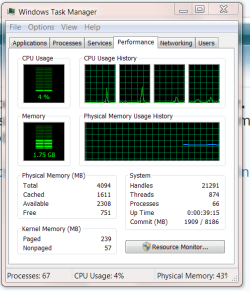
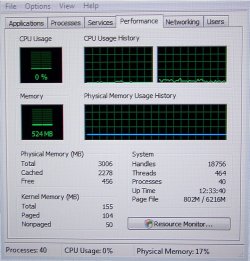
if you press ctrl-shift-esc you can bring up the task manager. navigate to the performance tab, that'll show your ram usage. | My System Specs | | System Manufacturer/Model Number [NEW PC :D] HP Pavilion p6565uk OS Windows 7 Home Premium 64bit CPU AMD Phenom II X6 1035T @2.6GHz (hexacore) (=15.6GHz) Motherboard FOXCONN (2AA9) Memory 6GB DDR3-1333 (running at 1066) Graphics Card NVIDIA GeForce GT 230 (1.5GB) Sound Card Realtek HD Audio (with 5.1 surroundsound always on) Monitor(s) Displays Sharp LL-T1620-H :( Screen Resolution 1024x768 Keyboard HP 2.4 GHz wireless keyboard + HP Media Centre Remote Mouse HP wireless mouse Case Stock HP one that came with it, mid-size ATX Cooling Stock fans, they're fairly quiet. Hard Drives 1TB internal WD Caviar Black
500GB Seagate FreeAgent Desk
500GB Seagate External Desktop Drive Internet Speed Lets just say my phone connection is four times faster... Optimizing RAM in Win7 problems? All times are GMT -5. The time now is 06:30 PM. |  |