| Windows 7: Free up Windows 7 memory usage to reduce disk swapping |
21 May 2011
|
#1 | | |
Free up Windows 7 memory usage to reduce disk swapping Hi Folks,
I installed Windows 7 on my Windows XP pro NEC netbook to be able to make use of the Intel GMA 500 H264 AVC hardware video decoding. That works pretty well and allows 720p H.264 AVC video decoding with subtitles in real time with minor CPU usage. Now the problem is free memory.
My machine only has 1GB memory and is NON-UPGRADEABLE. I cannot add more RAM, there is no second slot and the first DIMM is soldered on apparently. Is there any way to make Windows 7 Home Premium 32 to be a little slimmer. As is it takes up most RAM and under available I get at best about 200MB. I use NOD32 as my AV and have very little running otherwise. Is it possible to make Windows 7 use less RAM? Obviously I can't buy more RAM because the machine is not upgradeable. The machine originally shipped with either Vista Basic or XP Pro and NEC in Akihabara put XP Pro for me but Intel never made drivers for H/W H.264 decoding for XP Pro hence my need to run 7. XP itself was significantly faster in startup (less than 14 seconds) and operation than 7 and less SSD use was noted
but software CPU decoding of H.264 using CoreAVC was taxing the CPU at close to 100%.
The machine still runs very fast as it has a Toshiba SSD with a slightly faster than average Atom at 1.86GHz but with so little available (not free) RAM I'm afraid Windows will destroy the SSD with frequent writes. Windows does not even see it as an SSD as it scheduled defrag for it, which I disabled.
So if anyone has any hints and suggestions, I'm all ears. Thank you very much  . | My System Specs |
| System Manufacturer/Model Number NEC VersaPro UltraLite Type VS OS Win 7 Home Premium 32bit CPU Atom 1.86GHz Motherboard NEC proprietory Memory 1GB DDR2 RAM Graphics Card Intel GMA500 Sound Card Realtek Monitor(s) Displays NEC 10.1" Screen Resolution 1280x768 Keyboard Japanese keyboard Mouse Alps Technology stick pointing device PSU NEC portable power supply Case Ultraportable Cooling Passive Hard Drives Toshiba 64GB SSD Internet Speed 4 Mbit ADSL via WiFi |
21 May 2011
|
#2 | | Vista, Windows7, Mint Mate, Zorin, Windows 8 Florida in winter, Black Forest/Germany |
I am afraid there is little you can do. Some people recommend to disable some of the processes that are not needed. The problem is that you never know which ones are really not needed.
As far as the SSD goes, I would no worry about the lifetime. It will hold up longer than you will care to keep this system. | My System Specs | | System Manufacturer/Model Number HP, Dell, Gateway, Toshiba - 4 laptops and 2 desktops OS Vista, Windows7, Mint Mate, Zorin, Windows 8 CPU from 1.6GHz Duo to i7 Monitor(s) Displays 2x HP w2207 Keyboard with trackball - no mices Mouse Trackball mice Hard Drives 5x HDD, 7x SSD, 12x Externals Internet Speed DSL 6000 |
21 May 2011
|
#3 | | |

Quote: Originally Posted by whs I am afraid there is little you can do. Some people recommend to disable some of the processes that are not needed. The problem is that you never know which ones are really not needed.
As far as the SSD goes, I would no worry about the lifetime. It will hold up longer than you will care to keep this system. Thanks for the reply. The main worry is that the SSD will fail because MLC flash has a limited number of write cycles and this is a 1st Gen Toshiba SSD. However, perhaps as you say this drive will hold for a while. Saying this I've had a Gen2 Intel X25-M fail on me after several months of limited use and it wasn't from being written to, too much. | My System Specs | | System Manufacturer/Model Number NEC VersaPro UltraLite Type VS OS Win 7 Home Premium 32bit CPU Atom 1.86GHz Motherboard NEC proprietory Memory 1GB DDR2 RAM Graphics Card Intel GMA500 Sound Card Realtek Monitor(s) Displays NEC 10.1" Screen Resolution 1280x768 Keyboard Japanese keyboard Mouse Alps Technology stick pointing device PSU NEC portable power supply Case Ultraportable Cooling Passive Hard Drives Toshiba 64GB SSD Internet Speed 4 Mbit ADSL via WiFi |
21 May 2011
|
#4 | | W 7 64-bit Ultimate The Lowcountry |
Hello Puragu, welcome to Seven Forums!
Perhaps using another AV such as MSs own MS Security Essentials will free up some resources for you. Microsoft Security Essentials | My System Specs | | System Manufacturer/Model Number * BFK Customs * OS W 7 64-bit Ultimate CPU Intel Q9550 Yorkfield Motherboard ASUS P5Q Pro Memory 8GB Dominator 8500C5D Graphics Card ATI : XFX 5870 Sound Card Realtek HD Audio 7-1 Monitor(s) Displays 1x 47" LCD HDMI & 3x 26" LCD HDMI Screen Resolution 1920x1080P & 1920x1200 Keyboard Microsoft 500 Mouse Razer Diamondback 3G PSU Corsair 620HX Case Cooler Master RC-690 Cooling Tuniq Tower 120, 2x 140mm and 3x 120mm case fans Hard Drives 1x 80GB Intel X25-M G2 SSD : 1x 500GB & 1x 640GB WD Caviar Black(s) Internet Speed 14 Mb/s Other Info 1x Koutech 3Gb/s SATA HDD Hot Swap Rack |
21 May 2011
|
#5 | | Vista, Windows7, Mint Mate, Zorin, Windows 8 Florida in winter, Black Forest/Germany |
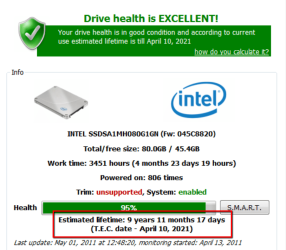
Let me show you the health status of one of my first gen Intels that I use since 2008. It will last another 10 years. | My System Specs | | System Manufacturer/Model Number HP, Dell, Gateway, Toshiba - 4 laptops and 2 desktops OS Vista, Windows7, Mint Mate, Zorin, Windows 8 CPU from 1.6GHz Duo to i7 Monitor(s) Displays 2x HP w2207 Keyboard with trackball - no mices Mouse Trackball mice Hard Drives 5x HDD, 7x SSD, 12x Externals Internet Speed DSL 6000 |
22 May 2011
|
#6 | | |

Quote: Originally Posted by whs Let me show you the health status of one of my first gen Intels that I use since 2008. It will last another 10 years. Hi Whs,
Thanks for your reply. It's good to know that that drive works so well after a long time. I hope Toshiba is as good as Intel in their QA.
I own 3 SSDs. One in my 2009 Japanese NEC netbook. Then I put a second gen X-25M in my Mac Pro which really makes OSX Leopard bootup in about 6 seconds. Then I bought a second 160GB Intel X-25M for my Let's Note notebook running WinXP Pro. It died after 3 months. The 2nd Gen Intel in the Mac Pro was purchased in 2009 and it works great. It's used as the OS drive and applications drive for Photoshop and Final Cut Pro. I used to push Intel SSDs on everyone in online recommendations but sadly after the death of a brand new X-25M I've had to eat my words. My failure rate on these is 50% and granted this could lead to the fallacy of small numbers but these drives are still very expensive. However your comments on your own drives are encouraging. Thanks | My System Specs | | System Manufacturer/Model Number NEC VersaPro UltraLite Type VS OS Win 7 Home Premium 32bit CPU Atom 1.86GHz Motherboard NEC proprietory Memory 1GB DDR2 RAM Graphics Card Intel GMA500 Sound Card Realtek Monitor(s) Displays NEC 10.1" Screen Resolution 1280x768 Keyboard Japanese keyboard Mouse Alps Technology stick pointing device PSU NEC portable power supply Case Ultraportable Cooling Passive Hard Drives Toshiba 64GB SSD Internet Speed 4 Mbit ADSL via WiFi |
22 May 2011
|
#7 | | |

Quote: Originally Posted by Bare Foot Kid Hello Puragu, welcome to Seven Forums!
Perhaps using another AV such as MSs own MS Security Essentials will free up some resources for you. Microsoft Security Essentials Hi Bare Foot Kid,
Thanks for the welcome  .
I've tried MS Security Essentials before and it made WinXP crawl on that netbook. Maybe it uses less RAM but it slowed everything down. With ESET NOD32 I see no performance decrease between switching it off or on. I used the WinXP Pro version
of Security Essentials on WinXP Pro before but sadly it was too slow. Do you think the Windows 7 version is faster? I have Windows Defender service running though for spyware which NOD32 may miss.
I disabled the MS Printing service, since I don't use this device to print from. If I need to print I transfer via USB stick or email to a different PC and print from that.
Thanks
Oh BTW, Microsoft H264 Decoder is the bomb! It is the only decoder capable of proper H.264 AVC 720p decoding using DXVA. I tried Cyberlink PowerDVD8's H264 Decoder -> screen corruption and SLOW in DVXA mode, I tried DivX H.264 decoder in DVXA mode -> slower and screen corruption, I tried FFDSHOW TryOuts decoder -> no go at all. CoreAVC in DXVA mode is also slow.
This is the only decoder which works with subtitles and it works virtually flawlessly on a system which has 1080p H.264 h/w decoding in GMA500 chipset. The rest are a waste of time and money, it is also FREE with Windows 7. | My System Specs | | System Manufacturer/Model Number NEC VersaPro UltraLite Type VS OS Win 7 Home Premium 32bit CPU Atom 1.86GHz Motherboard NEC proprietory Memory 1GB DDR2 RAM Graphics Card Intel GMA500 Sound Card Realtek Monitor(s) Displays NEC 10.1" Screen Resolution 1280x768 Keyboard Japanese keyboard Mouse Alps Technology stick pointing device PSU NEC portable power supply Case Ultraportable Cooling Passive Hard Drives Toshiba 64GB SSD Internet Speed 4 Mbit ADSL via WiFi |
22 May 2011
|
#9 | | Windows 7 Professional 64bit SP1 |
I have little experience with SSDs (so apols if this is moot), though have you considered using ReadyBoost? ReadyBoost can provide additional memory to up maximum 256 GB using most flash storage devices/USB port??? | My System Specs | | System Manufacturer/Model Number COMPAQ CQ5115 OS Windows 7 Professional 64bit SP1 CPU Intel Core 2 Quad 2.33GHz Memory 8 GB Graphics Card Intel GMA 3100 Monitor(s) Displays HannsG HW191D 19" Widescreen LCD TFT Screen Resolution 1440 x 900 Keyboard Logitech UltraX Mouse Logitech MX400 Hard Drives 1x internal 500 GB
2x external 500 GB Internet Speed 35+ Mb/s |
22 May 2011
|
#10 | | Windows 7 Ultimate 32 Bit, Windows Developer Preview, Linux Mint 9 Gnome 32 Bit Philippines |
I too have an old computer with just 1GB RAM and an Intel Pentium Dual CPU E2180@2GHz. It works fairly for basic computing and I was even able to watch live TV in it with Windows Media Center and play games but you can't expect it to do so good when running resource hogging programs or when running so many programs at the same time. It works just fine for me even if I had most of the visual effects and Aero enabled.
If you don't care much about the eye candy visual effects, you might wanna consider disabling Aero cause that will make the machine use RAM and resources, saving them for use of other things like running your programs more smoothly. When trying antivirus software, it is advised that you don't have 2 different antivirus programs running and installed at the same time because this results into a conflict that usually makes computers very slow.
When you installed Microsoft Security Essentials on your Windows XP on the netbook, did you have any other antivirus programs installed?? Did you install Microsft Security Essentials on your Windows XP with ESET NOD32 installed at the same time? It is advisable that you don't have the two of them installed at the same time so if you are gonna try a new antivirus program over another, please uninstall the other one before installing the new one.
However, some people on this forum have suggested that Microsoft Security Essentials and Malwarebytes don't conflict each other and can be installed on the computer at the same time. | My System Specs | | System Manufacturer/Model Number Custom Built OS Windows 7 Ultimate 32 Bit, Windows Developer Preview, Linux Mint 9 Gnome 32 Bit CPU Intel Pentium Dual CPU E2180@2GHz Motherboard Elitegroup 671T-M3 Graphics Card NVIDIA GeForce 7200 GS Monitor(s) Displays AOC TFT1560 15" LCD Monitor Screen Resolution 1024x768 Keyboard Logitech USB Keyboard Free up Windows 7 memory usage to reduce disk swapping problems? All times are GMT -5. The time now is 05:17 PM. | |