|
Welcome to Windows 7 Forums. Our forum is dedicated to helping you find solutions with any problems, errors or issues you are experiencing with Windows 7. The Windows 7 forum also covers news and updates and has an extensive Windows 7 tutorial section that covers a wide range of tips and tricks.
Windows 7 - Add Hibernate |
06-17-2011
|
#1 | | |
Add Hibernate I have tired stuff in the command prompt and i have tried in the power settings but nothing works.
How do i add herbenate to list of shut down commands?
What i mean is like this
How do i add it to above? | My System Specs | | |
06-17-2011
|
#2 | | Windows 7 Home Premium x64 SP1 |
Open elevated command prompt. Type powercfg -h on. After that, hibernate option should appear in the list of shutdown commands. | My System Specs | | System Manufacturer/Model Number Toshiba Satellite U500 OS Windows 7 Home Premium x64 SP1 CPU Intel Core i3 M330 @ 2.13GHz Memory 4 GB Graphics Card NVidia GeForce 310M Screen Resolution 1280x800 |
06-17-2011
|
#3 | | |

Quote: Originally Posted by Garlic Open elevated command prompt. Type powercfg -h on. After that, hibernate option should appear in the list of shutdown commands. It didn't work. | My System Specs | | |
06-17-2011
|
#4 | | Vista and Windows7, sometimes Ubuntu and Fedora |
The command that Garlic gave you should work. Are you sure the command was executed. Best is to copy/paste the command into the cmd window. Cmd is very iffy if you forget a blank. | My System Specs | | System Manufacturer/Model Number HP, Dell, Gateway - 2 laptops and 2 desktops OS Vista and Windows7, sometimes Ubuntu and Fedora CPU from 1.6GHz Duo to 2.5GHz Quad Monitor(s) Displays 2x HP w2207 Keyboard with trackball - no mices Mouse terrible devices, who wants them Hard Drives 5x HDD, 2x SSD, 6x Externals Internet Speed DSL 6000 |
06-17-2011
|
#5 | | Windows 7 Home Premium 64-bit, SP1 |

Quote: Originally Posted by sailornaruto39 
Quote: Originally Posted by Garlic Open elevated command prompt. Type powercfg -h on. After that, hibernate option should appear in the list of shutdown commands. It didn't work. Please elaborate what didn't work ?
such as..... what did the cmd window say when you type in powercfg -h on and press Enter ?
did you notice there is a space between " powercfg "and " - ", and between " h " and " on " ?
Try copy/paste the command line into the cmd window, instead of typing manually. | My System Specs | | System Manufacturer/Model Number Acer Aspire 7741Z OS Windows 7 Home Premium 64-bit, SP1 CPU Intel Pentium P6200, Cores 2, 2.13 GHz Memory 4 GB Graphics Card Intel HD Sound Card unknown Monitor(s) Displays 17.3 inches Screen Resolution 1600 x 900 Hard Drives 640 GB, 5400 PRM |
06-17-2011
|
#6 | | |

Quote: Originally Posted by t-4-2 
Quote: Originally Posted by sailornaruto39 
Quote: Originally Posted by Garlic Open elevated command prompt. Type powercfg -h on. After that, hibernate option should appear in the list of shutdown commands. It didn't work. Please elaborate what didn't work ?
such as..... what did the cmd window say when you type in powercfg -h on and press Enter ?
did you notice there is a space between " powercfg "and " - ", and between " h " and " on " ?
Try copy/paste the command line into the cmd window, instead of typing manually. I did copy and paste. I pasted and pressed enter, nothing happens.
Am i suppose to restart to see it? Or should it happen right away? | My System Specs | | |
06-17-2011
|
#7 | | Vista and Windows7, sometimes Ubuntu and Fedora |
It should happen right away. Try this, run powercfg -h off followed by powercfg -h on. See what happens. | My System Specs | | System Manufacturer/Model Number HP, Dell, Gateway - 2 laptops and 2 desktops OS Vista and Windows7, sometimes Ubuntu and Fedora CPU from 1.6GHz Duo to 2.5GHz Quad Monitor(s) Displays 2x HP w2207 Keyboard with trackball - no mices Mouse terrible devices, who wants them Hard Drives 5x HDD, 2x SSD, 6x Externals Internet Speed DSL 6000 |
06-17-2011
|
#8 | | |

Quote: Originally Posted by whs It should happen right away. Try this, run powercfg -h off followed by powercfg - h on. See what happens. i think you have an extra space in the on one.
I did that too. I look to the little shut down menu and still no hibernate. | My System Specs | | |
06-17-2011
|
#9 | | Windows 7 Pro x64 / WinXP Pro x86 on (1), Win7 Pro X64 / WinXP Pro x86 on (2) |
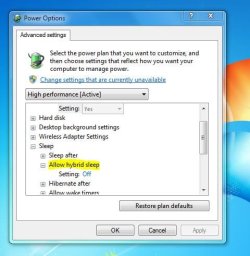
Turn off "hybrid sleep" in your "advanced power settings". That should enable hibernation. | My System Specs | | System Manufacturer/Model Number Home-built, two systems (1) and (2) OS Windows 7 Pro x64 / WinXP Pro x86 on (1), Win7 Pro X64 / WinXP Pro x86 on (2) CPU E6850 3.0Ghz/4MB-cache (1); E8400 3.0Ghz/6MB-cache (2) Motherboard SuperMicro C2SBX (1); ASUS P5Q3 (2) Memory 4GB PC3-8500 DDR3 (1); 4GB PC3-10600 DDR3 (2) Graphics Card ATI HD4850 (1); ATI HD5770 (dual-DVI) (2) (see TV cards) Sound Card Realtek ALC883 HD Audio (1); Realtek ALC1200 HD Audio (2) Monitor(s) Displays Eizo 24" S2433W (1); Eizo HD2441W LCD, Eizo S2433W (2) Screen Resolution 1920x1200 (1); 1920x1200, 1920x1200 (2) Keyboard IBM PS/2 (1) and (2) Mouse Microsoft wired (1); Logitech MX Revolution wireless (2) PSU Nesteq ECS-6001 600W (1); Nesteq ECS-5001 500W (2) Case Acousti-Case 360 (1) and (2) Cooling Zalman CNPS9700-NT for CPU, 2x120mm case fans (1) and (2) Hard Drives (1) 1x1TB SATA (7200 RPM), 1x300GB U320 SCSI (10000RPM), 1x750GB SATA (7200RPM), 1x150GB SATA (10000RPM) for OS;
(2) 1x320GB SATA (7200RPM), 1x140GB SCSI 10000RPM U320, 1x150GB SATA (10000RPM) for OS Internet Speed 15mbps down / 2mbps up Other Info Ceton InfiniTV 4-tuner cablecard-enabled TV card as well as ATI TV Wonder 650 Combo PCIe OTA/ATSC 2-tuner TV card in (2), running under Win7 WMC |
06-17-2011
|
#10 | | Vista and Windows7, sometimes Ubuntu and Fedora |

Quote: Originally Posted by sailornaruto39 
Quote: Originally Posted by whs It should happen right away. Try this, run powercfg -h off followed by powercfg - h on. See what happens. i think you have an extra space in the on one.
I did that too. I look to the little shut down menu and still no hibernate. Correct, fixed it. Thank you. | My System Specs | | System Manufacturer/Model Number HP, Dell, Gateway - 2 laptops and 2 desktops OS Vista and Windows7, sometimes Ubuntu and Fedora CPU from 1.6GHz Duo to 2.5GHz Quad Monitor(s) Displays 2x HP w2207 Keyboard with trackball - no mices Mouse terrible devices, who wants them Hard Drives 5x HDD, 2x SSD, 6x Externals Internet Speed DSL 6000 All times are GMT -5. The time now is 06:34 PM. |  |