
You are using an out of date browser. It may not display this or other websites correctly.
You should upgrade or use an alternative browser.
You should upgrade or use an alternative browser.
My PC is slightly slowing down - cookies??
- Thread starter ukthesis
- Start date

- Local time
- 2:45 PM
- Messages
- 12,011
How depends on the browser you use. Firefox? IE?
But that isn't likely the cause.
But that isn't likely the cause.
My Computer
At a glance
Windows 7 Home Premium SP1, 64-bitIntel Skylake i5-6600K, not overclocked8 GB HyperX DDR4-2666 (2 x 4 GB)none; graphics are integrated on CPU
- Computer type
- PC/Desktop
- Computer Manufacturer/Model Number
- Ignatz Special; 4 speed manual gearbox; factory air conditioning; one of one
- OS
- Windows 7 Home Premium SP1, 64-bit
- CPU
- Intel Skylake i5-6600K, not overclocked
- Motherboard
- AsRock Z170M Extreme 4, micro ATX
- Memory
- 8 GB HyperX DDR4-2666 (2 x 4 GB)
- Graphics Card(s)
- none; graphics are integrated on CPU
- Sound Card
- onboard: Realtek ALC1150; external: USB Behringer UF0-202
- Monitor(s) Displays
- Dell S2340M 23 inch IPS
- Screen Resolution
- 1600 x 900
- Hard Drives
- System: Crucial MX100 series SSD, 128 GB;
Data: Samsung Spinpoint 103SJ, 1 TB;
Backup: WD Caviar Green WD30EZRX-00D8PB0, 3 TB
- PSU
- Rosewill SilentNight 500 watt fanless, semi-modular
- Case
- Antec Solo II
- Cooling
- Noctua NH-U12S; Noctua F12 intake, Noctua S12A exhaust
- Keyboard
- Microsoft 200 6JH-00001 USB
- Mouse
- Dell or Microsoft optical wired; USB
- Antivirus
- Microsoft Security Essentials and Malwarebytes Premium
- Browser
- Pale Moon
- Other Info
- All fans PWM; speeds at idle: CPU circa 500 rpm; intake circa 600 rpm; exhaust circa 600 rpm; CPU temps 27 idle and 47 C load in a warm room (27 C/81 F) when running Intel Extreme Tuning Utility stress test.

A clean boot will show the cause. Its not cookies.
http://support.microsoft.com/kb/929135
Also make a full anti virus scan
Download the free version of malwarebytes and make a full scan
http://support.microsoft.com/kb/929135
Also make a full anti virus scan
Download the free version of malwarebytes and make a full scan
My Computer
At a glance
Windows 10, Home Clean InstallIntel Core2 processsor Q8200(2.33Ghz 1333FSB)...6 gbATI Radeon 256MB HD3650
- Computer type
- PC/Desktop
- Computer Manufacturer/Model Number
- Dell XPS 420
- OS
- Windows 10, Home Clean Install
- CPU
- Intel Core2 processsor Q8200(2.33Ghz 1333FSB) Quad Core Tech
- Motherboard
- Dell
- Memory
- 6 gb
- Graphics Card(s)
- ATI Radeon 256MB HD3650
- Sound Card
- Intergrated 7.1 Channel Audio
- Monitor(s) Displays
- Dell SP2009W 20"
- Hard Drives
- 640 GB Serial ATA Hard drive
- Cooling
- Fan
- Keyboard
- Dell USB Keyboard
- Mouse
- Dell Premium Optical USB
- Internet Speed
- DSL 2.85
A clean boot will show the cause. Its not cookies.
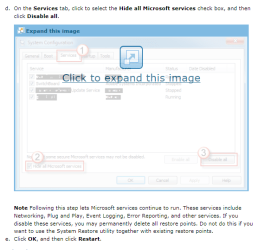
How to troubleshoot a problem by performing a clean boot in Windows Vista or in Windows 7
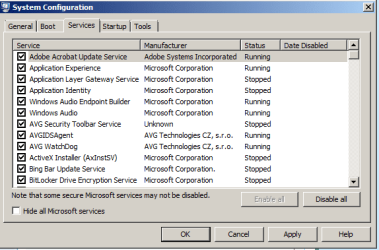
I can't find the option Hide All Microsoft Services. See attachment 1. Also attached my stage I'm up two (2)
I'll also do as the other posters says above, but as a beginner, I don't want different advice coming in to confuse the issue (as can happen, from personal experience).
And since I'm not confident with any of the technicalities, I would prefer not to get involved in procedures that involve entering commands, etc. that I can't easily get out of if there's a problem (the instructions at "How to Check / Repair the Windows System Files from a Command Prompt at Boot" look suspiciously like this type).
How to troubleshoot a problem by performing a clean boot in Windows Vista or in Windows 7
I can't find the option Hide All Microsoft Services. See attachment 1. Also attached my stage I'm up two (2)
I'll also do as the other posters says above, but as a beginner, I don't want different advice coming in to confuse the issue (as can happen, from personal experience).
And since I'm not confident with any of the technicalities, I would prefer not to get involved in procedures that involve entering commands, etc. that I can't easily get out of if there's a problem (the instructions at "How to Check / Repair the Windows System Files from a Command Prompt at Boot" look suspiciously like this type).
Attachments
My Computer
At a glance
64 bit
- OS
- 64 bit
The forum rules state that any member is free to contribute any ideas that he thinks will be helpful.
You can avoid confusion, by working with one member at a time. If those solutions do not work, move on to the next.
Hide MS services is checked in the lower left of your screen image.
You can avoid confusion, by working with one member at a time. If those solutions do not work, move on to the next.
Hide MS services is checked in the lower left of your screen image.
My Computer
At a glance
Windows 10, Home Clean InstallIntel Core2 processsor Q8200(2.33Ghz 1333FSB)...6 gbATI Radeon 256MB HD3650
- Computer type
- PC/Desktop
- Computer Manufacturer/Model Number
- Dell XPS 420
- OS
- Windows 10, Home Clean Install
- CPU
- Intel Core2 processsor Q8200(2.33Ghz 1333FSB) Quad Core Tech
- Motherboard
- Dell
- Memory
- 6 gb
- Graphics Card(s)
- ATI Radeon 256MB HD3650
- Sound Card
- Intergrated 7.1 Channel Audio
- Monitor(s) Displays
- Dell SP2009W 20"
- Hard Drives
- 640 GB Serial ATA Hard drive
- Cooling
- Fan
- Keyboard
- Dell USB Keyboard
- Mouse
- Dell Premium Optical USB
- Internet Speed
- DSL 2.85

t-4-2
Banned
- Local time
- 5:45 PM
- Messages
- 997
A clean boot will show the cause. Its not cookies.
How to troubleshoot a problem by performing a clean boot in Windows Vista or in Windows 7
I can't find the option Hide All Microsoft Services. See attachment 1. Also attached my stage I'm up two (2)
I'll also do as the other posters says above, but as a beginner, I don't want different advice coming in to confuse the issue (as can happen, from personal experience).
And since I'm not confident with any of the technicalities, I would prefer not to get involved in procedures that involve entering commands, etc. that I can't easily get out of if there's a problem (the instructions at "How to Check / Repair the Windows System Files from a Command Prompt at Boot" look suspiciously like this type).
>>> but as a beginner, I don't want different advice coming in to confuse the issue (as can happen, from personal experience).
In that case, I'll delete my original reply.
My Computer
At a glance
Windows 7 Home Premium 64-bit, SP1Intel Pentium P6200, Cores 2, 2.13 GHz4 GBIntel HD
- Computer Manufacturer/Model Number
- Acer Aspire 7741Z
- OS
- Windows 7 Home Premium 64-bit, SP1
- CPU
- Intel Pentium P6200, Cores 2, 2.13 GHz
- Memory
- 4 GB
- Graphics Card(s)
- Intel HD
- Sound Card
- unknown
- Monitor(s) Displays
- 17.3 inches
- Screen Resolution
- 1600 x 900
- Hard Drives
- 640 GB, 5400 PRM

AVG can slow down your system due to it's resident scanner constantly scanning.
You may want to uninstall it and try MSE or another program.
That may just be part of the problem, though.
You may want to uninstall it and try MSE or another program.
That may just be part of the problem, though.
My Computer
At a glance
Windows 7 Home Premium 64 bitIntel Core i7-4790G.SKILL 8GB (2 x 4GB) DDR3 F3-10666CL9D-8GBNTAMD Radeon R7 250
- Computer type
- PC/Desktop
- Computer Manufacturer/Model Number
- Custom Build
- OS
- Windows 7 Home Premium 64 bit
- CPU
- Intel Core i7-4790
- Motherboard
- GA-Z87X-D3H
- Memory
- G.SKILL 8GB (2 x 4GB) DDR3 F3-10666CL9D-8GBNT
- Graphics Card(s)
- AMD Radeon R7 250
- Sound Card
- Realtek ALC892
- Monitor(s) Displays
- Samsung UN32EH5000, Dell 1703FPT
- Screen Resolution
- 1920 x 1080, 1280 x 1024
- Hard Drives
- WD5003AZEX
WD10EZEX
Samsung HD103SJ
Samsung 128 GB 840 PRO
- PSU
- SeaSonic M12II SS-500GM
- Case
- Fractal Design Define R4
- Cooling
- Zalman CNPS9900ALED
- Keyboard
- Logitech K800
- Mouse
- Logitech M705
- Internet Speed
- 16 Mbps
- Antivirus
- Avast
- Browser
- Firefox
- Other Info
- Bose Companion 2 Multimedia Speakers
seavixen32
New member
If it's cookies you're concerned about, you can always delete them from time to time.
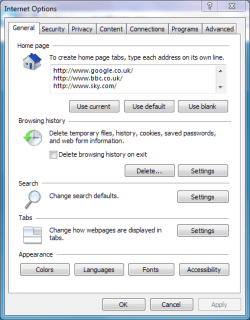
Failing that, run Disk Cleanup. Just click Start and type Disk Cleanup in the Search field.
Failing that, run Disk Cleanup. Just click Start and type Disk Cleanup in the Search field.
My Computer
At a glance
Windows 7 Ultimate SP1 64-BitIntel Core i7 870 @ 2.93GHz8Gb Dual-Channel DDR3 @ 664MHznVidia GeForce GTX 460 1024MB dedicated RAM
- Computer Manufacturer/Model Number
- HP Pavilion Elite 495UK
- OS
- Windows 7 Ultimate SP1 64-Bit
- CPU
- Intel Core i7 870 @ 2.93GHz
- Motherboard
- MSI 2A9C (CPU1)
- Memory
- 8Gb Dual-Channel DDR3 @ 664MHz
- Graphics Card(s)
- nVidia GeForce GTX 460 1024MB dedicated RAM
- Sound Card
- Realtek HD Audio
- Monitor(s) Displays
- HP2310i
- Screen Resolution
- 1920 x 1080
- Hard Drives
- 1x1954GB Hitachi HDS22020ALA 330 (RAID), 1x1954GB Hitachi External for backup and storage
- PSU
- 460W
- Case
- HP Elite
- Cooling
- Air cooled
- Keyboard
- Logitech K750 solar-powered keyboard
- Mouse
- Logitech Wireless M180 mouse
- Internet Speed
- 2Mb
- Other Info
- Pure Avanti Flow Internet Radio with iPod Dock, 64Gb iPod, HP USB Speakers, Sony MDR-V500 Headphones, Sony Vaio F-Series Laptop
What I mean is that I want to go through the basic checks, explained for the beginner. If they don't work, I have enough money to pay for someone to go through it for me.
Okay, I have Firefox, using AVG Free Edition, using Spybot also. The Windows firewall is switched on.
These were recommended for me, so I want to try to stay with them. I know that there are as many recommendations as there are anti-virus and other similar programs. But I also know (since it happened to me) that if you are not careful, you'll end up with incompatible programs hitting each other.
Back to this one I was just on.
How to troubleshoot a problem by performing a clean boot in Windows Vista or in Windows 7
It says:
"Note Following this step lets Microsoft services continue to run. These services include Networking, Plug and Play, Event Logging, Error Reporting, and other services. If you disable these services, you may permanently delete all restore points. Do not do this if you want to use the System Restore utility together with existing restore points."
What exactly does this mean?
Okay, I have Firefox, using AVG Free Edition, using Spybot also. The Windows firewall is switched on.
These were recommended for me, so I want to try to stay with them. I know that there are as many recommendations as there are anti-virus and other similar programs. But I also know (since it happened to me) that if you are not careful, you'll end up with incompatible programs hitting each other.
Back to this one I was just on.
How to troubleshoot a problem by performing a clean boot in Windows Vista or in Windows 7
It says:
"Note Following this step lets Microsoft services continue to run. These services include Networking, Plug and Play, Event Logging, Error Reporting, and other services. If you disable these services, you may permanently delete all restore points. Do not do this if you want to use the System Restore utility together with existing restore points."
What exactly does this mean?
My Computer
At a glance
64 bit
- OS
- 64 bit
seavixen32
New member
If malware is the culprit and causing your computer slow down then Malwarebytes is an excellent utility, you can download it here: Malwarebytes Anti-Malware - Reviews and free Malwarebytes Anti-Malware downloads at CNET Downloads
It's best to run it in Safe Mode with Networking (just keep pressing the F8 key during startup and choose from the list of options). The software will scan your computer and inform you of any nasties it finds, which you can then quarantine or delete.
If AVG isn't doing the business you might consider uninstalling it and using Microsoft Security Essentials instead: http://www.microsoft.com/en-gb/security_essentials/default.aspx
As for using Windows firewall as your router will have a firewall that may conflict with your Windows one, so you could try disabling it (Windows firewall that is).
It's best to run it in Safe Mode with Networking (just keep pressing the F8 key during startup and choose from the list of options). The software will scan your computer and inform you of any nasties it finds, which you can then quarantine or delete.
If AVG isn't doing the business you might consider uninstalling it and using Microsoft Security Essentials instead: http://www.microsoft.com/en-gb/security_essentials/default.aspx
As for using Windows firewall as your router will have a firewall that may conflict with your Windows one, so you could try disabling it (Windows firewall that is).
My Computer
At a glance
Windows 7 Ultimate SP1 64-BitIntel Core i7 870 @ 2.93GHz8Gb Dual-Channel DDR3 @ 664MHznVidia GeForce GTX 460 1024MB dedicated RAM
- Computer Manufacturer/Model Number
- HP Pavilion Elite 495UK
- OS
- Windows 7 Ultimate SP1 64-Bit
- CPU
- Intel Core i7 870 @ 2.93GHz
- Motherboard
- MSI 2A9C (CPU1)
- Memory
- 8Gb Dual-Channel DDR3 @ 664MHz
- Graphics Card(s)
- nVidia GeForce GTX 460 1024MB dedicated RAM
- Sound Card
- Realtek HD Audio
- Monitor(s) Displays
- HP2310i
- Screen Resolution
- 1920 x 1080
- Hard Drives
- 1x1954GB Hitachi HDS22020ALA 330 (RAID), 1x1954GB Hitachi External for backup and storage
- PSU
- 460W
- Case
- HP Elite
- Cooling
- Air cooled
- Keyboard
- Logitech K750 solar-powered keyboard
- Mouse
- Logitech Wireless M180 mouse
- Internet Speed
- 2Mb
- Other Info
- Pure Avanti Flow Internet Radio with iPod Dock, 64Gb iPod, HP USB Speakers, Sony MDR-V500 Headphones, Sony Vaio F-Series Laptop
On the page "If it's cookies you're concerned about, you can always delete them from time to time." I looked and the Browsing history also deletes "saved passwords." I don't want to delete my saved passwords. What do I do?
My Computer
At a glance
64 bit
- OS
- 64 bit
seavixen32
New member
When you press Delete for the first time the Delete Browsing History window will appear.
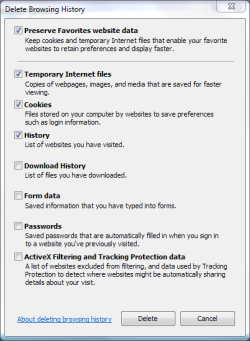
Just make sure the checkbox for your passwords is unchecked, press Delete again and your passwords will be untouched.
Just make sure the checkbox for your passwords is unchecked, press Delete again and your passwords will be untouched.
Last edited:
My Computer
At a glance
Windows 7 Ultimate SP1 64-BitIntel Core i7 870 @ 2.93GHz8Gb Dual-Channel DDR3 @ 664MHznVidia GeForce GTX 460 1024MB dedicated RAM
- Computer Manufacturer/Model Number
- HP Pavilion Elite 495UK
- OS
- Windows 7 Ultimate SP1 64-Bit
- CPU
- Intel Core i7 870 @ 2.93GHz
- Motherboard
- MSI 2A9C (CPU1)
- Memory
- 8Gb Dual-Channel DDR3 @ 664MHz
- Graphics Card(s)
- nVidia GeForce GTX 460 1024MB dedicated RAM
- Sound Card
- Realtek HD Audio
- Monitor(s) Displays
- HP2310i
- Screen Resolution
- 1920 x 1080
- Hard Drives
- 1x1954GB Hitachi HDS22020ALA 330 (RAID), 1x1954GB Hitachi External for backup and storage
- PSU
- 460W
- Case
- HP Elite
- Cooling
- Air cooled
- Keyboard
- Logitech K750 solar-powered keyboard
- Mouse
- Logitech Wireless M180 mouse
- Internet Speed
- 2Mb
- Other Info
- Pure Avanti Flow Internet Radio with iPod Dock, 64Gb iPod, HP USB Speakers, Sony MDR-V500 Headphones, Sony Vaio F-Series Laptop
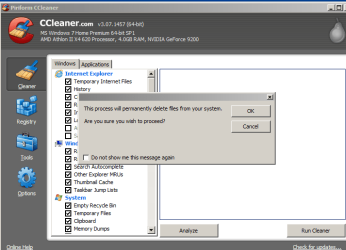
I woiuld download and use Ccleaner, it is the best for your purposes. Again, the cookies will not slow down the computer.
My Computer
At a glance
Windows 10, Home Clean InstallIntel Core2 processsor Q8200(2.33Ghz 1333FSB)...6 gbATI Radeon 256MB HD3650
- Computer type
- PC/Desktop
- Computer Manufacturer/Model Number
- Dell XPS 420
- OS
- Windows 10, Home Clean Install
- CPU
- Intel Core2 processsor Q8200(2.33Ghz 1333FSB) Quad Core Tech
- Motherboard
- Dell
- Memory
- 6 gb
- Graphics Card(s)
- ATI Radeon 256MB HD3650
- Sound Card
- Intergrated 7.1 Channel Audio
- Monitor(s) Displays
- Dell SP2009W 20"
- Hard Drives
- 640 GB Serial ATA Hard drive
- Cooling
- Fan
- Keyboard
- Dell USB Keyboard
- Mouse
- Dell Premium Optical USB
- Internet Speed
- DSL 2.85
No, and this is firsthand experience. Just download and you can leave the default settings or change to your preference. Dont tick any registry settings and you will be very happy with the results. You will be amazed how much stuff it finds.
My Computer
At a glance
Windows 10, Home Clean InstallIntel Core2 processsor Q8200(2.33Ghz 1333FSB)...6 gbATI Radeon 256MB HD3650
- Computer type
- PC/Desktop
- Computer Manufacturer/Model Number
- Dell XPS 420
- OS
- Windows 10, Home Clean Install
- CPU
- Intel Core2 processsor Q8200(2.33Ghz 1333FSB) Quad Core Tech
- Motherboard
- Dell
- Memory
- 6 gb
- Graphics Card(s)
- ATI Radeon 256MB HD3650
- Sound Card
- Intergrated 7.1 Channel Audio
- Monitor(s) Displays
- Dell SP2009W 20"
- Hard Drives
- 640 GB Serial ATA Hard drive
- Cooling
- Fan
- Keyboard
- Dell USB Keyboard
- Mouse
- Dell Premium Optical USB
- Internet Speed
- DSL 2.85
- Local time
- 2:45 PM
- Messages
- 12,011
Ccleaner - will it conflict with any of my other programs?
No, but you are best advised to not use the Registry Cleaner portion of the program.
My Computer
At a glance
Windows 7 Home Premium SP1, 64-bitIntel Skylake i5-6600K, not overclocked8 GB HyperX DDR4-2666 (2 x 4 GB)none; graphics are integrated on CPU
- Computer type
- PC/Desktop
- Computer Manufacturer/Model Number
- Ignatz Special; 4 speed manual gearbox; factory air conditioning; one of one
- OS
- Windows 7 Home Premium SP1, 64-bit
- CPU
- Intel Skylake i5-6600K, not overclocked
- Motherboard
- AsRock Z170M Extreme 4, micro ATX
- Memory
- 8 GB HyperX DDR4-2666 (2 x 4 GB)
- Graphics Card(s)
- none; graphics are integrated on CPU
- Sound Card
- onboard: Realtek ALC1150; external: USB Behringer UF0-202
- Monitor(s) Displays
- Dell S2340M 23 inch IPS
- Screen Resolution
- 1600 x 900
- Hard Drives
- System: Crucial MX100 series SSD, 128 GB;
Data: Samsung Spinpoint 103SJ, 1 TB;
Backup: WD Caviar Green WD30EZRX-00D8PB0, 3 TB
- PSU
- Rosewill SilentNight 500 watt fanless, semi-modular
- Case
- Antec Solo II
- Cooling
- Noctua NH-U12S; Noctua F12 intake, Noctua S12A exhaust
- Keyboard
- Microsoft 200 6JH-00001 USB
- Mouse
- Dell or Microsoft optical wired; USB
- Antivirus
- Microsoft Security Essentials and Malwarebytes Premium
- Browser
- Pale Moon
- Other Info
- All fans PWM; speeds at idle: CPU circa 500 rpm; intake circa 600 rpm; exhaust circa 600 rpm; CPU temps 27 idle and 47 C load in a warm room (27 C/81 F) when running Intel Extreme Tuning Utility stress test.
Dont be concerned by this double warning on the registry, it is very, very easy to see how to avoid using the registry portion. In fact to use it you specifically have to go to that section. Just download and you will see.
My Computer
At a glance
Windows 10, Home Clean InstallIntel Core2 processsor Q8200(2.33Ghz 1333FSB)...6 gbATI Radeon 256MB HD3650
- Computer type
- PC/Desktop
- Computer Manufacturer/Model Number
- Dell XPS 420
- OS
- Windows 10, Home Clean Install
- CPU
- Intel Core2 processsor Q8200(2.33Ghz 1333FSB) Quad Core Tech
- Motherboard
- Dell
- Memory
- 6 gb
- Graphics Card(s)
- ATI Radeon 256MB HD3650
- Sound Card
- Intergrated 7.1 Channel Audio
- Monitor(s) Displays
- Dell SP2009W 20"
- Hard Drives
- 640 GB Serial ATA Hard drive
- Cooling
- Fan
- Keyboard
- Dell USB Keyboard
- Mouse
- Dell Premium Optical USB
- Internet Speed
- DSL 2.85
- Local time
- 2:45 PM
- Messages
- 12,011
Yes, assuming you accepted default settings.
My Computer
At a glance
Windows 7 Home Premium SP1, 64-bitIntel Skylake i5-6600K, not overclocked8 GB HyperX DDR4-2666 (2 x 4 GB)none; graphics are integrated on CPU
- Computer type
- PC/Desktop
- Computer Manufacturer/Model Number
- Ignatz Special; 4 speed manual gearbox; factory air conditioning; one of one
- OS
- Windows 7 Home Premium SP1, 64-bit
- CPU
- Intel Skylake i5-6600K, not overclocked
- Motherboard
- AsRock Z170M Extreme 4, micro ATX
- Memory
- 8 GB HyperX DDR4-2666 (2 x 4 GB)
- Graphics Card(s)
- none; graphics are integrated on CPU
- Sound Card
- onboard: Realtek ALC1150; external: USB Behringer UF0-202
- Monitor(s) Displays
- Dell S2340M 23 inch IPS
- Screen Resolution
- 1600 x 900
- Hard Drives
- System: Crucial MX100 series SSD, 128 GB;
Data: Samsung Spinpoint 103SJ, 1 TB;
Backup: WD Caviar Green WD30EZRX-00D8PB0, 3 TB
- PSU
- Rosewill SilentNight 500 watt fanless, semi-modular
- Case
- Antec Solo II
- Cooling
- Noctua NH-U12S; Noctua F12 intake, Noctua S12A exhaust
- Keyboard
- Microsoft 200 6JH-00001 USB
- Mouse
- Dell or Microsoft optical wired; USB
- Antivirus
- Microsoft Security Essentials and Malwarebytes Premium
- Browser
- Pale Moon
- Other Info
- All fans PWM; speeds at idle: CPU circa 500 rpm; intake circa 600 rpm; exhaust circa 600 rpm; CPU temps 27 idle and 47 C load in a warm room (27 C/81 F) when running Intel Extreme Tuning Utility stress test.
Similar threads
- Replies
- 9
- Views
- 1K


- Replies
- 5
- Views
- 2K

