
Windows 7 Forums Search
Welcome to Windows 7 Forums. Our forum is dedicated to helping you find solutions with any problems, errors or issues you are experiencing with Windows 7. The Windows 7 forum also covers news and updates and has an extensive Windows 7 tutorial section that covers a wide range of tips and tricks.


Windows 7 - any way to make taskbar thumbnails appear faster?

 
01-12-2009   #1


7 Pro x64/XP


any way to make taskbar thumbnails appear faster?

This may be a stupid question, but is there any way to make the taskbar thumbnails appear faster? There's a 1-2 second delay which I find very annoying when I want to open a specific window of a program (and while I know I can click, I also find that very annoying... I guess I'm picky).

My System SpecsSystem Spec
01-12-2009   #2


Windows 7 Build 7100 32-bit, Windows Vista 32-bit


Indeed, you can simply click it But I know how you feel, since I tend to wait as well. I guess there must be some registry key to change this.
My System SpecsSystem Spec
01-12-2009   #3


windows 7


i'm waiting for some tweak for this........
My System SpecsSystem Spec
.


01-12-2009   #4


Windows 7 Build 7100 32-bit, Windows Vista 32-bit


Let's send some feedback on this. Microsoft might tweak it themselves...
My System SpecsSystem Spec
01-12-2009   #5


Windows 7 Ultimate Vista Ultimate x64


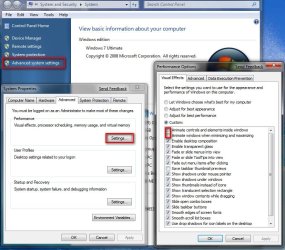
I found a way to make it open a little faster but if you do you will lose Aero Peak and Aero Snap, which is a nice feature but if your more interested in speed this is how.

1. Go to computer and Right Click and select Properties

2. Go to Advanced System settings

3. Go to the Advanced Tab and select Performance

4. Deselect the top two boxes for Animation as shown

any way to make taskbar thumbnails appear faster?-2009-01-13_002055.jpg
My System SpecsSystem Spec
01-12-2009   #6


Vista Ult 64 bit Seven Ult RTM x64


Hello Slashee the Cow,

Welcome to the Seven Forums.

It would help us answer questions for you if you filled out your system specs with as much detail as possible. You can click on 'My System Specs' in the lower left corner of one of your own posts and click on 'Update System Specs' to do so. Look at others to get an idea of what info is helpful.

Gary
My System SpecsSystem Spec
01-12-2009   #7


Windows 7 Ultimate x64 SP1


Quote   Quote: Originally Posted by Slashee the Cow View Post
This may be a stupid question, but is there any way to make the taskbar thumbnails appear faster? There's a 1-2 second delay which I find very annoying when I want to open a specific window of a program (and while I know I can click, I also find that very annoying... I guess I'm picky).


Yeah, type regedit in your start menu. Open it up, go to HKEY_CURRENT_USER, then to Control Panel, then to where it says Mouse, then go to MouseHoverTime to the right, it will have a value of 400. double click on MouseHoverTime, drop the 400 to whatever you want, enter 200, 100 20, etc. Click ok, close Regedit, Restart the computer and it will pop up faster. I set mine to like 30.


Shawn, can you make a tutorial of this?

Last edited by Airbot; 01-12-2009 at 06:58 PM..
My System SpecsSystem Spec
01-12-2009   #8


Windows 7 Build 7100 32-bit, Windows Vista 32-bit


Quote   Quote: Originally Posted by Airbot View Post
Yeah, type regedit in your start menu. Open it up, go to HKEY_CURRENT_USER, then to Control Panel, then to where it says Mouse, then go to MouseHoverTime to the right, it will have a value of 400. double click on MouseHoverTime, drop the 400 to whatever you want, enter 200, 100 20, etc. Click ok, close Regedit, Restart the computer and it will pop up faster. I set mine to like 30.


Shawn, can you make a tutorial of this?
Great find! I like 'em popping up fast
My System SpecsSystem Spec
01-12-2009   #9


W 7 64-bit Ultimate


Hello Aaron.

Why don't you do the tutorial....


Later Ted
My System SpecsSystem Spec
01-12-2009   #10


Windows 7 Ultimate x64 SP1


Shawn's already done them just now.
My System SpecsSystem Spec
Reply

 any way to make taskbar thumbnails appear faster? problems?


Thread Tools


Similar Threads for: any way to make taskbar thumbnails appear faster?
Thread Forum
How to make your PC faster! Performance & Maintenance
How can I make it faster? Performance & Maintenance
How to get thumbnails to show faster General Discussion
How to make IE open new tabs faster News


All times are GMT -5. The time now is 12:50 AM.


Windows 7 Forums is an independent web site and has not been authorized,
sponsored, or otherwise approved by Microsoft Corporation.
"Windows 7" and related materials are trademarks of Microsoft Corp.
© Designer Media Ltd
  

1 2 3 4 5 6 7 8 9 10 11 12 13 14 15 16 17 18 19 20 21 22 23 24 25 26 27 28 29 30