Windows 7 Forums


Windows 7: Cool'and'Quiet, How can I tell if it is working?

30 Aug 2011   #1

Windows 7x32 Home Premium & XP SP3 x86
Tucson, AZ
 
 
Cool'and'Quiet, How can I tell if it is working?

I have Cool'and'Quiet installed but I no longer have the monitor tools on my desk top.

I think that Cool'and'Quiet is working because I see the rpms and temperature changing in the bios.

Windows 7 boots fine and operates with no apparent problems UNLESS I enable Cool'and'Quiet in the bios.

When I do that, Windows starts up but freezes on the Windows Flag page.


Once that happens, I have to power down and upon start up go into the bios to disable Cool'and'Quiet.

Two questions then:

Why no Cool'and'Quiet tools on the desktop? and

Why does Enabling Cool'and'Quiet freeze Windows 7x32 Startup.

Last edited by dustywoodworker; 31 Aug 2011 at 02:33 PM..
My System SpecsSystem Spec

30 Aug 2011   #2

Windows 7 Ultimate SP1 (64-bit)
Valencia, VE.


Hello there, dww!

Well, you could check on the BIOS and you'll find if it's enabled or disabled, another way to check that out is to use CPU-Z on a idle state (don't do anything besides having the CPU-Z window open) and under Clocks, see if the core clock matches your actual processor speed.

IE: if your processor is an Athlon II X4 640, your core clock should be 3.0GHz, but with cool 'n' quiet enabled, in an idle state, the processor underclocks itself to save power.

This means that if you have CnC enabled, the processor's core clock could (could)! be 800MHz.
My System SpecsSystem Spec
30 Aug 2011   #3

Windows 7 Ultimate x86
Massachusetts


I don't know about special gadgets for that (never bothered to look because I don't need that)
But my Cool and Quiet (you mean the option for AMD-chips, right?) is enabled since day 1 and never caused a problem.
To check if it really works you could use Core Temp Core Temp (and see the temperature change in the tray..I recall there were desktop gadgets that show those temps too...a kind of indirect way of checking if C&Q works

And with SIV SIV - System Information Viewer you can see if the CPU Frequency changes with different loads (when idle the CPU gets tacted down to keep it cool(er))

Now that punkster mentions it...CPU-Z http://www.cpuid.com/softwares/cpu-z.html is an excellent tool for that too !
-DG
My System SpecsSystem Spec
.


30 Aug 2011   #4

Win 7 Ultimate x64
Etobicoke, Ontario


What is installed? You shouldn't need to install anything for it to work in Windows 7, as 7 supports CnQ natively, just need to enable it in the bios.

As for seeing if it is working you can use this,

CPUID - System & hardware benchmark, monitoring, reporting

to see if the CPU speed is going up and down as it should.
My System SpecsSystem Spec
30 Aug 2011   #5

Windows 7x32 Home Premium & XP SP3 x86
Tucson, AZ


Quote   Quote: Originally Posted by stormy13 View Post
What is installed? You shouldn't need to install anything for it to work in Windows 7, as 7 supports CnQ natively, just need to enable it in the bios.

As for seeing if it is working you can use this,

CPUID - System & hardware benchmark, monitoring, reporting

to see if the CPU speed is going up and down as it should.
Then, if CnQ is native to Windows 7, I may have a problem worse than I thought. If I have Cool'and'Quiet enabled (in the bios), my computer freezes at the
Starting Windows (Windows Flag) page. To recover, I must restart and disable Cool'and'Quite in the bios.

Are there any other settings within the bios can can jointly effect the operation of CnQ.

Recall, I changed from XP (where CnQ was visible on the desktop) to Windows 7 and while doing so I reset the bios (without taking note of the settings). Now I have the stated problem.
My System SpecsSystem Spec
30 Aug 2011   #6

Windows 7x32 Home Premium & XP SP3 x86
Tucson, AZ


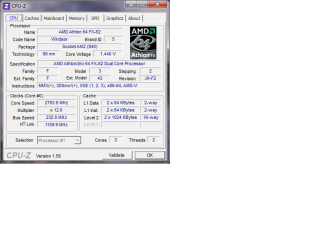
Using CPU-Z, I can see that my Core Speed is 2.780GHz (varies slightly). Someone said it should be 300GHz so it appears that it has been throttled down.

Is that because of the temperature?

PS: Just noticed in CPU-Z that the multiplier is x12. When idle, is that high?

Sorry for the dump questions but I am not well schooled on this high tech stuff. Please bare with me.

A sidebar question here: Are CPU-Z and CPUID one in the same or am I missing something?

Last edited by dustywoodworker; 30 Aug 2011 at 01:03 PM..
My System SpecsSystem Spec
30 Aug 2011   #7

32bit: XP, Win7 H.P. / 64bit: 2008R2, Win7 Pro, Ultimate / Several flavors of Linux
Denver, Colorado


Quote   Quote: Originally Posted by dustywoodworker View Post
A sidebar question here: Are CPU-Z and CPUID one in the same or am I missing something?
CPU-Z is the application based on the CPUID Software Development Kit.

Regards,
GEWB
My System SpecsSystem Spec
30 Aug 2011   #8

Windows 7x32 Home Premium & XP SP3 x86
Tucson, AZ


Quote   Quote: Originally Posted by GEWB View Post
Quote   Quote: Originally Posted by dustywoodworker View Post
A sidebar question here: Are CPU-Z and CPUID one in the same or am I missing something?
CPU-Z is the application based on the CPUID Software Development Kit.

Regards,
GEWB
Thanks. Appreciate the quick response.
My System SpecsSystem Spec
30 Aug 2011   #9

32bit: XP, Win7 H.P. / 64bit: 2008R2, Win7 Pro, Ultimate / Several flavors of Linux
Denver, Colorado


Quote   Quote: Originally Posted by dustywoodworker View Post
Using CPU-Z, I can see that my Core Speed is 2.780GHz (varies slightly). Someone said it should be 300GHz so it appears that it has been throttled down.
Which Athlon 64FX do you have (there was more than one)?

CPU-Z gives core speed in MHz so it sounds like yours is 2780MHz which is 2.78GHz. That would be slightly "up" for the 2.6GHz version or slightly "down" for the 3.0GHz version.

Can you post a screen shot of the CPU tab in CPU-Z?

Regards,
GEWB
My System SpecsSystem Spec
30 Aug 2011   #10

32bit: XP, Win7 H.P. / 64bit: 2008R2, Win7 Pro, Ultimate / Several flavors of Linux
Denver, Colorado


Ah ha - do you have the Athlon 64 FX-57? If so, it is running at 2.8GHz so 2.78GHz would be correct.

Regards,
GEWB
My System SpecsSystem Spec
Reply

 Cool'and'Quiet, How can I tell if it is working? problems?


Thread Tools


Similar help and support threads for: Cool'and'Quiet, How can I tell if it is working?
Thread Forum
Cool n´Quiet not working ! Hardware & Devices
Cool'n'quiet Pros and Cons Performance & Maintenance
Cool n Quiet not working General Discussion
Solved Cool N Quiet Etc Performance & Maintenance
AMD Cool N Quiet not working Installation & Setup


All times are GMT -5. The time now is 06:31 PM.


Seven Forums Android App Seven Forums IOS App Follow us on Facebook

Windows 7 Forums is an independent web site and has not been authorized,
sponsored, or otherwise approved by Microsoft Corporation.
"Windows 7" and related materials are trademarks of Microsoft Corp.
© Designer Media Ltd
  

1 2 3 4 5 6 7 8 9 10 11 12 13 14 15 16 17 18 19 20 21 22 23 24 25 26 27 28 29 30 31 32