Minimalist RAM Usage?

Zaraithe

New member
Local time
5:38 PM
Messages
1
Hey everyone; this is my first post on these forums, so I'm sorry if I'm beating a dead horse.

When I run windows 7 idle, I get somewhere in the neighborhood from 600 MB used (for a second or two after start up) to about 900 MB used. This is from an idle computer running no programs, with Windows Classic theme and thus (I believe) Aero disabled, but it seems a little high. I've heard of people getting their netbooks to run on 250 mb idle and other nice numbers, and I'd like the same for my laptop (if possible).

I'm running an Intel C2D 2.33 GHz laptop with 4GB of RAM with Windows 7 RC 7100 x64. RAM is limited to 3.37 GB, because the motherboard doesn't address that high (turning on PAE and turning off DEP haven't helped the issue).

I understand that the fact I have so much RAM could be why Win7 is being liberal with its use, but I thought I would see if there were any tricks I could pull to get such low numbers. I've not gone through Black Viper's service list yet, so that may yield some results, bu I don't think it would yield a 400-700 MB difference...
 

My Computer My Computer

At a glance

Windows 7 Build 7100Intel E8400 Wolfdale 3.00 GHZ/ Intel C2D 2.33...4GB/4GBATI Radeon HD4870/AT FireGL V5200
Computer Manufacturer/Model Number
Custom/Laptop
OS
Windows 7 Build 7100
CPU
Intel E8400 Wolfdale 3.00 GHZ/ Intel C2D 2.33 GHZ
Motherboard
ASROCK P45TurboTwins2000/??
Memory
4GB/4GB
Graphics Card(s)
ATI Radeon HD4870/AT FireGL V5200
Sound Card
none/none
Monitor(s) Displays
ASUS VK222H
Hard Drives
500 gb Seagate SATA 3.0 GB/s / 100 GB
PSU
Corsair 750W
Case
Ultra X-Blaster
Cooling
Air
So, here is the deal. Windows Vista and Windows 7 both cache RAM...which means Windows will gobble up as much as it wants and in the event that a program comes along and needs RAM available, Windows will drop what it has cached and free it up for the program in question.

Unfortunately, people often want to try to reduce their RAM usage as much as possible...but this really doesn't make any performance sense with Windows Vista and Windows 7. If you have 4GB of RAM, you might as well use as much as you can. If you have 8GB of RAM, you should want to use as much as you can.

So, there really is no point in having RAM just sitting there free. That's my point. Don't worry about it.
 

My Computer My Computer

At a glance

Windows 7 Ultimate x64Intel Q9550 2.83Ghz OC'd to 3.40Ghz8GB G.Skill PI DDR2-800, 4-4-4-12 timingsEVGA 1280MB Nvidia GeForce GTX570
Computer Manufacturer/Model Number
Self-Built in July 2009
OS
Windows 7 Ultimate x64
CPU
Intel Q9550 2.83Ghz OC'd to 3.40Ghz
Motherboard
Gigabyte GA-EP45-UD3R rev. 1.1, F12 BIOS
Memory
8GB G.Skill PI DDR2-800, 4-4-4-12 timings
Graphics Card(s)
EVGA 1280MB Nvidia GeForce GTX570
Sound Card
Realtek ALC899A 8 channel onboard audio
Monitor(s) Displays
23" Acer x233H
Screen Resolution
1920x1080
Hard Drives
Intel X25-M 80GB Gen 2 SSD
Western Digital 1TB Caviar Black, 32MB cache. WD1001FALS
PSU
Corsair 620HX modular
Case
Antec P182
Cooling
stock
Keyboard
ABS M1 Mechanical
Mouse
Logitech G9 Laser Mouse
Internet Speed
15/2 cable modem
Other Info
Windows and Linux enthusiast. Logitech G35 Headset.
So, here is the deal. Windows Vista and
So, there really is no point in having RAM just sitting there free. That's my point. Don't worry about it.

Why should RAM be wasted on caching apps I never use? Surely this isn't good on the desktop, let alone Windows 2008 File Servers? ;-)

In Widows 7 RTM downloaded from TechNet Plus, I've found my foreground apps (browser, explorer, explorer shell, pop3 mail, word) are sluggish because Windows 7 wastes my RAM on never used apps instead of my current foreground apps.

Thankfully Windows 7 performs better than Windows XP when I disable superfetch, windows defender, drive protection, indexing, and tweak aero to suit my 256Mb GeForce 6200
 

My Computer My Computer

At a glance

Windows XP Professional3.4Ghz HT3.3GBATI X800 XT 256Mb
Computer Manufacturer/Model Number
Dell 8400
OS
Windows XP Professional
CPU
3.4Ghz HT
Motherboard
Dell
Memory
3.3GB
Graphics Card(s)
ATI X800 XT 256Mb
Sound Card
Sound Blaster
Monitor(s) Displays
Samsung
I don't believe that Windows is caching apps that you "don't use". I just don't see a need for XXX amount of free RAM to be available at all times. If instead, the system can hold onto something that it might actually need again....why dump it out to RAM and then have to come back to the hard drive to get it again.

Personally, I'd rather have every single byte of RAM used. Free RAM just waiting around doesn't provide any benefit.
 

My Computer My Computer

At a glance

Windows 7 Ultimate x64Intel Q9550 2.83Ghz OC'd to 3.40Ghz8GB G.Skill PI DDR2-800, 4-4-4-12 timingsEVGA 1280MB Nvidia GeForce GTX570
Computer Manufacturer/Model Number
Self-Built in July 2009
OS
Windows 7 Ultimate x64
CPU
Intel Q9550 2.83Ghz OC'd to 3.40Ghz
Motherboard
Gigabyte GA-EP45-UD3R rev. 1.1, F12 BIOS
Memory
8GB G.Skill PI DDR2-800, 4-4-4-12 timings
Graphics Card(s)
EVGA 1280MB Nvidia GeForce GTX570
Sound Card
Realtek ALC899A 8 channel onboard audio
Monitor(s) Displays
23" Acer x233H
Screen Resolution
1920x1080
Hard Drives
Intel X25-M 80GB Gen 2 SSD
Western Digital 1TB Caviar Black, 32MB cache. WD1001FALS
PSU
Corsair 620HX modular
Case
Antec P182
Cooling
stock
Keyboard
ABS M1 Mechanical
Mouse
Logitech G9 Laser Mouse
Internet Speed
15/2 cable modem
Other Info
Windows and Linux enthusiast. Logitech G35 Headset.
I don't believe that Windows is caching apps that you "don't use". I just don't see a need for XXX amount of free RAM to be available at all times. If instead, the system can hold onto something that it might actually need again....why dump it out to RAM and then have to come back to the hard drive to get it again.

Personally, I'd rather have every single byte of RAM used. Free RAM just waiting around doesn't provide any benefit.

Well Prefetch is caching Excel, Powerpoint, the entire office suit in fact ..I only use Word 2007 and Opera so I don't see the point in consuming RAM for the sake of consuming RAM and slowing down my foreground apps / explorer shell in the process.

In the 2001-2006 era before Vista-the-resource-hog came about, XP would run on 256Mb RAM and when you added another 256Mb or more you got a big speed improvement. Not any more with Vista/Windows 7.

Maybe PC users shouldn't install anything on a PC anymore for fear of Vista / Windows 7 resource hogging *users* RAM with apps we never use and making the foreground apps we do use run slower as a consequence.
 

My Computer My Computer

At a glance

Windows XP Professional3.4Ghz HT3.3GBATI X800 XT 256Mb
Computer Manufacturer/Model Number
Dell 8400
OS
Windows XP Professional
CPU
3.4Ghz HT
Motherboard
Dell
Memory
3.3GB
Graphics Card(s)
ATI X800 XT 256Mb
Sound Card
Sound Blaster
Monitor(s) Displays
Samsung
Thats why they added a feature to disable superfetch for those who do no understand how it works and for those who believe it slows the system down, Personally i only upgraded to 8GB's of ram for superfetch, i want my programs prefetched while im browsing and doing all other stuff it has never degraded my system performance at all.


Altho 7's caching is bitter sweet since the algorithm is far less agressive w/c is a good thing since it doesnt cache any of my useless files like movie files or torrent zip files but this time around the caching is so relaxed and it starts over 3mins after windows boot time w/c i find a bit bad.. i hope MS adds a way of fine tuning 7's prefetch though.
 

My Computer My Computer

At a glance

Windows 7 Ultimate X64 RTMQ6600 @ 3.4Ghz8GB DDR2-800GTX285 1GB
OS
Windows 7 Ultimate X64 RTM
CPU
Q6600 @ 3.4Ghz
Motherboard
Abit IP35-E
Memory
8GB DDR2-800
Graphics Card(s)
GTX285 1GB
Sound Card
Creative X-Fi Extreme Music
Monitor(s) Displays
Samsung T220
Hard Drives
Samsung F1 Spinpoint 1TB
PSU
Silverstone Zues 750ZF
Case
Lian Li PC-P80
Cooling
Thermalright Ultra 120-Extreme
Well Prefetch is caching Excel, Powerpoint, the entire office suit in fact ..I only use Word 2007 and Opera so I don't see the point in consuming RAM for the sake of consuming RAM and slowing down my foreground apps / explorer shell in the process.

In the 2001-2006 era before Vista-the-resource-hog came about, XP would run on 256Mb RAM and when you added another 256Mb or more you got a big speed improvement. Not any more with Vista/Windows 7.

Maybe PC users shouldn't install anything on a PC anymore for fear of Vista / Windows 7 resource hogging *users* RAM with apps we never use and making the foreground apps we do use run slower as a consequence.
you might want to have a read on what superfect does and what it really is...;)
JSKYs - Vista's Prefetch or SuperFetch


To start with, SuperFetch overcomes one of the big drawbacks in Windows XP's Prefetch technology. Prefetch improves efficiency by loading the majority of the files and data needed by an application or process into memory so that they can be accessed very quickly when needed. However, because these files and data exist in memory, they are subject to the laws governing virtual memory. In other words, when other applications need access to memory, any prefetched data is moved out to the page file on the hard disk. When it is needed again, it then must be moved back from the page file to memory, which of course offsets the performance enhancement.
this why you get a performance boost when added more ram...
the system does not have to page the Prefetched data out all the time...;)


SuperFetch goes one step further to ensure that you get the most out of the performance enhancement. In addition to constructing the map files described earlier, SuperFetch also constructs profiles of the applications you use that include information about how often and when you use them. SuperFetch then will keep track of the applications in your profile and note when any prefetched data is moved out to the page file. SuperFetch will then monitor the progress of the application that caused the prefetched data to be moved out to the page file and, as soon as that application is done, it will pull the prefetched data back into memory. So when you go to access the application, the prefetched data will again be available in memory and the application will be very responsive.
while i admit the Vista Superfetch algorithm was a little too aggressive, it did its job, and so does Win7's Superfechter, it improves on this algorithm by making less aggressive and more intelligent...


SuperFetch Enhanced Prefetch - Instantaneous application launch - Softpedia
In XP memory management with Prefetch is simple: every time you load up an application a corresponding PF file is created in the Prefetch folder with the direct purpose of making that application load faster at the next launch. One would think that the folder would build up and take a lot of space on the disk drive, but the truth is that Windows will preserve up to 128 prefetches. When this limit is reached the operating system will keep only the 32 most frequently used files and dump all the others.
while this is according to XP's prefetch, the rule still applies...
its 128 prefetches, and if out of those 128 you opened Excel or Powerpoint well that gets prefetched too...

Thats why they added a feature to disable superfetch for those who do no understand how it works and for those who believe it slows the system down, Personally i only upgraded to 8GB's of ram for superfetch, i want my programs prefetched while im browsing and doing all other stuff it has never degraded my system performance at all.


Altho 7's caching is bitter sweet since the algorithm is far less agressive w/c is a good thing since it doesnt cache any of my useless files like movie files or torrent zip files but this time around the caching is so relaxed and it starts over 3mins after windows boot time w/c i find a bit bad.. i hope MS adds a way of fine tuning 7's prefetch though.
Superfetch and Prefetch only cach apps and never has cache the files used themselves (and this includes Vista)...;)
 
Last edited:

My Computer My Computer

At a glance

Windows 7 Ult x64(x2), HomePrem x32(x4), Serv...Turion X2 ultra (oh well came with laptop)/P4...OCZ Dual Channel 4GB kit/ 1gb Dual ChannelHD 3200 graphics /GMA x3100 (yay for intergra...
Computer Manufacturer/Model Number
Tx2500z Tablet Pc/Homemade Server
OS
Windows 7 Ult x64(x2), HomePrem x32(x4), Server 08 (+VM), 08 R2 (VM) , SuSe 11.2 (VM), XP 32 (VM)
CPU
Turion X2 ultra (oh well came with laptop)/P4 @3.2 (yes P4)
Motherboard
IDK HP Motherboard / Intel DG965SS
Memory
OCZ Dual Channel 4GB kit/ 1gb Dual Channel
Graphics Card(s)
HD 3200 graphics /GMA x3100 (yay for intergrated!!)
Sound Card
Realtek HD Audio(mic working, well sort of)/Siig IC-70012
Monitor(s) Displays
built-in Hp 12" laptop screen/ Acer 19"
Screen Resolution
1280x800 /1440x900
Cooling
All Air Cooled
Mouse
Logi MX Rev. /MS Wheel Optical 1.1A /Logitech Optical Mouse
Internet Speed
College baby but its still routed through vpn to 1536k...
Other Info
love my wacom pen and pressure sensitivity...
wished it worked in 7, SUSE for that matter though
In the 2001-2006 era before Vista-the-resource-hog came about, XP would run on 256Mb RAM and when you added another 256Mb or more you got a big speed improvement. Not any more with Vista/Windows 7.
Well, back in those days, running with 256MB of RAM was somewhat on the minimum side and adding another 256MB did provide breathing room. You would see similar improvements with Vista/Windows 7 if you started with 512MB of RAM and then increased to 1GB of RAM. However people start with 2GB of RAM or more and expect dramatic increases when they go to 4GB or 8GB of RAM and based on their actual use of the computer...this just isn't going to happen.

I always found it amusing when the use of memory in Windows changed to more closely work like Unix/Linux. People in forums kept wondering where all of their memory went kept trying to free it up. Watch any modern Linux machine which is very good with system resources. You boot up and it's only consuming a little RAM at first, but in a short while the amount of free memory is often pretty low. The key is that swap file usage. If your free ram is somewhat low...but your swap file isn't being touched...you have no problems whatsoever.

Maybe PC users shouldn't install anything on a PC anymore for fear of Vista / Windows 7 resource hogging *users* RAM with apps we never use and making the foreground apps we do use run slower as a consequence.

Well, from the things I have seen personally and on this forum...most people are absolutely ecstatic with the performance they are getting from Windows 7. I generally don't run across too many people who complain that Windows 7 just isn't performing well and that it's very slow and clumsy and are struggling to figure out where the speed went. I'd believe that many are simply letting Windows do what it wants with RAM and aren't spending hours on end trying to second guess how it's doing it. I simply cannot remember the last time on a Windows machine I went into task manager to see how much RAM I had free. But I do go into machines and find out how much RAM they have installed.
 

My Computer My Computer

At a glance

Windows 7 Ultimate x64Intel Q9550 2.83Ghz OC'd to 3.40Ghz8GB G.Skill PI DDR2-800, 4-4-4-12 timingsEVGA 1280MB Nvidia GeForce GTX570
Computer Manufacturer/Model Number
Self-Built in July 2009
OS
Windows 7 Ultimate x64
CPU
Intel Q9550 2.83Ghz OC'd to 3.40Ghz
Motherboard
Gigabyte GA-EP45-UD3R rev. 1.1, F12 BIOS
Memory
8GB G.Skill PI DDR2-800, 4-4-4-12 timings
Graphics Card(s)
EVGA 1280MB Nvidia GeForce GTX570
Sound Card
Realtek ALC899A 8 channel onboard audio
Monitor(s) Displays
23" Acer x233H
Screen Resolution
1920x1080
Hard Drives
Intel X25-M 80GB Gen 2 SSD
Western Digital 1TB Caviar Black, 32MB cache. WD1001FALS
PSU
Corsair 620HX modular
Case
Antec P182
Cooling
stock
Keyboard
ABS M1 Mechanical
Mouse
Logitech G9 Laser Mouse
Internet Speed
15/2 cable modem
Other Info
Windows and Linux enthusiast. Logitech G35 Headset.
Thats why they added a feature to disable superfetch for those who do no understand how it works and for those who believe it slows the system down, Personally i only upgraded to 8GB's of ram for superfetch, i want my programs prefetched while im browsing and doing all other stuff it has never degraded my system performance at all.


Altho 7's caching is bitter sweet since the algorithm is far less agressive w/c is a good thing since it doesnt cache any of my useless files like movie files or torrent zip files but this time around the caching is so relaxed and it starts over 3mins after windows boot time w/c i find a bit bad.. i hope MS adds a way of fine tuning 7's prefetch though.

Prefetch worked great on XP, they should have just left it at that. SSD "disks" are just around the corner, so heaven knows what Microsoft engineers were thinking with this obsession to fill RAM just because "unused RAM is wasted RAM" (which of course is patently false). Every PC I have used running Vista even Windows 7 in x86 and x64 with prefetch "ON" results in poorly performing foreground apps due to prefetch resource hogging and hard disk thrashing.

By default I disable prefetch, indexing, windows defender, resource protection on Vista / Windows 7 PC's. The result is an OS equal to Windows XP in performance, a quiet HDD, cached physical RAM that rarely goes above 600Mb, free RAM averaging out at 2Gb, foreground apps and the OS in general are instantly responsive because they have a large pool of RAM available when required which doesn't need to be 'dropped' then re-fetched back from HDD.
 

My Computer My Computer

At a glance

Windows XP Professional3.4Ghz HT3.3GBATI X800 XT 256Mb
Computer Manufacturer/Model Number
Dell 8400
OS
Windows XP Professional
CPU
3.4Ghz HT
Motherboard
Dell
Memory
3.3GB
Graphics Card(s)
ATI X800 XT 256Mb
Sound Card
Sound Blaster
Monitor(s) Displays
Samsung
Prefetch worked great on XP, they should have just left it at that. SSD "disks" are just around the corner, so heaven knows what Microsoft engineers were thinking with this obsession to fill RAM just because "unused RAM is wasted RAM" (which of course is patently false). Every PC I have used running Vista even Windows 7 in x86 and x64 with prefetch "ON" results in poorly performing foreground apps due to prefetch resource hogging and hard disk thrashing.

By default I disable prefetch, indexing, windows defender, resource protection on Vista / Windows 7 PC's. The result is an OS equal to Windows XP in performance, a quiet HDD, cached physical RAM that rarely goes above 600Mb, free RAM averaging out at 2Gb, foreground apps and the OS in general are instantly responsive because they have a large pool of RAM available when required which doesn't need to be 'dropped' then re-fetched back from HDD.

Caching helps prolong the use of SSD drives, the life of a SSD drive decreases with each read/write :sarc:

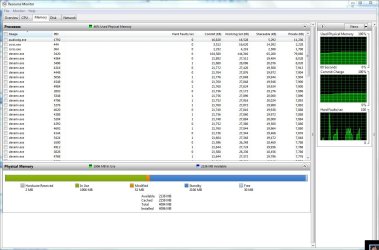
I will say that from reading your current posts that you dont have a reasonable idea how the memory caching works at all, If you took the time to learn about the changes and research/run tests then you wouldn't have any problem with it....I just started an extra 30 instances of Visual Studio just to show some examples here...

sysram.JPG

Look at the collums for each process, each instance of Visual Studio (devenv) has commited 21mb of data, has an available working set of 27MB available, currently shares 19MB between each process with an actual real memory use of 7MB (private).

You will notice all the instances of Visual Studio are sharing 19MB with a Private memory use of 7MB, after the first instance is running Windows is able to use that existing process's shareable memory for launching each new process and share xxx amount of ram with that process resulting in an actual private use of 7mb saving 20MB for each new instance I create, A classic example of these improvements with Memory Management if Firefox, You will notice its first launch after booting up your system is really slow but each new instance after that is launched near instantly.

That just never happened on XP, all these instances of Visual Studio would have consumed 27Mb of ram each instead of 7MB and ate all my available RAM.

You also have idea that the cached ram is actually slowing your applications down, You can see from the screenshot that I have 30mb of free ram with 2.1GB of cached ram... For example, when launching TF2 or CSS they query the amount of available RAM and reserve about 400mb each, Windows simply doesn't inform the requesting application that its using that ram for caching and consequently CSS/TF2 just over-writes the memory addresses its using, theres no unloading/clearing/deleting or whatever your thinking is going on that could possibly slow your system down... If it has to write data onto your page-file or something then it will defintly cause a slow down while that takes place.

BTW, Look at the Hard Faults/Sec graph on the right, That is your actual read/write usage of your RAM and you can see its almost nothing even though Im using 2gb RAM right now, That was also non-existent on XP and it would be constantly read/writing to your RAM resulting in a massive slowdown when your maximum RAM capacity was reached.

You could be listening to music, playing games, burning a DVD and transcoding a Movie and whatever else without even realising you had zero ram available provided you had a minimum 2-4gb ram installed, Yes you would notice a slow down while switching between applications but launching instances of current applications is near instantaneous and thats also something you could never do on XP.

Microsoft devs know more about Windows and its core management than anyone else, their much smarter then you or me and dont just do things because they feel like it, they play games, watch movies, burn dvds...etc just like "normal people" and dont just go around changing things because their bored, just like us...they want better management of things like Memory usage but hey if you feel that your smarter then you more than welcome to go ahead disable what you feel like.
 
Caching helps prolong the use of SSD drives, the life of a SSD drive decreases with each read/write :sarc:

I will say that from reading your current posts that you dont have a reasonable idea how the memory caching works at all, If you took the time to learn about the changes and research/run tests then you wouldn't have any problem with it....I just started an extra 30 instances of Visual Studio just to show some examples here...

View attachment 22552

Look at the collums for each process, each instance of Visual Studio (devenv) has commited 21mb of data, has an available working set of 27MB available, currently shares 19MB between each process with an actual real memory use of 7MB (private).

You will notice all the instances of Visual Studio are sharing 19MB with a Private memory use of 7MB, after the first instance is running Windows is able to use that existing process's shareable memory for launching each new process and share xxx amount of ram with that process resulting in an actual private use of 7mb saving 20MB for each new instance I create, A classic example of these improvements with Memory Management if Firefox, You will notice its first launch after booting up your system is really slow but each new instance after that is launched near instantly.

That just never happened on XP, all these instances of Visual Studio would have consumed 27Mb of ram each instead of 7MB and ate all my available RAM.

You also have idea that the cached ram is actually slowing your applications down, You can see from the screenshot that I have 30mb of free ram with 2.1GB of cached ram... For example, when launching TF2 or CSS they query the amount of available RAM and reserve about 400mb each, Windows simply doesn't inform the requesting application that its using that ram for caching and consequently CSS/TF2 just over-writes the memory addresses its using, theres no unloading/clearing/deleting or whatever your thinking is going on that could possibly slow your system down... If it has to write data onto your page-file or something then it will defintly cause a slow down while that takes place.

BTW, Look at the Hard Faults/Sec graph on the right, That is your actual read/write usage of your RAM and you can see its almost nothing even though Im using 2gb RAM right now, That was also non-existent on XP and it would be constantly read/writing to your RAM resulting in a massive slowdown when your maximum RAM capacity was reached.

You could be listening to music, playing games, burning a DVD and transcoding a Movie and whatever else without even realising you had zero ram available provided you had a minimum 2-4gb ram installed, Yes you would notice a slow down while switching between applications but launching instances of current applications is near instantaneous and thats also something you could never do on XP.

Microsoft devs know more about Windows and its core management than anyone else, their much smarter then you or me and dont just do things because they feel like it, they play games, watch movies, burn dvds...etc just like "normal people" and dont just go around changing things because their bored, just like us...they want better management of things like Memory usage but hey if you feel that your smarter then you more than welcome to go ahead disable what you feel like.

I can only speak from experience. The everyday Vista user is frustrated at why their PC requires 5 - 10 minutes before their PC is responsive to what they need to do. Even Microsoft engineers suggest users wait until Vista completes its caching (from Microsoft springboard series).

Windows Vista Performance Roundtable
http://technet.microsoft.com/en-us/windows/aa904820.aspx
Technical Chat with Mark Russinovich

I think we can all agree that Vista was/is the beginning of the end for Microsoft. This crazy obsession of launching applications instantly when 99% of applications launch pretty much instantly off HDD/SDD anyway is just one example.

And Ubuntu plus other Linux distro's aren't exactly performance wizards even on high spec hardware!

Ultimately the biggest looser in this massive gamble with re-engineering the memory management of Vista / Windows 7 is foreground application and Explorer shell responsiveness. And Microsoft still haven't listened with Windows 7.

Lets hope Google understands what users need rather than giving users a slow bloated OS that even Intel wouldn't touch alongside every large enterprise I have worked for. 2010 will be an interesting year as many IT teams begin to deploy Windows 7 to small test groups of Windows XP users.
 

My Computer My Computer

At a glance

Windows XP Professional3.4Ghz HT3.3GBATI X800 XT 256Mb
Computer Manufacturer/Model Number
Dell 8400
OS
Windows XP Professional
CPU
3.4Ghz HT
Motherboard
Dell
Memory
3.3GB
Graphics Card(s)
ATI X800 XT 256Mb
Sound Card
Sound Blaster
Monitor(s) Displays
Samsung
...every large enterprise I have worked for...
The verison of Windows deployed on your equipment appears to be Windows CE. We have been looking for personnel with experience using point-of-sale equipment at Burger King. McDonald's, one of the largest enterprises in the world, would be happy to avail ourselves of your vastly limited knowledge and superior grasp of baseless arguments. On the surface, you appear to be smarter than any of the engineers at any of the Big Five tech companies. We would like to determine exactly how thin the veneer is. Please pick up an application today.
 
I can only speak from experience. The everyday Vista user is frustrated at why their PC requires 5 - 10 minutes before their PC is responsive to what they need to do. Even Microsoft engineers suggest users wait until Vista completes its caching (from Microsoft springboard series).

Windows Vista Performance Roundtable
Windows Vista Service Pack (SP2) | Support, Deployment, Resources
Technical Chat with Mark Russinovich

I think we can all agree that Vista was/is the beginning of the end for Microsoft. This crazy obsession of launching applications instantly when 99% of applications launch pretty much instantly off HDD/SDD anyway is just one example.

And Ubuntu plus other Linux distro's aren't exactly performance wizards even on high spec hardware!

Ultimately the biggest looser in this massive gamble with re-engineering the memory management of Vista / Windows 7 is foreground application and Explorer shell responsiveness. And Microsoft still haven't listened with Windows 7.

Lets hope Google understands what users need rather than giving users a slow bloated OS that even Intel wouldn't touch alongside every large enterprise I have worked for. 2010 will be an interesting year as many IT teams begin to deploy Windows 7 to small test groups of Windows XP users.

spazzie,

Were not talking about Vista, We arnt talking about Linux, I dont care what you think the future of Microsoft will be, How can you know what Googles unreleased/unseen operating will be like? Whats with all this bull****! Arnt we trying to help you with your machine?? :sarc:

Ive seen all of Marks videos, Maybe you should see his last one talking about Windows 7, while you there go lookup all the Windows 7 videos form Microsoft developers.. You might actually learn something :sarc:

Mark Russinovich, Windows 7:
Mark Russinovich: Inside Windows 7 | Going Deep | Channel 9

Follow up Video:
Arun Kishan: Inside Windows 7 - Farewell to the Windows Kernel Dispatcher Lock | Going Deep | Channel 9

Chittur Subbaraman: Inside Windows 7 - Service Controller and Background Processing | Going Deep | Channel 9

Dave Probert: Inside Windows 7 - User Mode Scheduler (UMS) | Going Deep | Channel 9
 
I think we can all agree that Vista was/is the beginning of the end for Microsoft.
I'm not sure that I agree with this statement. While Vista was a bit shaky at first, due to large changes in way drivers and such worked, it became much better over time. The only way the end could be near for MS is if there was something else on the horizon picking up steam and starting to take over. As far as I know, there are 0 significant competitors here.

While vista was skipped by quite a number of enterprise customers, I don't necessarily think the same is going to be true for Win7. Win7 provides the benefits of Vista with significantly better performance and efficient use of the hardware. Plus, businesses have had a few more years to replace some of the lower-end equipment that would have never performed well with Vista in the first place.
 

My Computer My Computer

At a glance

Windows 7 Ultimate x64Intel Q9550 2.83Ghz OC'd to 3.40Ghz8GB G.Skill PI DDR2-800, 4-4-4-12 timingsEVGA 1280MB Nvidia GeForce GTX570
Computer Manufacturer/Model Number
Self-Built in July 2009
OS
Windows 7 Ultimate x64
CPU
Intel Q9550 2.83Ghz OC'd to 3.40Ghz
Motherboard
Gigabyte GA-EP45-UD3R rev. 1.1, F12 BIOS
Memory
8GB G.Skill PI DDR2-800, 4-4-4-12 timings
Graphics Card(s)
EVGA 1280MB Nvidia GeForce GTX570
Sound Card
Realtek ALC899A 8 channel onboard audio
Monitor(s) Displays
23" Acer x233H
Screen Resolution
1920x1080
Hard Drives
Intel X25-M 80GB Gen 2 SSD
Western Digital 1TB Caviar Black, 32MB cache. WD1001FALS
PSU
Corsair 620HX modular
Case
Antec P182
Cooling
stock
Keyboard
ABS M1 Mechanical
Mouse
Logitech G9 Laser Mouse
Internet Speed
15/2 cable modem
Other Info
Windows and Linux enthusiast. Logitech G35 Headset.
Superfetch and Prefetch only cach apps and never has cache the files used themselves (and this includes Vista)...

Wrong, Go boot up your Vista install if you still have it and launch resource monitor, goto the disk view and sort it by read/min and see for your self.

Maybe a PC that is exclusive to work stuff alone only gets to see applications prefetched since theres nothing more to cache, on my system the torrent zip files,avi files basically anything gets precached, i didnt mind it so much since i bought 8GB's just for that.

With windows 7, a lot of my applications/games launch noticeably slower since the cache is too conservative this time. But that is not a show stopper for me anyway.
 

My Computer My Computer

At a glance

Windows 7 Ultimate X64 RTMQ6600 @ 3.4Ghz8GB DDR2-800GTX285 1GB
OS
Windows 7 Ultimate X64 RTM
CPU
Q6600 @ 3.4Ghz
Motherboard
Abit IP35-E
Memory
8GB DDR2-800
Graphics Card(s)
GTX285 1GB
Sound Card
Creative X-Fi Extreme Music
Monitor(s) Displays
Samsung T220
Hard Drives
Samsung F1 Spinpoint 1TB
PSU
Silverstone Zues 750ZF
Case
Lian Li PC-P80
Cooling
Thermalright Ultra 120-Extreme
Wrong, Go boot up your Vista install if you still have it and launch resource monitor, goto the disk view and sort it by read/min and see for your self.
i dont understand why this has to do with caching files (avi and the like)...:sarc:


Maybe a PC that is exclusive to work stuff alone only gets to see applications prefetched since theres nothing more to cache, on my system the torrent zip files,avi files basically anything gets precached, i didnt mind it so much since i bought 8GB's just for that.
as you can read there are several articles explaining this...

Windows Vista I/O technologies - Wikipedia, the free encyclopedia
SuperFetch is a technology that pre-loads commonly used applications into memory to reduce their load times.

Windows Administration: Inside the Windows Vista Kernel: Part 2
It stores this information in scenario files with a .db extension in the %SystemRoot%\Prefetch directory alongside standard prefetch files used to optimize application launch.


in short it only caches data and code that is necessary for the application to launch and nothing more...
there should be no avi or torrent files being cached....:)


With windows 7, a lot of my applications/games launch noticeably slower since the cache is too conservative this time. But that is not a show stopper for me anyway.
from the guy himself
Mark's Blog : Pushing the Limits of Windows: Physical Memory


During Windows7 development, we made a number of improvements to how Superfetch manages memory. Many of these changes were directly in response to customer comments. At a high level, some of these improvements are as follows:

(1) Be quieter: Even though Superfetch always utilizes low-priority I/O for its memory population in order to avoid interfering with foreground activity, we found that many users get annoyed at hearing the disk activity and seeing the disk light blink. In Windows7, Superfetch is a lot more respectful of user presence.

(2) Be more selective: In Windows7, Superfetch still populates the OS cache with frequently-accessed data from the disk and prioritizes RAM contents, but the underlying algorithms have been improved over Vista. As a result, Superfetch now typically prefetches a smaller, but more relevant volume of data from the disk and prioritizes memory more effectively.

Overall, our results (from a number of users over weeks) indicate that disk activity due to Superfetch is significantly lower in Windows7 compared to Vista while system responsiveness is much improved due to fewer hard page faults from the pagefile and other files.

There is no way to make Windows7 Superfetch bahave like its Vista predecessor.
 

My Computer My Computer

At a glance

Windows 7 Ult x64(x2), HomePrem x32(x4), Serv...Turion X2 ultra (oh well came with laptop)/P4...OCZ Dual Channel 4GB kit/ 1gb Dual ChannelHD 3200 graphics /GMA x3100 (yay for intergra...
Computer Manufacturer/Model Number
Tx2500z Tablet Pc/Homemade Server
OS
Windows 7 Ult x64(x2), HomePrem x32(x4), Server 08 (+VM), 08 R2 (VM) , SuSe 11.2 (VM), XP 32 (VM)
CPU
Turion X2 ultra (oh well came with laptop)/P4 @3.2 (yes P4)
Motherboard
IDK HP Motherboard / Intel DG965SS
Memory
OCZ Dual Channel 4GB kit/ 1gb Dual Channel
Graphics Card(s)
HD 3200 graphics /GMA x3100 (yay for intergrated!!)
Sound Card
Realtek HD Audio(mic working, well sort of)/Siig IC-70012
Monitor(s) Displays
built-in Hp 12" laptop screen/ Acer 19"
Screen Resolution
1280x800 /1440x900
Cooling
All Air Cooled
Mouse
Logi MX Rev. /MS Wheel Optical 1.1A /Logitech Optical Mouse
Internet Speed
College baby but its still routed through vpn to 1536k...
Other Info
love my wacom pen and pressure sensitivity...
wished it worked in 7, SUSE for that matter though
i dont understand why this has to do with caching files (avi and the like)...:sarc:


as you can read there are several articles explaining this...

Windows Vista I/O technologies - Wikipedia, the free encyclopedia


Windows Administration: Inside the Windows Vista Kernel: Part 2


in short it only caches data and code that is necessary for the application to launch and nothing more...
there should be no avi or torrent files being cached....:)


from the guy himself
Mark's Blog : Pushing the Limits of Windows: Physical Memory

If you believe in all of those I would presume that you have never used vista or never observed on how superfetch worked.

The I/O priority is true to some extent, personally I didnt notice my system respond any faster with superfetch off ( disabled service , cleared prefetch folder ) like what other users say that it degrades system performance so i left it running. Some believe that superfetch slows down the system.


Superfetch loads ANYTHING that is used even if it was just launched once, forget about the "commonly used part"

All of the above is for windows VISTA.

For Win7 , I am aware that they reworked the code so that it only caches the most important files. But it has a downside to it though, my Sims3 (and over a dozen other apps/games ) loads significantly slower as compared to vista its taking almost 2x the amount of time because 7 does not cache the game files anymore while vista cached EVERYTHING ( including junk ) so its a trade off, two steps forward and one step back.

This is all based on actual usage and application , this is not theory crafting.
 

My Computer My Computer

At a glance

Windows 7 Ultimate X64 RTMQ6600 @ 3.4Ghz8GB DDR2-800GTX285 1GB
OS
Windows 7 Ultimate X64 RTM
CPU
Q6600 @ 3.4Ghz
Motherboard
Abit IP35-E
Memory
8GB DDR2-800
Graphics Card(s)
GTX285 1GB
Sound Card
Creative X-Fi Extreme Music
Monitor(s) Displays
Samsung T220
Hard Drives
Samsung F1 Spinpoint 1TB
PSU
Silverstone Zues 750ZF
Case
Lian Li PC-P80
Cooling
Thermalright Ultra 120-Extreme
   Warning
Thread cleaned up. Let's keep this off topic fanboy conversation and insults out, and stick to the OP's question.
 

My Computer My Computer

At a glance

64-bit Windows 11 Pro for WorkstationsIntel i7-8700K OC'd to 5 GHz64 GB (4x16GB) G.SKILL TridentZ RGB DDR4 3600...ASUS ROG-STRIX-GTX1080TI-O11G-GAMING
Computer type
PC/Desktop
Computer Manufacturer/Model Number
Self built custom
OS
64-bit Windows 11 Pro for Workstations
CPU
Intel i7-8700K OC'd to 5 GHz
Motherboard
ASUS ROG Maximus XI Formula Z390
Memory
64 GB (4x16GB) G.SKILL TridentZ RGB DDR4 3600 MHz
Graphics Card(s)
ASUS ROG-STRIX-GTX1080TI-O11G-GAMING
Sound Card
Integrated
Monitor(s) Displays
2 x Samsung Odyssey G7 27"
Screen Resolution
2560x1440
Hard Drives
1TB Samsung 990 PRO M.2,
4TB Samsung 990 PRO PRO M.2,
TerraMaster F8 SSD Plus NAS
PSU
Seasonic Prime Titanium 850W
Case
Thermaltake Core P3
Cooling
Corsair Hydro H115i
Keyboard
Logitech wireless K800
Mouse
Logitech MX Master 4
Internet Speed
2 Gb/s Download and 100 Mb/s Upload
Antivirus
Malwarebyte Anti-Malware Premium
Browser
Google Chrome
Other Info
Logitech Z625 speaker system,
Logitech BRIO 4K Pro webcam,
HP Color LaserJet Pro MFP M477fdn,
APC SMART-UPS RT 1000 XL - SURT1000XLI,
Galaxy S23 Plus phone
Back
Top