
| Windows 7: Getting System Interrupts |
01 Oct 2011
|
#1 | | |
Getting System Interrupts Hi masters. Within 10-20 minutes after booting my whole PC starts to lag very heavily. I checked the Process Explorer and found "System Interrupts" consuming about 25 % of CPU. I had all the latest drivers but I have rolled backed to older driver for the GPU for now thinking that might have caused the problem. I have uninstalled ESET Smart Security and ran the ESET Uninstaller, and afterwards installed MSE. I have also removed Alcohol and SPTD along with it. But none of this has solved the problem
I am searching for xperf so that I could provide more information here, but can't seem to find it.
Please help. I will be very grateful | My System Specs |
| System Manufacturer/Model Number Self Assembled OS Windows 7 x64 CPU Core i7 920, Core2Quad 9550 Motherboard Asus Rampage II Extreme, Asus P5G something Memory 12 Gigs Kingston, 4 Gigs Corsair Graphics Card AMD 4870 Crossfire, Nvidia GTS 250 Monitor(s) Displays Viewsonic VP2250wb, BenQG2220HD Screen Resolution 1680x1050, 1920x1080 Keyboard Logitech G15, el cheapo Logitech Keyboard Mouse Logitech G5, Razer Deathadder PSU Tagan 1100, Corsair 500 Case Thermaltake Xaser VI, HAF 922 Cooling CM V8, Thermalright Hard Drives 2x 500G Seagate 1x 1TB Seagate, 1 500gb WD 1 TB Seagate Internet Speed upto 4mbps |
01 Oct 2011
|
#2 | | Win 8 Release candidate 8400 |

Quote: Originally Posted by BubbaDaCaveman Hi masters. Within 10-20 minutes after booting my whole PC starts to lag very heavily. I checked the Process Explorer and found "System Interrupts" consuming about 25 % of CPU. I had all the latest drivers but I have rolled backed to older driver for the GPU for now thinking that might have caused the problem. I have uninstalled ESET Smart Security and ran the ESET Uninstaller, and afterwards installed MSE. I have also removed Alcohol and SPTD along with it. But none of this has solved the problem
I am searching for xperf so that I could provide more information here, but can't seem to find it.
Please help. I will be very grateful  You can use apps like SIW2, speccy, everest, etc to get the system specs which we do need.
Sysem interrupts are almost always not the cause of lagging. Sometimes it is an errant driver. Use this free app to test yours. DPC Latency Checker | My System Specs | | System Manufacturer/Model Number HP Pavillion dv-7 1005 Tx OS Win 8 Release candidate 8400 CPU 2@2.4 Memory 4 gigs Graphics Card Nvidia 9600M Sound Card HD built-in Monitor(s) Displays 17" Wxga Screen Resolution 1440x900 Cooling none Internet Speed 45Mb down 5Mb up |
01 Oct 2011
|
#3 | | |
Hi thanks for replying. I think I have solved the problem by uninstalling Diskeeper 2011. It's been almost an hour now and till now I am seeing no lag, previously I could barely keep the PC on for more than 10 mins. That's strange because Diskeeper 2011 is running fine on my other pc. Also thanks for PC Latency Checker it might come in handy in future.
Thanks again. | My System Specs | | System Manufacturer/Model Number Self Assembled OS Windows 7 x64 CPU Core i7 920, Core2Quad 9550 Motherboard Asus Rampage II Extreme, Asus P5G something Memory 12 Gigs Kingston, 4 Gigs Corsair Graphics Card AMD 4870 Crossfire, Nvidia GTS 250 Monitor(s) Displays Viewsonic VP2250wb, BenQG2220HD Screen Resolution 1680x1050, 1920x1080 Keyboard Logitech G15, el cheapo Logitech Keyboard Mouse Logitech G5, Razer Deathadder PSU Tagan 1100, Corsair 500 Case Thermaltake Xaser VI, HAF 922 Cooling CM V8, Thermalright Hard Drives 2x 500G Seagate 1x 1TB Seagate, 1 500gb WD 1 TB Seagate Internet Speed upto 4mbps |
01 Oct 2011
|
#4 | | |
Hi I think I should inform here that although Diskeeper seemed to be the cause it was actually caused by a recent update to Tune Up Utilities 2011. Tune Up started disliking Diskeeper after the update  so I rolled back to the version of TU that was working properly. Now I have both Diskeeper and TU running together.
Thanks for reading. Wrong Info read the following post for the actual cause.
Last edited by BubbaDaCaveman; 01 Oct 2011 at 11:45 AM..
| My System Specs | | System Manufacturer/Model Number Self Assembled OS Windows 7 x64 CPU Core i7 920, Core2Quad 9550 Motherboard Asus Rampage II Extreme, Asus P5G something Memory 12 Gigs Kingston, 4 Gigs Corsair Graphics Card AMD 4870 Crossfire, Nvidia GTS 250 Monitor(s) Displays Viewsonic VP2250wb, BenQG2220HD Screen Resolution 1680x1050, 1920x1080 Keyboard Logitech G15, el cheapo Logitech Keyboard Mouse Logitech G5, Razer Deathadder PSU Tagan 1100, Corsair 500 Case Thermaltake Xaser VI, HAF 922 Cooling CM V8, Thermalright Hard Drives 2x 500G Seagate 1x 1TB Seagate, 1 500gb WD 1 TB Seagate Internet Speed upto 4mbps |
01 Oct 2011
|
#5 | | |
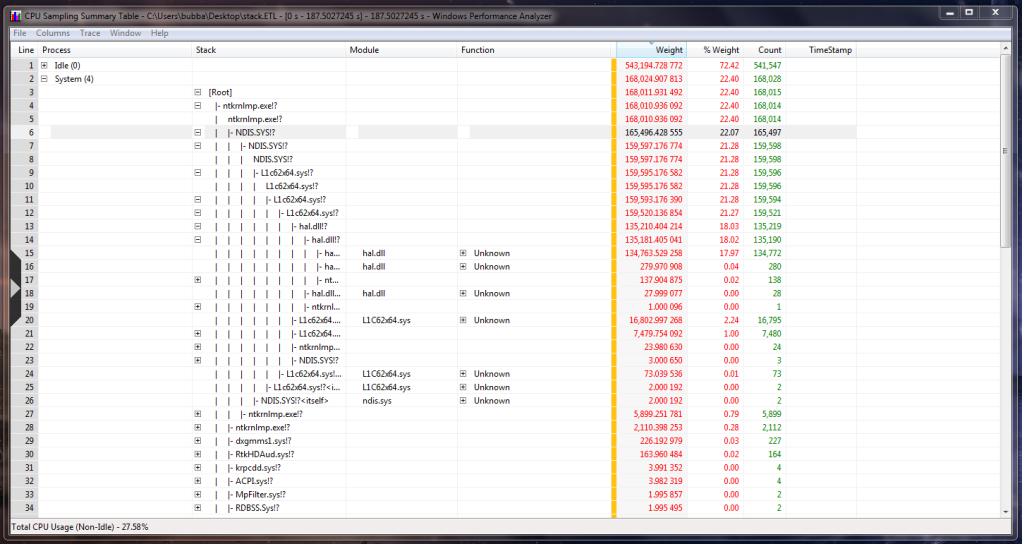
Wow! it turned out that neither Diskeeper nor Tune Up were the culprits. After a few hours I started getting the same problem again. So I got XPerf from MS website, and after using XPerf I found out that it was my ethernet drivers that was causing the huge CPU consumption. So while it was lagging I disabled the drivers from the Device Manager and as soon as I did that the CPU process went to normal. [IMG]
Now I have uninstalled the driver and let Windows install it automatically. Everything seems to be working fine now. Thanks for reading and hopefully I have resolved my issue this time.
Also thanks zigzag3143 for DPC Latency Checker. While it was lagging I ran DPC and it clearly showed that there was something wrong. Although it can't find the driver itself it helps a lot in such situations. | My System Specs | | System Manufacturer/Model Number Self Assembled OS Windows 7 x64 CPU Core i7 920, Core2Quad 9550 Motherboard Asus Rampage II Extreme, Asus P5G something Memory 12 Gigs Kingston, 4 Gigs Corsair Graphics Card AMD 4870 Crossfire, Nvidia GTS 250 Monitor(s) Displays Viewsonic VP2250wb, BenQG2220HD Screen Resolution 1680x1050, 1920x1080 Keyboard Logitech G15, el cheapo Logitech Keyboard Mouse Logitech G5, Razer Deathadder PSU Tagan 1100, Corsair 500 Case Thermaltake Xaser VI, HAF 922 Cooling CM V8, Thermalright Hard Drives 2x 500G Seagate 1x 1TB Seagate, 1 500gb WD 1 TB Seagate Internet Speed upto 4mbps |
19 Oct 2012
|
#6 | | |
Thanks guys I've solved my problem too | My System Specs | | System Manufacturer/Model Number ThinkPad/X301 OS Win7 Enterprise x64 Getting System Interrupts problems? All times are GMT -5. The time now is 10:00 AM. | |