Windows 7 Forums Search
Welcome to Windows 7 Forums. Our forum is dedicated to helping you find solutions with any problems, errors or issues you are experiencing with Windows 7. The Windows 7 forum also covers news and updates and has an extensive Windows 7 tutorial section that covers a wide range of tips and tricks.


Windows 7 - Cannot Turn System Icons On Or Off

 
08-01-2009   #1


Windows 7 Professional x64 / Ubuntu 9.10


Cannot Turn System Icons On Or Off

I can't customize which system icons show up on the taskbar. For some reason, I can only set the clock on or off. When I click the help file link that says "Why can't I change some of these settings?", it gives me some information about how an administrator may of changed group policies. I didn't change these settings, and I'm the administrator. Just noticed this issue as I installed the Windows 7 RTM Build x64 last night and this morning wanted to tweak which system icons showed up and which didn't. Any help would be appreciated.

(Screen attached of window with greyed out system icons.)
Attachment 20940

My System SpecsSystem Spec
08-01-2009   #2


Windows 7 Ultimate x64 SP1


Hello Gemini Man,

Sometimes a simple restart will allow you to change them again. If not, then the tutorial below to see if that may help.

System Icons - Enable or Disable

Hope this helps,
Shawn

Last edited by Brink; 08-01-2009 at 04:10 PM..
My System SpecsSystem Spec
08-01-2009   #3


Windows 7 Ultimate x64


You can try this tutorial:
Notification Area Icons - Reset
My System SpecsSystem Spec
.


08-01-2009   #4


Windows 7 Ultimate 32-bit & 64-bit both SP1


You can also do this through Group Policy.

Click on the start orb and type gpedit.msc into the search box. When the program appears in the results panel, right click and select Run as administrator and provide administrative credentials.
Attachment 20958
Expand the category User Configuration and Administrative Templates. Click on Start Menu and Taskbar. The following screen appears. I have scrolled down, and you can see that the highlighted item is one of those you are having problems with. The others are immediately beneath it.
Attachment 20959
The setting of each of these options needs to be Not configured, so double click on each of these in turn to arrive at the following screen.
Attachment 20966
Make sure that Not configured is selected, as shown. Then click OK to return to the previous screen. Alternatively, click Next Setting to move to the next item. When you have adjusted the final setting, click OK twice to exit the adjustment screen and close the editor.

The other option that might be useful is Remove Clock from the system notification area.

Last edited by Dwarf; 08-01-2009 at 03:07 PM..
My System SpecsSystem Spec
08-01-2009   #5


Windows 7 Professional x64 / Ubuntu 9.10


Thank you everyone for the help! Brink your method worked whereas the other two suggestions didn't. Of course I tried Brink's method last! I now notice that my options are still greyed out when I try to customize which icons show up on the taskbar... Which leads me to believe something is still funny with group policy settings. However, everything is back to showing up, so thanks again for all your help! As usual, seven forums never disappoints.
My System SpecsSystem Spec
08-02-2009   #6


Windows 7 Ultimate x64 SP1


You're welcome Gemini Man. I'm happy to hear that you got those icons sorted out now.

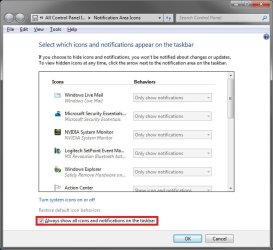
Do you mean the Notification Area Icons options below are grayed out now? If so, check to make sure that the boxed in red option below is unchecked.

Cannot Turn System Icons On Or Off-icons.jpg
My System SpecsSystem Spec
Reply

 Cannot Turn System Icons On Or Off problems?


Thread Tools


Similar Threads for: Cannot Turn System Icons On Or Off
Thread Forum
Notification Area Icons - Hide or Show System Icons and Notifications Tutorials
System Icons - Turn On or Off Tutorials
Icons turn white, then turn back one by one General Discussion
Cant turn on/off systray icons General Discussion
My system administrator cant turn on system restore Backup and Restore


All times are GMT -5. The time now is 06:39 PM.


Windows 7 Forums is an independent web site and has not been authorized,
sponsored, or otherwise approved by Microsoft Corporation.
"Windows 7" and related materials are trademarks of Microsoft Corp.
© Designer Media Ltd
  

1 2 3 4 5 6 7 8 9 10 11 12 13 14 15 16 17 18 19 20 21 22 23 24 25 26 27 28 29 30