| Windows 7: 4 GB of Physical Memory but 1.74 GB Usable |
08 Nov 2011
|
#1 | | |
4 GB of Physical Memory but 1.74 GB Usable Hello All,
I have of course read extensively on this issue and of course there are all sorts of opinions out there about if Windows 7 is using the correct amount of memory. However, it seems to me that my computer is using more than everyone else.
Some specs:
Windows 7 Home Premium x64
Hp Pavilion DV6 3160us laptop
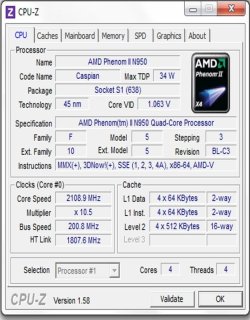
Quad Core AMD CPU
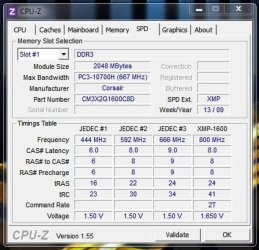
4 GB of installed RAM. Showing 1.74 GB usable. The performance monitor shows that over 2GB is being held for hardware.
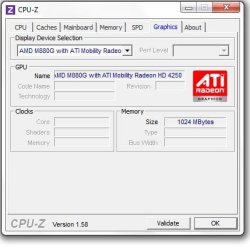
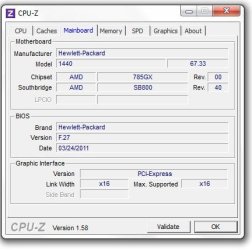
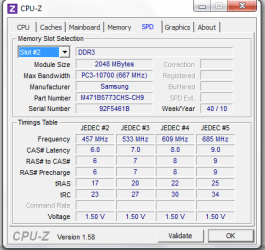
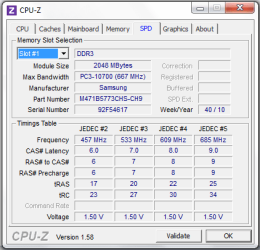
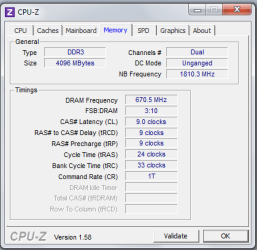
Attaching CPU Z screen shots.
I cannot access BIOS settings to enable remapping (its not even available as an option).
The msconfig fix that people are posting has been done.
Any thoughts on how to reduce the usage? | My System Specs |
| |
08 Nov 2011
|
#2 | | Windows 7 Ultimate x86/Snow Leopard 10.6.6i/Ubuntu 11.10/Android Pennsylvania |
Check your motherboard. It showin the 1.74827362 number because some of that ram is saved for video ram. | My System Specs | | System Manufacturer/Model Number Homemade OS Windows 7 Ultimate x86/Snow Leopard 10.6.6i/Ubuntu 11.10/Android CPU AMD Phenom x6 1055T @ 2.88GHz Motherboard Biostar A870U3 Memory 8GB DDR3 1333 RAM Graphics Card ATI Radeon HD 5450 Sound Card Integrated Monitor(s) Displays Dell IN1910N Screen Resolution 1366x768x32 PSU 450W PCU Hard Drives 1TB HDD Internet Speed Wired: OMFG SO FAST; Wireless: WTFFF Y U SO SLOW?! |
09 Nov 2011
|
#3 | | Windows 7 Pro-x64 South Texas |
The BIOS has reserved the 2.3Gb for hardware use. There should be an option in your BIOS to set the video "aperture" size. Even when set to auto, I've never seen it that large though. There could be a problem with your BIOS recognizing the hardware you have installed. First check to be sure your BIOS is up to date. Then check the options under the System menu for memory mapping. It could be called something else. I'm not familiar with the BIOS used in HPs and they're a little stingy with info but check to see if there's hardware options turned on for things you don't have. (Bluetooth, multiple LAN adapters, touch screen, etc.) | My System Specs | | Computer type PC/Desktop System Manufacturer/Model Number Built 2/11/2011 OS Windows 7 Pro-x64 CPU i7-2600 3.4GHz - 3.8GHz Turbo Motherboard Intel DH67BL-B3 Memory 8Gb - 2x4GB, Muskin 991770 PC3-1333 Graphics Card Integrated Intel HD 2000 Sound Card Integrated Intel 10.1 HD, RealTek ALC892 Monitor(s) Displays Asus LCD VH222H, Haier HL24XSL2a Screen Resolution 1920x1080, 1920x1080 Keyboard Logitech EX100 Wireless Mouse Logitech EX100 Wireless PSU Seasonic 650W 80+ Gold Modular Case Rosewill Defender Cooling Stock CPU, Four 120mm case fans, PCH fan added Hard Drives Crucial C300-128Gb,
Western Digital WD5002AALX - 500Gb,
Western Digital WD7501AALS - 750Gb Internet Speed 2.5/1.5 Mbs Antivirus Microsoft Security Essentials Browser Microsoft Internet Explorer 10 Other Info Antec Veris Premier-Multimedia IR Station,
Cyber Accoustics-3602 Speakers,
AFT XM-5U Card Reader,
Hauppauge TV-HVR-2250,
Sony LX300 USB Turntable |
09 Nov 2011
|
#4 | | Windows 7 Professional SP1 32-bit Fantasyland |
Are you using the onboard video or a separate PCI-E videocard? | My System Specs | | System Manufacturer/Model Number Custom-built OS Windows 7 Professional SP1 32-bit CPU Intel Core 2 Duo E6600 2.4GHz, overclocked to 2.7GHz Motherboard Asus PL5D2 Memory 4GB DDR2-667 (4x1GB in dual-channel config) Graphics Card nVidia GeForce 9800 GT Sound Card Creative X-Fi XtremeMusic Monitor(s) Displays Acer Screen Resolution 1920x1200 (DVI) Keyboard Standard Mouse Microsoft wireless optical mouse PSU Antec TruePower 2.0 Case Cooler Master Centurion Cooling various fans Hard Drives OCZ SSD Vertex Plus 60GB SATA (Firmware 3.55), 64MB cache
Hitachi HD321KJ SATA, 320GB, 7200rpm, 16MB cache Internet Speed DSL; ~330KB/sec down, ~110KB/sec up Other Info Have a laptop too :) (Compaq CQ60 also with Win7 Pro SP1 32-bit)
Drives in both systems:
C: - Windows 7 + apps. Pagefile is fixed size and located at the very end of the partition.
D: - various temp files/cache for Firefox and apps/games.
E: - videos, music, misc. storage, torrent downloads, etc. |
09 Nov 2011
|
#5 | | Win 7 Ultimate x64 Etobicoke, Ontario |
| My System Specs | | System Manufacturer/Model Number Me OS Win 7 Ultimate x64 CPU Phenom II x4 955 @ 4 GHz. Motherboard Asus M5A97 EVO Memory 2x2 GB Kingston HyperX DDR3 1600 Graphics Card Sapphire HD 6850 Sound Card Xonar DGX w/ Logitech X-530 Monitor(s) Displays Acer S232HL Abid Screen Resolution 1920x1080 Keyboard Logitech Wave Mouse Logitech G5 v2 PSU Antec Earthwatts 650W Green Case Antec Three Hundred Cooling Cooler Master 212 EVO Hard Drives 120 GB OCZ Vertex 3
500 GB Seagate 7200.12 Internet Speed 24000/1000 |
09 Nov 2011
|
#6 | | Windows 7 Ultimate x64 SP1 Hampton VA |
You might also check your MSCONFIG settings by typing "msconfig" (no quotes) in the search bar and making sure the Maximum memory box is not ticked. | My System Specs | | Computer type PC/Desktop System Manufacturer/Model Number Built by me OS Windows 7 Ultimate x64 SP1 CPU Intel Core i7-950 (3.06GHz) OC to 3.8GHz Motherboard Gigabyte GA-X58A-UD5 rev 1, F6 Bios Memory 12 gig Corsair DDR3 Dominator GT Memory (3X 4GB) Graphics Card AMD Radeon HD6950 2gig (Sapphire) Sound Card X-Fi Titanium Fatality Pro Monitor(s) Displays HP ZR22w 22" LCD Monitor Screen Resolution 1920 x 1080 Keyboard Logitech Wireless Wave Mouse Logitech Performance MX PSU Antec Signature - SG-850 Case Cooler Master HAF X Cooling Noctua NH-C12P SE14 Hard Drives Primary - OCZ Vertex 4 SSD (256GB). Storage - OCZ Vertex 2 SSD (120GB) & 2TB WD Caviar Black. Internet Speed High Speed Cable Other Info Memory Timings - 1600MHz @ 8-8-8-20-1T @ 1.640 volts |
09 Nov 2011
|
#7 | | |
The only thing in BIOS that I could change is SVM Support which I have. There is no option for changing mapping. Bios is up to date.
Will look at some of the devices that are on the computer. I do know that there is bluetooth adapter that is usually on.
When you say check your mother board... what do you mean?
I'm using the on board video card.
I will look into the memory sticks. But if they are being recognized and used then wouldn't that mean there shouldn't be a problem with them being seated properly?
By the way I LOVE how on the spec page at HP the graphics are "icthable" instead of "switchable" | My System Specs | | |
09 Nov 2011
|
#8 | | |
[QUOTE=sygnus21;1649304]You might also check your MSCONFIG settings by typing "msconfig" (no quotes) in the search bar and making sure the Maximum memory box is not ticked.
Yes, did that. Was no turned on. Plus the number of CPU processors was not ticked as well. | My System Specs | | |
09 Nov 2011
|
#9 | | Win 7 Ultimate x64 Etobicoke, Ontario |
It is possible that one of the sticks moved a bit from a bump or even just every day use. You would think they wouldn't move, but it is possible. It also doesn't take much for a stick to be misaligned in a slot for it not to be read/used corrected. Could even be that there is/was a bit of dust in the slot or on a stick when they were inserted, and that too can cause what you are seeing. | My System Specs | | System Manufacturer/Model Number Me OS Win 7 Ultimate x64 CPU Phenom II x4 955 @ 4 GHz. Motherboard Asus M5A97 EVO Memory 2x2 GB Kingston HyperX DDR3 1600 Graphics Card Sapphire HD 6850 Sound Card Xonar DGX w/ Logitech X-530 Monitor(s) Displays Acer S232HL Abid Screen Resolution 1920x1080 Keyboard Logitech Wave Mouse Logitech G5 v2 PSU Antec Earthwatts 650W Green Case Antec Three Hundred Cooling Cooler Master 212 EVO Hard Drives 120 GB OCZ Vertex 3
500 GB Seagate 7200.12 Internet Speed 24000/1000 |
09 Nov 2011
|
#10 | | |

Quote: Originally Posted by stormy13 It is possible that one of the sticks moved a bit from a bump or even just every day use. You would think they wouldn't move, but it is possible. It also doesn't take much for a stick to be misaligned in a slot for it not to be read/used corrected. Could even be that there is/was a bit of dust in the slot or on a stick when they were inserted, and that too can cause what you are seeing. This is a good point. Will check it out right now, post back any results | My System Specs | | 4 GB of Physical Memory but 1.74 GB Usable problems? All times are GMT -5. The time now is 03:42 AM. | |