| Windows 7: increase factory image partition |
30 Nov 2011
|
#1 | | |
increase factory image partition Hello,
as the title states, im wanting to increase the factory image partition.
the pc came with one drive, partitioned into 2.
one the system files etc, second the factory image which i belkive is what is used for system resotres, and factory recoveries.
just recently the factory image partition has become red, and ona few mb left.
ive been into disk mng, right-clicked on the partion to extend it. BUT, the 'extend partition' link is greyed out
any help is definately much appreciated,
thanks
stuart | My System Specs |
| System Manufacturer/Model Number HP OS Windows 7 Home Pre 64bit CPU i7 intel core 2.93GHZ Motherboard MSI Memory 16.00GB Graphics Card nVidia GT 220 |
30 Nov 2011
|
#2 | | Windows 7 SP1, Home Premium, 64-bit |
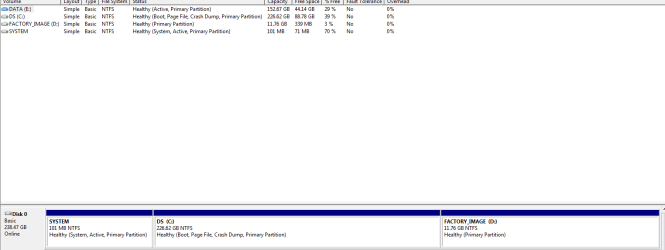
Post a screen shot of that Disk Management.
That partition is likely used to restore your PC to its factory state. I wouldn't expect it to change in size and become "red" unless you are somehow saving stuff to it. | My System Specs | | System Manufacturer/Model Number Ignatz Special; 4 speed manual gearbox; factory air conditioning; one of one OS Windows 7 SP1, Home Premium, 64-bit CPU Intel Sandy Bridge i5-2500, not overclocked Motherboard Gigabyte H67A-UD3H-B3, full ATX Memory 4 GB Crucial DDR3-1333 Graphics Card none; graphics are integrated on CPU Sound Card onboard: Realtek ALC892; external: USB Behringer UF0-202 Monitor(s) Displays NEC 90GX2-BK 19" LCD Screen Resolution 800 x 640 Keyboard Leopold Tenkeyless with Cherry Blue switches, USB Mouse Logitech or Microsoft optical wired; either USB or PS 2 PSU Seasonic SS-560KM, modular Case Antec Solo II Cooling CPU: Scythe Big Shuriken; Case: Scythe Slipstream 800 & 500 Hard Drives System: Intel 320 Series SSD, 80 GB;
Data: Samsung Spinpoint 103SJ, 1 TB;
Backup: WD Caviar Green WD15EADS-00P8B0, 1.5TB Other Info Power consumption of this system, including monitor: 68 watts at idle; 144 watts at full load |
30 Nov 2011
|
#3 | | |
sure thing... 
it never used to be red ,
just all of a sudden, | My System Specs | | System Manufacturer/Model Number HP OS Windows 7 Home Pre 64bit CPU i7 intel core 2.93GHZ Motherboard MSI Memory 16.00GB Graphics Card nVidia GT 220 |
30 Nov 2011
|
#4 | | |
i was going to use some of the other drives space - if this is possible | My System Specs | | System Manufacturer/Model Number HP OS Windows 7 Home Pre 64bit CPU i7 intel core 2.93GHZ Motherboard MSI Memory 16.00GB Graphics Card nVidia GT 220 |
30 Nov 2011
|
#6 | | |
im sure i did yes, when i first brought the pc - took four cds, haha. I may do this again and see if i can get it all on one dvd maybe.
how comes? | My System Specs | | System Manufacturer/Model Number HP OS Windows 7 Home Pre 64bit CPU i7 intel core 2.93GHZ Motherboard MSI Memory 16.00GB Graphics Card nVidia GT 220 |
30 Nov 2011
|
#7 | | Windows 7 SP1, Home Premium, 64-bit |
Can you post a picture of Disk Management??? | My System Specs | | System Manufacturer/Model Number Ignatz Special; 4 speed manual gearbox; factory air conditioning; one of one OS Windows 7 SP1, Home Premium, 64-bit CPU Intel Sandy Bridge i5-2500, not overclocked Motherboard Gigabyte H67A-UD3H-B3, full ATX Memory 4 GB Crucial DDR3-1333 Graphics Card none; graphics are integrated on CPU Sound Card onboard: Realtek ALC892; external: USB Behringer UF0-202 Monitor(s) Displays NEC 90GX2-BK 19" LCD Screen Resolution 800 x 640 Keyboard Leopold Tenkeyless with Cherry Blue switches, USB Mouse Logitech or Microsoft optical wired; either USB or PS 2 PSU Seasonic SS-560KM, modular Case Antec Solo II Cooling CPU: Scythe Big Shuriken; Case: Scythe Slipstream 800 & 500 Hard Drives System: Intel 320 Series SSD, 80 GB;
Data: Samsung Spinpoint 103SJ, 1 TB;
Backup: WD Caviar Green WD15EADS-00P8B0, 1.5TB Other Info Power consumption of this system, including monitor: 68 watts at idle; 144 watts at full load |
30 Nov 2011
|
#8 | | |
sure, here you go ... | My System Specs | | System Manufacturer/Model Number HP OS Windows 7 Home Pre 64bit CPU i7 intel core 2.93GHZ Motherboard MSI Memory 16.00GB Graphics Card nVidia GT 220 |
30 Nov 2011
|
#9 | | Windows 7 SP1, Home Premium, 64-bit |
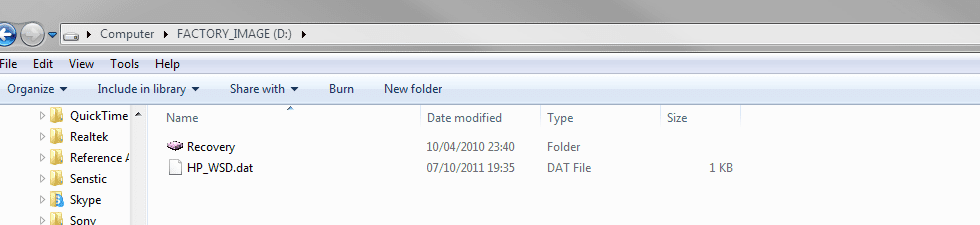
Rather than trying to borrow space from C, I would want to know why the image partition has grown. That's not normal.
What appears to be on it? | My System Specs | | System Manufacturer/Model Number Ignatz Special; 4 speed manual gearbox; factory air conditioning; one of one OS Windows 7 SP1, Home Premium, 64-bit CPU Intel Sandy Bridge i5-2500, not overclocked Motherboard Gigabyte H67A-UD3H-B3, full ATX Memory 4 GB Crucial DDR3-1333 Graphics Card none; graphics are integrated on CPU Sound Card onboard: Realtek ALC892; external: USB Behringer UF0-202 Monitor(s) Displays NEC 90GX2-BK 19" LCD Screen Resolution 800 x 640 Keyboard Leopold Tenkeyless with Cherry Blue switches, USB Mouse Logitech or Microsoft optical wired; either USB or PS 2 PSU Seasonic SS-560KM, modular Case Antec Solo II Cooling CPU: Scythe Big Shuriken; Case: Scythe Slipstream 800 & 500 Hard Drives System: Intel 320 Series SSD, 80 GB;
Data: Samsung Spinpoint 103SJ, 1 TB;
Backup: WD Caviar Green WD15EADS-00P8B0, 1.5TB Other Info Power consumption of this system, including monitor: 68 watts at idle; 144 watts at full load |
30 Nov 2011
|
#10 | | |
just these two files...
ill paste an image, is it something i can hide, or delete do you think? | My System Specs | | System Manufacturer/Model Number HP OS Windows 7 Home Pre 64bit CPU i7 intel core 2.93GHZ Motherboard MSI Memory 16.00GB Graphics Card nVidia GT 220 increase factory image partition problems? All times are GMT -5. The time now is 12:38 AM. | |