| Windows 7: Hardware reserved Memory? |
06 Dec 2011
|
#1 | | windows 7 ultimate x32 india |
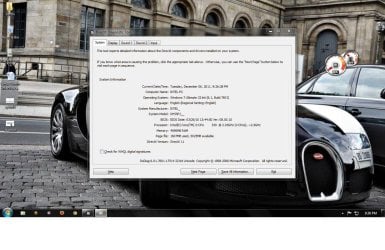
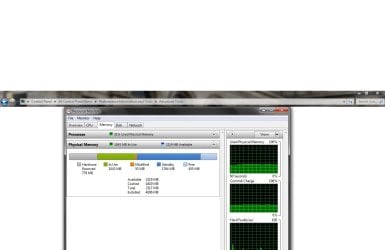
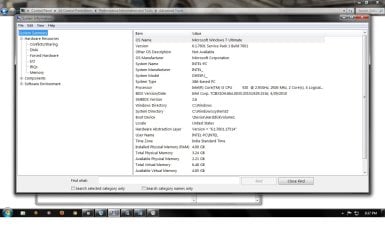
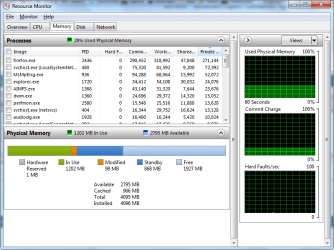
Hardware reserved Memory? I had 2 gb of ddr3 ram installed before, yesterday i added 2 more gb but the system uses only 3.24 gb and the rest is reserved for hardware. I hope it is used for graphics memory but i have an external graphic card of 1 gb video memory. How to release this memory. I have searched many forums and they suggested to uncheck the maxmemory in msconfig, that didnt work.
Also they asked to enable memory remapping in bios, but my bios doesnt have that option. My OS is windows 7 ultimate 32 bit.
I'm attaching the screenshots below. | My System Specs |
| Computer type PC/Desktop System Manufacturer/Model Number Intel OS windows 7 ultimate x32 CPU core i3 530 @ 3.63 ghz Motherboard Intel dh55pj Memory 4 gb ddr3 1333mhz Graphics Card Sapphire radeon 7770 1gb Ghz Edition Monitor(s) Displays lg 19" Screen Resolution 1368*768 Mouse Lenovo razer 1600 dpi laser PSU Zebronics 450 w Case Zebronics Cooling Cooler master Tx3 Evo cpu and cooler master 120mm Inlet fan Hard Drives Seagate 500gb @ 7200 rpm Internet Speed 8 Mbps dsl Antivirus Avast Free Browser Chrome |
06 Dec 2011
|
#2 | | |
There are a lot of things that can cause this. However since you are on 32 bit windows 3.2 gigs is the maximum it will make use of. This is a limitation in the 32bit system not an actual error per say. | My System Specs | | System Manufacturer/Model Number Insane hobo technologies. ;-) OS Windows 7 x64 CPU Intel i7 2600k Motherboard Asrock z68 extreme 4 gen 3 Memory G.skill Ripjaw 16gigs @ 1866 Graphics Card Nvidia gtx580 (evga) Sound Card Integrated HD audio + hdmi Monitor(s) Displays 24" ASUS widescreen + 42" insignia Screen Resolution 1080p (1920x1080) Keyboard Microsoft wireless 3000 (v2) Mouse MS - wireless 5000 (bluetrack) PSU 1 kilowatt SLI/Crossfire rated Silverstone modular Case NZXT Phantom + additional 220 fan Cooling Zalmann Hard Drives 128 Samsung 830
256 Samsung 840
3 x 1tb storage drive (various)
1 western digital 1tb (eSATA)
1 Seagate 1tb (eSATA) Internet Speed depends on if you ask me or my provider. Other Info The above information is provided as is, and the author assumes no responsibility for issues it may cause with your sanity or fanboyism. |
06 Dec 2011
|
#3 | | windows 7 ultimate x32 india |
thanks for the reply, so no way for using the remaining 750mb ram  . I have another question.. hope you saw the screen shots i attached it shows that i have 6+ gb of virtual memory. Is it really necessary to have such huge space since i've already have 3.2 GB of ram.. | My System Specs | | Computer type PC/Desktop System Manufacturer/Model Number Intel OS windows 7 ultimate x32 CPU core i3 530 @ 3.63 ghz Motherboard Intel dh55pj Memory 4 gb ddr3 1333mhz Graphics Card Sapphire radeon 7770 1gb Ghz Edition Monitor(s) Displays lg 19" Screen Resolution 1368*768 Mouse Lenovo razer 1600 dpi laser PSU Zebronics 450 w Case Zebronics Cooling Cooler master Tx3 Evo cpu and cooler master 120mm Inlet fan Hard Drives Seagate 500gb @ 7200 rpm Internet Speed 8 Mbps dsl Antivirus Avast Free Browser Chrome |
06 Dec 2011
|
#4 | | Windows 7 Ultimate SP1 x64 Macedonia |
It's because you're using 32bit OS. I have the same as you when was using 32 bit, but now I don't. | My System Specs | | OS Windows 7 Ultimate SP1 x64 CPU Intel Pentium G630 @2.7GHz 3MB Motherboard Asus P8H61-M LX3 PLUS Memory Corsair 4GB DDR3 / 1066MHz 9-9-9-24 2T Graphics Card Intel HD Graphics Sound Card Integrated Monitor(s) Displays Philips 192EL Screen Resolution 1366 x 768 Keyboard Delux K5108 Mouse Genius PSU Hantol 500W Case Delux costumized... Cooling 120mm Hantol, Spire 80mm Hard Drives WD Caviar Blue 500GB / 16MB Internet Speed 15 Mbit Other Info Genius SW-2.1 355 Speakers,Camera,Joystick
Asus K55VJ(i5 3210, GT635M / 2GB, 8GB DDR3, 500GB HDD) |
06 Dec 2011
|
#5 | | Windows 7 Ultimate x64 SP1 Hampton VA |
Have a look at this and note the "Hardware Reserved" section.... Investigate memory usage with Windows 7 Resource Monitor | TechRepublic Quote: Typically, the amount of Hardware Reserved memory ranges from 10MB to 70MB but can vary depending on the system’s hardware configuration and might be several hundred MB. You might also want to see these posts....
- 4 GB of Physical Memory but 1.74 GB Usable
- 4 GB of Physical Memory but 1.74 GB Usable | My System Specs | | Computer type PC/Desktop System Manufacturer/Model Number Built by me OS Windows 7 Ultimate x64 SP1 CPU Intel Core i7-950 (3.06GHz) OC to 3.8GHz Motherboard Gigabyte GA-X58A-UD5 rev 1, F6 Bios Memory 12 gig Corsair DDR3 Dominator GT Memory (3X 4GB) Graphics Card AMD Radeon HD6950 2gig (Sapphire) Sound Card X-Fi Titanium Fatality Pro Monitor(s) Displays HP ZR22w 22" LCD Monitor Screen Resolution 1920 x 1080 Keyboard Logitech Wireless Wave Mouse Logitech Performance MX PSU Antec Signature - SG-850 Case Cooler Master HAF X Cooling Noctua NH-C12P SE14 Hard Drives Primary - OCZ Vertex 4 SSD (256GB). Storage - OCZ Vertex 2 SSD (120GB) & 2TB WD Caviar Black. Internet Speed High Speed Cable Other Info Memory Timings - 1600MHz @ 8-8-8-20-1T @ 1.640 volts |
06 Dec 2011
|
#6 | | |
The memory is not hardware reserved. 32-bit Windows 7 deliberately prevents you from using it even if PAE is enabled.
To demonstrate this as fact...
1) Download and install Gavotte Ramdisk 1.0.4096.5
2) Create a PAE ramdisk
3) Use ramdisk
4) Point proven
On my 4GB 32bit system Gavotte Ramdisk is able to use 990MB of supposedly 'hardware reserved' RAM. This is a fact - not something that I read somewhere.
If you're willing to forego the use of hibernate or hybrid-sleep (sleep works fine and I have a UPS so I don't care) then you can create an additional page file on the ram disk which Windows will prefer due to the fact that it will likely be at least 20 times faster than your HDD. How to use full 4GB RAM in Windows 7 32 Bit (Gavotte RAMDisk in Windows 7) | Homepage of Jens Scheffler
Last edited by murmatron; 06 Dec 2011 at 10:22 PM..
Reason: typo
| My System Specs | | System Manufacturer/Model Number AOpen MP45 OS Windows 7 Pro x86 CPU T6600 @ 0.975V Motherboard i45GMx-I Memory 4GB DDRII-800 Graphics Card Onboard Intel 4500mhd Sound Card Onboard Realtek + SteelSeries USB Monitor(s) Displays Asus ProArt 246 Screen Resolution 1920x1200 Keyboard Cherry G230 Mouse MS Wireless 3500 Hard Drives Seagate Momentus XT 750 |
06 Dec 2011
|
#7 | | Vista, Windows7, Mint Mate, Zorin, Windows 8 Florida in winter, Black Forest/Germany |
The fact that you can only use 3.2GBs is not a RAM problem per se but an address space problem. A 32bit system has only 4GB-1 of address space and everything has to fit into there. And that also includes a graphics card with its own RAM. It has to be addressed somehow.
Here is a bit more about all the other stuff that needs address space: Maximum Memory in 32-bit Windows Vista : Windows Vista and Windows 7 Help | My System Specs | | System Manufacturer/Model Number HP, Dell, Gateway, Toshiba - 4 laptops and 2 desktops OS Vista, Windows7, Mint Mate, Zorin, Windows 8 CPU from 1.6GHz Duo to i7 Monitor(s) Displays 2x HP w2207 Keyboard with trackball - no mices Mouse Trackball mice Hard Drives 5x HDD, 7x SSD, 12x Externals Internet Speed DSL 6000 |
06 Dec 2011
|
#8 | | Windows 7 Professional SP1 32-bit Fantasyland |
You're right on one point: none of the memory is actually reserved for anything. What is reserved is a portion of the 32-bit address space just below the 4GB barrier. (You can't address more than 4GB with just 32 bits, it's numerically impossible.)
Where it gets tricky is that modern motherboards actually have at least a 36-bit address bus (from what I understand) - the 4 additional bits would allow access to 16 blocks of 4GB each for a total address space of 64GB. This is where PAE (physical address extension) comes in, using exactly these extra bits to allow a 32-bit Windows system to access memory that was mapped above 4GB (which is possible and even normal even if only 4GB of physical RAM is actually installed).
Using PAE, however, Windows could access memory that was remapped by the BIOS to reside in an address space above 4GB. The reason it won't is because far too many 32-bit device drivers were developed under the assumption that there'll never be any memory addresses beyond 4GB of RAM available, and if these drivers suddenly had to deal with memory addresses above 4GB they'd crash and burn, bringing the system down with it.
So Microsoft had to implement this classic 3.xx GB limitation in all 32-bit versions of Windows, so that no address space above the 4GB barrier is visible to anything running on the system.
That is, unless something explicitly requests access to the "invisible" memory, which is what Gavotte Ramdisk does.
So, the reason Windows only uses 3.25GB out of 4GB is because only 3.25GB are mapped within the address space below 4GB. The rest is mapped above 4GB up to 4.75GB, while the address space between 3.25GB and 4GB is mapped to all PCI devices and motherboard resources so they can exchange data with the system through that address space. This is the only way to ensure 32-bit drivers will work correctly, by not exposing them to the >4GB address space. Thus the artificial limitation.
But using PAE, Windows is able to allow Gavotte Ramdisk to access the >4GB memory and use it for the RAM disk. | My System Specs | | System Manufacturer/Model Number Custom-built OS Windows 7 Professional SP1 32-bit CPU Intel Core 2 Duo E6600 2.4GHz, overclocked to 2.7GHz Motherboard Asus PL5D2 Memory 4GB DDR2-667 (4x1GB in dual-channel config) Graphics Card nVidia GeForce 9800 GT Sound Card Creative X-Fi XtremeMusic Monitor(s) Displays Acer Screen Resolution 1920x1200 (DVI) Keyboard Standard Mouse Microsoft wireless optical mouse PSU Antec TruePower 2.0 Case Cooler Master Centurion Cooling various fans Hard Drives OCZ SSD Vertex Plus 60GB SATA (Firmware 3.55), 64MB cache
Hitachi HD321KJ SATA, 320GB, 7200rpm, 16MB cache Internet Speed DSL; ~330KB/sec down, ~110KB/sec up Other Info Have a laptop too :) (Compaq CQ60 also with Win7 Pro SP1 32-bit)
Drives in both systems:
C: - Windows 7 + apps. Pagefile is fixed size and located at the very end of the partition.
D: - various temp files/cache for Firefox and apps/games.
E: - videos, music, misc. storage, torrent downloads, etc. |
07 Dec 2011
|
#9 | | Windows 7 Ultimate x64 SP1 Hampton VA |

Quote: Originally Posted by murmatron The memory is not hardware reserved. 32-bit Windows 7 deliberately prevents you from using it even if PAE is enabled. So, it is therefore... hardware preserved. The fact that you can use a 3rd party program to get around it doesn't negate the fact that " Windows 7 deliberately prevents you from using it even if PAE is enabled"
I'm just reporting what's stated here - Investigate memory usage with Windows 7 Resource Monitor | TechRepublic
And here - Windows 7 memory usage: What's the best way to measure? | ZDNet
Anyway I'm not going to call myself a memory expert so....
And yes WHS, it is a address space thing. | My System Specs | | Computer type PC/Desktop System Manufacturer/Model Number Built by me OS Windows 7 Ultimate x64 SP1 CPU Intel Core i7-950 (3.06GHz) OC to 3.8GHz Motherboard Gigabyte GA-X58A-UD5 rev 1, F6 Bios Memory 12 gig Corsair DDR3 Dominator GT Memory (3X 4GB) Graphics Card AMD Radeon HD6950 2gig (Sapphire) Sound Card X-Fi Titanium Fatality Pro Monitor(s) Displays HP ZR22w 22" LCD Monitor Screen Resolution 1920 x 1080 Keyboard Logitech Wireless Wave Mouse Logitech Performance MX PSU Antec Signature - SG-850 Case Cooler Master HAF X Cooling Noctua NH-C12P SE14 Hard Drives Primary - OCZ Vertex 4 SSD (256GB). Storage - OCZ Vertex 2 SSD (120GB) & 2TB WD Caviar Black. Internet Speed High Speed Cable Other Info Memory Timings - 1600MHz @ 8-8-8-20-1T @ 1.640 volts |
07 Dec 2011
|
#10 | | |
Edit: Snipped, misread last sentence as a question 
Quote: Originally Posted by sygnus21 
Quote: Originally Posted by murmatron The memory is not hardware reserved. 32-bit Windows 7 deliberately prevents you from using it even if PAE is enabled. So, it is therefore... hardware preserved. The fact that you can use a 3rd party program to get around it doesn't negate the fact that " Windows 7 deliberately prevents you from using it even if PAE is enabled"
...
And yes WHS, it is a address space thing. The RAM between 3.25GB and 4GB is absolutely not hardware reserved; it's remapped (as Corazon stated) to above 4GB so that the devices in the machine can be accessed through memory-mapped I/O in the region below 4GB. The remapping is necessary because the PCI-Express bus still only has 32bit address lines and can't address memory above 4GB. This is true even in 64bit Windows, Linux or whatever - it's not done by the operating system.
By contrast, every processor since the Pentium-I-can't-remember-which-one-exactly has been capable of 36bit PAE addressing (that's 64GB)
The claim that allowing PAE addressing in Windows causes (or caused at some point in the past) problems with some drivers may well be true for drivers that are not written following the Windows DDK specification, with the 'gotcha' being that realistically, there's no way to tell in advance of them crashing your system. For that reason I more-or-less accept Microsoft's stated rationale for hobbling PAE on desktop Windows since XP-SP3, but the fact remains that there exists a way to use this memory in a way that makes badly written drivers irrelevant, so I often feel the need to point this out.
It's interesting to note that Gavotte Ramdisk is based on a sample ramdisk program provided by Microsoft in the Windows DDK a long time ago. | My System Specs | | System Manufacturer/Model Number AOpen MP45 OS Windows 7 Pro x86 CPU T6600 @ 0.975V Motherboard i45GMx-I Memory 4GB DDRII-800 Graphics Card Onboard Intel 4500mhd Sound Card Onboard Realtek + SteelSeries USB Monitor(s) Displays Asus ProArt 246 Screen Resolution 1920x1200 Keyboard Cherry G230 Mouse MS Wireless 3500 Hard Drives Seagate Momentus XT 750 Hardware reserved Memory? problems? All times are GMT -5. The time now is 12:28 PM. | |