Solved Windows 7 constantly & regularly freezes/pauses for no known reason

Lunieboy

New member
Windows 7 constantly & regularly freezes/pauses for no known reason

I have Windows 7 x64 Home Premium SP1 on a brand new HP i got at Best Buy. Since i got it, when i am using the PC, the programs stop responding and the internet as well. the mouse just gives me the rotating blue circle. even when i hit "ctrl, alt, delete" to open task manager, it still doesn't respond. Then after a minute, the PC is running fine and fast. At least till it freezes a couple minutes later. This happens regularly every couple minutes without fail. I tried disabling the internet and just use program and it still happens. I have defraged and still no help. i tried restoring to factory and using no new programs and it still happens. i have tried every malware and antivirus i could think of including ESET, Kaspersky, MalwareBytes, Windows Essentials, Spybot S&D, CCleaner, jv16 power tools, HP's own programs too. i have tried uninstalling everything. Nothing works. When i ask the Geeks at B.B., they said i have a virus... mind you, without even turning it on or asking me what i have tried. then he said all my programs are fake crap and i need to install Kaspersky for only a couple hundred $$. Well all he wants is my money. I hope i'm not the only one this happens to for the sake of fixing this and helping those who have this issue.
 

My Computer

Computer Manufacturer/Model Number
HP G42-303DX Notebook
OS
Windows 7 x64 Home Premium SP1
CPU
AMD Turion(tm) II P540 Dual-Core Processor 2.4 GHz
Motherboard
HP 1444
Memory
Kingston 8GB SODIMM
Graphics Card(s)
AMD M880G w/ ATI Mobility Radeon HD 4250 256MB
Sound Card
Realtek High Def
Screen Resolution
1366x768
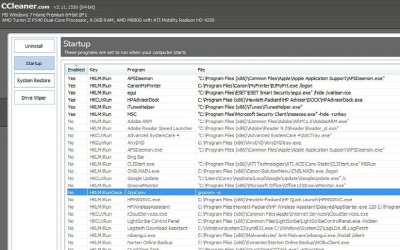
The problem is most likely pre-installed programs. Open Programs and Features in Control Panel and do a screenshot. Also take a screen shot of the startup tab in MSConfig. From there we can give you advice on what to stop from running at startup and what to just remove entirely. Somestuff that is preinstalled we do not recommend removing merely because we do not always know exactly what they do.
 

My Computer

Computer type
Laptop
Computer Manufacturer/Model Number
Toshiba P775-S7100
OS
Windows 7 Professional SP1 64-bit
CPU
Intel Core i5-2450M @2.5 GHz
Memory
6 GB DDR3 1333MHz
Graphics Card(s)
Intel HD 3000
Monitor(s) Displays
Built-in 17.3" LED; 22" Insignia NS-L22Q-10A
Screen Resolution
1600x900; 1360x768
Hard Drives
750 GB Hitachi
1TB Seagate FreeAgent External
Internet Speed
Verizon DSL Speed(Down/Up): 3360 Kbps / 800 Kbps
Antivirus
MSE and MBAM Pro
Browser
IE10
Here the filesstartup.jpg

Programs.jpg
 

My Computer

Computer Manufacturer/Model Number
HP G42-303DX Notebook
OS
Windows 7 x64 Home Premium SP1
CPU
AMD Turion(tm) II P540 Dual-Core Processor 2.4 GHz
Motherboard
HP 1444
Memory
Kingston 8GB SODIMM
Graphics Card(s)
AMD M880G w/ ATI Mobility Radeon HD 4250 256MB
Sound Card
Realtek High Def
Screen Resolution
1366x768
I see you use Ccleaner. Nice Choice. But I do spot one thing that I am curious about. Do you have MSE installed, or does Microsoft Security Client refer to Windows Defender. If it is MSE, MSE and ESET could be conflicting with each other. You can set them to ignore each other, but I usually recommend just uninstalling one or the other. In this case, I would say keep ESET. From what I here it is great AV and worth the money.

I would open msconfig and going to the services tab. Then click the box that says Hide all Microsft Services, and see if you see any services set to run that are not associated with the program you want to run at start-up.
 

My Computer

Computer type
Laptop
Computer Manufacturer/Model Number
Toshiba P775-S7100
OS
Windows 7 Professional SP1 64-bit
CPU
Intel Core i5-2450M @2.5 GHz
Memory
6 GB DDR3 1333MHz
Graphics Card(s)
Intel HD 3000
Monitor(s) Displays
Built-in 17.3" LED; 22" Insignia NS-L22Q-10A
Screen Resolution
1600x900; 1360x768
Hard Drives
750 GB Hitachi
1TB Seagate FreeAgent External
Internet Speed
Verizon DSL Speed(Down/Up): 3360 Kbps / 800 Kbps
Antivirus
MSE and MBAM Pro
Browser
IE10
Defender has been off. ESET, MS security essentials and windows firewall are active. i have another new HP notebook pc that has all the same systems and it doesn't ever have an issue.
 

My Computer

Computer Manufacturer/Model Number
HP G42-303DX Notebook
OS
Windows 7 x64 Home Premium SP1
CPU
AMD Turion(tm) II P540 Dual-Core Processor 2.4 GHz
Motherboard
HP 1444
Memory
Kingston 8GB SODIMM
Graphics Card(s)
AMD M880G w/ ATI Mobility Radeon HD 4250 256MB
Sound Card
Realtek High Def
Screen Resolution
1366x768
While I agree It's good to try to troubleshoot it briefly, possibly learn how to avoid such problems in the future (assuming you had anything to do with the issue!) - I can't help but wonder how new is "Brand New" and if you purchased any extended warranty service. (If not you have up to 14 days I think to buy the extended warranty) That would be the quickest way to go, also I'm certain HP still has it under Manufacturer's warranty, in either case, you paid for one (or both) of those coverages, (mfgr's warranty was a portion of the cost) They have legal obligations toward someone that has a problem with a NEW computer. (yes, even if you or a virus caused it somehow!) I personally would recommend getting a new computer. I always demand this instead of a fixed one, since I just bought a new computer not a refurb.

Mike:)
 

My Computer

Computer Manufacturer/Model Number
Custom self build - Desktop
OS
MS Windows 7 Home Premium SP1 64-bit (Family Pack Lic.) Upgrade
CPU
AMD Phenom II X6: Black Ed 1090T - AM3 / 3.2GHz / 8MB
Motherboard
Biostar TA790XE3
Memory
2 dual ch sets OCZ DDR3 PC3-10666 Platinum 1333MHz 8GB total
Graphics Card(s)
Onboard
Sound Card
Onboard 5.1 channel HD
Monitor(s) Displays
SyncMaster "Legal-sized" LCD (rotatable)
Screen Resolution
unknown (8.5"x15")? pixels are not known
Hard Drives
HDD1: WD RE3 Enterprize [p/n: WD500ABYS-NDW]
________SATA-II (3Gb/s) 500GB/7200rpm/16MB

HDD2: Deskstar 7K1000.C [p/n: HDS721010CLA332]
________SATA-II (3Gb/s) 1TB/7200rpm/32MB
PSU
Antec 900W mATX 20+4 w/6-8SATA;2MLX;4x6(+2)PCIe[p/n HCG-900]
Case
Mid 10-bay tower - free space design interior & well vented
Cooling
CPU HS cooler, 14.5" Case-sysfan1, dual sysfan2, exhaust
Keyboard
Blue Star Ergonomic - ps/2
Mouse
LED coorded w/v. roller wheel - ps/2
Internet Speed
GbLAN 10/100/1000 & WLAN - on T1 (Peer Network)
Other Info
Harmon-Karden speakers (L,R @ sub)

APC (Lead/Acid Batt backup UPC+Surge protector+etc)

Sony DVD SATA(300) - RW DVD/CD SATA-II(300)
Well I have that special black tie service. So I may accidentally break it and get a replacement soon. Unfortunately software is not covered under any warranty
 

My Computer

Computer Manufacturer/Model Number
HP G42-303DX Notebook
OS
Windows 7 x64 Home Premium SP1
CPU
AMD Turion(tm) II P540 Dual-Core Processor 2.4 GHz
Motherboard
HP 1444
Memory
Kingston 8GB SODIMM
Graphics Card(s)
AMD M880G w/ ATI Mobility Radeon HD 4250 256MB
Sound Card
Realtek High Def
Screen Resolution
1366x768
Again I have no idea how new it is (2 days? 3 weeks? month(s)?) But if you just bought a new PC and it is not working, it can be fixed even if it's the S/W. Trust me, I work on computers for a living and so when I get problems with my home computers, I really can't stand looking at more windows diagnostics screens when I get home!! So, I do the simple thing and drop it off as broken - being vague on the details helps, because once they take it in (Geek Squad) then even if it's malware, etc they have always just taken the "path of least resistance", and instead of arguing w/me they simply fix it. I've never had a problem. What's to say it's not your Hard Drive - many new drives can be defective!

That's my advice for simplicity!

also Make sure that any anti virus software you uninstalled was uninstalled correctly by means of the vender's website. Almost all A/V products have s special tool, usually called a "Removal tool" that must be used to remove all traces of the software from the system, including any preinstalled anti-virus/anti-malware software you may have removed. Using the uninstaller is not enough, and can cause all sorts of problems.

Mike :)
 

My Computer

Computer Manufacturer/Model Number
Custom self build - Desktop
OS
MS Windows 7 Home Premium SP1 64-bit (Family Pack Lic.) Upgrade
CPU
AMD Phenom II X6: Black Ed 1090T - AM3 / 3.2GHz / 8MB
Motherboard
Biostar TA790XE3
Memory
2 dual ch sets OCZ DDR3 PC3-10666 Platinum 1333MHz 8GB total
Graphics Card(s)
Onboard
Sound Card
Onboard 5.1 channel HD
Monitor(s) Displays
SyncMaster "Legal-sized" LCD (rotatable)
Screen Resolution
unknown (8.5"x15")? pixels are not known
Hard Drives
HDD1: WD RE3 Enterprize [p/n: WD500ABYS-NDW]
________SATA-II (3Gb/s) 500GB/7200rpm/16MB

HDD2: Deskstar 7K1000.C [p/n: HDS721010CLA332]
________SATA-II (3Gb/s) 1TB/7200rpm/32MB
PSU
Antec 900W mATX 20+4 w/6-8SATA;2MLX;4x6(+2)PCIe[p/n HCG-900]
Case
Mid 10-bay tower - free space design interior & well vented
Cooling
CPU HS cooler, 14.5" Case-sysfan1, dual sysfan2, exhaust
Keyboard
Blue Star Ergonomic - ps/2
Mouse
LED coorded w/v. roller wheel - ps/2
Internet Speed
GbLAN 10/100/1000 & WLAN - on T1 (Peer Network)
Other Info
Harmon-Karden speakers (L,R @ sub)

APC (Lead/Acid Batt backup UPC+Surge protector+etc)

Sony DVD SATA(300) - RW DVD/CD SATA-II(300)
Sorry I did not respond to you sooner. I am really not sure about this one. You have taken care of all the usual causes (kudos for you). It does sound like it could be a hardware issue as well. One thing you can try is looking at event viewer. Go to windows logs and look under Application and System for errors. Anything listed as Information or Warning can typically be ignored.
 

My Computer

Computer type
Laptop
Computer Manufacturer/Model Number
Toshiba P775-S7100
OS
Windows 7 Professional SP1 64-bit
CPU
Intel Core i5-2450M @2.5 GHz
Memory
6 GB DDR3 1333MHz
Graphics Card(s)
Intel HD 3000
Monitor(s) Displays
Built-in 17.3" LED; 22" Insignia NS-L22Q-10A
Screen Resolution
1600x900; 1360x768
Hard Drives
750 GB Hitachi
1TB Seagate FreeAgent External
Internet Speed
Verizon DSL Speed(Down/Up): 3360 Kbps / 800 Kbps
Antivirus
MSE and MBAM Pro
Browser
IE10
Sorry I did not respond to you sooner. I am really not sure about this one. You have taken care of all the usual causes (kudos for you). It does sound like it could be a hardware issue as well. One thing you can try is looking at event viewer. Go to windows logs and look under Application and System for errors. Anything listed as Information or Warning can typically be ignored.
I agree about the Event Viewer

(also I would uninstall one of the two A/V apps PROPERLY using the the vender's removal tool. Even if there are no problems on your other system!)

Anything showing up in the Action Center?

I'd scan the hard drive (right-click on your hard drive and select Properties - then click the Tools tab and under Error-checking press [Check now]. I would check both check-boxes, and press [Start]. You'll get a pop-up asking you to schedule the disk check for next reboot, click [Schedule Disk Check]. After rebooting, if there were no problems seen, Id run the system file checker: SFC /SCANNOW Command - System File Checker. If no system files are found to be corrupt.

Also the HDD manufacturer should have a diagnostic tool available to test the hardware. Check their site.

Try to generate a System Health Report Computer >> Properties >>Advanced Tools >> Performance Log

Testing the memory might be a good idea, although lengthy: RAM - Test with Memtest86+

You could always do a Repair Install if you REALLY want to pursue this and find no answers. Although I still recommend the simple way out, use the warranty you paid for.

Good luck,
Mike
 

My Computer

Computer Manufacturer/Model Number
Custom self build - Desktop
OS
MS Windows 7 Home Premium SP1 64-bit (Family Pack Lic.) Upgrade
CPU
AMD Phenom II X6: Black Ed 1090T - AM3 / 3.2GHz / 8MB
Motherboard
Biostar TA790XE3
Memory
2 dual ch sets OCZ DDR3 PC3-10666 Platinum 1333MHz 8GB total
Graphics Card(s)
Onboard
Sound Card
Onboard 5.1 channel HD
Monitor(s) Displays
SyncMaster "Legal-sized" LCD (rotatable)
Screen Resolution
unknown (8.5"x15")? pixels are not known
Hard Drives
HDD1: WD RE3 Enterprize [p/n: WD500ABYS-NDW]
________SATA-II (3Gb/s) 500GB/7200rpm/16MB

HDD2: Deskstar 7K1000.C [p/n: HDS721010CLA332]
________SATA-II (3Gb/s) 1TB/7200rpm/32MB
PSU
Antec 900W mATX 20+4 w/6-8SATA;2MLX;4x6(+2)PCIe[p/n HCG-900]
Case
Mid 10-bay tower - free space design interior & well vented
Cooling
CPU HS cooler, 14.5" Case-sysfan1, dual sysfan2, exhaust
Keyboard
Blue Star Ergonomic - ps/2
Mouse
LED coorded w/v. roller wheel - ps/2
Internet Speed
GbLAN 10/100/1000 & WLAN - on T1 (Peer Network)
Other Info
Harmon-Karden speakers (L,R @ sub)

APC (Lead/Acid Batt backup UPC+Surge protector+etc)

Sony DVD SATA(300) - RW DVD/CD SATA-II(300)
so i review the event viewer and found alot of errors about hardware issues. so i took it back and it's getting sent of to manufacturer since its still under warranty. thanks guys you helped me get to the source.
 

My Computer

Computer Manufacturer/Model Number
HP G42-303DX Notebook
OS
Windows 7 x64 Home Premium SP1
CPU
AMD Turion(tm) II P540 Dual-Core Processor 2.4 GHz
Motherboard
HP 1444
Memory
Kingston 8GB SODIMM
Graphics Card(s)
AMD M880G w/ ATI Mobility Radeon HD 4250 256MB
Sound Card
Realtek High Def
Screen Resolution
1366x768
Very welcome, glad you took the easy way, and avoided the potential headaches of troubleshooting it! :)

And, your two fixes away from getting a new "comperable" model, if you ever have more problems! Think of it that way.

Remember with antivirus software on the new system use one (Avira, Avast, MSE, ESET, whatever...just one and to remove any such software, use the mfgr's removal tool, or if you can't find it, ask here at Seven Forums, and someone will surely help you!

Let us know if you have more problems or if it works afterwards! :)

(oh and mark the thread as solved if you would)


Best Wishes!
Mike
 

My Computer

Computer Manufacturer/Model Number
Custom self build - Desktop
OS
MS Windows 7 Home Premium SP1 64-bit (Family Pack Lic.) Upgrade
CPU
AMD Phenom II X6: Black Ed 1090T - AM3 / 3.2GHz / 8MB
Motherboard
Biostar TA790XE3
Memory
2 dual ch sets OCZ DDR3 PC3-10666 Platinum 1333MHz 8GB total
Graphics Card(s)
Onboard
Sound Card
Onboard 5.1 channel HD
Monitor(s) Displays
SyncMaster "Legal-sized" LCD (rotatable)
Screen Resolution
unknown (8.5"x15")? pixels are not known
Hard Drives
HDD1: WD RE3 Enterprize [p/n: WD500ABYS-NDW]
________SATA-II (3Gb/s) 500GB/7200rpm/16MB

HDD2: Deskstar 7K1000.C [p/n: HDS721010CLA332]
________SATA-II (3Gb/s) 1TB/7200rpm/32MB
PSU
Antec 900W mATX 20+4 w/6-8SATA;2MLX;4x6(+2)PCIe[p/n HCG-900]
Case
Mid 10-bay tower - free space design interior & well vented
Cooling
CPU HS cooler, 14.5" Case-sysfan1, dual sysfan2, exhaust
Keyboard
Blue Star Ergonomic - ps/2
Mouse
LED coorded w/v. roller wheel - ps/2
Internet Speed
GbLAN 10/100/1000 & WLAN - on T1 (Peer Network)
Other Info
Harmon-Karden speakers (L,R @ sub)

APC (Lead/Acid Batt backup UPC+Surge protector+etc)

Sony DVD SATA(300) - RW DVD/CD SATA-II(300)
Back
Top