Windows 7 Forums


Windows 7: Can't run 64-bit dxdiag, Help!

26 Dec 2011  
Gertas

Georgia
1 posts
 
 
Can't run 64-bit dxdiag, Help!

Hello, i'm not sure if i'm posting this in the right thread but i'm running a 64-bit operating system, with 2.00gb of ram and an AMD v140 processor(2.30ghz) I'm trying to get more FPS to make swtor playable. I have direct x11 installed, when i run dxdiag it says 32-bit unit code. When i select 'Run 64-bit DxDiag' it switches to 84-bit unitcode, but when i close from the diagnostic tool and re-open it, it says i'm running in 32 bit again. Anyone know what my problem here is? Please help.

My System SpecsSystem Spec

26 Dec 2011  
Ztruker

Windows 7 Pro X64
3,616 posts
Space Coast of Florida


Running dxdiag in 64bit mode doesn't change anything in Windows 7. It just changes the mode dxdiag is runnig in. It still runs the same program, C:\Windows\System32\dxdiag.exe.

If you want to improve performance, add another 2GB or ram or upgrade your video card.

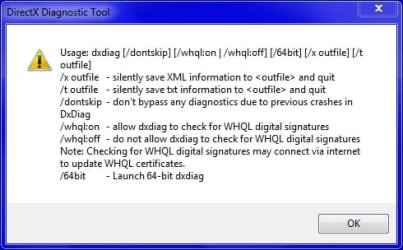
You can add a shortcut on your Desktop to run dxdiag in x64 mode by adding a /64bit parameter. There are other command line parameters as well.

Can't run 64-bit dxdiag, Help!-dxdiag.jpg
My System SpecsSystem Spec
Reply

 Can't run 64-bit dxdiag, Help! problems?


Thread Tools


Similar help and support threads for: Can't run 64-bit dxdiag, Help!
Thread Forum
Dxdiag not recognizing CPU Hardware & Devices
DxDiag Log Showing Graphic Cards
Dxdiag Performance & Maintenance
Can someone check this dxdiag log? Gaming
Dxdiag false info? Graphic Cards


All times are GMT -5. The time now is 02:43 AM.


Windows 7 Forums is an independent web site and has not been authorized,
sponsored, or otherwise approved by Microsoft Corporation.
"Windows 7" and related materials are trademarks of Microsoft Corp.
© Designer Media Ltd