|
Welcome to Windows 7 Forums. Our forum is dedicated to helping you find solutions with any problems, errors or issues you are experiencing with Windows 7. The Windows 7 forum also covers news and updates and has an extensive Windows 7 tutorial section that covers a wide range of tips and tricks.
Windows 7 - PageFile.sys & Hiberfil.sys - Delete Safe? |
01-05-2012
|
#1 | | |
PageFile.sys & Hiberfil.sys - Delete Safe? Hello SF,
I just do a drive clean-up (Deleting some junk files to free some space on my HDD)
I managed to see the HD stats what files did takes a lot of space in it using WinDirStat app...
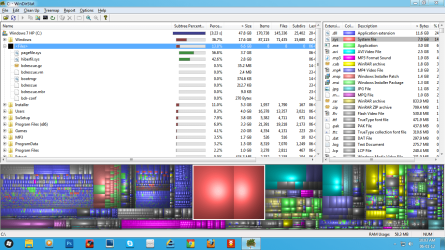
I removed some games that I no longer played in a while and some backup files that already made a copy to an external HDD...
Now, my question is;
I want to delete pagefile.sys & hiberfil.sys so that It will rebuild upon reboot and hoping it cleans up data inside the pagefile & hiberfil
does it rebuild those files and is it safe? and what tools do we need to remove those files..
Thank you. Sorry for my bad english.
PS. What are those BDRescue*.* files? (on screenshot)
is it safe to delete those also? | My System Specs | | System Manufacturer/Model Number HP G62-340US Notebook OS Win7 Pro SP1 x64 CPU AMD K10 Athlon(tm) II P340 Dual-Core Processor ~2.2GHz Motherboard Hewlett-Packard 1444 69.37/AMD 785GX/BIOS F29 Memory DDR3 4.0GB (3.74 Usable) Graphics Card AMD M880G with ATI Mobility Radeon HD 4250 256MB Video Sound Card ATI RS785/RS880 - High Definition Audio Controller Monitor(s) Displays SAMSUNG 156AT09-H04 Screen Resolution 1366x768 - 344 x 194 mm, Pixel Clock 69.30 MHz Hard Drives WDC WD3200BEVT-60A23T0 320GB Other Info Bought on July 03, 2011 |
01-05-2012
|
#2 | | Systems 1 and 2: Windows 7 Enterprise x64, Win 8 Developer |
Why delete pagefile.sys? If you have enough memory, you can reset your virtual memory. Of course if you reset it to 0, it would get rid of virtual memory.
Regarding hiberfil.sys, you could turn off hibernation. You can do this at an elevated (run as administrator) command prompt. Then: powercfg –h off | My System Specs | | System Manufacturer/Model Number Dell and Custom OS Systems 1 and 2: Windows 7 Enterprise x64, Win 8 Developer CPU System 1: i7 2600@3.4GHz, System 2: AMD FX-4100 Zambezi 3.6G Motherboard System 1:Dell 06NWYK System 2: ASUS M5A97 AM3+ Memory System 1: 8GB System 2: 8GB Graphics Card System 1: ATI FirePro V4800 System 2: Radeon HD 6850 Sound Card System 1: onboard System 2: onboard Monitor(s) Displays System1: Viewsonic HDMI 24" Screen Resolution System 1: 1920x1080 System 2: 1920x1080 Case System 1: Dell System 2: Cooler Master Hard Drives System 1: Mirrored .5B drives System 2: Seagate Barracuda ST1000DM003 1TB 7200 RPM 64MB Cache SATA 6.0Gb/s Internet Speed 10 MBPS |
01-05-2012
|
#3 | | |
The easiest way to delete those files is to disbale the files first:
Hibernation
Run the command prompt as admin and type:
powercfg -h off
Pagefile:
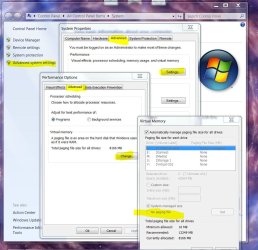
Win key+Pause/Break>advanced system settings>Advanced>Settings>Change>No page file>set and then reboot.
Then you can delete the pagefile, re-enable it, reboot and then it's rebuilt. | My System Specs | | System Manufacturer/Model Number Me OS 7 Ultimate x64 CPU i5 2500K 4.7 Ghz Motherboard ASUS P8Z68 Deluxe Gen 3 Memory 8GB G.Skill Ripjaws X 2133mhz Graphics Card Asus GTX 580 DirectCU II Sound Card X-FI Forte 7.1 + ATH-AD900 Headphones Monitor(s) Displays x2 Dell U2410 / 58" Samsung / "40 Sony Screen Resolution 1920*1200 / 1920*1080 Keyboard Topre Realforce // Ducky Shine MX Black // Filco Ninja TKL Mouse Razer Imperator + Razer Lachesis PSU Corsair AX1200W Case Lian Li PC-V1020A Cooling Noctua NH-D14: 3x140mm Gelid Wing 14 : Noctua NF-P12 120mm Hard Drives 2x Intel 520 240GB * Crucial M4 128GB * 2x Samsung F3 1TB (RAID 0) * 2x WD Caviar Blacks 2TB (RAID 0) Other Info Laptop Specs:
Clevo Sager P170HM //
17.3 Matte 1920x1200 //
i7 2720QM // 8GB 1333mhz //
Dedicated GTX 485M //
240GB Intel 520 + 750GB + Blu-Ray //
Samsung Story 2TB USB 3.0 |
01-05-2012
|
#4 | | Systems 1 and 2: Windows 7 Enterprise x64, Win 8 Developer |
Astro-Lemur? | My System Specs | | System Manufacturer/Model Number Dell and Custom OS Systems 1 and 2: Windows 7 Enterprise x64, Win 8 Developer CPU System 1: i7 2600@3.4GHz, System 2: AMD FX-4100 Zambezi 3.6G Motherboard System 1:Dell 06NWYK System 2: ASUS M5A97 AM3+ Memory System 1: 8GB System 2: 8GB Graphics Card System 1: ATI FirePro V4800 System 2: Radeon HD 6850 Sound Card System 1: onboard System 2: onboard Monitor(s) Displays System1: Viewsonic HDMI 24" Screen Resolution System 1: 1920x1080 System 2: 1920x1080 Case System 1: Dell System 2: Cooler Master Hard Drives System 1: Mirrored .5B drives System 2: Seagate Barracuda ST1000DM003 1TB 7200 RPM 64MB Cache SATA 6.0Gb/s Internet Speed 10 MBPS |
01-05-2012
|
#5 | | |
Thanks for the help guys. I will try it now.
as for hibernation, if i turn-off hibernation i can delete the hiberfil.sys now? and it will rebuild if I do this;
powercfg -h on | My System Specs | | System Manufacturer/Model Number HP G62-340US Notebook OS Win7 Pro SP1 x64 CPU AMD K10 Athlon(tm) II P340 Dual-Core Processor ~2.2GHz Motherboard Hewlett-Packard 1444 69.37/AMD 785GX/BIOS F29 Memory DDR3 4.0GB (3.74 Usable) Graphics Card AMD M880G with ATI Mobility Radeon HD 4250 256MB Video Sound Card ATI RS785/RS880 - High Definition Audio Controller Monitor(s) Displays SAMSUNG 156AT09-H04 Screen Resolution 1366x768 - 344 x 194 mm, Pixel Clock 69.30 MHz Hard Drives WDC WD3200BEVT-60A23T0 320GB Other Info Bought on July 03, 2011 |
01-05-2012
|
#6 | | |
Yes, if you turn off hibernation (and reboot), you can delete it. However, it should go away on it's own at that point (same with pagefile.sys if you set your system to use no paging file). | My System Specs | | System Manufacturer/Model Number HP Z400 workstation OS Windows Server 2008 R2 CPU Intel Xeon 3550 @3.06GHz Motherboard HP Memory 16GB DDR3 Graphics Card Nvidia Quadro 600 Sound Card Realtek ALC262 Monitor(s) Displays 2x Hanns-G HG281 Screen Resolution 1920x1200 Keyboard Microsoft Natural Ergonomic Keyboard 7000 Mouse Microsoft Intellimouse Explorer 3.0 PSU HP Case HP Hard Drives 1x Samsung 160GB SSD
2x WD 1TB (RAID1) |
01-05-2012
|
#7 | | |
Done.
Thanks a lot for your info & help guys
and yes, the pagefile.sys and hiberfil.sys are automatically deleted after turning it off (no reboot).
I just want to delete those files (refresh before defragmenting my drive)
again, much love and respect for helping me out with your informations and tips.
FTW SevenForums. Great staff and members here. Keep it up.
by the way, anyone knows what are those bdrescue*.* files in my root drive?
are those safe to delete too? | My System Specs | | System Manufacturer/Model Number HP G62-340US Notebook OS Win7 Pro SP1 x64 CPU AMD K10 Athlon(tm) II P340 Dual-Core Processor ~2.2GHz Motherboard Hewlett-Packard 1444 69.37/AMD 785GX/BIOS F29 Memory DDR3 4.0GB (3.74 Usable) Graphics Card AMD M880G with ATI Mobility Radeon HD 4250 256MB Video Sound Card ATI RS785/RS880 - High Definition Audio Controller Monitor(s) Displays SAMSUNG 156AT09-H04 Screen Resolution 1366x768 - 344 x 194 mm, Pixel Clock 69.30 MHz Hard Drives WDC WD3200BEVT-60A23T0 320GB Other Info Bought on July 03, 2011 |
01-05-2012
|
#8 | | |
If you're using BitDefender, you'd need to know what they were before removing them. If you're not using BD, then you might want to give us more info on them  . | My System Specs | | System Manufacturer/Model Number HP Z400 workstation OS Windows Server 2008 R2 CPU Intel Xeon 3550 @3.06GHz Motherboard HP Memory 16GB DDR3 Graphics Card Nvidia Quadro 600 Sound Card Realtek ALC262 Monitor(s) Displays 2x Hanns-G HG281 Screen Resolution 1920x1200 Keyboard Microsoft Natural Ergonomic Keyboard 7000 Mouse Microsoft Intellimouse Explorer 3.0 PSU HP Case HP Hard Drives 1x Samsung 160GB SSD
2x WD 1TB (RAID1) |
01-05-2012
|
#9 | | |

Quote: Originally Posted by cluberti If you're using BitDefender, you'd need to know what they were before removing them. If you're not using BD, then you might want to give us more info on them  . I installed BitDefender few weeks ago (when my nephew bought me a 1yr license key), just to test them out on my machine and after a week of using it, I removed it and back to MSE and MBAM..
I havent noticed that BDR files not until now when I explore WinDirStat
So, my guess would be safe to delete those files (crossfingers) because I no longer use BitDefender,
am I right about this thoughts? | My System Specs | | System Manufacturer/Model Number HP G62-340US Notebook OS Win7 Pro SP1 x64 CPU AMD K10 Athlon(tm) II P340 Dual-Core Processor ~2.2GHz Motherboard Hewlett-Packard 1444 69.37/AMD 785GX/BIOS F29 Memory DDR3 4.0GB (3.74 Usable) Graphics Card AMD M880G with ATI Mobility Radeon HD 4250 256MB Video Sound Card ATI RS785/RS880 - High Definition Audio Controller Monitor(s) Displays SAMSUNG 156AT09-H04 Screen Resolution 1366x768 - 344 x 194 mm, Pixel Clock 69.30 MHz Hard Drives WDC WD3200BEVT-60A23T0 320GB Other Info Bought on July 03, 2011 |
01-05-2012
|
#10 | | |

Quote: Originally Posted by netbox Done.
Thanks a lot for your info & help guys
and yes, the pagefile.sys and hiberfil.sys are automatically deleted after turning it off (no reboot). I stand corrected on the automatic deletion
* 
Quote: Originally Posted by Lemur Astro-Lemur?  heh heh - It's from one of the craziest end of the world theories I've ever read: Quote: if the human race do not pull themselves together and disregard the norms and stop being so “normal”, the gods will “remove their protective hands“ from our world by the 14:th of September, 2047, on the strike of 03:28 (GMT). And as a result, lemur-like creatures with rainbow-patterned bodies will be free to invade the planet of earth wielding giant burritos which they will punish the entire human race with by clubbing them mercilessly. Here:
The thought of a rainbow coloured lemur from out of space is so ridiculous, it tickles my funny bone
(No offence intended at all to your user name  ) | My System Specs | | System Manufacturer/Model Number Me OS 7 Ultimate x64 CPU i5 2500K 4.7 Ghz Motherboard ASUS P8Z68 Deluxe Gen 3 Memory 8GB G.Skill Ripjaws X 2133mhz Graphics Card Asus GTX 580 DirectCU II Sound Card X-FI Forte 7.1 + ATH-AD900 Headphones Monitor(s) Displays x2 Dell U2410 / 58" Samsung / "40 Sony Screen Resolution 1920*1200 / 1920*1080 Keyboard Topre Realforce // Ducky Shine MX Black // Filco Ninja TKL Mouse Razer Imperator + Razer Lachesis PSU Corsair AX1200W Case Lian Li PC-V1020A Cooling Noctua NH-D14: 3x140mm Gelid Wing 14 : Noctua NF-P12 120mm Hard Drives 2x Intel 520 240GB * Crucial M4 128GB * 2x Samsung F3 1TB (RAID 0) * 2x WD Caviar Blacks 2TB (RAID 0) Other Info Laptop Specs:
Clevo Sager P170HM //
17.3 Matte 1920x1200 //
i7 2720QM // 8GB 1333mhz //
Dedicated GTX 485M //
240GB Intel 520 + 750GB + Blu-Ray //
Samsung Story 2TB USB 3.0 PageFile.sys & Hiberfil.sys - Delete Safe? problems? All times are GMT -5. The time now is 06:42 PM. |  |