|
Welcome to Windows 7 Forums. Our forum is dedicated to helping you find solutions with any problems, errors or issues you are experiencing with Windows 7. The Windows 7 forum also covers news and updates and has an extensive Windows 7 tutorial section that covers a wide range of tips and tricks.
Windows 7 - Automatically delete files |
01-09-2012
|
#1 | | |
Automatically delete files I am using this program to record TV shows (BeyondTV) and for every recording it creates extra files that are not need. These are the extra filests1.index, ts0.timeindex and ts1.header. I only use the *.td files which are the actual recording.
Is there a way to automatically delete these files?
| My System Specs | | OS Windows 7 Ultimate x64 |
01-09-2012
|
#2 | | |
Create .bat script (and have a desktop icon for it) of something like:
REM execute the BeyondTV executablet
START /WAIT drive:\folder\subfolder\.....\executable.exe (runs the executable but waits/suspends the rest of this .bat from running)
REM point to directory that TV shows are saved in
CD "folderpath" to the directory where these files are save
REM delete unnecessary file
del filests1.index
del ts0.timeindex
ts1.header | My System Specs | | System Manufacturer/Model Number Custom OS Windows 7 CPU AMD Phenom II X2 (dual-core) Motherboard GA-MA785GM-US2H Memory 4G Graphics Card integrated ATI HD 4200 Sound Card integrated Monitor(s) Displays Samsung 24" Screen Resolution 1920x1080 Keyboard Microsoft Digital Media Pro Mouse Logitech WIRED! PSU Ultra X4 500W Case Ultra X-blaster Hard Drives 1 SATA (750GB, 32MB cache, 7200 RPM)
1 IDE (80GB, 8MB cache, 7200 RPM) Internet Speed 15 Mbps FIOS |
01-09-2012
|
#3 | | |
Thank you Jim for your speedy reply, I am a bit of a noob when it comes to programming, so please have patience with me.
The name of the files will change depending on the name of the Tv show the only thing that is constant would be the file type, *.index, *.timeindex and *.header.
So if I understand correctly I create a text file and rename it to a *.bat file.
In this batch file I will have the following text: REM execute the BeyondTV executablet
START /WAIT C:\RecordedTV\MyBatchFile.bat (runs the executable but waits/suspends the rest of this .bat from running)
REM point to directory that TV shows are saved in
CD C:\RecordedTV to the directory where these files are save
REM delete unnecessary file
del *.index
del *.timeindex
del *.header
Then I could have task manager run this script every hour, or I could just click a link on the desktop. | My System Specs | | OS Windows 7 Ultimate x64 |
01-09-2012
|
#4 | | |

Quote: Originally Posted by Bigsplash Thank you Jim for your speedy reply, I am a bit of a noob when it comes to programming, so please have patience with me.
The name of the files will change depending on the name of the Tv show the only thing that is constant would be the file type, *.index, *.timeindex and *.header.
So if I understand correctly I create a text file and rename it to a *.bat file.
In this batch file I will have the following text: REM execute the BeyondTV executablet START /WAIT C:\RecordedTV\MyBatchFile.bat (runs the executable but waits/suspends the rest of this .bat from running) REM point to directory that TV shows are saved in CD C:\RecordedTV to the directory where these files are save REM delete unnecessary file del *.index del *.timeindex del *.header
Then I could have task manager run this script every hour, or I could just click a link on the desktop. No need to rename a txt to bat. Start with bat. Edit using notepad. From command line "notepad whateveryourbatiscalled.bat".
The START /WAIT command will point to your .exe file that launches your TV Recorder software (GUI). It does not point to another .bat file.
Your wildcard deletes will work. I believe you'll need a del command with the /Q option (quiet mode, to ignore prompts from wildcard delete).
No need to have task manager run unless you want those files deleted within that hour. Once you exit the application, it would then delete the files. Then again, maybe you leave this app up all the time so the task scheduler would work. No reason to not have that task run with an even short duration. This task would then call the .bat file WITHOUT the START /WAIT part. It would simply CD to the directory and wildcard delete. | My System Specs | | System Manufacturer/Model Number Custom OS Windows 7 CPU AMD Phenom II X2 (dual-core) Motherboard GA-MA785GM-US2H Memory 4G Graphics Card integrated ATI HD 4200 Sound Card integrated Monitor(s) Displays Samsung 24" Screen Resolution 1920x1080 Keyboard Microsoft Digital Media Pro Mouse Logitech WIRED! PSU Ultra X4 500W Case Ultra X-blaster Hard Drives 1 SATA (750GB, 32MB cache, 7200 RPM)
1 IDE (80GB, 8MB cache, 7200 RPM) Internet Speed 15 Mbps FIOS |
01-09-2012
|
#5 | | |
Hi Jim
Yes i keep the recording program running 24/7.
So then my batch file would look like this? REM point to directory that TV shows are saved in
CD C:\RecordedTV to the directory where these files are save
REM delete unnecessary file
del/q *.index
del/q *.timeindex
del/q *.header | My System Specs | | OS Windows 7 Ultimate x64 |
01-09-2012
|
#6 | | |
Yes. But space between del and /Q.
DEL /Q ....... | My System Specs | | System Manufacturer/Model Number Custom OS Windows 7 CPU AMD Phenom II X2 (dual-core) Motherboard GA-MA785GM-US2H Memory 4G Graphics Card integrated ATI HD 4200 Sound Card integrated Monitor(s) Displays Samsung 24" Screen Resolution 1920x1080 Keyboard Microsoft Digital Media Pro Mouse Logitech WIRED! PSU Ultra X4 500W Case Ultra X-blaster Hard Drives 1 SATA (750GB, 32MB cache, 7200 RPM)
1 IDE (80GB, 8MB cache, 7200 RPM) Internet Speed 15 Mbps FIOS |
01-11-2012
|
#7 | | |
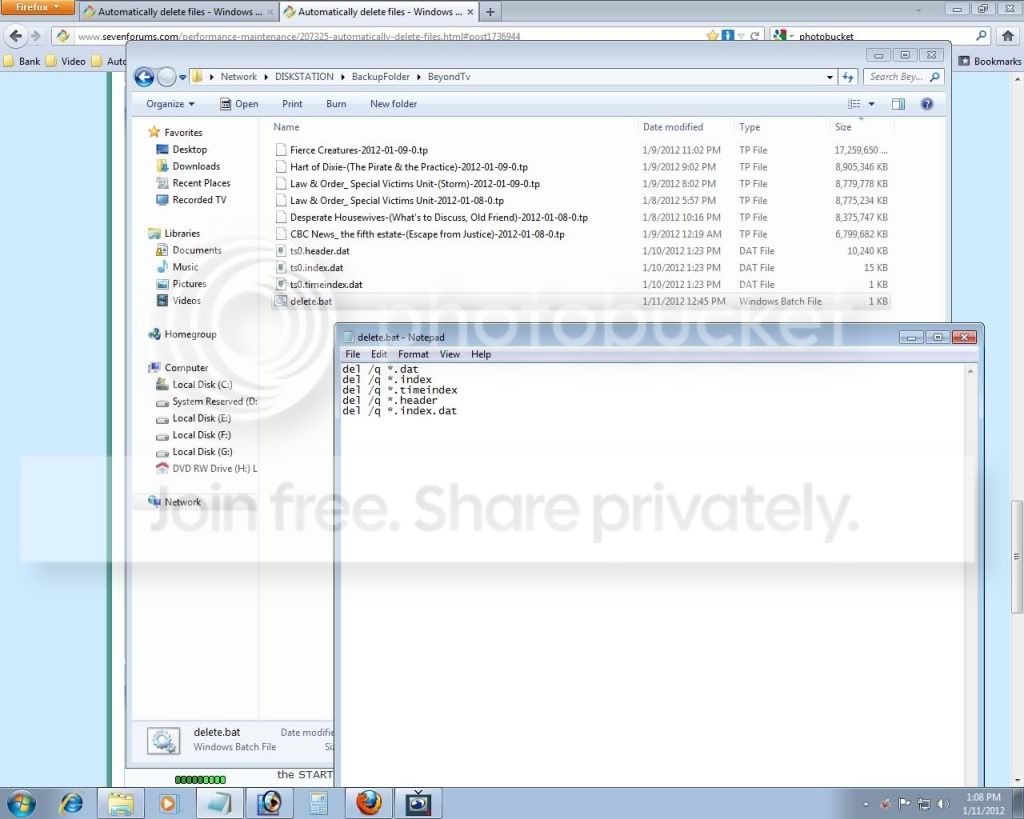
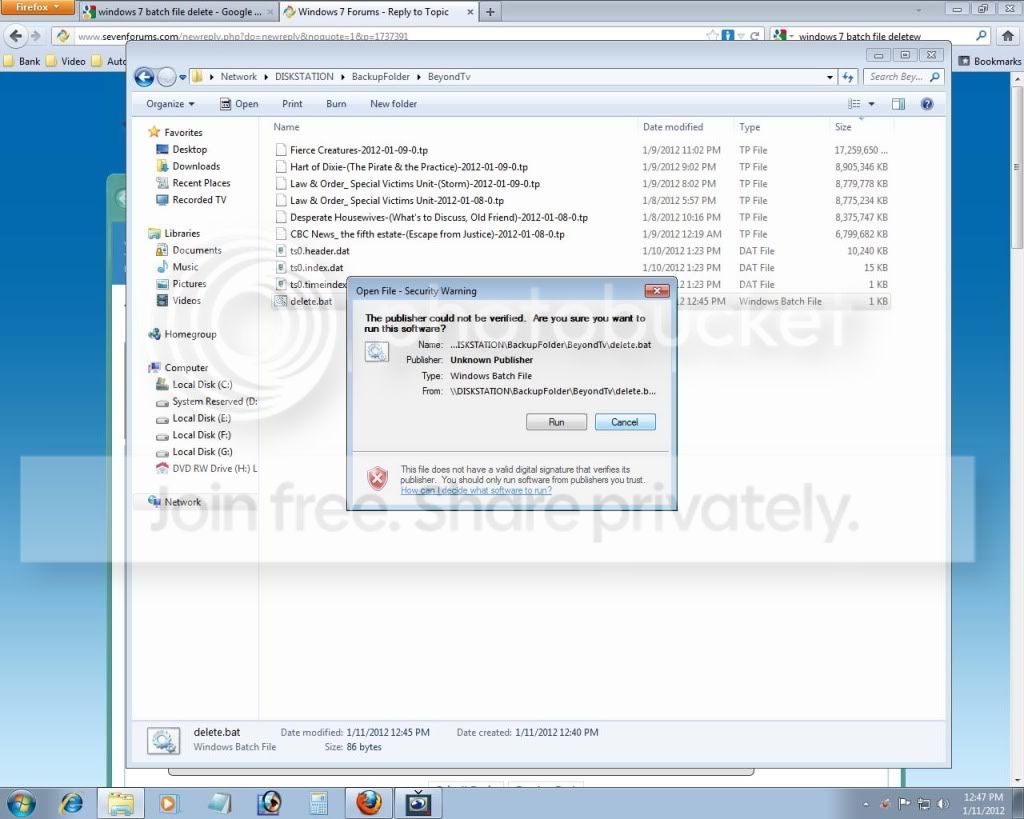
Doesn't work.
Windows will ask whether I am sure if i want to run this software, since the publisher can not be verified?
I click OK, I see the batch file execute, but nothing happens.
This is the content of the delete.bat, this batch file is also in the same folder where it is deleting the files. del /q *.dat
del /q *.index
del /q *.timeindex
del /q *.header
del /q *.index.dat | My System Specs | | OS Windows 7 Ultimate x64 |
01-11-2012
|
#8 | | |
I can't see the photobucket image at work. Post them as regular attachments using the Attachment option on EDIT post (GO ADVANCED option).
You're just running a .bat script via task scheduler every hour. Are going with the solution in the 2nd post with the START /WAIT part??
So, for the task in Task Scheduler do you have it setup to simply run a command:
C:\RecordedTV\MyBatchFile.bat
There is no publisher or anything involved. It's a simple .bat script with some delete commands in it. Do you have the CD C:\RecordedTV\ line in that .bat script? When things run from task scheduler, the default directory is C:\Windows\System32. | My System Specs | | System Manufacturer/Model Number Custom OS Windows 7 CPU AMD Phenom II X2 (dual-core) Motherboard GA-MA785GM-US2H Memory 4G Graphics Card integrated ATI HD 4200 Sound Card integrated Monitor(s) Displays Samsung 24" Screen Resolution 1920x1080 Keyboard Microsoft Digital Media Pro Mouse Logitech WIRED! PSU Ultra X4 500W Case Ultra X-blaster Hard Drives 1 SATA (750GB, 32MB cache, 7200 RPM)
1 IDE (80GB, 8MB cache, 7200 RPM) Internet Speed 15 Mbps FIOS |
01-11-2012
|
#9 | | |
At this point I am just trying to get the script to work, so I am not using task scheduler, as of yet.
Sorry, don't quite understand the START /WAIT part, like I said I am a noob at this stuff. | My System Specs | | OS Windows 7 Ultimate x64 |
01-11-2012
|
#10 | | |
Repeat: your bat script as called via task scheduler OR the CMD line prompt contains:
CD C:\RecordedTV\
del /q *.dat
del /q *.index
del /q *.timeindex
del /q *.header
del /q *.index.dat
From the CMD line or prompt, enter:
C:\RecordedTV\MyBatchFile.bat (or you seem to be testing with one called "delete.bat")
There is no START command in this .bat script as you said RecorderTV runs 24x7 so is virtually never shutdown. So, we decided to simply have the CD and DEL statements in the .bat script. | My System Specs | | System Manufacturer/Model Number Custom OS Windows 7 CPU AMD Phenom II X2 (dual-core) Motherboard GA-MA785GM-US2H Memory 4G Graphics Card integrated ATI HD 4200 Sound Card integrated Monitor(s) Displays Samsung 24" Screen Resolution 1920x1080 Keyboard Microsoft Digital Media Pro Mouse Logitech WIRED! PSU Ultra X4 500W Case Ultra X-blaster Hard Drives 1 SATA (750GB, 32MB cache, 7200 RPM)
1 IDE (80GB, 8MB cache, 7200 RPM) Internet Speed 15 Mbps FIOS Automatically delete files problems? All times are GMT -5. The time now is 06:44 PM. |  |